
GEWOKLIY GE-MC40USDG
Manual d'instruccions de la carcassa GEWOKLIY GE-MC40USDG 40 Gbps M.2 NVMe
Model: GE-MC40USDG
1. Introducció
This manual provides detailed instructions for the installation, operation, and maintenance of your GEWOKLIY GE-MC40USDG 40Gbps M.2 NVMe Enclosure. Please read this manual thoroughly before use to ensure proper functionality and longevity of the product.
2. Contingut del paquet
Verifiqueu que tots els elements siguin presents al vostre paquet:
- USB 4 Enclosure (GE-MC40USDG)
- Coaxial USB-C Cable (40Gbps)
- Velvet Drawstring Gift Bag
- Guia d'inici ràpid
- Silicone Thermal Pads
- Tornavís
- Cargols
Note: An M.2 NVMe SSD is not included and must be purchased separately.
3. Setup: SSD Installation
Segueix aquests passos per instal·lar el teu SSD NVMe M.2 a la carcassa:
- Disassemble the Enclosure: Use the provided screwdriver to remove the four screws securing the aluminum enclosure. Carefully separate the top and bottom covers.
- Inseriu l'SSD: Gently insert your M.2 NVMe SSD into the M.2 slot on the PCB board. Ensure it is fully seated.
- Assegureu l'SSD: Place the screw on the edge of the SSD and lock it into the designated hole to hold the SSD in place.
- Aplicar coixinets tèrmics: Place one silicone thermal pad on the surface of the SSD. Place another silicone thermal pad on the surface of the main control chip for optimal heat dissipation. Ensure good contact between the thermal pads and the aluminum casing when reassembling.
- Torneu a muntar la carcassa: Carefully align the top and bottom covers and secure them with the four screws.

Image: Step-by-step guide for SSD installation.
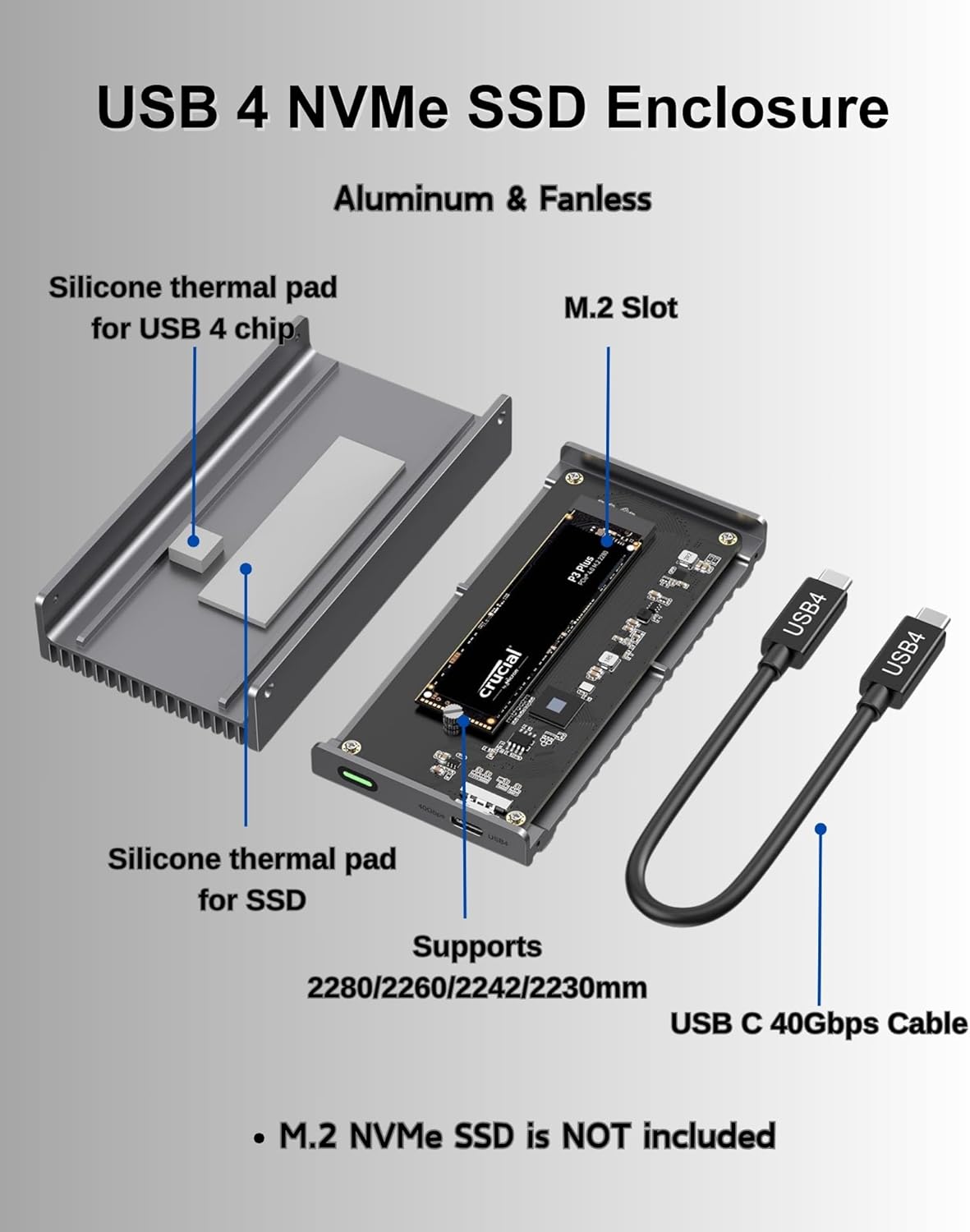
Image: Internal components of the enclosure, highlighting thermal pad placement.
4. Instruccions de funcionament
The GEWOKLIY GE-MC40USDG enclosure is designed for plug-and-play operation, requiring no driver installation.
4.1 Connexió a un dispositiu
Connect the enclosure to your host device (computer, laptop, tablet, smartphone, or gaming console) using the provided coaxial USB-C cable. Ensure the cable is securely connected to both the enclosure and the device's Thunderbolt 3/4 or USB 3.0/3.1/3.2 port.
4.2 Velocitat de transferència de dades
The enclosure supports data transfer speeds up to 40Gbps when connected to a Thunderbolt 3 or Thunderbolt 4 interface. When connected to USB 3.2/3.1/3.0 interfaces, speeds will be lower. The LED indicator on the enclosure will light up to show operational status. A white LED indicates USB 3 speed, while a green LED indicates full USB4/Thunderbolt speed.

Image: Data transfer speed demonstration.
4.3 S.M.A.R.T. and TRIM Support
The enclosure utilizes S.M.A.R.T. (Self-Monitoring, Analysis and Reporting Technology) to monitor the hard drive's operational status and supports the TRIM command function to optimize SSD performance, ensuring data security and stability.
5. Compatibilitat
5.1 Supported SSD Types and Sizes
This enclosure supports M/B+M key NVMe solid-state drives with a maximum capacity of 8TB. Compatible SSD sizes include 2280mm, 2260mm, 2242mm, and 2230mm.
Note: This enclosure does not support SATA NGFF solid-state drives or mSATA solid-state drives.
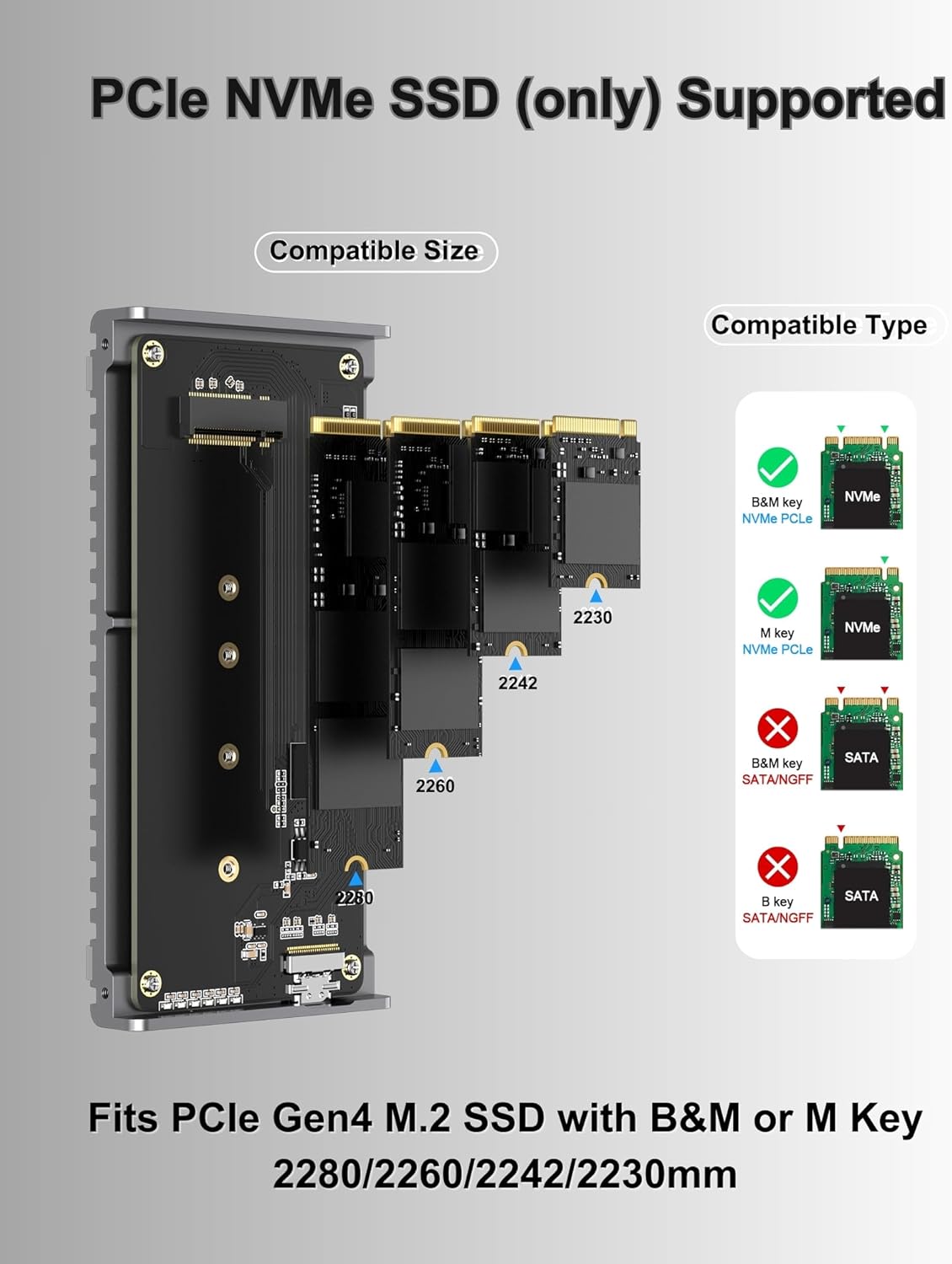
Image: Compatible M.2 NVMe SSD types and sizes.
5.2 Compatible Devices and Systems
The enclosure is widely compatible with various devices and operating systems:
- Dispositius: Personal Computer, Laptop, Smartphone, Tablet, Gaming Console (e.g., ROG Ally, Mac mini)
- Sistemes operatius: Windows, Mac OS, Linux, Android, Chrome OS

Image: Universal compatibility overview.
6. Dissipació de calor
The GEWOKLIY GE-MC40USDG enclosure features a robust, fanless industrial design for efficient heat management:
- All-Aluminum Case: Constructed from rugged aluminum with a groove surface, the enclosure acts as a large passive heatsink, efficiently absorbing and dispersing heat.
- Silicone Thermal Pads: Built-in thermal pads enhance heat transfer from the SSD and control chip to the aluminum casing, preventing overheating during intensive tasks.
- Funcionament sense soroll: The fanless design ensures silent operation, making it suitable for environments where noise is a concern.

Image: Passive cooling system of the enclosure.

Image: Internal heat dissipation mechanism.
7. Manteniment
To ensure optimal performance and longevity of your enclosure:
- Neteja: Use a soft, dry cloth to clean the exterior of the enclosure. Avoid using liquid cleaners or solvents.
- Thermal Pad Integrity: Periodically check that the thermal pads are properly seated and making good contact with both the SSD/chip and the enclosure casing. If the enclosure consistently runs hot, re-check the thermal pad application.
- Cura del cable: Handle the USB-C cable carefully. Avoid sharp bends or excessive pulling to prevent damage.
- Emmagatzematge: When not in use, store the enclosure in a cool, dry place, preferably in the provided velvet bag, to protect it from dust and scratches.
8. Solució De Problemes
- Enclosure Not Detected:
- Assegureu-vos que el cable USB-C estigui connectat correctament tant a la carcassa com al dispositiu amfitrió.
- Try connecting to a different USB-C or Thunderbolt port on your device.
- Verify that the M.2 NVMe SSD is correctly installed and seated within the enclosure.
- Check if the SSD requires initialization and formatting in your operating system's Disk Management (Windows) or Disk Utility (Mac OS).
- Velocitat de transferència de dades lenta:
- Ensure you are using a Thunderbolt 3 or Thunderbolt 4 port on your host device to achieve 40Gbps speeds. USB 3.x ports will operate at lower speeds.
- Confirm that the provided coaxial USB-C cable (40Gbps) is being used, as cable quality can affect performance.
- Check the LED indicator: White for USB 3 speed, Green for full USB4/Thunderbolt speed.
- Verify your SSD is an NVMe PCIe Gen4 drive, as older generations or SATA SSDs will have lower speeds.
- La carcassa s'escalfa:
- It is normal for the aluminum enclosure to become warm during heavy use, as it is designed to dissipate heat from the SSD.
- Ensure the thermal pads are correctly installed and making firm contact with the SSD, control chip, and the enclosure's metal casing. Improper installation can hinder heat transfer.
- Avoid placing the enclosure in confined spaces that restrict airflow.
- SSD no compatible:
- Confirm your SSD is an M.2 NVMe (M Key or B+M Key) and not a SATA NGFF or mSATA drive.
- Verify the physical size of your M.2 SSD (2230, 2242, 2260, or 2280mm) is supported.
9. Especificacions
| Número de model | GE-MC40USDG |
| Marca | GEWOKLIY |
| Interfície del maquinari | Thunderbolt 4 (compatible with Thunderbolt 3, USB 3.2/3.1/3.0) |
| Velocitat de transferència de dades | Fins a 40 gigabits per segon |
| Tipus d'SSD compatible | M.2 NVMe (M Key, B+M Key) |
| Mides SSD compatibles | 2230 mm, 2242 mm, 2260 mm, 2280 mm |
| Capacitat màxima | 8 TB |
| Material | Alumini |
| Color | Gris fosc |
| Pes de l'article | 0.36 quilograms (12.6 unces) |
| Dimensions del paquet | 5.87 x 3.15 x 1.46 polzades |
10. Garantia i Suport
For warranty information and technical support, please refer to the official GEWOKLIY weblloc web o contacteu directament amb el servei d'atenció al client. Conserveu el rebut de compra per a reclamacions de garantia.
Documents relacionatsGE-MC40USDG


Ask a question about this manual
Ask about setup, troubleshooting, compatibility, parts, safety, or missing instructions. Manuals+ will review the question and use this page’s manual context to help answer it.