
1. Introducció
This manual provides essential information for the safe and effective use of your Zipro Flame WM Magnetic Exercise Bike. Please read it thoroughly before assembly and operation. Proper assembly, usage, and maintenance will ensure the longevity and optimal performance of your equipment.
The Zipro Flame WM exercise bike is designed for home fitness, featuring an easy-to-use computer, Bluetooth connectivity for iConsole+ Training and Kinomap applications, pulse sensors on the handlebars, a convenient water bottle holder, and adjustable components for a personalized and comfortable workout experience.
2. Informació de seguretat
- Consulta un metge abans de començar qualsevol nou programa d'exercicis.
- Assegureu-vos que totes les peces estiguin ben subjectes abans de cada ús.
- Mantingueu els nens i les mascotes lluny de l'equip durant el funcionament.
- Col·loqueu la bicicleta estàtica sobre una superfície plana i estable.
- Utilitzeu calçat esportiu adequat durant l'ús.
- The maximum user weight capacity for this device is 150 kg.
- Deixa de fer exercici immediatament si et sents dèbil, marejat o tens dolor.
3. Instruccions de muntatge
Assembly of the Zipro Flame WM exercise bike typically requires two people. Follow the step-by-step instructions provided in the included assembly guide. Ensure all components are present before beginning.

Figura 3.1: Principal view of the Zipro Flame WM Exercise Bike.
3.1 Desembalatge i comprovació de components
- Traieu amb cura totes les peces de l'embalatge.
- Verify that all components listed in the parts diagram are present and undamaged. Refer to the included manual for a complete parts list.
- Keep packaging materials until assembly is complete in case of missing parts or return needs.

Figure 3.2: The instruction manual and power adapter for the Zipro Flame WM.
3.2 Base and Stabilizers
Attach the front and rear stabilizers to the main frame. Ensure all bolts are tightened securely. The front stabilizer includes transport wheels for easy relocation.
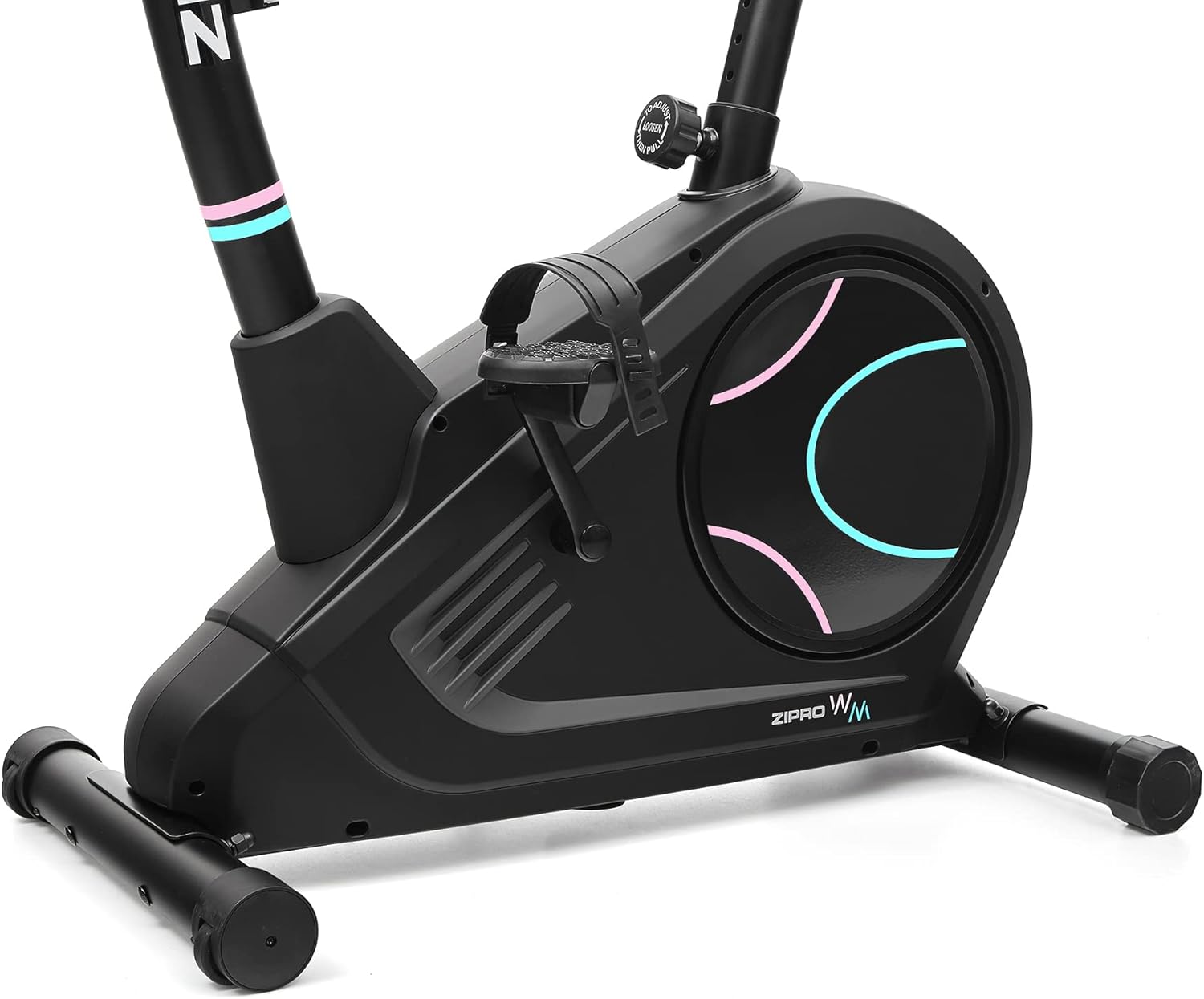
Figure 3.3: Transport wheels located on the front stabilizer for convenient movement.
3.3 Pedals and Crank Arms
Attach the pedals to the crank arms. Note that pedals are typically marked 'L' for left and 'R' for right and thread in opposite directions. Ensure they are firmly secured to prevent loosening during use.

Figure 3.4: Non-slip pedals with adjustable straps for secure foot placement.
3.4 Instal·lació del seient i del manillar
Install the seat post and seat, then the handlebar post and handlebars. Adjust the seat height and handlebar angle to a comfortable position for your body. The seat can be adjusted both vertically and horizontally.

Figure 3.5: The seat post features multiple height adjustment points.

Figure 3.6: The seat can be adjusted horizontally for optimal riding posture.
3.5 Console and Wiring
Connect the console cables to the main frame wiring. Mount the console onto the handlebar post. Ensure all connections are firm. The console also features a holder for mobile devices.

Figure 3.7: The power cable connects to the main unit for console functionality.
4. Instruccions de funcionament
The Zipro Flame WM exercise bike is equipped with an intuitive computer and various features to enhance your workout.

Figure 4.1: The advanced computer displays time, calories, speed, pulse, body fat, and recovery.
4.1 Powering On and Basic Functions
- Connect the power adapter to the bike and a wall outlet.
- The computer will automatically power on or can be activated by pressing any button or starting to pedal.
- Use the 'MODE' button to cycle through display functions such as Time, Distance, Speed, Calories, and Pulse.
- Use the 'UP' and 'DOWN' buttons to adjust resistance levels or navigate menu options.
- The 'START/STOP' button initiates or pauses your workout.
- The 'RESET' button clears all workout data.

Figure 4.2: The computer console with clearly labeled buttons for easy control.
4.2 Pulse Measurement
Grip the pulse sensors on the handlebars firmly with both hands. Your heart rate will be displayed on the console. Maintain consistent contact for accurate readings.

Figure 4.3: Interacting with the console to select programs or view dades.
4.3 Bluetooth Connectivity (iConsole+ Training & Kinomap)
The exercise bike features Bluetooth connectivity, allowing you to connect to iConsole+ Training and Kinomap applications on your mobile device. These apps offer additional workout programs, virtual routes, and progress tracking.
- Download the iConsole+ Training or Kinomap app from your device's app store.
- Activa el Bluetooth al teu dispositiu mòbil.
- Open the app and follow the on-screen instructions to pair with your Zipro Flame WM bike.
- Place your mobile device on the integrated holder for convenient viewdurant el teu entrenament.

Figure 4.4: The integrated holder supports mobile devices for entertainment or app use.

Figure 4.5: The Kinomap app enhances workouts with virtual routes and interactive training.
4.4 Hydration
A water bottle holder is integrated into the design, allowing you to stay hydrated without interrupting your workout.

Figure 4.6: The convenient water bottle holder ensures easy access to hydration.
5. Manteniment
Regular maintenance ensures the longevity and safe operation of your Zipro Flame WM exercise bike.
5.1 Neteja
- Netegeu la bicicleta amb un anunciamp drap després de cada ús per eliminar la suor i la pols.
- Eviteu utilitzar netejadors o dissolvents abrasius, ja que poden danyar l'acabat i els components electrònics.
5.2 Inspecció
- Periodically check all bolts and nuts to ensure they are tight. Tighten any loose fasteners.
- Inspect pedals, straps, and seat for any signs of wear or damage. Replace worn parts immediately.
- Check the power cable for fraying or damage.
5.3 Lubricació
While the magnetic resistance system requires minimal lubrication, refer to the detailed manual for any specific lubrication points or recommended maintenance schedules.
6. Solució De Problemes
If you encounter issues with your Zipro Flame WM exercise bike, refer to the following common troubleshooting steps:
| Problema | Causa possible | Solució |
|---|---|---|
| Bike does not power on / Console is blank | Power cable disconnected or faulty adapter. | Ensure the power cable is securely connected to both the bike and a working power outlet. Check the adapter for damage. |
| Inaccurate pulse readings | Hands not firmly on sensors; sweat or moisture on sensors. | Ensure firm and consistent contact with both pulse sensors. Wipe sensors clean if moist. Note that home equipment pulse readings can vary. |
| Soroll inusual durant el funcionament | Loose components; internal friction. | Check and tighten all visible bolts and nuts. If noise persists, consult the full manual or contact customer support. |
| Problemes de connexió Bluetooth | Bluetooth off on device; app issues; bike not discoverable. | Ensure Bluetooth is enabled on your mobile device. Restart the app and the bike. Try pairing again. |
| Inaccurate calorie/distance estimation | Variations in user input or sensor calibration. | Calorie and distance estimations are approximate for home fitness equipment. For precise measurements, external calibrated devices may be required. |
If the problem persists after attempting these solutions, please contact Zipro customer support.
7. Especificacions
Detailed technical specifications for the Zipro Flame WM Exercise Bike:
| Característica | Especificació |
|---|---|
| Model | Flame WM |
| Marca | ZIPRO |
| Número de model | 6299209 |
| Mecanisme de resistència | Magnètic |
| Sistema d'accionament | Cinturó |
| Capacitat màxima de pes | 150 quilos |
| Dimensions del producte (L x A x A) | 118 x 49 x 140 cm |
| Pes de l'article | 27.3 quilos |
| Material | Plàstic |
| Font d'alimentació | Amb cable |
| Connectivitat | Bluetooth (iConsole+ Training, Kinomap compatible) |
| Ajustaments | Adjustable seat (vertical and horizontal), adjustable handlebar angle |
| Característiques especials | Modern computer with clear display, pulse sensors, non-slip pedals with straps, mobile device holder, transport wheels. |
8. Garantia i Suport
Your Zipro Flame WM Exercise Bike is covered by standard legal guarantees. Additionally, a 30-day return policy may apply, depending on your purchase terms.
8.1 Informació de la garantia
For specific warranty details, including coverage period and terms, please refer to the documentation provided at the time of purchase or contact your retailer. Keep your proof of purchase for warranty claims.
8.2 Atenció al client
For technical assistance, parts replacement, or any other inquiries, please contact Zipro's specialized customer support. Contact information can typically be found on the product packaging, the official Zipro website, or your purchase invoice.
When contacting support, please have your model number (Flame WM) and proof of purchase ready.