
HOgardenME D328Q7W433V974K8219833Y28
HOgardenME Wooden Digital Alarm Clock User Manual
Model: D328Q7W433V974K8219833Y28
Introducció
Gràcies per la compraasing the HOgardenME Wooden Digital Alarm Clock. This device combines a digital time and temperature display with multiple alarm settings and a convenient wireless charging function. This manual provides detailed instructions for setup, operation, and maintenance to ensure optimal performance and longevity of your product.
Informació de seguretat
- No exposeu el dispositiu a temperatures extremes, llum solar directa ni humitat elevada.
- Eviteu deixar caure o sotmetre el dispositiu a forts impactes.
- Use only the provided USB cable or a certified power adapter.
- If using batteries, ensure they are inserted with correct polarity. Do not mix old and new batteries or different types of batteries.
- Mantingueu el dispositiu allunyat de l'aigua o altres líquids.
- No intenteu desmuntar ni reparar el dispositiu vosaltres mateixos. Poseu-vos en contacte amb el servei d'atenció al client si sorgeixen problemes.
Contingut del paquet
- 1 x HOgardenME Wooden Digital Alarm Clock
- Cable d’alimentació 1 x USB
- 1 x Manual d'usuari (aquest document)
- Note: 4 AAA batteries are not included and must be purchased separately if battery power is desired.
Producte acabatview
The HOgardenME Wooden Digital Alarm Clock features a sleek design with a clear LED display. It includes various functions such as time, date, temperature display, multiple alarm settings, brightness adjustment, and a built-in wireless charging pad on top.

Image: The HOgardenME Wooden Digital Alarm Clock shown in black, light wood, and dark wood finishes, displaying time and temperature.
Característiques principals:
- Time Display (12/24-hour format)
- Visualització de temperatura (Fahrenheit/Celsius)
- Date Display (Month/Day/Year)
- Three Alarm Settings with Working Alarm Option
- Manual and Automatic Brightness Adjustment
- Wireless Charging Function (5W output)
- Dual Power Options (USB or 4x AAA Batteries)
Configuració
1. Alimentació del dispositiu
The alarm clock can be powered in two ways:
- Potència USB: Connect the included USB cable to the clock's power input port and plug the other end into a USB power adapter (not included) or a powered USB port. This is the recommended method for continuous operation and to enable the wireless charging function.
- Potència de la bateria: Insert 4 AAA batteries (not included) into the battery compartment located on the back of the clock, ensuring correct polarity. Battery power is suitable for travel or as a backup, but the wireless charging function will not operate when powered solely by batteries.
2. Configuració inicial
Upon first power-up, the clock will display default settings. Refer to the "Operating Instructions" section to set the correct time, date, temperature unit, and alarm preferences.
Instruccions de funcionament
1. Time Display (12/24-hour switching)
The clock supports both 12-hour and 24-hour time formats. Consult the physical buttons on the back or bottom of the clock for specific instructions on how to toggle between these modes and set the time. Typically, a "SET" or "MODE" button is used to enter setting mode, and "UP"/"DOWN" buttons adjust values.
2. Temperature Display (Fahrenheit/Celsius switching)
The clock can display temperature in either Fahrenheit (°F) or Celsius (°C). Locate the temperature unit switch or button (often labeled "TEMP" or integrated with other settings) to select your preferred unit.
3. Date Display (Month/Day/Year)
The date display shows the month, day, and year. Use the setting buttons to adjust these values according to your current date.
4. Alarm Settings (Three groups / Working alarm)
The clock allows for setting up to three independent alarms. There may also be an option for a "working alarm" which typically activates only on weekdays. Refer to the button labels (e.g., "ALARM 1", "ALARM 2", "ALARM 3", "WORKDAY ALARM") and the manual's specific button sequence for setting and activating alarms.
5. Brightness Adjustment (Manual/Automatic)
The display brightness can be adjusted manually or set to an automatic dimming mode. In automatic mode, the display will dim between 18:00 (6 PM) and 06:00 (6 AM) to reduce light pollution during sleep hours. Look for a "BRIGHTNESS" or "DIMMER" button to cycle through brightness levels or activate auto-dimming.
6. Funció de càrrega sense fil
When the clock is powered via the USB cable, the wireless charging function is active. To charge a compatible mobile phone:
- Ensure the alarm clock is connected to a power source via the USB cable.
- Place your mobile phone with wireless charging capability directly on the top surface of the clock, aligning it with the charging symbol.
- The phone should begin charging automatically. If your phone does not have built-in wireless charging, a compatible wireless charging receiver (not included) is required.
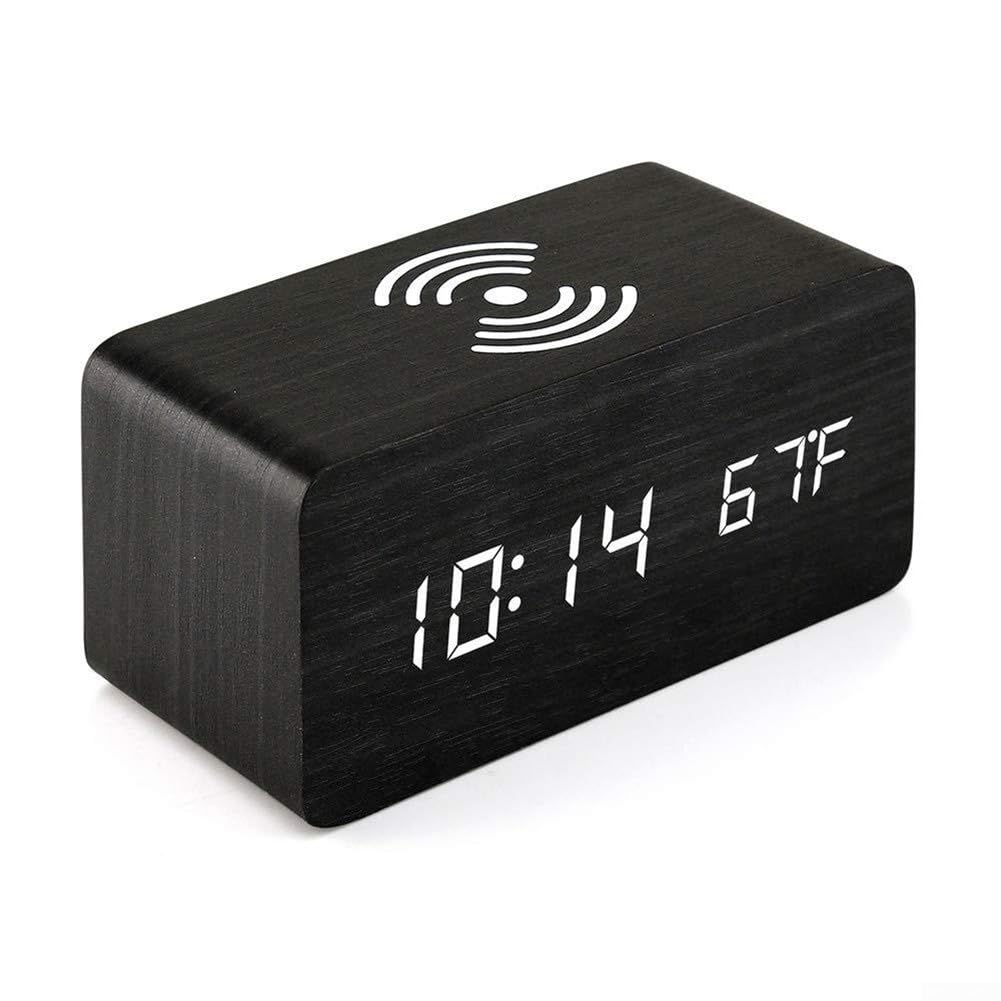
Image: A black HOgardenME Wooden Digital Alarm Clock displaying time and temperature, with a smartphone placed on its top surface, indicating active wireless charging.
Manteniment
- Clean the clock's surface with a soft, dry cloth. Do not use abrasive cleaners or solvents.
- If using batteries, replace them when the display becomes dim or functions become erratic. Remove batteries if the device will not be used for an extended period.
Resolució de problemes
| Problema | Causa possible | Solució |
|---|---|---|
| La pantalla està apagada o té poca llum. | No power, low batteries, or auto-dimming active. | Check USB connection. Replace AAA batteries. Adjust brightness settings or disable auto-dimming. |
| La càrrega sense fil no funciona. | Not connected via USB, phone not compatible, or misaligned. | Ensure clock is powered by USB. Verify phone has wireless charging or use a receiver. Reposition phone on the charging pad. |
| L'alarma no sona. | L'alarma no està configurada o el volum és massa baix. | Verify alarm time and activation. Check alarm volume settings (if applicable). |
| Hora/data incorrecta. | No està configurat correctament o hi ha hagut una interrupció del corrent. | Re-enter time and date settings. Ensure continuous power supply. |
Especificacions
- Número de model: D328Q7W433V974K8219833Y28
- Material: PVC, MDF
- Tipus de visualització: LED digital
- Font d'alimentació: USB (DC 5V) or 4 x AAA Batteries (not included)
- Sortida de càrrega sense fils: 5W
- Dimensions del producte: Aproximadament 3.43" d'amplada x 7.28" d'alçada
- Color: Negre
- Funcions: Time (12/24H), Date (M/D/Y), Temperature (F/C), 3 Alarms, Brightness Adjustment, Wireless Charging
Garantia i Suport
For warranty information or technical support, please refer to the contact details provided with your purchase or visit the official HOgardenME weblloc web. Conserveu el rebut de compra com a comprovant de compra.
Ask a question about this manual
Ask about setup, troubleshooting, compatibility, parts, safety, or missing instructions. Manuals+ will review the question and use this page’s manual context to help answer it.