
1. Primers passos
1.1 Què hi ha a la caixa
- Manual d'usuari
- Cable de càrrega
- Corretja de rellotge
1.2 First Use and Charging
Before initial use, ensure the smartwatch is fully charged. Use the provided charging cable and connect it to a 5V power supply or a USB port on your computer.
Video: This video demonstrates the initial unboxing and contents of the Gydom Smartwatch package, including the manual, service card, watch, and charging cable.
Video: This video illustrates how to properly charge the Gydom Smartwatch using the provided charging cable, connecting it to a USB port on a PC or a 5V power supply.
1.3 Descàrrega i instal·lació d'aplicacions
Download the 'VeryFit' app from the Google Play Store (for Android 6.0+ devices) or the Apple App Store (for iOS 9.0+ devices). Scan the QR code on the watch screen or product packaging to quickly find the app.
Video: This video guides users through downloading and setting up the VeryFit application, including scanning the QR code, granting necessary permissions, and registering an account.
1.4 Emparellament de dispositius
Open the VeryFit app and follow the on-screen instructions to pair your smartwatch. Ensure Bluetooth is enabled on your smartphone and keep the watch close during the pairing process. If pairing fails, forget the device in your phone's Bluetooth settings and try again.
Video: This video demonstrates basic navigation and interaction with the Gydom Smartwatch, including swiping through menus, accessing features like activity tracking, phone calls, AI voice, and Alexa.
1.5 Alexa Setup
After pairing, you can integrate Alexa. Follow the prompts in the VeryFit app to log in with your Amazon account and grant necessary permissions for Alexa functionality on your smartwatch.
Video: This video provides a step-by-step guide on how to connect and set up Alexa on your Gydom Smartwatch through the VeryFit app, including logging into your Amazon account.
2. Funcionament del rellotge intel·ligent
2.1 Navegació bàsica
The Gydom Smartwatch features a 1.91-inch HD touchscreen and a rotating crown for intuitive navigation. Swipe across the screen to access different menus and functions. Rotate the crown to scroll through options or change pages.

The Gydom 1.91-inch Smartwatch features a large display, capable of showing time, notifications, and call functions.

Explore new features such as managing contacts, reviewing call history, checking weather forecasts, customizing watch faces, automatic movement detection, built-in games, and a functional calendar. The rotating crown provides intuitive navigation.
Trucades Bluetooth 2.2
With the built-in microphone and hi-fi speaker, you can make and receive calls directly from your smartwatch. Dial numbers, access frequent contacts, and view call logs on the watch screen.

Stay connected with the intelligent voice assistant for commands and receive notifications from various apps directly on your wrist.
2.3 AI Voice Assistant & Alexa
The smartwatch features an AI voice assistant and integrated Alexa. Use voice commands to set alarms, check the weather, control smart home devices, and more.
2.4 Notificacions intel·ligents
Receive real-time notifications for SMS messages and various applications (WhatsApp, Facebook, etc.) directly on your watch, keeping you informed without needing to check your phone.

Receive notifications from various applications directly on your smartwatch.
3. Monitorització de la salut
The Gydom Smartwatch offers 24/7 health monitoring features to help you manage and improve your lifestyle. All recorded data can be synchronized with the VeryFit mobile application for detailed analysis.

Comprehensive health monitoring includes continuous tracking of heart rate, blood oxygen saturation (SpO2), stress levels, and detailed sleep analysis.
3.1 Monitorització de la freqüència cardíaca
Monitor your heart rate throughout the day to understand your cardiovascular health.
3.2 Monitorització de la SpO2
Track your blood oxygen saturation levels to gain insights into your respiratory well-being.
3.3 Seguiment del son
The watch records and analyzes your sleep patterns, including light, deep, and REM sleep, to help you improve sleep quality.
3.4 Stress Monitoring
Keep an eye on your stress levels to manage daily pressures effectively.
3.5 Menstrual Cycle Tracking
For female users, the smartwatch offers menstrual cycle tracking to help predict periods and ovulation.
4. Modes esportius i seguiment d'activitat
The Gydom Smartwatch supports over 100 exercise modes, allowing you to track various activities such as walking, running, cycling, basketball, swimming, Pilates, and more.
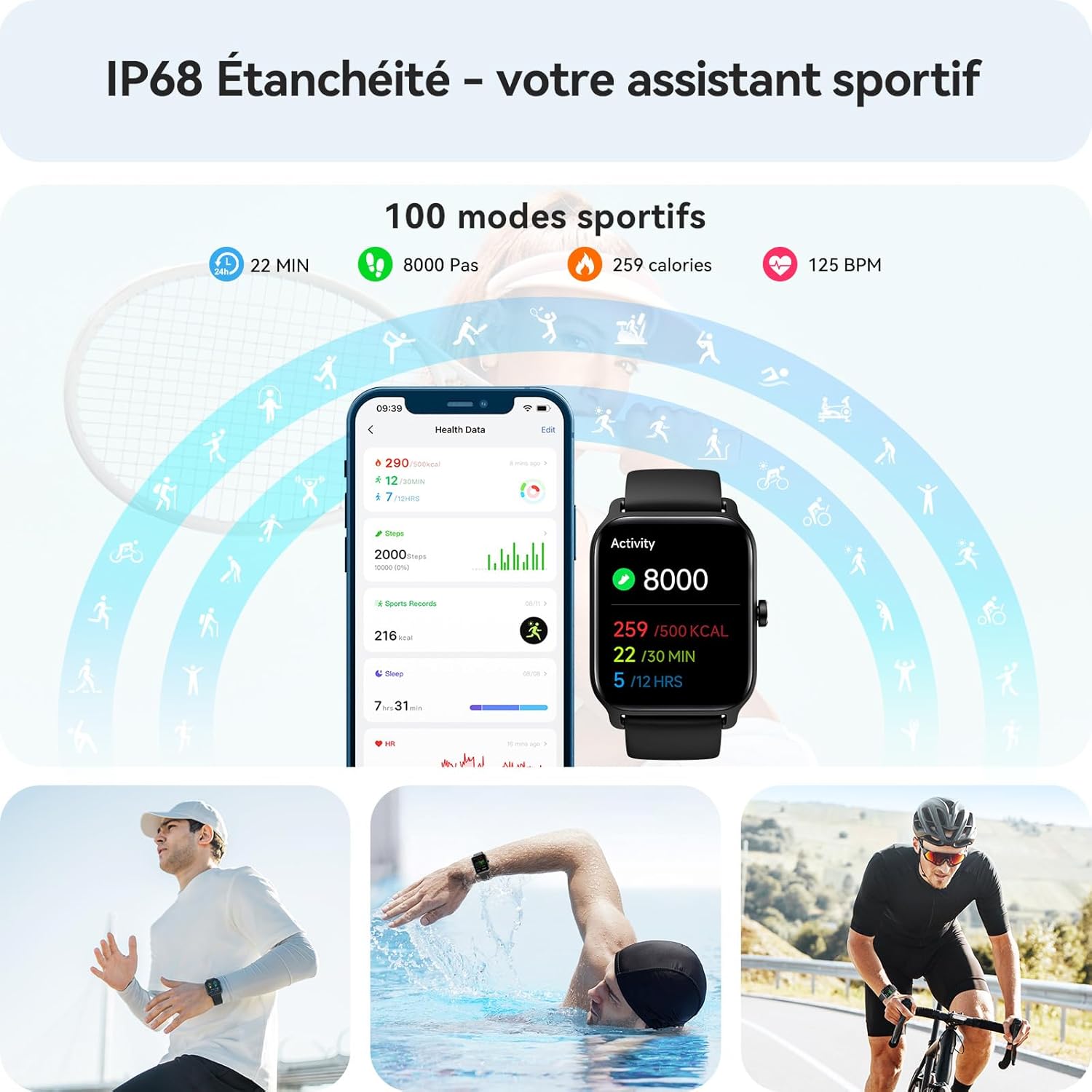
The device is IP68 water-resistant, making it suitable for various activities including swimming. It supports over 100 sport modes to track your workouts.
4.1 Seguiment d'activitat
The watch tracks movement, duration, and speed. Connect your smartwatch to your phone to view detailed movement tracking graphs in the app.
4.2 IP68 Water Resistance
With an IP68 rating, the smartwatch is resistant to dust and water, suitable for daily use and swimming (not recommended for hot water or seawater).
5. Personalització
5.1 Esferes de rellotge
Choose from over 100 cloud-based watch faces or customize your own using photos through the VeryFit app.

The smartwatch boasts a 1.91-inch HD screen with a resolution of 320x385 pixels, offering clear visuals and a variety of customizable watch faces. It also indicates a long battery life.
Vídeo: Un breu resumview of the VeryFit app interface, showing how to check health data, synchronize information, adjust watch settings, and change watch faces.
6. Manteniment
6.1 Durada de la bateria
The smartwatch is equipped with a 300 mAh lithium-polymer battery, offering 5-7 days of normal use and up to 20 days in power-saving mode. A full charge takes approximately 2 hours.
6.2 Actualitzacions de programari
Regularly check for and install software updates through the VeryFit app to ensure optimal performance and access to new features.
Video: Instructions on how to check for and install firmware updates for the Gydom Smartwatch via the VeryFit app to ensure the device is running the latest version.
7. Solució De Problemes
If you encounter issues, refer to the 'Help' section within the VeryFit app for FAQs and troubleshooting guides. You can also submit feedback or contact customer service directly through the app.
Vídeo: Un breu resumview of the VeryFit app interface, showing how to check health data, synchronize information, adjust watch settings, and change watch faces.
8. Especificacions
| Marca | Gydom |
| Número de model | IDW13 |
| Color | Negre |
| Sistema operatiu | AsteroidOS |
| Mida de la pantalla | 1.91 polzades |
| Connectivitat | Bluetooth |
| Característiques especials | Voice Call, Sedentary Reminder, Cycle Tracking, Activity Tracker, AI Voice, Alexa |
| Dispositius compatibles | Smartphones (iOS 9.0+ & Android 6.0+) |
| Tipus de bateria | Polímer de liti |
| Capacitat de la bateria | 300 mAh |
| Resistència a l'aigua | IP68 |
| Capacitat d'emmagatzematge de memòria | 128 MB |
| GPS | GPS via telèfon intel·ligent |
| Forma | Plaçada |
9. Garantia i Suport
The Gydom Smartwatch comes with a 1-year manufacturer's warranty. For any product-related inquiries or support, please utilize the 'AI customer service' or 'Questions and Suggestions' features within the VeryFit app. You can also submit a log to help resolve issues faster.