
1. Introducció
The Soundcore Select 4 Go is a compact and portable Bluetooth speaker designed for on-the-go audio. It features a powerful 5W speaker, a passive radiator for enhanced bass, and IP67 dust and water resistance, making it suitable for various environments, including outdoor use. With up to 20 hours of playback time, you can enjoy your favorite music for extended periods. This manual provides instructions for setting up, operating, and maintaining your speaker.
2. Contingut del paquet
Ensure all items are present in your package. If any items are missing or damaged, please contact customer support.
- Soundcore Select 4 Go Speaker
- Cable USB-A a USB-C
- Guia d'inici ràpid
- Manual de seguretat

Image: Package contents of the Soundcore Select 4 Go speaker.
3. Producte acabatview
The Soundcore Select 4 Go features a compact design with intuitive controls and robust audio components.
3.1. Components
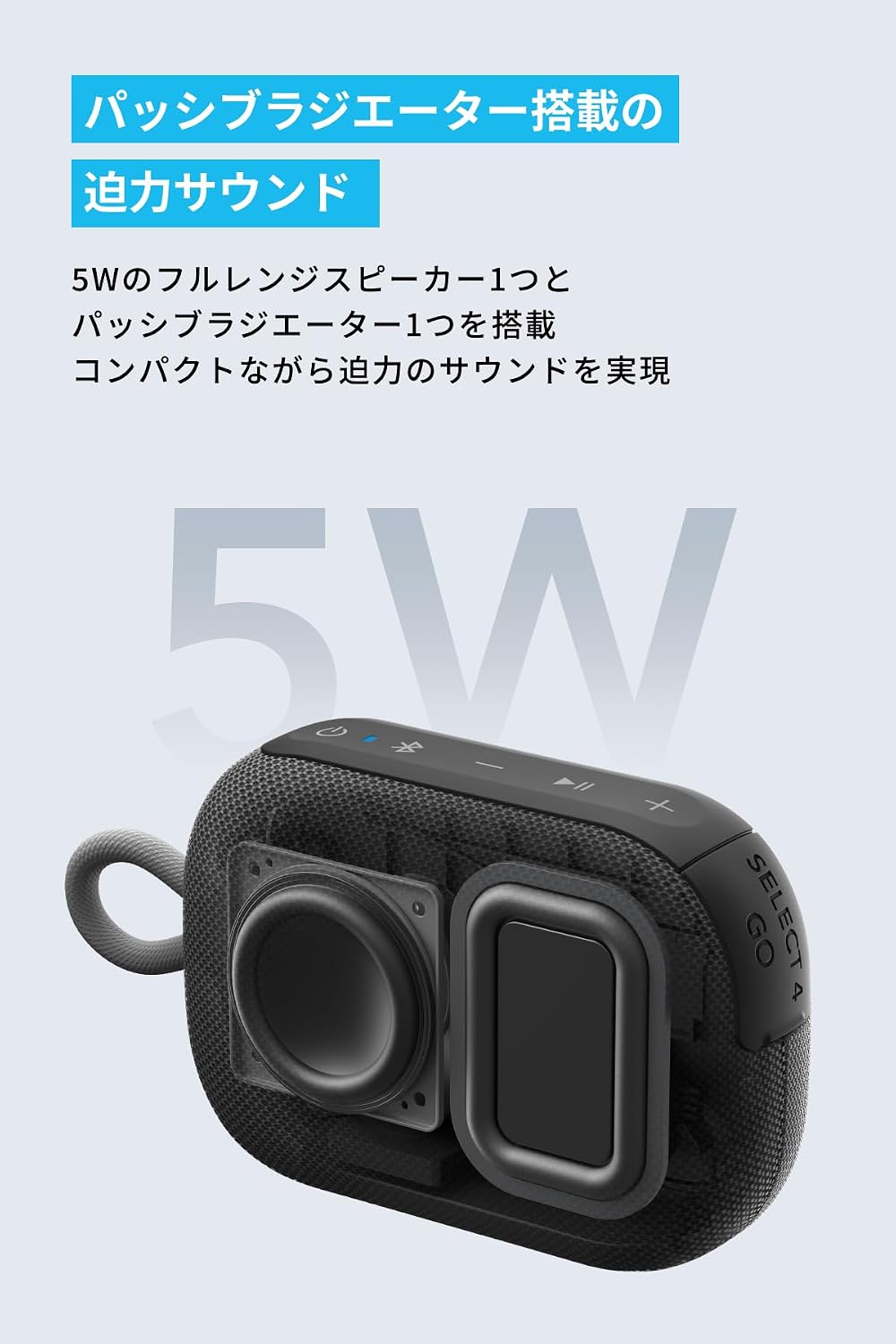
Imatge: Interna view highlighting the 5W full-range speaker and passive radiator.
The speaker is equipped with a 5W full-range speaker and a passive radiator to deliver powerful and clear audio despite its compact size.
3.2. Controls i indicadors
The speaker features several buttons for control and LED indicators for status.
- Botó d'encesa: Manteniu premut per encendre/apagar.
- Botó Bluetooth: Premeu per entrar al mode de vinculació Bluetooth.
- Baixar el volum (-): Disminuir el volum.
- Botó multifunció (Reproduir/Pausa): Play/pause music, answer/end calls. Double press for next track, triple press for previous track.
- Puja el volum (+): Augmenta el volum.
- Indicadors LED: Show power, charging, and Bluetooth status.
4. Configuració
4.1. Carregant l’altaveu
Before first use, fully charge the speaker. Use the provided USB-A to USB-C cable to connect the speaker to a 5V USB power adapter (not included).
- L'indicador LED mostrarà l'estat de càrrega.
- Una càrrega completa sol trigar aproximadament 3 hores.
4.2. Encendre/apagar
- Per engegar, premeu i manteniu premut el botó d'engegada durant 2 segons.
- Per apagar-lo, premeu i manteniu premut el botó d'engegada durant 2 segons.
4.3. Emparellament Bluetooth
- Power on the Soundcore Select 4 Go. The Bluetooth indicator will flash blue, indicating it is in pairing mode.
- On your Bluetooth-enabled device, go to the Bluetooth settings and search for 'Soundcore Select 4 Go'.
- Select 'Soundcore Select 4 Go' to connect. Once connected, the Bluetooth indicator will turn solid blue.
L'altaveu intentarà tornar a connectar-se automàticament amb l'últim dispositiu emparellat quan s'engegui.
5. Funcionament
5.1. Reproducció de música
- Press the Multi-function button once to play or pause music.
- Double press the Multi-function button for the next track.
- Triple press the Multi-function button for the previous track.
5.2. Control de volum
- Premeu el botó '+' per augmentar el volum.
- Premeu el botó '-' per baixar el volum.
5.3. Emparellament estèreo sense fil (TWS)
You can pair two Soundcore Select 4 Go speakers together for a more immersive stereo sound experience.
- Ensure both Soundcore Select 4 Go speakers are powered on and not connected to any other Bluetooth device.
- On one speaker (this will be the primary speaker), press and hold the Bluetooth button for 2 seconds until you hear a tone. The Bluetooth indicator will flash white.
- On the second speaker, press the Bluetooth button once. It will automatically search for the primary speaker.
- Once successfully paired, both speakers will emit a tone, and the Bluetooth indicator on the primary speaker will flash blue, while the secondary speaker's indicator will turn solid white.
- Connect your Bluetooth device to the primary speaker ('Soundcore Select 4 Go').

Image: Two Soundcore Select 4 Go speakers demonstrating wireless stereo pairing.
Nota: For products with a serial number where the 7th digit is 'C' or later, or if the firmware version in the Soundcore app starts with '3.', simultaneous pairing with older models may not be possible. If you encounter pairing issues, please contact customer support.
6. Manteniment
6.1. Neteja
- Netegeu l'altaveu amb un suau, damp tela.
- Do not use any corrosive cleaners or chemicals.
- Thanks to its IP67 rating, the speaker can be rinsed with water if it gets dirty with sand or mud. Ensure the charging port cover is securely closed before rinsing.

Image: Speaker submerged in shallow water with dirt, showcasing IP67 durability.
6.2. Emmagatzematge
- Guardeu l'altaveu en un lloc fresc i sec, allunyat de la llum solar directa i de temperatures extremes.
- Avoid storing the speaker with a completely depleted battery for extended periods. Charge it periodically to maintain battery health.
7. Solució De Problemes
| Problema | Solució |
|---|---|
| L'altaveu no s'encén. | Assegureu-vos que l'altaveu estigui carregat. Connecteu-lo a una font d'alimentació i torneu-ho a provar. |
| No es pot emparellar amb un dispositiu Bluetooth. | Ensure the speaker is in pairing mode (flashing blue LED). Turn off Bluetooth on other devices to avoid interference. Try restarting both the speaker and your device. |
| Sense so o amb un volum baix. | Comproveu els nivells de volum tant de l'altaveu com del dispositiu connectat. Assegureu-vos que l'altaveu no estigui silenciat. |
| La qualitat del so és deficient. | Move the speaker closer to your Bluetooth device. Avoid obstacles between the speaker and device. Ensure there is no interference from other wireless devices. |
| Cannot perform TWS pairing. | Ensure both speakers are Soundcore Select 4 Go models and are not connected to any other device. Refer to the note in Section 5.3 regarding serial numbers and firmware versions. |
8. Especificacions
| Característica | Detall |
|---|---|
| Marca | Soundcore |
| Número de model | AMZ-A31X1 |
| Tecnologia de connectivitat | Bluetooth |
| Potència de sortida | 5W |
| Durada de la bateria | Fins a 20 hores |
| Classificació impermeable | IP67 (a prova de pols i impermeable) |
| UPC | 194644205386 |
9. Garantia i Suport
9.1. Informació de la garantia
Soundcore provides an 18-month warranty from the date of purchase. This warranty covers defects in materials and workmanship. If you register your product with Anker, the warranty period is automatically extended to 24 months.
9.2. Atenció al client
For any questions regarding the product or delivery, please contact our customer support team. Our Japanese customer support is available to assist you.
You can find contact information on the official Soundcore weblloc web o a través de la vostra plataforma de compra.
10. Informació de seguretat
- No exposeu l'altaveu a temperatures extremes ni a la llum solar directa durant períodes prolongats.
- No desmunteu ni modifiqueu l'altaveu. Això anul·larà la garantia.
- Feu servir només cables originals o certificats per a la càrrega.
- Mantingueu l'altaveu lluny dels nens i de les mascotes.
- Ensure the charging port cover is securely closed when using the speaker near water to maintain its IP67 rating.