
S.M.S.L D10
S.M.S.L D10 Portable Mini Decoder Earphone AmpManual d'usuari més viu
Model: D10
1. Introducció
Gràcies per la compraasing the S.M.S.L D10 Portable Mini Decoder Earphone Amplifier. This device is designed to enhance your audio experience by providing high-fidelity sound from your computer or mobile device. Please read this manual carefully before using the product to ensure proper operation and to maximize its performance.
2. Producte acabatview
The S.M.S.L D10 is a compact and powerful audio decoder and earphone amplifier. It features dual Cirrus Logic CS43131 DAC chips for superior sound quality, supporting DSD256 and PCM 32bit/384kHz high-resolution audio formats. With both 3.5mm and 4.4mm balanced headphone jacks, it offers versatile connectivity and robust output power for a wide range of headphones.

Image: S.M.S.L D10 USB Headphone Amplificador acabatview.
3. Característiques clau
- High-Performance DAC Chips: Utilizes two Cirrus Logic CS43131 audio decoding chips for excellent performance and pure sound.
- Suport d'àudio d'alta resolució: Supports DSD256 hardware decoding and PCM 32bit/384kHz specifications.
- Sortides dobles per a auriculars: Equipped with a 3.5mm single-ended headphone jack and a 4.4mm balanced headphone jack for broad compatibility.
- Sortida potent: Delivers up to 500mW@16Ω output power, capable of driving most headphones.
- Àmplia compatibilitat: Connects easily to computers and mobile phones, compatible with Windows 7/8/8.1/10/11 (requires driver), Mac OS X 10.6+, Linux, Android, and iOS.
- Disseny transparent: Features a transparent window and textured alloy casing, allowing visibility of internal components.
- Side Volume Control: Conveniently located volume button for easy adjustment.

Image: Visual representation of the D10's core features.
4. Contingut del paquet
Verifiqueu que tots els elements siguin presents al paquet:
- S.M.S.L D10 Unit
- Cable USB
- Manual d'instruccions (aquest document)
5. Guia de configuració
5.1 Connexió a un ordinador (Windows/Mac/Linux)
- Connect one end of the provided USB cable to the USB input port on the S.M.S.L D10.
- Connecteu l'altre extrem del cable USB a un port USB disponible de l'ordinador.
- For Windows operating systems (7/8/8.1/10/11), a specific driver may be required for optimal performance. Please visit the official S.M.S.L website for the latest driver downloads. Mac OS X 10.6+ and Linux systems typically operate without additional drivers.
- Once connected, select the S.M.S.L D10 as your audio output device in your computer's sound settings.

Image: S.M.S.L D10 connected to a laptop.
5.2 Connecting to a Mobile Phone (Android/iOS)
- Connect one end of the provided USB cable to the USB input port on the S.M.S.L D10.
- Connect the other end of the USB cable to your mobile phone. An adapter (not included) may be required depending on your phone's port type (e.g., USB-C to USB-C, or Lightning to USB-A/C).
- The D10 is generally plug-and-play with Android and iOS devices.
- Ensure the D10 is selected as the audio output device in your phone's audio settings or music player application.
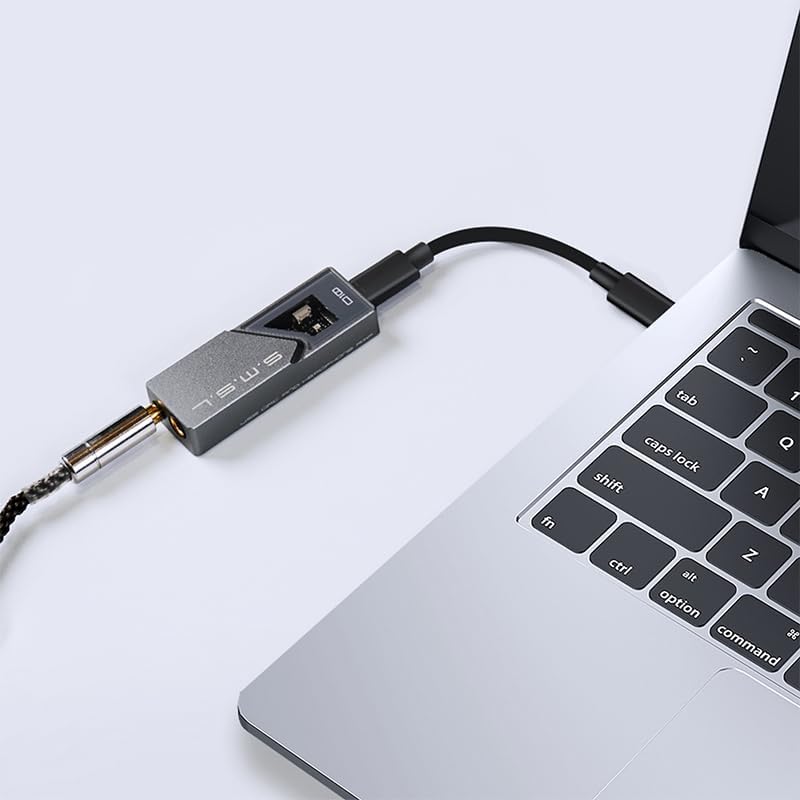
Image: S.M.S.L D10 connected to a mobile phone.
6. Instruccions de funcionament
6.1 Connectar auriculars
The S.M.S.L D10 offers two headphone output options:
- Presa d'auriculars de 3.5 mm: Per a auriculars estàndard d'una sola punta.
- 4.4mm Balanced Headphone Jack: For balanced headphones, offering improved signal separation and power.
Insert your headphone's plug firmly into the corresponding jack on the D10. Ensure you use the correct type of plug for the desired output.

Imatge: Superior view of the D10 with 3.5mm and 4.4mm headphone jacks.

Image: Port diagram of the S.M.S.L D10.
6.2 Control de volum
The D10 features a physical volume button on its side. Use this button to adjust the output volume to a comfortable listening level. It is recommended to start with a lower volume and gradually increase it to prevent sudden loud sounds.

Imatge: Lateral view of the D10, highlighting the volume control.
6.3 Data Status Indicator
When playing music, the data status indicator light on the D10 will illuminate, confirming active audio processing and high-resolution sound restoration.

Image: D10 connected to a phone, showing the illuminated data status indicator.
7. Manteniment
- Neteja: Utilitzeu un drap suau i sec per netejar l'exterior del dispositiu. Eviteu utilitzar productes químics o materials abrasius.
- Emmagatzematge: Store the D10 in a cool, dry place away from direct sunlight and extreme temperatures.
- Manipulació: Manipuleu el dispositiu amb cura. Eviteu deixar-lo caure ni sotmetre'l a impactes forts.
- Connectivitat: Ensure USB and headphone cables are connected securely but without excessive force to prevent damage to ports.
8. Solució De Problemes
| Problema | Causa possible | Solució |
|---|---|---|
| Sense sortida de so |
|
|
| So distorsionat o de mala qualitat |
|
|
| Device feels warm during operation |
|
|
9. Especificacions
| Característica | Detall |
|---|---|
| Model | D10 |
| Xips DAC | 2 x Cirrus Logic CS43131 |
| Formats d'àudio compatibles | DSD256, PCM 32bit/384kHz |
| Sortides d'auriculars | 3.5mm (Single-ended), 4.4mm (Balanced) |
| Potència de sortida màxima | 500 mW @ 16 Ω |
| Compatibilitat | Windows 7/8/8.1/10/11 (driver required), Mac OS X 10.6+, Linux, Android, iOS |
| Dimensions del paquet | 5.47 x 2.95 x 1.22 polzades |
| Pes de l'article | 1.1 lliures |
| Fabricant | SMSL |
| Data de primera disponibilitat | 24 de juliol de 2024 |
10. Garantia i Suport
S.M.S.L products are covered by a manufacturer's warranty. For specific warranty terms and conditions, please refer to the warranty card included with your product or visit the official S.M.S.L website. For technical support, troubleshooting assistance beyond this manual, or warranty claims, please contact S.M.S.L customer service through their official channels.
Official S.M.S.L Weblloc: www.smsl-audio.com
Ask a question about this manual
Ask about setup, troubleshooting, compatibility, parts, safety, or missing instructions. Manuals+ will review the question and use this page’s manual context to help answer it.