
Morelax M858
Morelax Mini Electric Under-Desk Elliptical User Manual
Model: M858
Introducció
The Morelax Mini Electric Under-Desk Elliptical (Model M858) is designed to provide a convenient and effective low-impact exercise solution for home or office use. This motorized elliptical offers both manual and automatic modes, a quiet operation, and a portable design, making it suitable for various users, including those seeking rehabilitation or gentle fitness.
This manual provides essential information for the safe and efficient operation, maintenance, and troubleshooting of your Morelax elliptical machine. Please read it thoroughly before first use and keep it for future reference.
Què hi ha a la caixa
En obrir el paquet, comproveu que hi hagi tots els components següents:
- 1 x Morelax Mini Electric Under-Desk Elliptical (Main Unit)
- 1 x cable d'alimentació
- 2 corretges per als peus
- 1 x PVC Anti-Slip Pad
- 1 x comandament a distància
- 1 x Manual d'usuari (aquest document)

Image: All components included in the Morelax Mini Electric Under-Desk Elliptical package.
Configuració
The Morelax Mini Electric Under-Desk Elliptical comes fully assembled and ready to use. No complex installation is required.
- Col·locació: Place the elliptical on a flat, stable surface. Ensure there is enough space around the unit for comfortable use and to prevent obstruction.
- Coixinet antilliscant: For enhanced stability and to protect your floor, place the provided PVC anti-slip pad underneath the elliptical.
- Connexió d'alimentació: Connect the power cord to the elliptical's power input port and then plug it into a standard electrical outlet.
- Foot Straps (Optional): If desired, attach the foot straps to the pedals to secure your feet during exercise. This can improve stability and control.

Image: Close-up of the elliptical pedals with foot straps for secure placement.

Image: The elliptical placed on an anti-slip mat for stability during use.
Instruccions de funcionament
Encès/Apagat
Premeu el botó PODER button on the remote control or the main unit's display to turn the elliptical on or off.
Manual Mode (HR Mode)
In Manual Mode, you have full control over the speed and direction of the pedals.
- Activació: Premeu el botó MANUAL button on the display or the MODE button on the remote until "HR" appears on the screen.
- Ajust de velocitat: Utilitza el VELOCITAT+ i VELOCITAT- buttons on the display or remote to adjust the speed from 1 to 12 levels.
- Canvi de direcció: Premeu el botó DIRECCIÓ button on the display or remote to switch between forward and backward motion.
- Inici/Parada: Premeu el botó INICI/PARA button to begin or pause your exercise.
Automatic Modes (P1, P2, P3)
The elliptical offers three pre-programmed automatic modes with fixed speeds and directions.
- Activació: Premeu el botó AUTO button on the display or the MODE button on the remote to cycle through P1, P2, and P3.
- P1 - Gentle: A low-intensity program suitable for warm-up or gentle exercise.
- P2 - Walk: A moderate-intensity program simulating a walking pace.
- P3 - Sport: A higher-intensity program for more vigorous exercise.
- Nota: In automatic modes, speed and direction are pre-set and cannot be manually adjusted.

Image: Visual representation of Manual (HR) and Automatic (P1/P2/P3) modes and their controls.
Display and Remote Control
Pantalla LCD
The built-in LCD screen provides real-time feedback on your workout:
- ESCANEAR: Passa cíclicament per totes les mètriques automàticament.
- HORA: Durada de la sessió d'exercici.
- DISTÀNCIA: Distance covered (in 10-meter units).
- VELOCITAT: Current speed of the pedals.
- COMPTADOR: Total number of pedal rotations.
- CALORIES: Calories cremades estimades.
Premeu el botó VISUALITZACIÓ button on the unit or remote to manually cycle through these metrics.

Image: The large LCD screen displaying workout data such as time, distance, speed, and calories.
Control remot
The remote control allows for convenient operation without bending down.
- POTÈNCIA: Encén/apaga la unitat.
- INICI / PARADA: Starts or pauses the exercise.
- Mode: Switches between Manual (HR) and Automatic (P1/P2/P3) modes.
- VELOCITAT +/-: Adjusts speed in Manual mode.
- DIRECCIÓ: Changes pedal direction.
- FUNCIÓ: Cycles through display metrics.
Important: When using the remote control, aim it directly at the elliptical's display for optimal responsiveness.
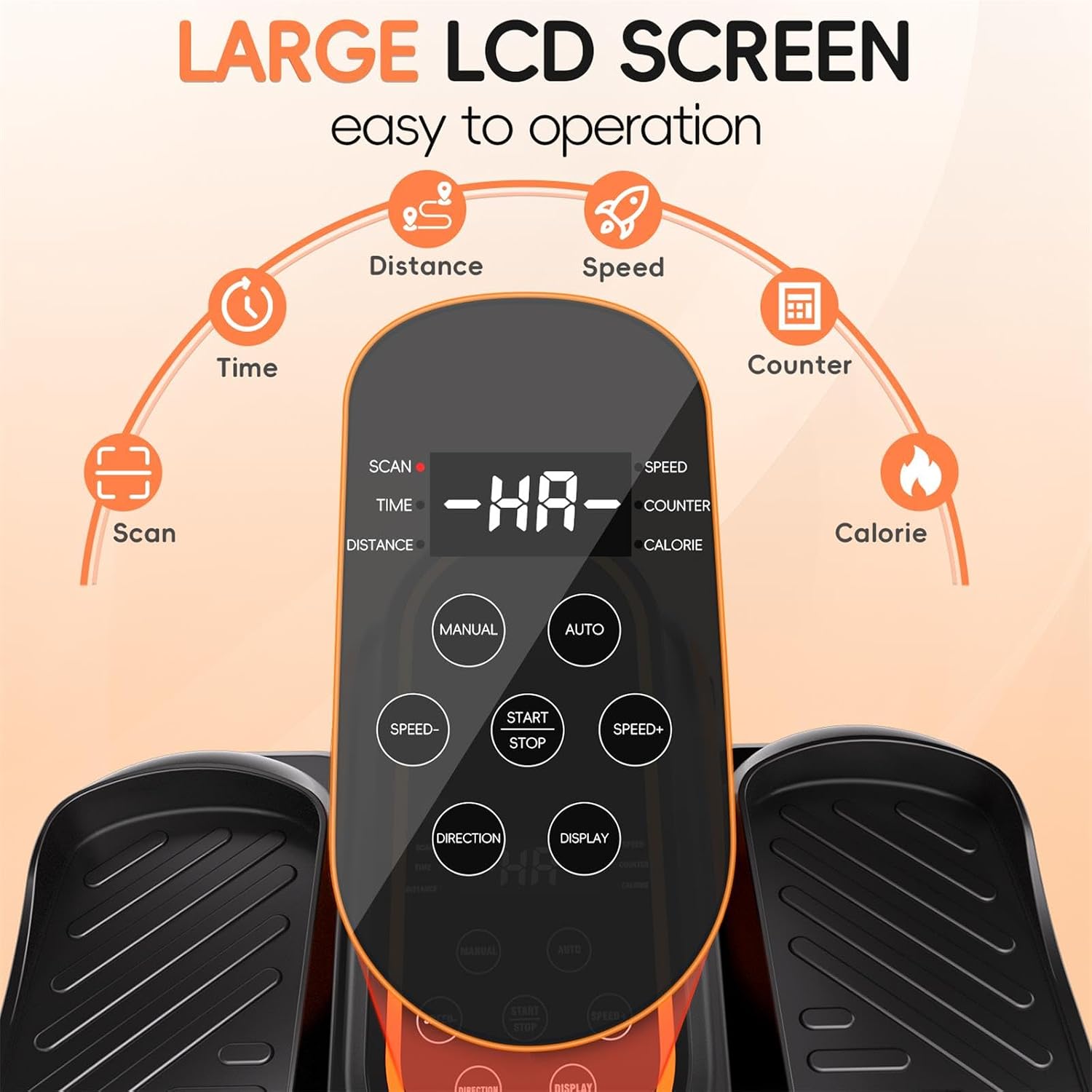
Image: The remote control, allowing users to adjust settings without bending down.
Informació de seguretat
WARNING: To prevent injury, always adhere to the following safety guidelines.
- Seated Use Only: This elliptical is designed exclusively for seated use. DO NOT STAND ON THE ELLIPTICAL. Standing on the unit can cause serious injury and damage the machine.
- Stable Seating: Always use the elliptical while sitting comfortably in a stable chair or sofa. Ensure your feet are firmly placed on the pedals.
- Entorn clar: Ensure the area around the elliptical is clear of obstructions before and during use.
- Nens i animals de companyia: Keep children and pets away from the elliptical during operation.
- Condicions mèdiques: Consult a physician before starting any new exercise program, especially if you have pre-existing medical conditions or are undergoing rehabilitation.
- Calçat adequat: Wear appropriate footwear to ensure a secure grip on the pedals.
- Desconnecteu quan no estigui en ús: Always unplug the elliptical from the power outlet when not in use or before cleaning.

Image: Important safety warning illustrating that the elliptical is for seated use only, not for standing.
Manteniment
Regular maintenance helps ensure the longevity and optimal performance of your Morelax elliptical.
- Neteja: Netegeu la unitat amb un drap suau iamp drap després de cada ús. No utilitzeu productes de neteja abrasius ni dissolvents. Assegureu-vos que la unitat estigui desendollada abans de netejar-la.
- Emmagatzematge: Store the elliptical in a cool, dry place away from direct sunlight and extreme temperatures. Its compact design and built-in handle make it easy to move and store.
- Inspecció: Periodically inspect the power cord for any damage. Check pedals and straps for wear and tear.

Image: The elliptical's portable design with a built-in handle for easy movement and storage.
Resolució de problemes
| Problema | Causa possible | Solució |
|---|---|---|
| La unitat no s'encén. | Power cord not properly connected; Power outlet not working. | Assegureu-vos que el cable d'alimentació estigui ben connectat a la unitat i a una presa de corrent que funcioni. Proveu una altra presa de corrent. |
| Pedals are not moving. | Unit is paused; Incorrect mode selected; Motor issue. | Press START/STOP. Ensure a mode (Manual or Auto) is selected. If problem persists, contact customer support. |
| El comandament a distància no respon. | Remote not aimed at display; Low battery in remote. | Aim remote directly at the elliptical's display. Replace remote batteries if needed. |
| La unitat fa un soroll estrany. | Obstruction; Internal component issue. | Ensure no objects are obstructing the pedals. If noise persists, discontinue use and contact customer support. |
Especificacions
- Número de model: M858
- Dimensions (L x A x A): 44 x 40 x 25 cm (17.32 x 15.75 x 9.84 polzades)
- Pes: 5.2 kg (11.46 lliures)
- Material: Acrilonitril butadiè estirè (ABS)
- Color: Negre
- Speed Levels (Manual Mode): 12
- Modes automàtics: P1 (Gentle), P2 (Walk), P3 (Sport)
- Visualització: LCD (Time, Distance, Speed, Counter, Calories)
- Control: On-unit buttons, Remote Control
- Origen: Xina
Garantia i Suport
Morelax is committed to providing high-quality products and excellent customer service.
- Política de devolució: All Morelax under-desk ellipticals are eligible for a 90-day free return service.
- Atenció al client: For any questions, concerns, or assistance, please contact Morelax customer support. We aim to respond to all inquiries within 24 hours.
- Informació de contacte: Please refer to the contact details provided on the Morelax official weblloc web o la vostra plataforma de compra per obtenir els canals d'assistència més actualitzats.

Image: Morelax's commitment to customer satisfaction, including quick response times and a generous return policy.
Ask a question about this manual
Ask about setup, troubleshooting, compatibility, parts, safety, or missing instructions. Manuals+ will review the question and use this page’s manual context to help answer it.