
1. Introducció
Thank you for choosing the VolkanoX VXH300 Hybrid Active Noise Cancelling Bluetooth Headphones. These headphones are designed to provide a high-quality audio experience with the convenience of wireless connectivity and effective noise cancellation. This manual will guide you through the setup, operation, and maintenance of your new headphones.
2. Informació de seguretat
- No utilitzeu els auriculars a un volum alt durant períodes prolongats per evitar danys auditius.
- Do not use the headphones in situations where inability to hear ambient sounds could be dangerous, such as while driving or cycling.
- Mantingueu els auriculars allunyats de l'aigua, la humitat i les temperatures extremes.
- No intenteu desmuntar ni modificar els auriculars. Això anul·larà la garantia.
- Charge the headphones using a compatible USB power source.
3. Contingut del paquet
Si us plau, assegureu-vos que tots els articles estiguin presents al vostre paquet:
- 1 x VolkanoX VXH300 Hybrid Active Noise Cancelling Bluetooth Headphones
- 1 x cable de càrrega USB tipus C
- 1 cable d'àudio de 3.5 mm
- 1 x Maletí de transport
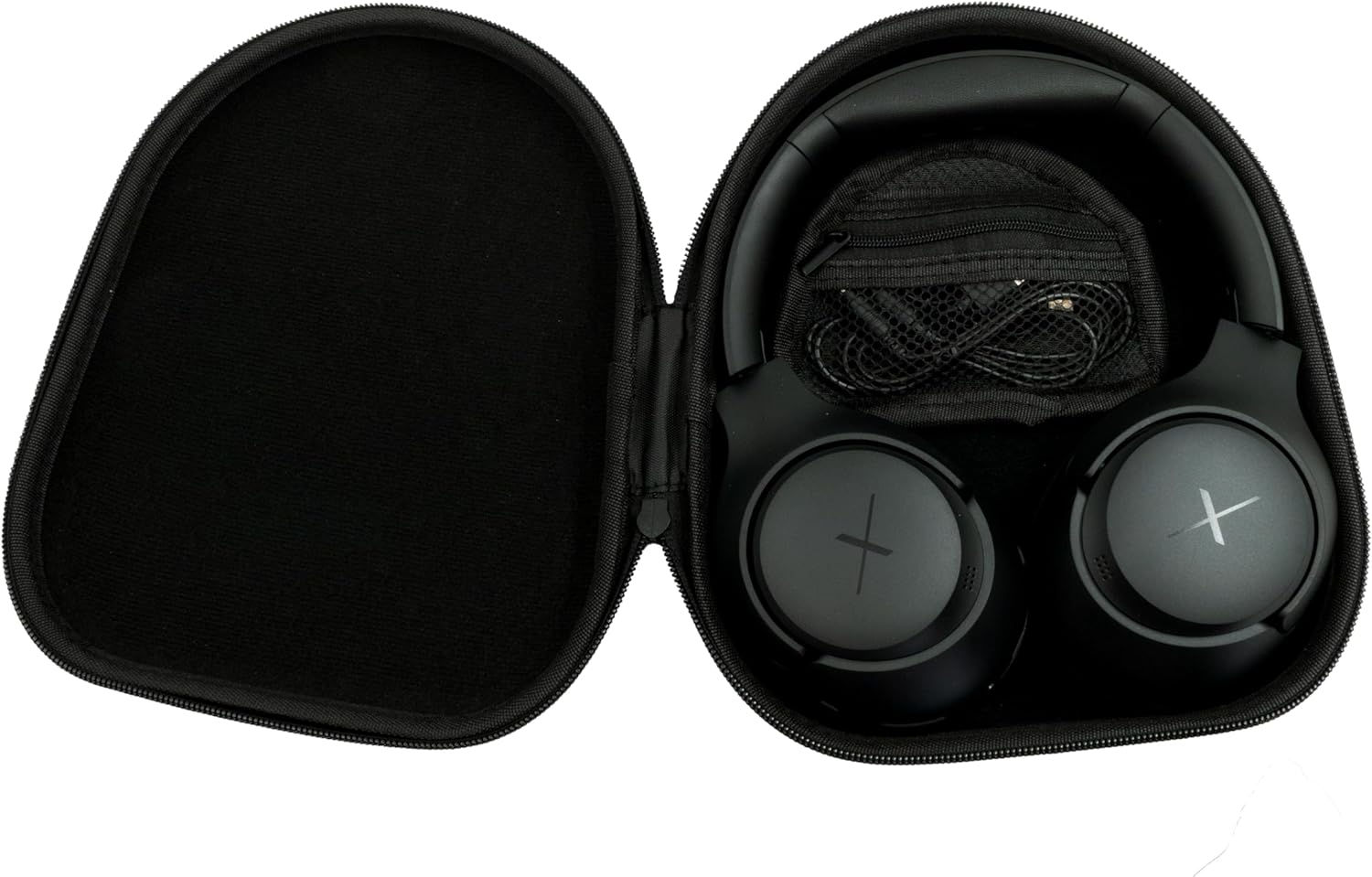
Image: VolkanoX VXH300 Headphones neatly stored in their carrying case, alongside the included charging and audio cables.
4. Producte acabatview
Familiarize yourself with the various parts and controls of your VolkanoX VXH300 headphones:

Imatge: Una imatge detallada view of the right earcup, highlighting the control buttons, the 3.5mm Aux Input, and the USB Type-C Charging Port.
- Botons de control: Power On/Off, Volume Up/Down, Play/Pause, Track Skip, Call Answer/End.
- Entrada auxiliar: For wired audio connection using the 3.5mm audio cable.
- Port de càrrega tipus C: Per carregar la bateria interna.
- Interruptor ANC: Dedicated button or switch for Active Noise Cancelling function.
- Micròfon: Integrat per a trucades de mans lliures.
5. Configuració
5.1 Càrrega dels auriculars
- Connecteu el cable de càrrega USB tipus C subministrat al port de càrrega dels auriculars.
- Connecteu l'altre extrem del cable a un adaptador de corrent USB (no inclòs) o al port USB d'un ordinador.
- The LED indicator will show charging status (e.g., red for charging, blue/off for fully charged).
- Una càrrega completa triga aproximadament 1 hora.
5.2 Engegada/apagada
- Per encendre: Press and hold the Power button for approximately 3 seconds until the LED indicator flashes.
- Per apagar: Premeu i manteniu premut el botó d'engegada durant aproximadament 3 segons fins que l'indicador LED s'apagui.
5.3 Vinculació Bluetooth
- Assegureu-vos que els auriculars estiguin apagats.
- Premeu i manteniu premut el botó d'engegada durant aproximadament 5-7 segons fins que l'indicador LED parpellegi alternativament en vermell i blau, cosa que indica el mode d'emparellament.
- Al dispositiu (telèfon intel·ligent, tauleta, ordinador), activeu el Bluetooth i cerqueu dispositius nous.
- Select "VolkanoX VXH300" from the list of available devices.
- Once paired, the LED indicator will flash blue slowly, and you will hear an audible confirmation.
- The headphones will automatically reconnect to the last paired device when powered on, if within range (up to 10 meters).
5.4 Wired Connection (Duo Mode)
For ultimate flexibility, you can use the headphones in wired mode:
- Connect one end of the 3.5mm audio cable to the Aux Input port on the headphones.
- Connect the other end of the cable to the 3.5mm audio jack on your audio device.
- The headphones will automatically switch to wired mode. Bluetooth functionality will be disabled.
6. Instruccions de funcionament
6.1 Reproducció de música
- Reproduir/pausa: Premeu el botó d'engegada/multifunció una vegada.
- Pujar el volum: Premeu el botó Pujar volum (+).
- Baixar el volum: Premeu el botó per baixar el volum (-).
- Pista següent: Premeu i manteniu premut el botó de pujar el volum (+).
- Pista anterior: Premeu i manteniu premut el botó per baixar el volum (-).
6.2 Gestió de trucades
- Respondre/Finalitzar la trucada: Premeu el botó d'engegada/multifunció una vegada.
- Rebutja la trucada: Premeu i manteniu premut el botó d'engegada/multifunció durant 2 segons.
- Torna a marcar l'últim número: Premeu dues vegades el botó d'engegada/multifunció.
6.3 Active Noise Cancelling (ANC) Function
The VolkanoX VXH300 features Hybrid Active Noise Cancelling technology to reduce ambient noise.

Image: A visual representation of Hybrid Active Noise Cancelling, showing how external noise is filtered to enhance the listening experience.
- Activa l'ANC: Locate the dedicated ANC switch or button (refer to Product Overview) and slide/press it to the ON position. The ANC indicator light will illuminate.
- Desactiva l'ANC: Slide/press the ANC switch or button to the OFF position. The ANC indicator light will turn off.
- ANC can be used independently or simultaneously with Bluetooth audio.
7. Manteniment
7.1 Neteja
- Netegeu els auriculars amb un drap suau i sec.
- No utilitzeu netejadors abrasius, dissolvents ni productes químics agressius.
- Eviteu que entri humitat a cap obertura.
7.2 Emmagatzematge
The VolkanoX VXH300 headphones feature a twist and folding design for compact storage.

Image: The headphones folded for portability, highlighting their space-saving design.
- When not in use, fold the headphones and store them in the provided carrying case to protect them from dust and damage.
- Emmagatzemar en un lloc fresc i sec, allunyat de la llum solar directa i de temperatures extremes.
8. Solució De Problemes
Si teniu problemes amb els auriculars, consulteu els problemes i solucions més comuns següents:
| Problema | Possible solució |
|---|---|
| Els auriculars no s'engeguen. | Assegureu-vos que els auriculars estiguin completament carregats. Connecteu-los a una font d'alimentació i torneu-ho a provar. |
| No es pot emparellar amb un dispositiu Bluetooth. | Ensure headphones are in pairing mode (LED flashing red/blue). Turn off and on Bluetooth on your device. Move headphones closer to the device. Clear previous pairings on your device. |
| Sense so o amb un volum baix. | Check volume levels on both headphones and your connected device. Ensure headphones are properly paired or the 3.5mm cable is fully inserted. |
| L'ANC no és eficaç. | Ensure the ANC function is switched on. ANC is most effective against low-frequency, constant noise. |
| El micròfon no funciona. | Ensure headphones are connected via Bluetooth. Check microphone settings on your device. |
9. Especificacions
| Característica | Detall |
|---|---|
| Nom del model | VXH300 |
| Número de model | VKX-2104-BK |
| Connectivitat | Bluetooth 5.0, Wired (3.5mm Aux) |
| Interval Bluetooth | Fins a 10 metres |
| Control de soroll | Cancel·lació activa de soroll híbrida |
| Col·locació de l'orella | Sobre l'orella |
| Sensibilitat | 105 dB |
| Temps de càrrega de la bateria | Aproximadament 1 hora |
| Micròfon incorporat | Sí |
| Pes | 300 grams |
| Color | Negre |
10. Garantia i Suport
10.1 Informació de la garantia
Your VolkanoX VXH300 headphones are covered by a Garantia limitada d'1 any. This warranty covers manufacturing defects and ensures dependable performance.
You can extend your coverage by an additional 12 months, for a total of 24 months coverage, by registering your product. Please visit the official Volkano weblloc web per obtenir detalls de registre del producte.
10.2 Atenció al client
Should you have any questions, require assistance, or need to claim warranty support, please contact Volkano customer service. You can message us via the official Volkano Page o consulteu la informació de contacte que trobareu a l'embalatge del producte.