
1. Introducció
This manual provides essential instructions for the safe and effective use of your HITBOX HT-111 Auto Darkening Welding Helmet. This helmet is designed to offer superior eye and face protection during various welding and grinding operations. It features an auto-darkening lens, true color technology, and a comfortable, lightweight design.

Figura 1: Frontal view of the HITBOX HT-111 Auto Darkening Welding Helmet.
2. Informació de seguretat
Always prioritize safety when performing welding or grinding tasks. This helmet provides protection against harmful ultraviolet (UV) and infrared (IR) radiation, sparks, and spatter. However, it is crucial to follow all general welding safety guidelines and wear appropriate personal protective equipment (PPE).
- Ensure the helmet is properly fitted and adjusted before each use.
- Inspect the helmet and lens for any damage before use. Replace damaged parts immediately.
- Do not use the helmet if the auto-darkening function is not working correctly.
- Eviteu l'exposició directa a l'arc de soldadura sense la protecció ocular adequada.
- The helmet is not suitable for laser welding or overhead applications where falling objects may be a hazard.
3. Producte acabatview i Components
Familiarize yourself with the various parts of your welding helmet for optimal performance and safety.
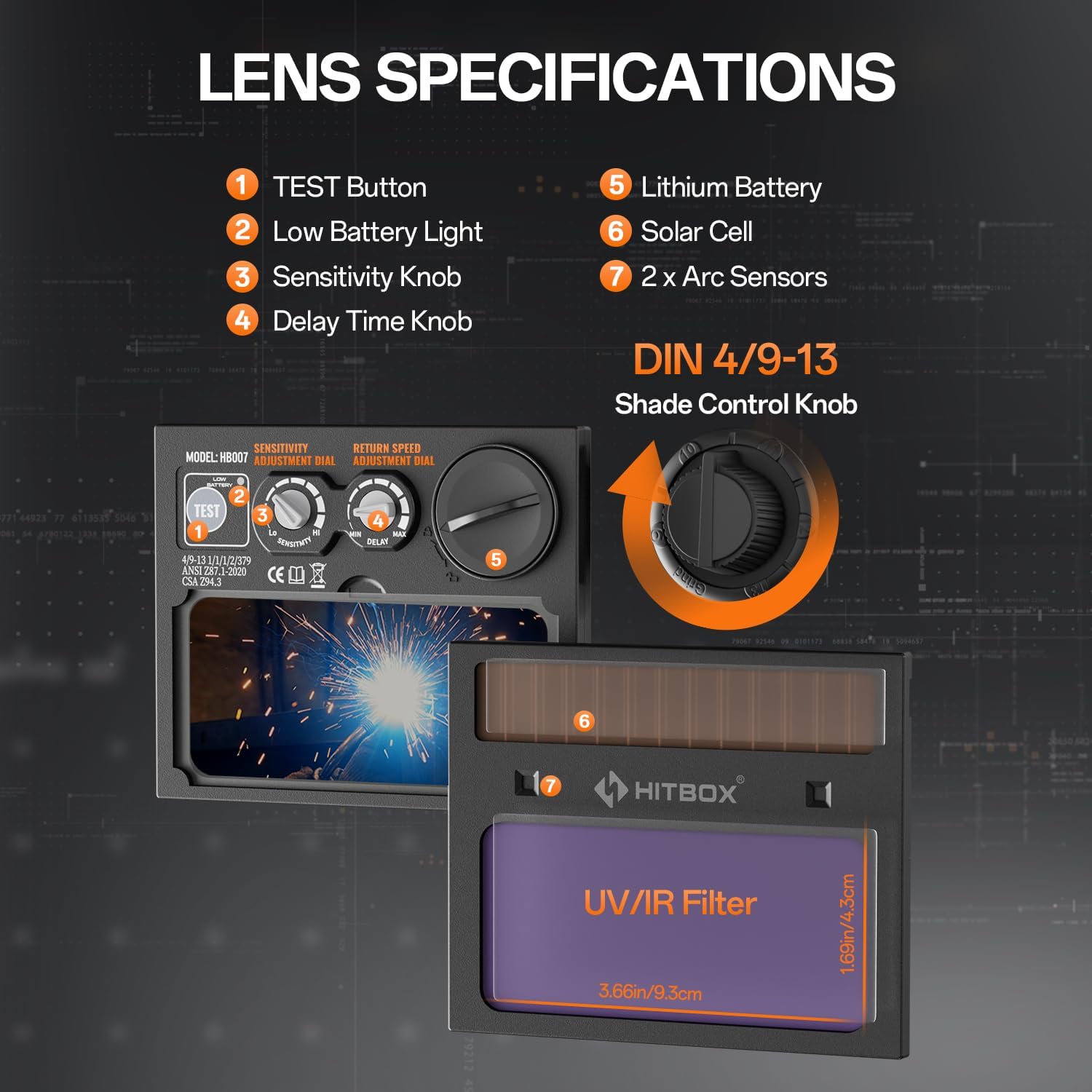
Figure 2: Lens specifications and controls.
- Botó TEST: Used to check the auto-darkening function.
- Llum de bateria baixa: Indicates when the battery needs replacement.
- Botó de sensibilitat: Adjusts the sensitivity of the arc sensors.
- Delay Time Knob: Controls the time the lens stays dark after the arc stops.
- Bateria de liti: Provides power to the auto-darkening filter.
- Cèl · lula solar: Extends battery life by charging from welding light.
- Sensors d'arc: Detect the welding arc to trigger darkening.
- Shade Control Knob: Adjusts the dark shade level (DIN 4/9-13).
Accessoris inclosos:

Figura 3: Accessoris inclosos.
- Welding Helmet x 1
- Outer Protection Board x 1
- CR2450 Battery x 3 (Note: Product specifications state 3 batteries, image shows 2 replaceable batteries plus one pre-installed)
- Manual d'usuari x 1
4. Configuració
4.1 Ajust de la diadema
Proper adjustment of the headband is crucial for comfort and stability during use.

Figure 4: Headband adjustment points.
- Ajustar la corretja superior: Loosen or tighten the top strap to adjust the helmet's height on your head.
- Width Knob: Rotate the knob at the back of the headband to adjust the circumference for a snug fit.
- Angle Knob: Ajusteu l'angle del casc respecte a la cara per obtenir una òptima viewing i comoditat.
- Comfort Cushion: Ensure the comfort cushion rests properly against your forehead to reduce pressure points.
4.2 Battery Installation/Check
The helmet is powered by a CR2450 lithium battery, supplemented by solar cells. Ensure the battery is correctly installed and functional.
- Locate the battery compartment, typically on the auto-darkening filter cartridge.
- Inseriu la bateria CR2450 amb la polaritat correcta.
- Premeu el botó PROVA button (1 in Figure 2) to verify the auto-darkening function. The lens should momentarily darken.
- If the low battery light (2 in Figure 2) illuminates, replace the battery.
5. Instruccions de funcionament
The HT-111 helmet offers various adjustments to suit different welding and grinding tasks.

Figure 5: Clear view before welding and auto-darkening during welding.
5.1 Encès/Apagat
The auto-darkening filter is solar-powered and automatically activates when exposed to light. There is no manual on/off switch for the auto-darkening function itself.
5.2 Shade Control
The external shade control knob (8 in Figure 2) allows adjustment from DIN 4 (light state) to DIN 9-13 (dark state). Rotate the knob to select the appropriate shade level for your welding process.
5.3 Ajust de sensibilitat
The sensitivity knob (3 in Figure 2) controls how easily the arc sensors detect the welding arc. Adjust it to prevent false darkening from ambient light or to ensure darkening in low-amp Soldadura TIG.
5.4 Delay Time Adjustment
The delay time knob (4 in Figure 2) sets how long the lens remains dark after the welding arc ceases. A shorter delay is suitable for tack welding, while a longer delay is recommended for high-amperage welding to protect eyes from afterglow.
5.5 Welding and Grind Modes
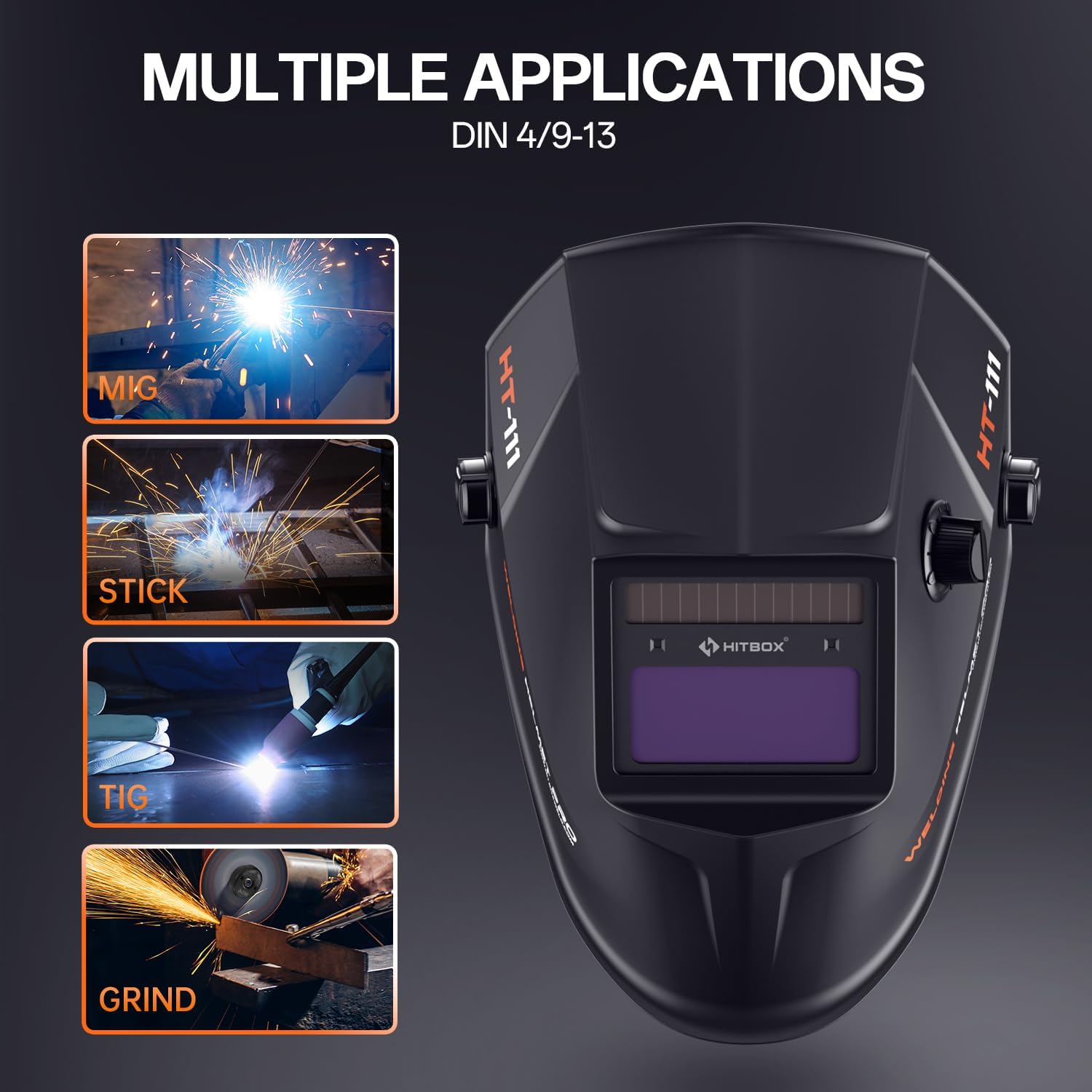
Figure 6: Multiple applications supported by the helmet.
The HT-111 helmet supports various applications:
- Mode de soldadura: For MIG, TIG, ARC (Stick), and other welding processes. The lens automatically darkens to the selected shade (DIN 9-13) upon arc ignition.
- Mode de mòlta: For grinding operations. The lens remains in its light state (DIN 4) to provide clear vision while protecting against sparks and debris. Ensure the helmet is set to Grind Mode before starting grinding to prevent accidental darkening.
5.6 Shade Number Selection Guide
Refer to the table below for recommended shade numbers based on welding process and current (Amperes).
Figure 7: Shade number selection table.
| Procés | Corrent (A) | |||||||||||||||||
|---|---|---|---|---|---|---|---|---|---|---|---|---|---|---|---|---|---|---|
| 5 | 10 | 15 | 30 | 40 | 70 | 100 | 125 | 150 | 175 | 200 | 225 | 250 | 300 | 350 | 400 | 500 | 600 | |
| MMA | 9 | 10 | 11 | 12 | 13 | 14 | ||||||||||||
| MAG | 10 | 11 | 12 | 13 | 14 | |||||||||||||
| TIG | 9 | 10 | 11 | 12 | 13 | 14 | ||||||||||||
| MIG | 10 | 11 | 12 | 13 | 14 | |||||||||||||
| PAC | 11 | 12 | 13 | 14 | ||||||||||||||
| PATA | 9 | 10 | 11 | 12 | 13 | 14 | ||||||||||||
6. Manteniment
Regular maintenance ensures the longevity and proper functioning of your welding helmet.
6.1 Neteja
- Netegeu la carcassa del casc amb una solució suau d'aigua i sabó. Eviteu dissolvents agressius.
- Wipe the auto-darkening filter and protection lenses with a soft, clean cloth. Do not use abrasive materials or cleaners that could scratch the lens.
- Keep the arc sensors clean and free from obstructions.
6.2 Replacing Outer Protection Board
The outer protection board protects the auto-darkening filter from spatter and scratches. Replace it when it becomes scratched or damaged to maintain clear vision.
- Carefully remove the old protection board from its frame.
- Insert a new outer protection board (one is included as an accessory) into the frame, ensuring it sits securely.
6.3 Replacing CR2450 Battery
When the low battery indicator illuminates, replace the CR2450 battery.
- Locate the battery compartment on the auto-darkening filter.
- Obriu el compartiment i traieu la bateria antiga.
- Insert a new CR2450 battery, ensuring correct polarity (+ side up).
- Close the compartment and press the TEST button to confirm functionality.
7. Solució De Problemes
If you encounter issues with your welding helmet, refer to the following common problems and solutions.
| Problema | Causa possible | Solució |
|---|---|---|
| Lens does not darken when arc is struck. |
|
|
| Lens darkens intermittently or flashes. |
|
|
| Mala visibilitat a través de la lent. |
|
|
| El casc és incòmode o inestable. | Headband not properly adjusted. | Adjust the top strap, width knob, and angle knob for a secure and comfortable fit. |
8. Especificacions
Detailed technical specifications for the HITBOX HT-111 Auto Darkening Welding Helmet.
| Característica | Especificació |
|---|---|
| Model | HT111 |
| Viewàrea d’inici | 3.66 cm x 1.69 cm |
| Sensors d'arc | 2 unitats |
| Protecció UV/IR | DIN 16 |
| Estat de llum | DIN 4 |
| Estat fosc | DIN 9-13 |
| Canvia l'hora | 1/30000s (0.04ms) |
| Control de retard | 0.1-1.0 segons |
| Font d'alimentació | Li-battery & Solar |
| Tipus de bateria | CR2450 (substituïble) |
| Capacitat de la bateria | 600 mAh |
| Way to Shift Dark State | Outer Stepless Shift |
| Temperatura de funcionament | -5 °C a +55 °C |
| Low Battery Tip | Indicació LED |
| Grind Function | Sí |
| Compatibilitat de processos de soldadura | MMA, MIG/MAG, TIG |
| Pes de l'article | 13.8 unces |
| Dimensions del producte | 11.02 x 9.84 x 11.02 polzades |
9. Garantia i Suport
HITBOX is committed to providing reliable welding products and customer satisfaction. If you encounter any quality problems with your HT-111 welding helmet, please contact our customer service team. We are dedicated to arranging an immediate replacement or a full refund as per our after-sale service policy.
Per obtenir assistència, consulteu la informació de contacte que s'inclou amb l'embalatge del producte o visiteu el lloc web oficial de HITBOX. weblloc.