
1. Producte acabatview
The Hasbro Gaming Operation Electronic Board Game is a modern update to the classic game, offering two exciting ways to play: Modalitat hospitalària for traditional gameplay and Mode d'emergència for a fast-paced challenge. Designed for ages 6 and up, this game combines fun with skill-building, featuring an all-in-one carrying case for portability and easy storage.
Experience first-ever sound effects and a light-up nose that add to the excitement. Cavity Sam has received a makeover with humorous details and updated cavities, including a squiggly shaped one, for an added challenge. The game includes 12 wacky, updated, and classic ailments, all larger than in previous editions, such as "Glued to His Phone" and "Frog in His Throat."
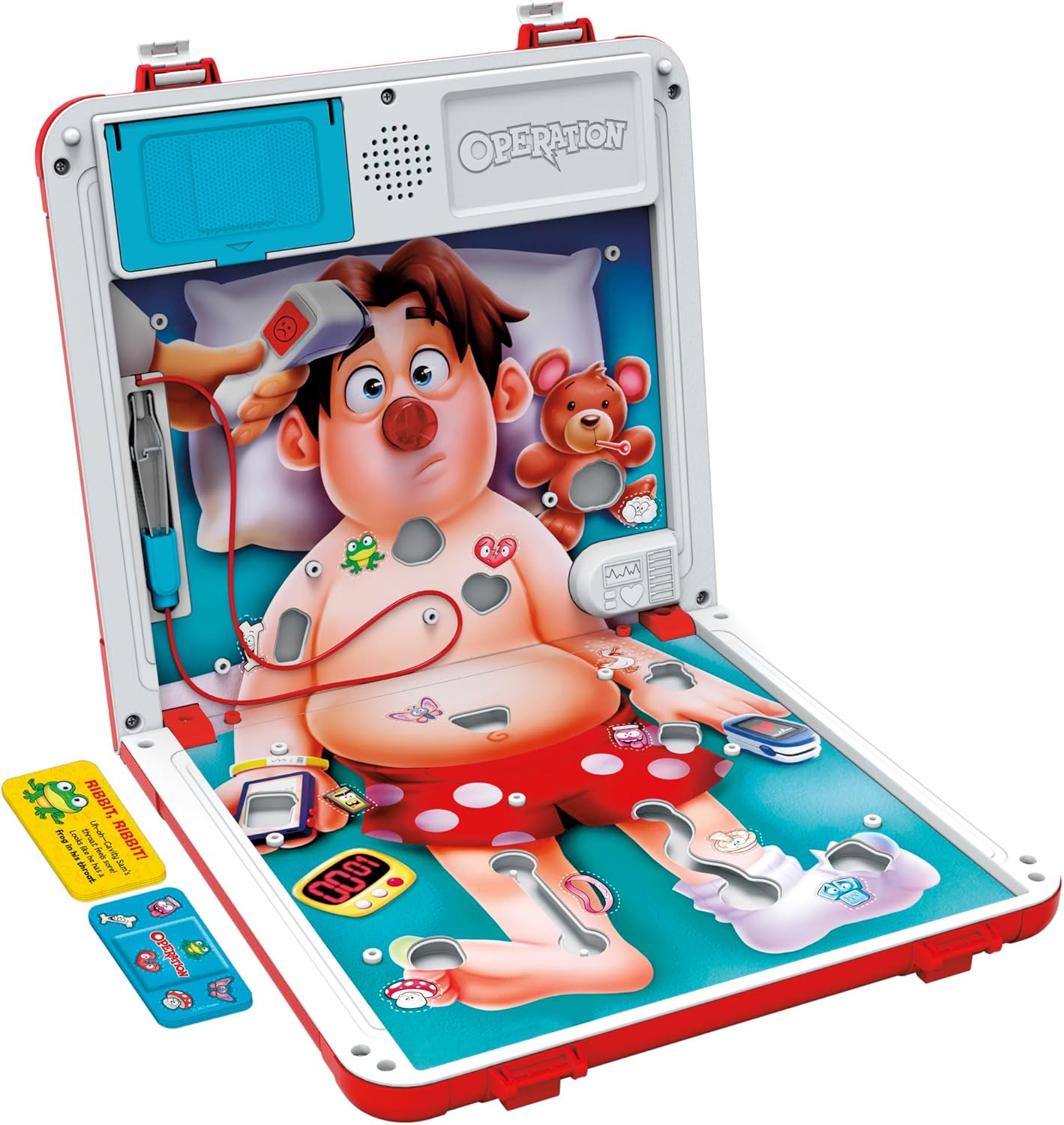
Image: The full game board of the Operation Electronic Board Game, showing Cavity Sam on a bed with various ailments placed in his body, ready for play.
2. Configuració
- Desempaquetar el joc: Open the all-in-one carrying case. The gameboard unfolds to reveal Cavity Sam.
- Instal·leu les bateries: The game requires 3 piles alcalines AA de 1.5 V (not included). Locate the battery compartment, typically on the underside or side of the game unit, and insert the batteries according to the polarity markings.
- Place Ailments: Distribute the 12 wacky ailments into their corresponding slots on Cavity Sam's body. Ensure each ailment is securely placed.
- Preparar les targetes: Shuffle the Bandage cards and place them face down near the game board.

Image: The Operation game board is shown folded into a compact red carrying case, highlighting a built-in blue drawer that stores the game pieces. This design emphasizes portability and organized storage.
3. Instruccions de funcionament
3.1. Hospital Mode (Classic Gameplay)
- Players take turns drawing a Bandage card.
- The card will instruct the player to remove a specific ailment from Cavity Sam using the tweezers.
- Carefully use the tweezers to extract the ailment without touching the metal sides of the cavity.
- If the tweezers touch the sides, Cavity Sam's red nose will light up and a buzzer will sound, indicating a failed operation. The player's turn ends.
- If the ailment is successfully removed, the player keeps the card.
- The game continues until all ailments are removed. The player with the most successfully removed ailments (cards) wins.

Imatge: Un primer pla view of a child's hand carefully using the tweezers to remove a small yellow ailment from one of the openings on Cavity Sam's body on the Operation game board.
3.2. Emergency Mode (Timed Challenge)
- In this mode, players race against the clock to remove as many ailments as possible.
- Players do not draw cards. Instead, they attempt to remove ailments one by one.
- If the tweezers hit the side of a cavity, Cavity Sam will react with funny sounds (burps, yelps, etc.).
- The game can be played with a set time limit (e.g., 60 seconds) or until a player makes a certain number of mistakes.
- The player who removes the most ailments within the time limit or with the fewest mistakes wins.

Image: The Operation game board is displayed with a large timer icon in the foreground, indicating the fast-paced Emergency Mode. A hand is shown attempting to remove an ailment from Cavity Sam's body.
4. Manteniment
4.1. Emmagatzematge
- The gameboard folds up into a durable handled case, making it easy to transport and store.
- Utilize the built-in drawer to keep all small game pieces (ailments and cards) securely stored and prevent them from getting lost.
- Ensure the tweezers are properly secured in their designated slot before closing the case.
4.2. Neteja
- Wipe the game board and plastic pieces with a soft, damp tela.
- Do not immerse the electronic components in water.
- Eviteu utilitzar productes químics aggressivs o netejadors abrasius.
5. Solució De Problemes
- El joc no s'encén: Check if the batteries are correctly installed and not depleted. Replace with fresh batteries if necessary.
- Buzzer Not Sounding/Nose Not Lighting Up: Ensure the tweezers are making proper contact with the metal sides of the cavity. Verify battery power.
- Pieces Difficult to Remove: Ensure the ailments are correctly placed in their slots. Practice fine motor skills for smoother removal.
6. Especificacions
| Característica | Detall |
|---|---|
| Dimensions del producte | 10.5 x 10.5 x 1.63 polzades |
| Pes de l'article | 1.43 lliures |
| Número de model | G0951 |
| Edat recomanada pel fabricant | 3 anys i més |
| Piles necessàries | 3 piles AAA (no incloses) |
| Nombre de jugadors | 1+ |
| Llengua | Anglès |
7. Informació important de seguretat
ADVERTÈNCIA: Es poden generar peces petites. No apte per a nens menors de 3 anys.
8. Garantia i Suport
For warranty information or product support, please refer to the contact details provided on the product packaging or visit the official Hasbro Gaming weblloc web. Conserveu el rebut de compra per a qualsevol reclamació de garantia.