
DOOGEE DOOGEE Blade 10 Ultra
Manual d'usuari del telèfon intel·ligent DOOGEE Blade 10 Ultra
Model: DOOGEE Blade 10 Ultra
1. Introducció
This manual provides comprehensive instructions for the safe and efficient use of your DOOGEE Blade 10 Ultra smartphone. Please read this manual carefully before using the device to ensure optimal performance and longevity.

Imatge: Anvers i revers view of the DOOGEE Blade 10 Ultra smartphone, highlighting its rugged design and key features like NFC and Android 14.
2. Configuració
2.1 Desembalatge i inspecció inicial
Carefully unbox your DOOGEE Blade 10 Ultra and verify that all components are present and in good condition. The package should contain:
- 1 x DOOGEE Blade 10 Ultra Smartphone
- 1 x cable USB tipus C
- 1 x Carregador
- 1 x Tempered Glass Protector (pre-applied)
- 1 x Manual d'usuari
2.2 Instal·lació de la targeta SIM i la targeta microSD
Per instal·lar la targeta SIM i/o la targeta microSD:
- Localitza la safata de la targeta SIM al lateral del dispositiu.
- Introduïu l'eina d'expulsió de la SIM al forat petit que hi ha al costat de la safata per obrir-la.
- Place your Nano-SIM card(s) and/or microSD card into the designated slots. Ensure the gold contacts are facing down. The device supports up to 2TB external storage via microSD.
- Empenyeu suaument la safata cap enrere a la ranura fins que encaixi al seu lloc.

Image: Illustration of the internal storage components, showing 8GB+12GB RAM and 256GB ROM, with support for up to 2TB microSD card.
2.3 First Power On and Basic Setup
Press and hold the power button until the DOOGEE logo appears. Follow the on-screen prompts to complete the initial setup, including language selection, Wi-Fi connection, Google account setup, and security settings.
2.4 Càrrega del dispositiu
Connect the USB Type-C cable to the phone's charging port and the other end to the provided charger. Plug the charger into a power outlet. The battery indicator will show charging status. For optimal battery life, fully charge the device before first use.
3. Com fer servir el telèfon intel·ligent
3.1 Acabatview of Android 14
Your DOOGEE Blade 10 Ultra runs on the latest Android 14 operating system, offering enhanced privacy features, improved security, and a more personalized user experience. Explore new customization options and streamlined notifications.

Image: The Android 14 system logo, emphasizing its smart, secure, and convenient features.
3.2 Pantalla i navegació
The device features a 6.56-inch HD+ IPS waterdrop display with a 90Hz refresh rate for smooth visuals. Navigate the interface using touch gestures: swipe, tap, pinch-to-zoom, and long-press.
3.3 Ús de la càmera
Capture high-quality photos and videos with the 50MP AI main camera and 8MP front camera. The Morpho Imaging Algorithm enhances your photography with various modes including HDR, Watermark, Video, Picture, Beauty, Pro Mode, Portrait, Gif, Panorama, and Filter.

Image: Visual representation of the 50MP main camera and 8MP front camera, detailing the various imaging modes available through the Morpho Imaging Algorithm.
3.4 Connectivitat
Your smartphone supports a wide range of connectivity options:
- Wi-Fi: Connect to 2.4G and 5G networks (802.11ac/a/b/g/n).
- Bluetooth: BT5.0 for connecting to wireless accessories.
- NFC: Per a pagaments sense contacte i compartició ràpida de dades.
- OTG: On-The-Go support for connecting USB devices.
- Navegació: Integrated GPS, Glonass, Galileo, and Beidou for accurate positioning.
- Xarxes cel·lulars: Supports 2G GSM (B2/3/5/8), 3G WCDMA (B1/2/4/5/8), and 4G FDD (B1/2/3/4/5/7/8/18/19/20/25/26/28A/28B/66) bands.
3.5 Gestió de la bateria
The DOOGEE Blade 10 Ultra is equipped with a large 5150mAh battery, providing extended usage times. To maximize battery life:
- Optimize screen brightness.
- Tanca les aplicacions en segon pla que no fas servir.
- Desactiveu el Wi-Fi, el Bluetooth o el GPS quan no els feu servir.
- Expected battery life: up to 470 hours standby, 111.9 hours music, 25.5 hours talk, 16.7 hours video, 7.6 hours web navegació.
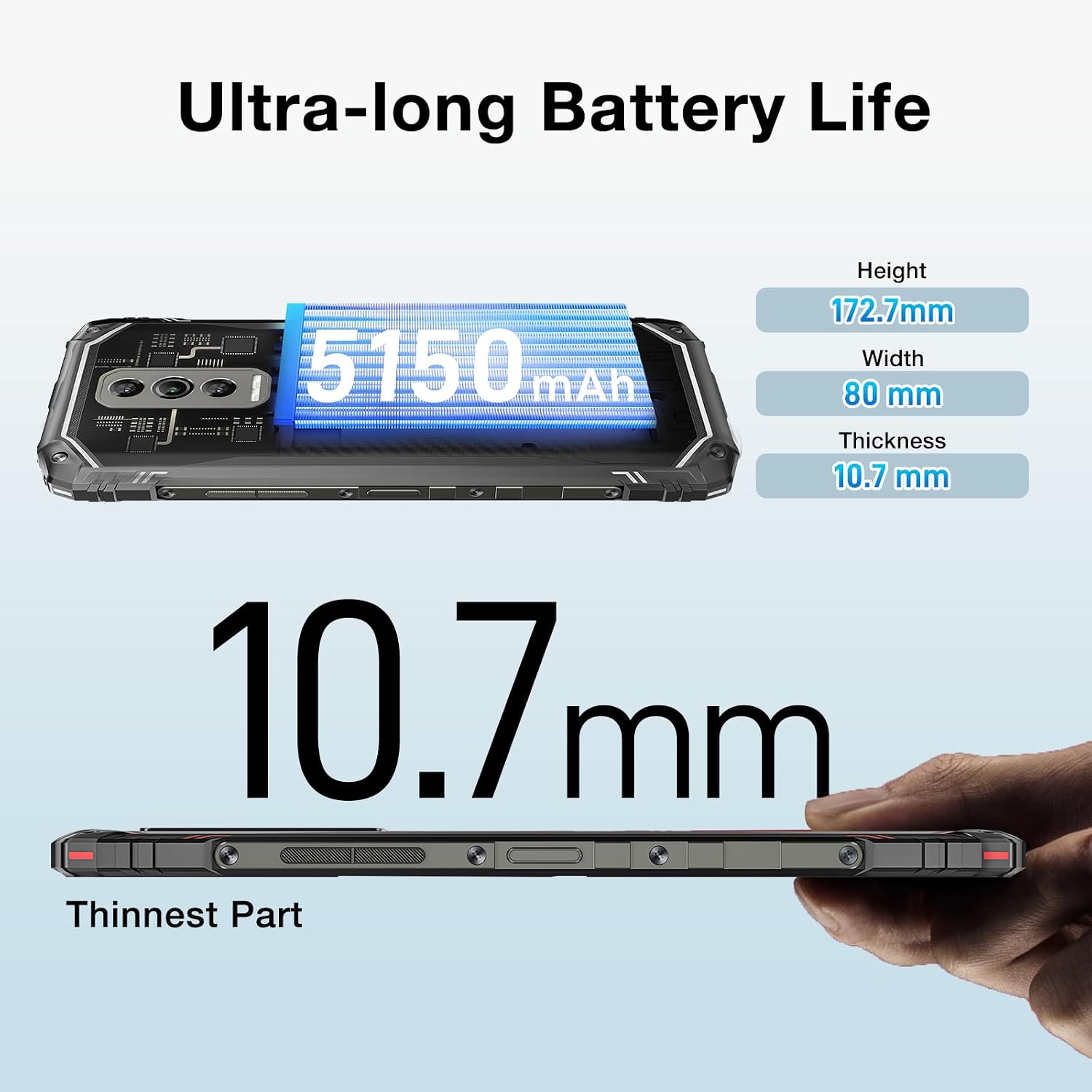
Image: The DOOGEE Blade 10 Ultra highlighting its 5150mAh battery capacity and physical dimensions (Height: 172.7mm, Width: 80mm, Thickness: 10.7mm).
3.6 Gestió d'emmagatzematge
The device comes with 256GB of internal storage (ROM) and up to 20GB of RAM (8GB physical + 12GB virtual). You can expand storage by up to 2TB using a microSD card. Regularly clear cache and unnecessary files to maintain optimal performance.
3.7 Suport Widevine L1
The DOOGEE Blade 10 Ultra supports Widevine L1, enabling high-definition streaming from popular platforms. Enjoy your favorite movies and shows in crisp, clear quality.
4. Manteniment
4.1 Neteja del vostre dispositiu
Feu servir un drap suau i sense borrissol per netejar la pantalla i la carcassa del telèfon. Eviteu utilitzar productes químics agressius o materials abrasius que puguin danyar el dispositiu. Per a taques difícils, netegeu lleugerament.ampNetegeu el drap amb aigua o un netejador de pantalles.
4.2 Actualitzacions de programari
Comproveu i instal·leu regularment si hi ha actualitzacions de programari per assegurar-vos que el dispositiu tingui les darreres funcions, pegats de seguretat i millores de rendiment. Aneu a Configuració > Sistema > Actualització del sistema per comprovar si hi ha actualitzacions.
4.3 Storage Optimization
To keep your phone running smoothly, periodically review and delete unnecessary apps, photos, videos, and files. Utilize cloud storage or transfer large files to a computer to free up internal space.
5. Solució De Problemes
If you encounter issues with your DOOGEE Blade 10 Ultra, refer to the following common solutions:
| Problema | Solució |
|---|---|
| El dispositiu no s'encén | Ensure the battery is charged. Connect to the charger for at least 10 minutes, then try powering on. If unresponsive, perform a forced restart by holding the power button for 10-15 seconds. |
| Problemes de càrrega | Comproveu si el cable USB i el carregador estan danyats. Proveu una altra presa de corrent. Assegureu-vos que el port de càrrega estigui net i lliure de residus. |
| Mala connectivitat de xarxa | Check if airplane mode is off. Restart the device. Verify SIM card is properly inserted. Contact your network provider if the issue persists. |
| Les aplicacions es bloquegen o es bloquegen | Clear the app's cache and data (Settings > Apps > [App Name] > Storage). Update the app to the latest version. If the problem continues, uninstall and reinstall the app. |
| Device running slow | Close unused background apps. Clear cache and temporary files. Ensure sufficient storage space is available. Restart the device. |
5.1 Restabliment de fàbrica
If other troubleshooting steps fail, you may need to perform a factory reset. Avís: Això esborrarà totes les dades del telèfon. Fes una còpia de seguretat de les dades importants abans de continuar. Vés a Configuració > Sistema > Opcions de restabliment > Esborra totes les dades (restabliment de fàbrica) i seguiu les instruccions a la pantalla.
6. Especificacions
Detailed technical specifications for the DOOGEE Blade 10 Ultra:
| Característica | Especificació |
|---|---|
| Model | DOOGEE Blade 10 Ultra |
| Sistema operatiu | Android 14 |
| Mostra | 6.56-inch HD+ IPS Waterdrop, 90Hz Refresh Rate |
| Processador | Spreadtrum T606 Octa-core 1.6GHz (12nm) |
| RAM | Up to 20GB (8GB physical + 12GB virtual) |
| Emmagatzematge intern (ROM) | 256 GB |
| Emmagatzematge ampliable | Up to 2TB via microSD card |
| Càmera principal | 50MP AI |
| Càmera frontal | 8MP |
| Capacitat de la bateria | 5150 mAh |
| Bandes de xarxa | 2G GSM: B2/3/5/8; 3G WCDMA: B1/2/4/5/8; 4G FDD: B1/2/3/4/5/7/8/18/19/20/25/26/28A/28B/66 |
| Wi-Fi | 2.4G/5G (802.11ac/a/b/g/n) |
| Bluetooth | BT5.0 |
| NFC | Admet |
| OTG | Admet |
| Navegació | GPS | Glonass | Galileu | Beidou |
| Dimensions (Alt x A x A) | 172.7 mm x 80 mm x 10.7 mm |
| Color | Negre |

Image: Diagram illustrating the powerful Octa-core 1.6GHz processor, highlighting its boosted performance and reduced consumption.
7. Garantia i Suport
For warranty information, please refer to the warranty card included in your product packaging or visit the official DOOGEE website. For technical support or further assistance, please contact DOOGEE customer service through their official channels.
Ask a question about this manual
Ask about setup, troubleshooting, compatibility, parts, safety, or missing instructions. Manuals+ will review the question and use this page’s manual context to help answer it.