
1. Introducció
This manual provides detailed instructions for the installation, operation, and maintenance of your MekedeTech M6 Pro Android 13 Car Radio. This unit is specifically designed for Hyundai I20 models manufactured between 2015 and 2018, for right-hand drive vehicles. Please read this manual thoroughly before installation and use to ensure proper function and safety.
2. Informació de seguretat
- Instal·lació professional recomanada: A causa de la complexitat dels sistemes elèctrics dels cotxes, es recomana la instal·lació professional per evitar danys a la unitat o al vehicle.
- Font d'alimentació: Assegureu-vos que la unitat estigui connectada a una font d'alimentació de 12 V CC amb un contacte negatiu a terra. Volum incorrectetage pot causar danys.
- Cablejat: Do not modify or cut any wires unless explicitly instructed. Incorrect wiring can lead to malfunctions or electrical hazards.
- Seguretat de conducció: No feu servir la unitat de manera que us distregui de la conducció. Prioritzeu sempre la seguretat viària.
- Temperatura: Eviteu exposar la unitat a temperatures extremes o a la llum solar directa durant períodes prolongats.
- Humitat: Keep the unit away from water and excessive moisture to prevent electrical shock or damage.
3. Contingut del paquet
Verifiqueu que tots els components siguin presents al paquet:
- MekedeTech M6 Pro Head Unit
- Power Harness (Vehicle Specific)
- GPS Antenna (Fakra)
- 4G Antenna (Fakra)
- Cables USB
- RCA Cables (Audio/Video Output)
- Micròfon extern
- Manual d'usuari (aquest document)
4. Instal·lació i configuració
This unit is designed for a plug-and-play installation for compatible Hyundai I20 models (2015-2018, Right Hand Drive). However, professional installation is recommended.
4.1 Llista de comprovació prèvia a la instal·lació
- Assegureu-vos que el contacte del vehicle estigui apagat i que la bateria estigui desconnectada.
- Gather all necessary tools (e.g., trim removal tools, screwdrivers).
- Confirmeu que hi hagi tot el contingut del paquet.
4.2 Passos d'instal·lació
- Treure la unitat principal existent: Carefully remove the factory radio and trim panels from your Hyundai I20. Refer to your vehicle's service manual for specific instructions.
- Connecteu l'arnès d'alimentació: Connect the provided vehicle-specific power harness to the car's wiring loom and then to the MekedeTech M6 Pro unit.
- Connecteu les antenes:
- Antena GPS: Connect the Fakra GPS antenna to the corresponding port on the head unit. Route the antenna to a location with a clear view of the sky, such as the dashboard or under the windshield, ensuring it is not obstructed by metal.
- Antena 4G: Connect the Fakra 4G antenna. Route it to an optimal location for signal reception.
- Connect USB and RCA Cables: Connect any necessary USB cables for external devices or RCA cables for additional audio/video outputs (e.g., external amplifier, rear monitors).
- Connecteu el micròfon extern: Plug in the external microphone for improved call quality and voice command accuracy. Position it near the driver for best performance.
- Funcionalitat de prova: Before fully reassembling the dashboard, reconnect the vehicle battery and turn on the ignition to test the unit's basic functions (power, audio, touch screen, GPS signal, Bluetooth).
- Assegurar i tornar a muntar: Once tested, securely mount the MekedeTech M6 Pro unit into the dashboard and reassemble all trim panels.

Image: Comparison of the car dashboard before and after installing the MekedeTech M6 Pro unit, showing the integrated display.
5. Instruccions de funcionament
The MekedeTech M6 Pro operates on Android 13, offering a familiar and intuitive user experience.
5.1 Funcionament bàsic
- Encès/apagat: The unit typically powers on with the vehicle's ignition. A long press on the power button (if available) can manually turn it off or on.
- Pantalla tàctil: Navegueu per la interfície tocant, lliscant i pessigant la pantalla tàctil QLED.
- Control de volum: Adjust volume using the physical buttons on the unit or steering wheel controls (if supported and configured).
5.2 Key Features Operation
- CarPlay sense fil / Android Auto:
Connect your compatible iPhone or Android smartphone wirelessly. Access navigation, music, messages, and calls directly from the head unit's screen. Follow the on-screen prompts to pair your device via Bluetooth and Wi-Fi.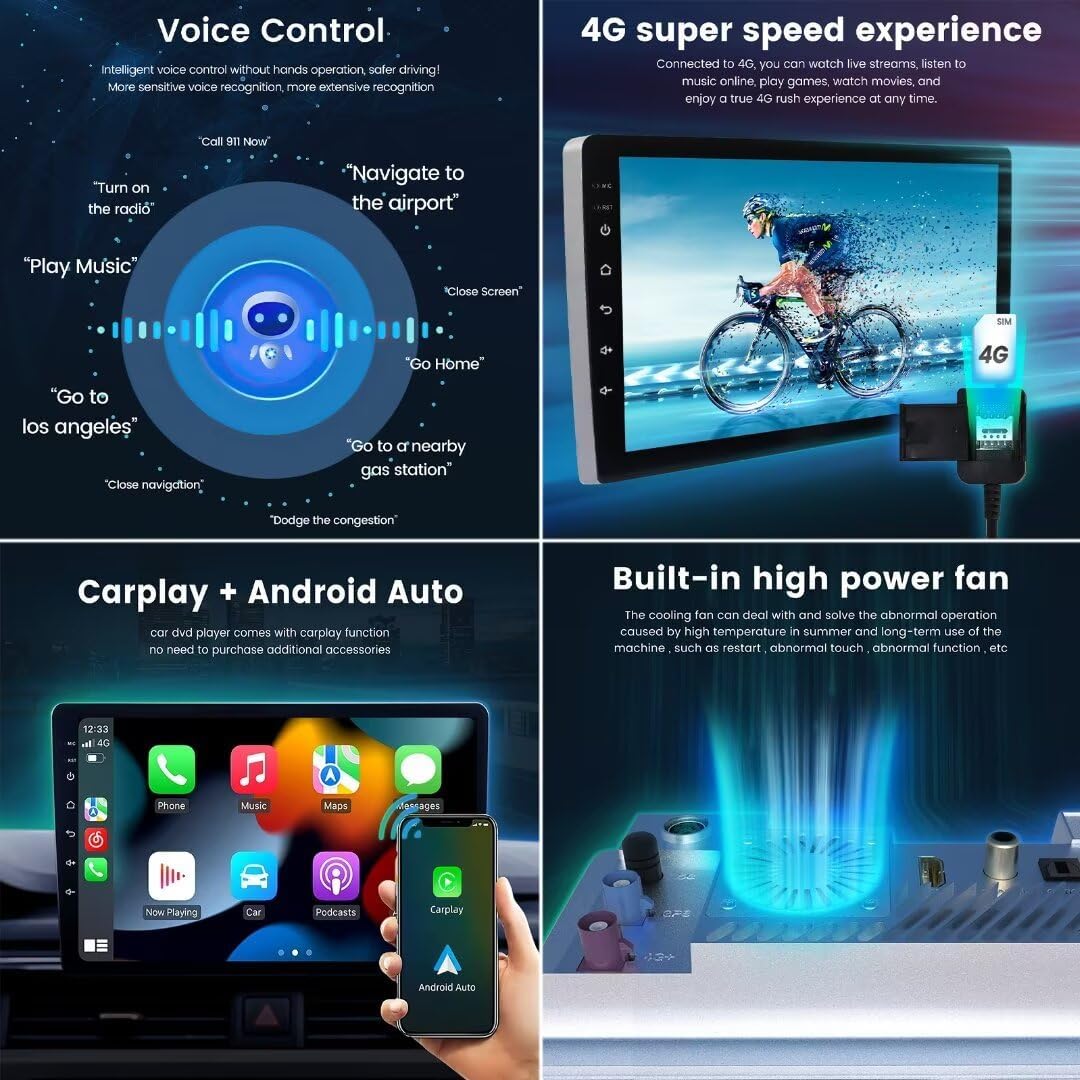
Image: Display of Wireless CarPlay and Android Auto functionality, showing phone, music, maps, and messages icons.
- Control de veu:
Utilize intelligent voice control for hands-free operation. Activate voice commands to navigate, play music, make calls, or open applications. This feature enhances driving safety and convenience.Image: Visual representation of voice control capabilities, showing various commands like 'Call 911 Now' and 'Go to Los Angeles'.
- Ràdio FM/AM amb RDS:
Access local radio stations with clear reception. The unit supports RDS (Radio Data System) for displaying station information. Use the touch interface to scan, save presets, and switch between FM and AM bands.
Image: The radio interface displaying FM frequency and controls for tuning and saving stations.
- Navegació GPS:
The built-in GPS module provides accurate positioning and supports various navigation applications. Ensure the GPS antenna is properly installed for optimal signal reception. Download and use your preferred navigation apps from the Google Play Store.
Image: The GPS navigation screen displaying a map, current location, and route details.
- Funció de pantalla dividida:
Multitask by running two applications simultaneously on the screen. For example, use navigation on one side and music playback on the other. Activate split screen mode through the recent apps menu or by long-pressing an app icon.Image: The split screen feature displaying a radio interface on one side and a map application on the other.
- Bluetooth 5.1:
Pair your smartphone for hands-free calling and audio streaming. The Qualcomm 3031 chip ensures low power consumption, faster transmission, and stable signal. Access your phone's contacts and call history directly from the unit.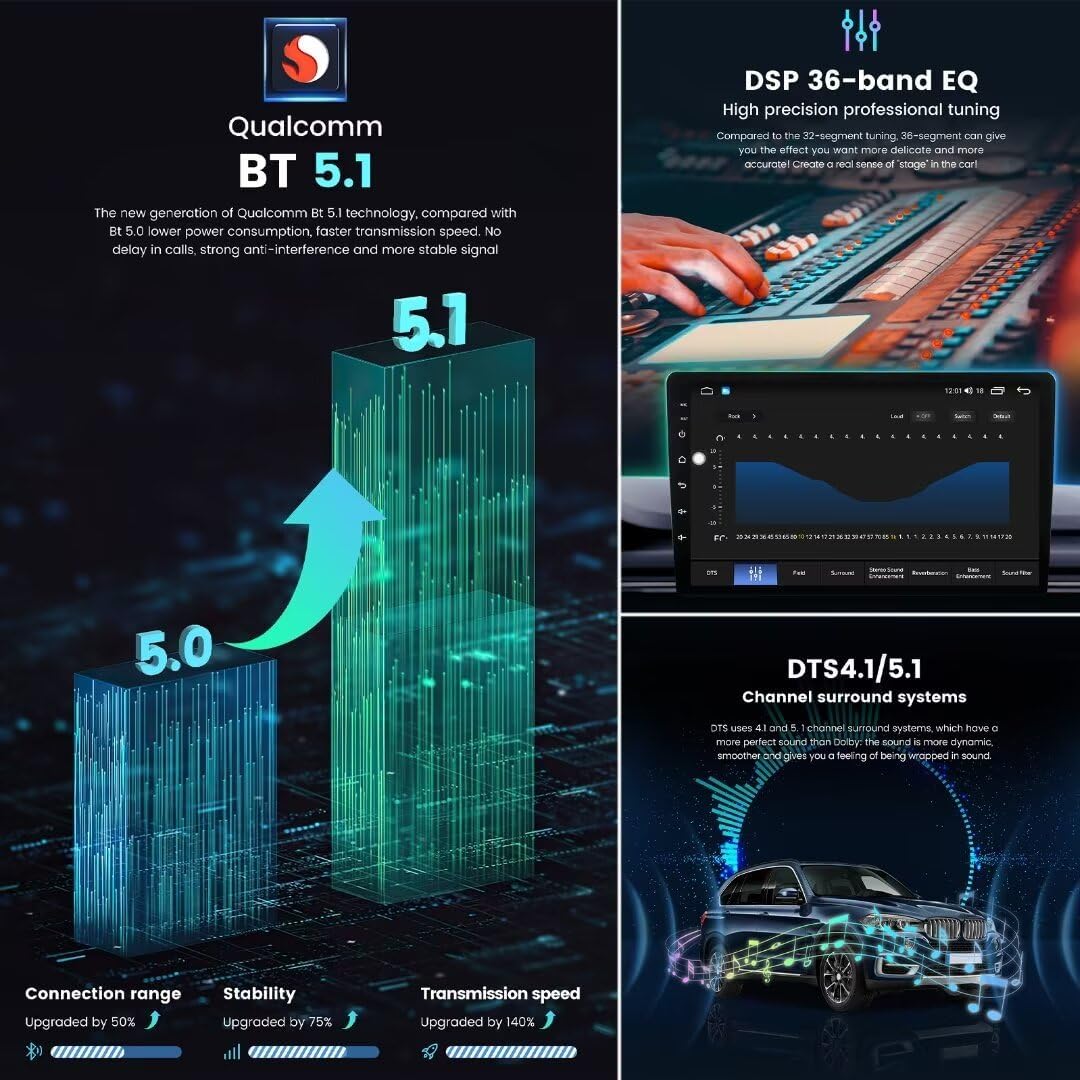
Image: A graphic illustrating the enhanced performance of Bluetooth 5.1 compared to older versions, highlighting improved connection range, stability, and transmission speed.
- Connectivitat 4G LTE:
Insert a SIM card (not included) to enable 4G LTE connectivity, allowing for online navigation, streaming, and app downloads directly on the unit without relying on a phone hotspot.Image: The car radio displaying a 4G signal indicator and a visual representation of high-speed internet access.
6. Funcions avançades
6.1 Audio Processing (DSP & DTS)
The unit features a Digital Sound Processor (DSP) with a 36-band equalizer, allowing for precise audio tuning. It also supports DTS 4.1/5.1 channel surround systems for an immersive audio experience.
- EQ de 36 bandes: Adjust specific frequency ranges to customize your sound profile.
- DTS 4.1/5.1 Channel Surround: Experience dynamic and smooth surround sound, creating a 'stage' effect within your vehicle.
- Equalizer Features: Includes low-pass filter, tone compensation, balanced mode, and surround sound mode settings.
Image: The DSP 36-band equalizer interface for precise audio adjustments and a visual of the DTS surround sound system.
6.2 Pantalla i interfície d'usuari
The M6 Pro features a 1280x720 QLED full-fit screen, offering excellent display quality and reduced reflection. It comes with various UI themes to personalize your experience.
- Pantalla QLED: Provides vibrant colors and high contrast, with a high light transmittance that reduces light reflection by 40%.
- Full-Fit Screen: Designed without an air layer, preventing dust accumulation and offering a clearer, more integrated display.
- Interfície d'usuari personalitzable: Choose from multiple user interface designs (e.g., UI08, UI22, UI29, UI34) to match your preference.

Image: Details on the 1280x720 QLED screen resolution and the advantages of a full-fit screen design.

Imatge: Examples of different user interface themes (UI08, UI22, UI29, UI34) that can be selected on the device.
6.3 Hardware Performance
The M6 Pro is powered by a UIS7862S 2.0GHz 8-core processor, ensuring smooth performance and efficient multitasking.
- CPU: UIS7862S 2.0GHz 8-core (2 cores ARM Cortex A75 + 6 cores ARM Cortex A55) for enhanced speed and efficiency.
- Memòria: 8GB RAM and 256GB internal storage for ampespai per a aplicacions i contingut multimèdia.
- Sistema de refrigeració: Built-in powerful cooling fan to manage heat dissipation and ensure stable long-term operation.
Image: Detailed specifications of the 12NM 8-core 2.0GHz processor, highlighting performance, heat dissipation, and productivity improvements.
Imatge: Un retall view illustrating the built-in high-power cooling fan designed to prevent overheating.
6.4 Expandabilitat
- ADAS DVR Front Camera Support: Connect an ADAS (Advanced Driver-Assistance Systems) DVR front camera for recording driving footage and safety features.
- Suport de càmera posterior AHD: Integrate an AHD (Analog High Definition) rear camera for clear reverse parking assistance.
7. Especificacions
| Característica | Especificació |
|---|---|
| Nom del model | M6Pro8+256G |
| Número de model de l'article | M6Pro |
| Sistema operatiu | Android 13 |
| CPU | UIS7862S 2.0GHz 8-core (2 cores ARM Cortex A75 + 6 cores ARM Cortex A55) |
| Resolució de visualització | 1280 x 720 |
| Tipus de visualització | QLED |
| Tipus de pantalla tàctil | Capacitiva |
| Capacitat d'emmagatzematge de memòria | 8 GB de RAM + 256 GB de ROM |
| Bluetooth | BT 5.1 (Qualcomm 3031 chip) |
| Wi-Fi | WiFi de 5 GHz |
| Tecnologia de connectivitat | Wireless (4G LTE, Wi-Fi, Bluetooth) |
| Característiques especials | Wireless CarPlay, Wired Android Auto, Touchscreen, Voice Control, DSP (36-band EQ), DTS 4.1/5.1, Built-in Cooling Fan, RDS Radio |
| Poder Ampmés viu | TDA7850/7851 |
| Circuit integrat de ràdio | TDA7708 |
| Tipus de mapa | Worldwide (via installed apps) |
| Entrada de la interfície humana | Buttons, Keyboard, Microphone, Touchscreen |
Imatge: Detallada view of the M6 Pro main board, showing key components like the UIS7862S CPU, TDA7850 amplifier, TDA7708 radio IC, and Fakra antenna ports.
8. Solució De Problemes
If you encounter issues with your MekedeTech M6 Pro unit, refer to the following common troubleshooting steps:
- Sense energia:
Check all power connections. Ensure the vehicle's ignition is on. Verify the vehicle's fuse box for any blown fuses related to the radio. - Sense so:
Check speaker connections. Ensure the volume is not muted or set to zero. Verify audio settings in the unit's menu. - La pantalla tàctil no respon:
Restart the unit by turning off the vehicle's ignition and restarting. If the issue persists, a factory reset might be necessary (note: this will erase all user data). - GPS Signal Lost/Inaccurate:
Assegureu-vos que l'antena GPS estigui connectada correctament i col·locada en un lloc amb visibilitat clara view of the sky, free from obstructions. - Problemes de connexió Bluetooth:
Ensure Bluetooth is enabled on both the unit and your mobile device. Delete previous pairings and attempt to re-pair. Clear Bluetooth cache on your mobile device if necessary. - CarPlay/Android Auto no es connecta:
Ensure Wi-Fi and Bluetooth are enabled on your phone. Check that your phone's operating system is up to date. Try restarting both the unit and your phone. - Sobreescalfament de la unitat:
Ensure the built-in cooling fan is not obstructed and is functioning correctly. Avoid prolonged use in direct sunlight or extreme heat.
For persistent issues, contact MekedeTech customer support.
9. Manteniment
- Neteja de la pantalla: Use a soft, lint-free cloth to gently wipe the screen. For stubborn smudges, use a screen cleaner specifically designed for electronic displays. Do not use abrasive cleaners or solvents.
- Actualitzacions de programari: Periodically check for software updates provided by MekedeTech to ensure optimal performance and access to new features. Follow the instructions provided with the update.
- Atenció general: Avoid placing heavy objects on the unit or exposing it to excessive force. Keep the unit free from dust and debris.
10. Garantia i Suport
The MekedeTech M6 Pro unit comes with a 1 anys de garantia des de la data de compra. Aquesta garantia cobreix defectes de fabricació i avaries en condicions d'ús normal.
La garantia no cobreix:
- Danys causats per una instal·lació incorrecta o reparacions no autoritzades.
- Damage caused by accidents, misuse, abuse, or neglect.
- Danys estètics.
- Damage due to natural disasters or power surges.
For warranty claims or technical support, please contact MekedeTech customer service through their official weblloc web o el distribuïdor on es va comprar el producte. Si us plau, tingueu a punt el rebut de compra i la informació del model del producte.
