
Sorandy Brown Switch
User Manual for 82 Keys RGB Mechanical Keyboard
Model: Brown Switch | Brand: Sorandy
Introducció
Thank you for choosing the Sorandy 82 Keys RGB Mechanical Keyboard. This manual provides detailed instructions for setting up, operating, and maintaining your new keyboard. Please read this manual thoroughly before use to ensure optimal performance and longevity of your device.
Informació de seguretat
- Keep the keyboard away from liquids and excessive moisture to prevent damage.
- Eviteu exposar el teclat a temperatures extremes (calor o fred).
- No intenteu desmuntar ni modificar el teclat. Això pot anul·lar la garantia i causar danys.
- Use only the provided USB cable for charging and wired connection.
- Mantenir fora de l'abast dels nens petits.
Contingut del paquet
Si us plau, comproveu el contingut del paquet per assegurar-vos que hi hagi tots els elements:
- 1 x Sorandy 82 Keys RGB Mechanical Keyboard
- 1 x extractor de claus
- 1 cable de dades USB tipus C
- 1 x 2.4G Wireless Adapter
- 1 x Manual d'usuari (aquest document)
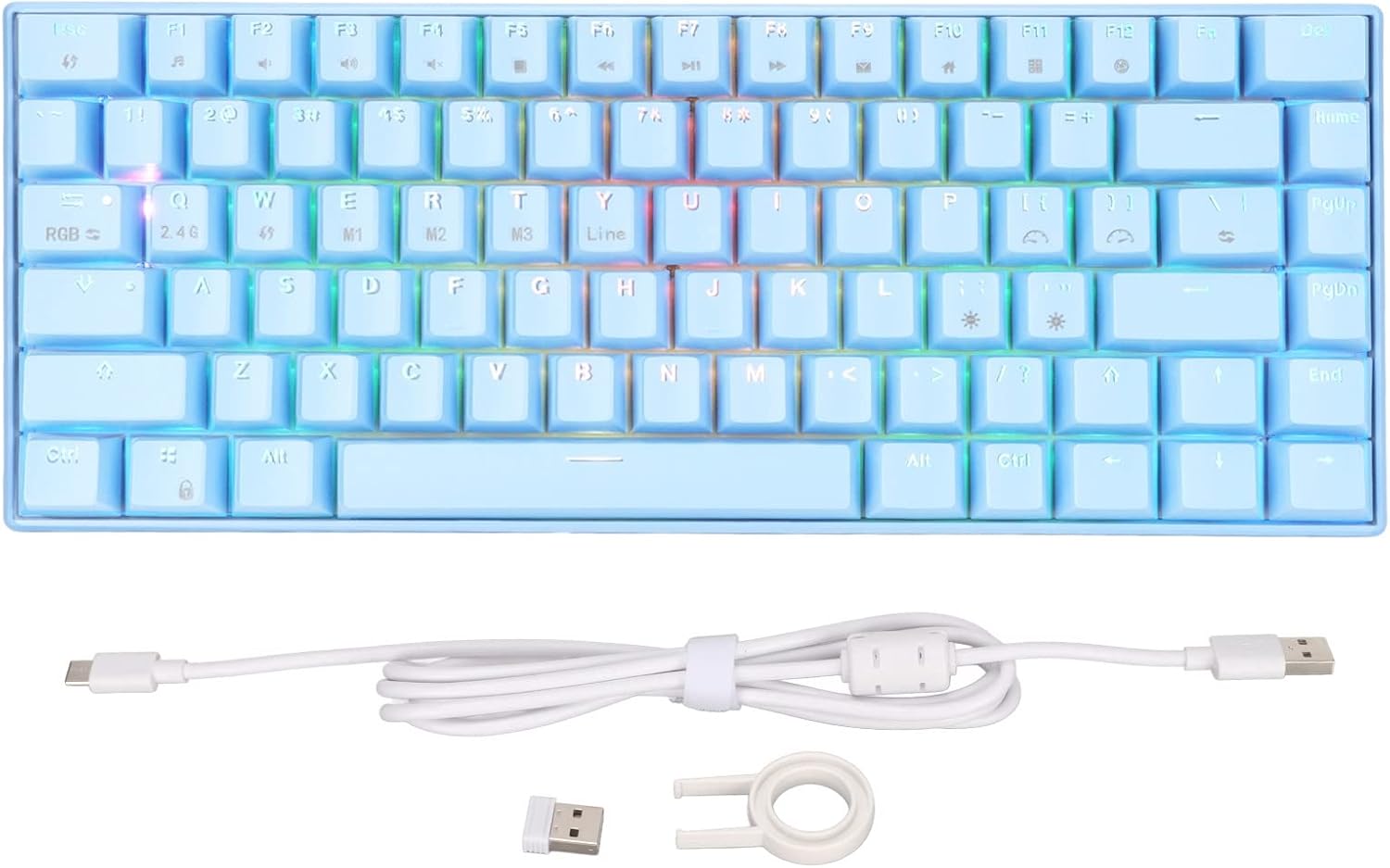
Image: Contents of the keyboard package, including the keyboard, USB cable, 2.4G adapter, and key puller.
Producte acabatview
Familiarize yourself with the layout and features of your mechanical keyboard.

Imatge: Superior view of the 82-key mechanical keyboard, showing the key layout and RGB lighting.

Imatge: Part inferior view of the keyboard, showing the product label with specifications and rubber feet.

Image: Close-up of the brown mechanical switches, illustrating the switch type used in the keyboard.
Configuració
1. Wired Connection (Type-C)
- Connect the USB Type-C end of the provided cable to the Type-C port on the keyboard.
- Connecteu l'extrem USB-A del cable a un port USB disponible de l'ordinador.
- El sistema reconeixerà automàticament el teclat.
2. Connexió sense fil 2.4G
- Locate the 2.4G wireless adapter included in the package.
- Plug the 2.4G adapter into an available USB port on your computer.
- Ensure the keyboard is in 2.4G mode (refer to the keyboard's function keys for mode switching, usually indicated by an LED).
- The keyboard should automatically connect to the adapter.
3. Bluetooth Connection (BT3.0/5.0)
- Ensure your computer or device has Bluetooth enabled.
- Switch the keyboard to Bluetooth mode (usually by pressing Fn + a specific key, e.g., Fn + 1/2/3 for different Bluetooth channels). The indicator light will flash, indicating pairing mode.
- Al dispositiu, vés a la configuració de Bluetooth i cerca dispositius nous.
- Select "Sorandy Keyboard" or a similar name from the list of available devices to pair.
- Un cop emparellat, l'indicador lluminós del teclat deixarà de parpellejar i romandrà fix.
4. Càrrega del teclat
The keyboard has an inbuilt 1800mAh rechargeable lithium battery. To charge:
- Connect the keyboard to a USB power source (computer USB port, wall adapter) using the provided Type-C cable.
- El llum indicador de càrrega s'il·luminarà durant la càrrega i s'apagarà quan estigui completament carregat.
Instruccions de funcionament
RGB Backlight Adjustment
The keyboard features dynamic RGB backlighting with multiple modes. Use the following key combinations to adjust the lighting:
- Fn + \ |: Passa pels diferents modes de retroiluminació.
- Fn + [ {: Redueix la brillantor de la retroiluminació.
- Fn + ] }: Augmenta la brillantor de la retroiluminació.
- Fn + ; :: Redueix la velocitat de retroiluminació.
- Fn + ' ": Augmenta la velocitat de la retroiluminació.
- Fn + Fletxa esquerra: Change backlight color (in certain modes).
- Fn + Fletxa dreta: Change backlight color (in certain modes).

Image: The keyboard displaying its vibrant RGB backlighting.
Combinacions de tecles de funció (Fn)
The keyboard utilizes an 82-key layout, requiring the use of the Fn key for accessing certain functions and multimedia controls. Refer to the keycaps for specific Fn combinations.
| Combinació | Funció |
|---|---|
| Fn + F1 | El meu ordinador |
| Fn + F2 | Cerca |
| Fn + F3 | Calculadora |
| Fn + F4 | Reproductor multimèdia |
| Fn + F5 | Pista anterior |
| Fn + F6 | Pista següent |
| Fn + F7 | Reproduir/Pausa |
| Fn + F8 | Atureu-vos |
| Fn + F9 | Silenciar |
| Fn + F10 | Baixa el volum |
| Fn + F11 | Puja el volum |
| Fn + F12 | Bloquejar el teclat |
| Fn + Q | Canvia al mode 2.4G |
| Fn + W/E/R | Switch to Bluetooth mode (BT1/BT2/BT3) |
Compatibilitat
This mechanical keyboard is compatible with a wide range of operating systems, including:
- Win 2000, ME, Win XP, Win Vista, Win 7, Win 8, Win 10
- Harmony OS
- Android
- iOS
Manteniment
Neteja
- Desconnecteu el teclat de l'ordinador abans de netejar-lo.
- Utilitzeu un drap suau i sense pelusa lleugerament dampesbandida amb aigua o una solució netejadora suau per netejar la superfície.
- For dust and debris between keycaps, use compressed air or the provided key puller to remove keycaps and clean underneath.
- No utilitzeu productes químics o materials abrasius.
Emmagatzematge
- Store the keyboard in a cool, dry place away from direct sunlight.
- Si l'emmagatzemeu durant un període prolongat, assegureu-vos que la bateria estigui parcialment carregada (al voltant del 50%) per preservar-ne l'estat.
Resolució de problemes
| Problema | Solució |
|---|---|
| El teclat no respon (amb cable) |
|
| Keyboard not connecting (2.4G/Bluetooth) |
|
| La retroiluminació no funciona o és tènue |
|
| Les claus no es registren o s'escriuen dues vegades |
|
Especificacions
| Característica | Detall |
|---|---|
| Model | 82 Keys RGB Mechanical Keyboard (Brown Switch) |
| Modes de connexió | 2.4G Wireless, Bluetooth 3.0/5.0, Type-C Wired |
| Il·luminació | RGB Multiple Modes |
| Key Conflict | Full Key Without Conflict (N-Key Rollover) |
| Capacitat de la bateria | Inbuilt 1800mAh Lithium Battery |
| Ergonomia | Admet |
| Corrent de funcionament | 300 mA (màxim) |
| Corrent d'espera | 0.5 mA |
| Sistemes compatibles | Win 2000/ME/XP/Vista/7/8/10, Harmony OS, Android, iOS |
| Material | ABS (acrilonitril butadiè estirè) |
| Nombre de claus | 82 |
Garantia i Suport
Sorandy products are manufactured to high quality standards. For information regarding warranty coverage, technical support, or service inquiries, please refer to the warranty card included with your product or visit the official Sorandy weblloc web. Si us plau, conserveu el comprovant de compra per a reclamacions de garantia.
Per obtenir més ajuda, també podeu contactar directament amb el venedor a través de la plataforma on vau comprar el producte.
Ask a question about this manual
Ask about setup, troubleshooting, compatibility, parts, safety, or missing instructions. Manuals+ will review the question and use this page’s manual context to help answer it.