
1. Introducció
Thank you for choosing the AUHIFVAX S6 Max Drone. This manual provides essential information for the safe operation, setup, and maintenance of your drone. Please read this manual thoroughly before operating the device to ensure proper use and to prevent damage or injury. Keep this manual for future reference.
Precaucions de seguretat:
- Feu servir sempre el dron en zones obertes, lluny de persones, animals i obstacles.
- No voli a prop d'aeroports, espai aeri restringit o zones sensibles.
- Assegureu-vos que la bateria estigui completament carregada abans de cada vol.
- Eviteu volar amb vents forts o condicions meteorològiques adverses.
- Mantingueu les mans i la cara allunyades de les hèlixs giratòries.
- Supervise children during drone operation.
2. Producte acabatview
2.1 Contingut del paquet
Verifiqueu que tots els elements siguin presents al vostre paquet:

Image: Package contents of the AUHIFVAX S6 Max Drone, showing the drone, remote control, battery, charging cable, screwdriver, user manual, and spare propellers.
- 1 x S6 Max Quadcopter
- 1 x comandament a distància
- 1 x 3.7V Lithium Battery
- 1 x cable de càrrega USB
- 1 x tornavís
- 1 x Manual d'usuari
- 2 x Spare Blades
2.2 Característiques clau
- Professional HD Camera: Captures high-definition aerial photography with 4K resolution.
- Tecnologia d'evitació d'obstacles: Intelligent sensors detect and avoid obstacles in real-time.
- Optical Flowable Foldable Design: Compacte i portàtil per a un fàcil transport.
- Quadcopter Stability: Advanced flight algorithms and built-in gyroscopes ensure stable flight.
- 5G WiFi Function: Connects to APP for real-time image/video transfer.
- Mode de manteniment d'altitud: Provides stable flight at a set altitude.
- Waypoint Flight Mode: Draw a route on the screen for the drone to follow.
- Mode sense cap: No need to adjust aircraft position before flight.
- Retorn amb un clic: Easily recall the drone to its takeoff position.
- Enlairament/aterratge amb un sol clic: Automated takeoff and landing.
2.3 Drone Dimensions

Image: Visual representation of the AUHIFVAX S6 Max Drone's dimensions in both folded and unfolded states, including propeller guards.
3. Configuració
3.1 Desplegament del dron
Gently unfold the drone arms until they lock into place. Ensure all propellers are securely attached and free from obstruction.
3.2 Instal·lació de la bateria
Insert the 3.7V lithium battery into the drone's battery compartment. Ensure it is securely seated. For the remote control, install 3 x 1.5 AAA batteries (not included) into the designated compartment.
3.3 Control remotview
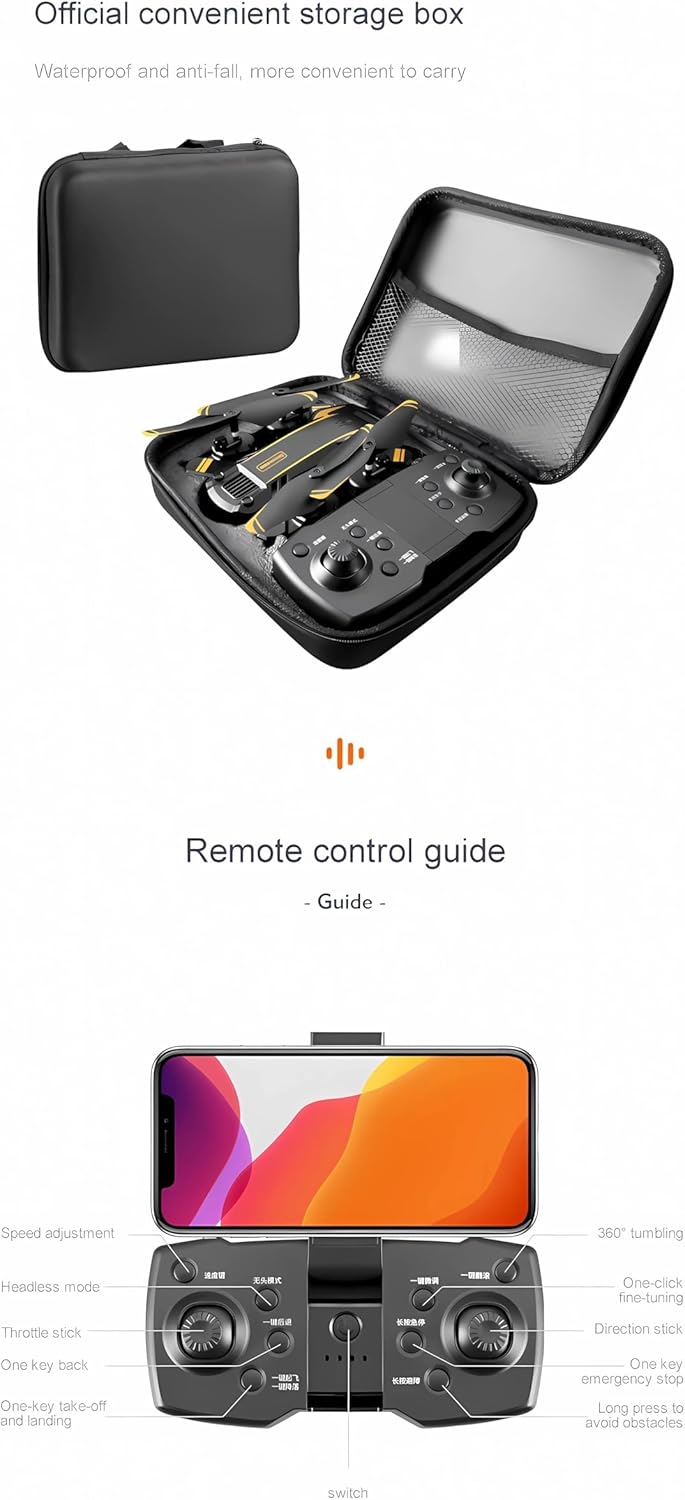
Image: Detailed guide to the remote control, highlighting buttons for speed adjustment, headless mode, one-key back, throttle stick, one-key takeoff/landing, 360° tumbling, one-click fine-tuning, direction stick, one-key emergency stop, and long press to avoid obstacles.
Familiarize yourself with the remote control layout and button functions as shown in the image above. The remote control also features a holder for your smartphone.
3.4 Instal·lació i connexió de l'aplicació
Download the official drone application from the App Store (iOS) or Google Play (Android). Power on the drone and connect your smartphone to the drone's 5G WiFi network. Open the app to establish a connection and view el feed en directe.

Image: A user controlling the drone with a smartphone mounted on the remote, displaying the live video feed from the drone's camera.
4. Instruccions de funcionament
4.1 Llista de verificació prèvia al vol
- Assegureu-vos que les bateries del dron i del comandament a distància estiguin completament carregades.
- Comproveu que les hèlixs estiguin ben fixades i no estiguin danyades.
- Select an open, clear area for flight.
- Connect the drone to the app on your smartphone.
4.2 Enlairament i aterratge
Press the one-key takeoff button on the remote control or within the app to automatically launch the drone. To land, press the one-key landing button. The drone will descend and land automatically.
4.3 Controls de vol
Feu servir els joysticks del comandament a distància per maniobrar el dron:
- Joystick esquerre: Controla l'altitud (amunt/avall) i la rotació (esquerra/dreta).
- Joystick dret: Controla el moviment endavant/enrere i esquerra/dreta.
4.4 Special Flight Modes and Features
The S6 Max Drone offers several intelligent flight modes to enhance your experience:
- Optical Flow Location: Provides stable hovering, especially useful for indoor flight or precise positioning.
- Evitació intel·ligent d'obstacles: The drone uses sensors to detect and avoid obstacles, reducing the risk of collisions.
- Control de gestos: Perform specific hand gestures to trigger photo or video recording.
- Seguiment intel·ligent: El dron pot seguir automàticament un subjecte designat.
- Hand Sliding Trajectory Flight: Draw a flight path on your smartphone screen, and the drone will follow it.
- Gir de 360°: Executa acrobàcies aèries impressionants amb un sol botó.
- Mode sense cap: Simplifies control by eliminating the need to orient the drone's front direction.
- High Brightness Searchlight: Assists with visibility and navigation in low-light conditions.
4.5 Vídeo de demostració
Video: This video demonstrates various features of the AUHIFVAX S6 Max Drone, including its foldable design, one-key takeoff, optical flow location for stable hovering, high brightness searchlight, intelligent obstacle avoidance, dual high-definition cameras, gesture control for photos and videos, intelligent follow mode, hand sliding trajectory flight, and different speed gears, concluding with one-key landing.
5. Manteniment
- Neteja: Use a soft, dry cloth to clean the drone and remote control. Avoid using liquids or solvents.
- Hèlixs: Regularly inspect propellers for damage. Replace any bent or broken blades using the provided spare blades and screwdriver.
- Cura de la bateria: Store batteries in a cool, dry place. Do not overcharge or over-discharge. If storing for extended periods, charge to approximately 50%.
- Emmagatzematge: Quan no l'utilitzeu, plegueu el dron i guardeu-lo en el seu embalatge original o en una funda protectora per evitar que es faci malbé.
6. Solució De Problemes
| Problema | Causa possible | Solució |
|---|---|---|
| El dron no s'encén | Bateria baixa; instal·lació incorrecta de la bateria | Charge the drone battery; Reinstall battery correctly |
| El comandament a distància no es connecta | Low remote battery; Pairing issue | Replace AAA batteries; Re-pair drone and remote (refer to quick start guide for pairing steps) |
| Vol inestable / Deriva | Uncalibrated gyroscope; Strong wind interference | Perform gyroscope calibration (refer to app instructions); Fly in calm conditions |
| No image on app | WiFi not connected; App not open | Connect phone to drone's 5G WiFi; Open the drone app |
| L'evitació d'obstacles no funciona | Sensors obstructed; Feature not activated | Clean sensors; Ensure obstacle avoidance mode is enabled in the app or remote |
7. Especificacions
| Característica | Detall |
|---|---|
| Marca | AUHIFVAX |
| Nom del model | S6 Màx |
| Color | Yellow-Dual-4K (Current Variant) |
| Resolució de captura de vídeo | 4K, 6K, 8K (depending on variant) |
| Tecnologia de connectivitat | APP Controller, Wi-Fi |
| Característiques especials | 5G WiFi, Altitude Maintenance, Orbital Flight, Waypoint Flight Mode, One-Click Back Function, Obstacle Avoidance |
| Pes de l'article | 4.8 unces |
| Composició de les cèl·lules de la bateria | Liti |
| Temps de càrrega | 120-150 minuts |
| Temps de vol | Fins a 15-20 minuts |
| FOV | Gran angular de 120° |
| Material | Plàstic |
| Product Folding Size | 7.5 x 4.9 x 3.0 polzades |
| Product Development Size | 15.7 x 15.7 x 3.0 polzades |
8. Garantia i Suport
For warranty information, please refer to the specific terms and conditions provided at the time of purchase or visit the official AUHIFVAX website. If you encounter any issues not covered in this manual, please contact AUHIFVAX customer support for assistance.
Fabricant: AUHIFVAX
UPC: 698704554143