
AUHIFVAX S6 Max
AUHIFVAX S6 Max Drone User Manual
Model: S6 Max (Blue-Dual-8K) | Brand: AUHIFVAX
1. Introducció
Gràcies per la compraasing the AUHIFVAX S6 Max Drone. This manual provides essential information for the safe operation, setup, and maintenance of your drone. Please read this manual thoroughly before operating the drone and retain it for future reference.
Pautes de seguretat
- Feu servir sempre el dron en zones obertes, lluny de persones, animals i obstacles.
- No voli a prop d'aeroports, espai aeri restringit o zones sensibles.
- Ensure the drone battery is fully charged and the remote control has sufficient power before each flight.
- Eviteu volar amb vents forts, pluja o altres condicions meteorològiques adverses.
- Mantingueu els dits i la roba solta allunyats de les hèlixs giratòries.
- Superviseu els nens mentre operen el dron.
2. Contingut del paquet
Verifiqueu que tots els elements següents estiguin inclosos al vostre paquet:
- 1 x AUHIFVAX S6 Max Quadcopter
- 1 x comandament a distància
- 1 x 3.7V Lithium Battery (for drone)
- 1 x cable de càrrega USB
- 1 x tornavís
- 1 x Manual d'usuari (aquest document)
- 2 x Spare Blades

Figure 2.1: Included accessories and drone in its carrying bag.
3. Producte acabatview
3.1 Components del dron

Figura 3.1: Frontal view of the AUHIFVAX S6 Max Drone.
3.2 Disseny del comandament a distància
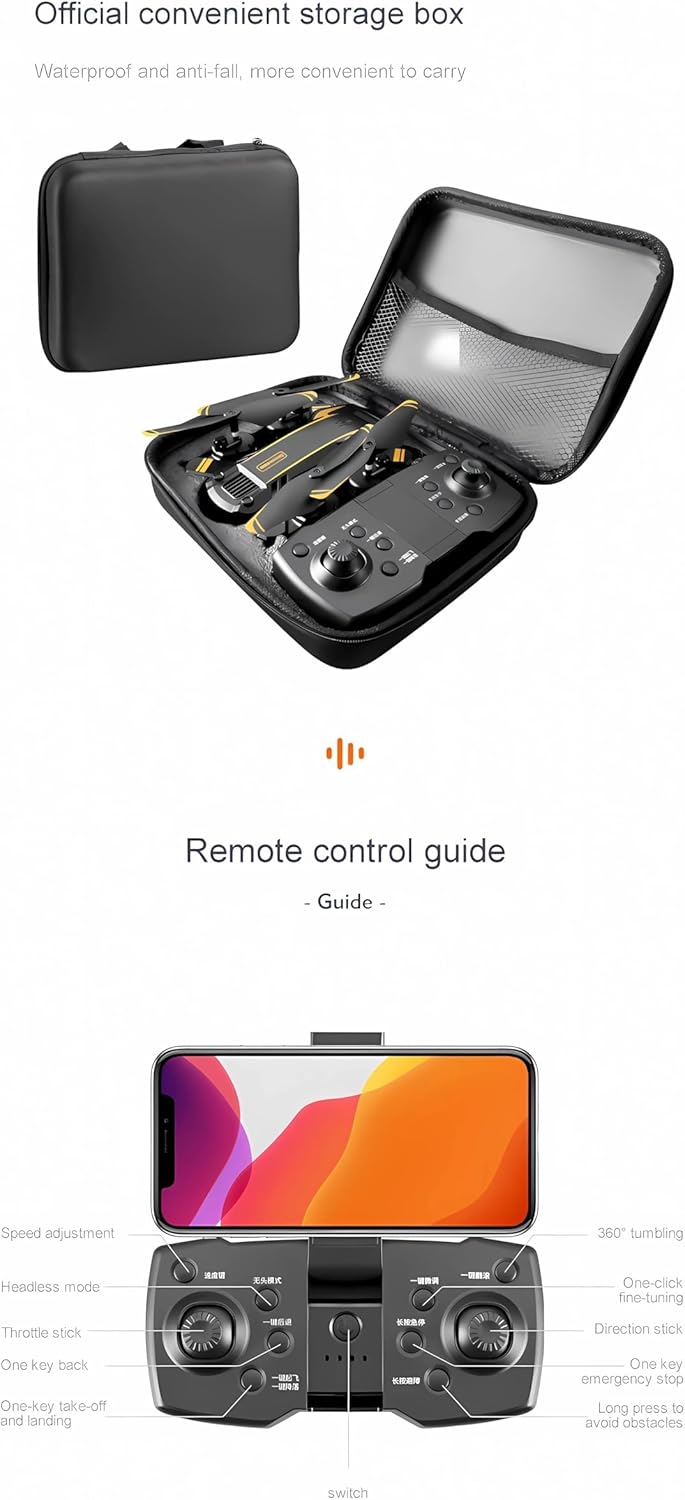
Figure 3.2: Remote control guide showing various buttons and functions.
3.3 Dimensions del producte

Figure 3.3: Folded and unfolded dimensions of the drone.
The drone features a foldable design for portability:
- Mida plegada: 7.5 x 4.9 x 3.0 polzades
- Mida desplegada: 15.7 x 15.7 x 3.0 polzades
4. Configuració
4.1 Càrrega de la bateria del dron
Connect the 3.7V lithium battery to the USB charging cable. Plug the USB cable into a 5V/1A USB power adapter (not included). The charging time is approximately 120-150 minutes. The indicator light on the USB cable will change to indicate charging status (e.g., red for charging, off for fully charged).
4.2 Instal·lació de les piles del transmissor
The remote control requires 3 x 1.5V AAA batteries (not included). Open the battery compartment on the back of the remote control, insert the batteries according to the polarity markings, and close the compartment.
4.3 Instal·lació de l'hèlix
If propellers are not pre-installed, attach them to the motor shafts. Ensure you match the correct propellers (marked A and B) to the corresponding motor shafts as indicated in the drone's manual or on the drone itself. Use the provided screwdriver to secure them if necessary.
4.4 Emparellar el dron i el comandament a distància
- Col·loqueu el drone sobre una superfície plana i plana.
- Engegueu l'interruptor d'encesa del dron. Els llums indicadors del dron parpellejaran.
- Engegueu el comandament a distància.
- Push the left joystick (throttle) all the way up, then all the way down. The drone's lights will stop flashing and become solid, indicating successful pairing.
4.5 Instal·lació i connexió de l'aplicació
Download the official drone application from your smartphone's app store (Google Play for Android or App Store for iOS). Cerca the app name provided in the drone's packaging or quick start guide.

Figure 4.1: App download options for real-time video transmission.
Per connectar l'aplicació:
- Assegureu-vos que el dron estigui engegat.
- Go to your smartphone's Wi-Fi settings and connect to the drone's Wi-Fi network (usually named something like "AUHIFVAX-Drone-XXXX").
- Open the drone application. You should see the live camera feed from the drone.
5. Instruccions de funcionament
5.1 Llista de verificació prèvia al vol
- Drone battery fully charged.
- Remote control batteries installed.
- Propellers correctly installed and secure.
- Drone and remote control paired.
- Fly in an open, safe area.
5.2 Enlairament i aterratge
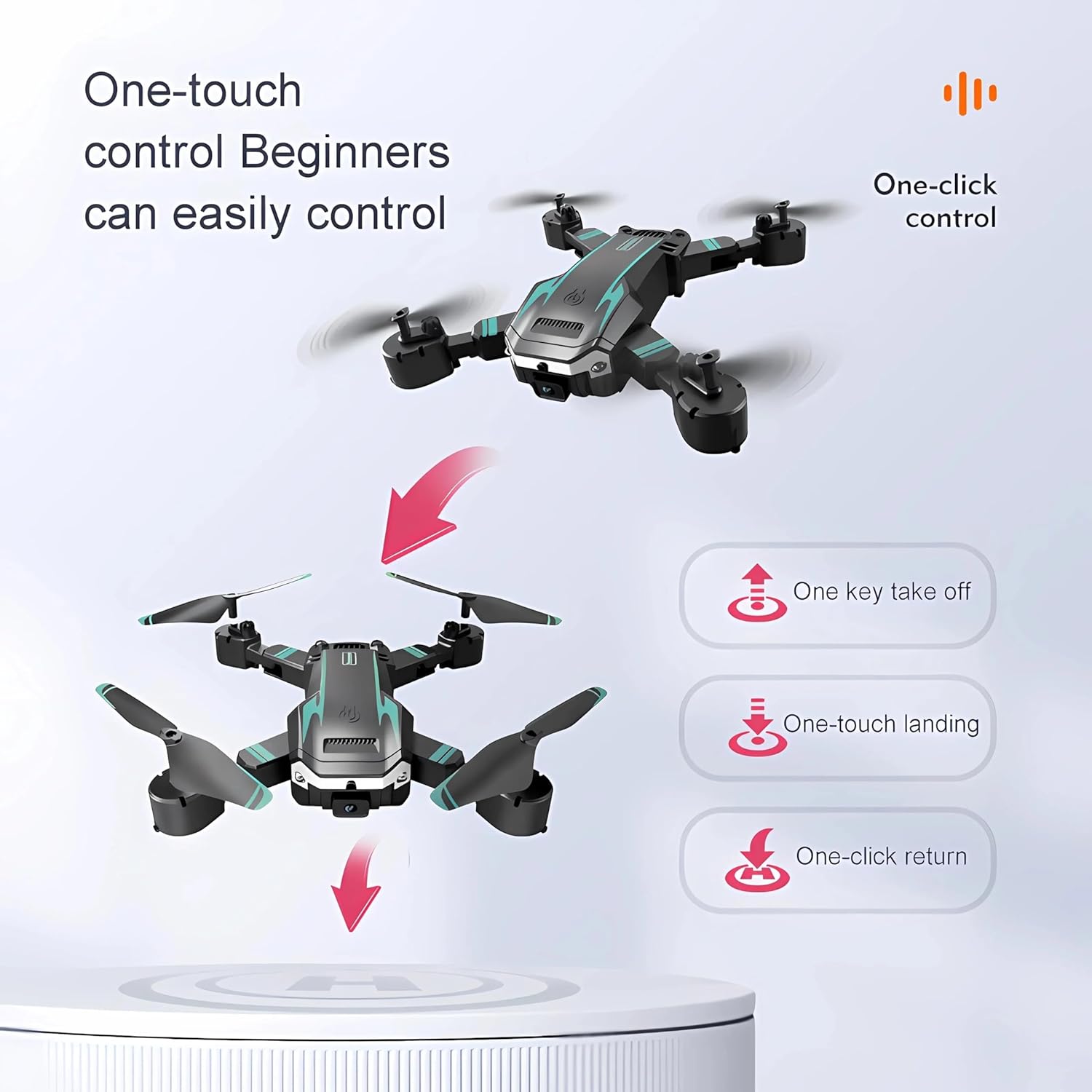
Figure 5.1: One-touch control features for beginners.
- Enlairament amb una sola clau: After pairing, press the one-key takeoff button on the remote control. The drone will automatically ascend and hover at a certain altitude.
- Enlairament manual: After pairing, push both joysticks down and outwards simultaneously to unlock the motors. Then, slowly push the left joystick (throttle) upwards to ascend.
- Aterratge d'una sola clau: During flight, press the one-key landing button. The drone will automatically descend and land gently.
- Aterratge manual: Slowly pull the left joystick (throttle) downwards until the drone lands. Once landed, push both joysticks down and inwards simultaneously to stop the motors.
5.3 Modes i funcions de vol
- Mode de manteniment d'altitud: The drone maintains a consistent altitude, making it easier to control and capture stable footage.
- Mode sense cap: In headless mode, the drone's orientation is relative to the pilot, eliminating the need to adjust the drone's position before flight.
- Posicionament del flux òptic: Utilizes a downward-facing camera to analyze ground patterns, providing stable hovering and precise positioning, especially indoors or at low altitudes.
- Waypoint Flight Mode: Draw a desired flight path on the app screen, and the drone will automatically follow the specified route.
- Orbital Flight: The drone can fly in circles around a designated point, providing dynamic shooting angles.
- Seguiment intel·ligent: The drone can automatically follow a subject, keeping it in the frame for dynamic video recording.
- 3 Flight Speed Levels: Adjust the drone's speed (low, medium, high) to suit your flying environment and skill level.
- Retorn amb un clic: Press the one-click return button, and the drone will automatically fly back towards its takeoff point.
5.4 Evitació d'obstacles
The S6 Max Drone is equipped with intelligent obstacle avoidance technology. This feature uses sensors to detect and automatically maneuver around obstacles, reducing the risk of collisions during flight.
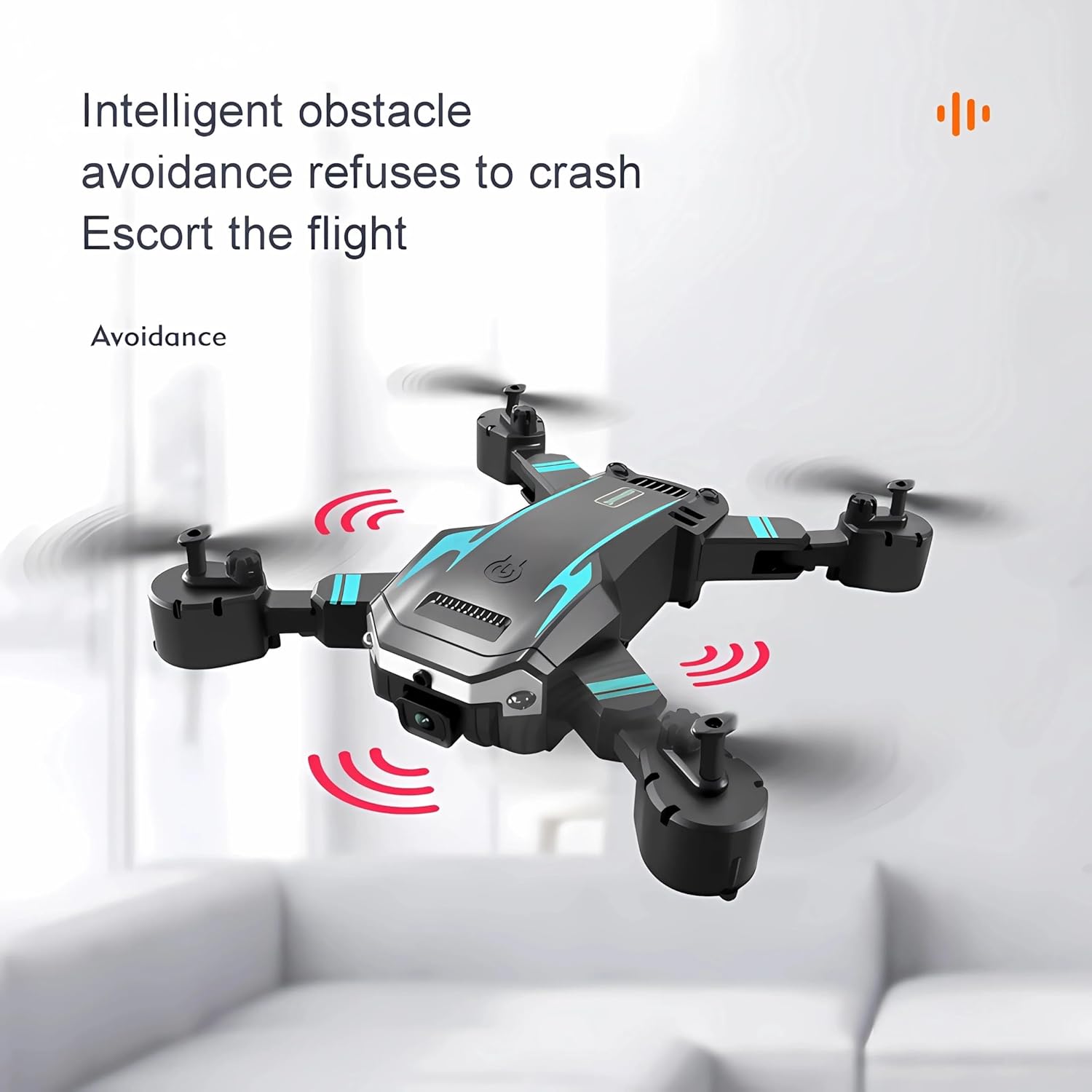
Figure 5.2: Intelligent obstacle avoidance in action.
5.5 Funcionament de la càmera
The drone features a professional HD camera (available in 4K, 6K, or 8K resolution) for aerial photography and video recording. It also includes dual high-definition cameras for versatile shooting.
- Captura de fotos: Press the photo button on the remote control or tap the camera icon in the app to take a picture.
- Gravació de vídeo: Press the video button on the remote control or tap the video icon in the app to start/stop recording.
- Control de gestos: The drone supports gesture control for taking photos and videos. Refer to the app or quick start guide for specific gestures (e.g., V-gesture for photo, palm for video).
5.6 Product Features in Action
Watch the official product video to see the AUHIFVAX S6 Max Drone's features in operation, including one-key takeoff, optical flow positioning, intelligent obstacle avoidance, and camera functions.
Video 5.1: Demonstration of AUHIFVAX S6 Max Drone features, including takeoff, optical flow, obstacle avoidance, and camera gestures.
6. Manteniment
6.1 Cura de la bateria
- Always use the original charging cable provided.
- No sobrecarregueu ni descarregueu excessivament la bateria.
- Emmagatzemeu les bateries en un lloc fresc i sec, lluny de la llum solar directa i de temperatures extremes.
- If the battery is swollen or damaged, discontinue use immediately and dispose of it properly.
6.2 Neteja
Use a soft, dry cloth to clean the drone and remote control. Do not use liquid cleaners or solvents, as they may damage the electronic components.
6.3 Substitució de l'hèlix
If a propeller is damaged, replace it with a spare blade. Ensure you replace it with the correct type (A or B) and secure it firmly using the screwdriver.
6.4 Emmagatzematge
When not in use for extended periods, remove batteries from both the drone and the remote control. Store the drone in its original packaging or a protective carrying case in a cool, dry environment.
7. Solució De Problemes
| Problema | Causa possible | Solució |
|---|---|---|
| El dron no respon al comandament a distància. | No emparellat; bateria baixa; fora de l'abast. | Re-pair the drone and remote; charge drone battery; replace remote control batteries; ensure within operating range. |
| El dron no pot enlairar-se o vola de manera inestable. | Propellers installed incorrectly; motors blocked; drone not calibrated; strong wind. | Check propeller installation (A/B); clear any obstructions; perform gyroscope calibration (refer to quick start guide); avoid flying in strong winds. |
| No live video feed in app. | Not connected to drone's Wi-Fi; app not open; drone camera issue. | Connect to drone's Wi-Fi network; restart app; restart drone and app. |
| Temps de vol curt. | Battery not fully charged; old battery; flying aggressively. | Ensure battery is fully charged; consider replacing old battery; fly more conservatively. |
| L'evitació d'obstacles no funciona. | Sensors blocked or dirty; feature disabled. | Clean sensors; ensure feature is enabled in app/remote settings. |
8. Especificacions
| Característica | Detall |
|---|---|
| Marca | AUHIFVAX |
| Nom del model | S6 Màx |
| Color | Blue-Dual-8K |
| Dimensions del producte (plegat) | 7.5 cm de llargada x 4.9 cm d'amplada x 3.0 cm d'alçada |
| Dimensions del producte (desplegat) | 15.7 cm de llargada x 15.7 cm d'amplada x 3.0 cm d'alçada |
| Pes de l'article | 4.8 unces |
| Resolució de captura de vídeo | 8K, 6K, 4K (selectable) |
| Format de captura de vídeo | MP4 |
| Format d'imatge compatible | JPEG |
| FOV | Gran angular de 120° |
| Tecnologia de connectivitat | APP Controller, Wi-Fi |
| Tecnologia de control remot | WIFI, APP Controller |
| Bateria de control remot | 3 piles AAA d'1.5 V (no incloses) |
| Bateria de dron | 1 x 3.7V Lithium Battery (included) |
| Temps de càrrega | 120-150 minuts |
| Temps de vol | 15-20 minuts |
| 5G WiFi FPV Distance | Fins a 5000 m |
| Característiques especials | 5G WiFi, Altitude Hold, Orbital Flight, Waypoint Flight, One-Click Return, Obstacle Avoidance, Headless Mode, 3 Speed Levels, Six-axis Gyroscope |
| Material | High-strength Engineering Plastics |
| Nivell d'habilitat | Tots |
| País d'origen | Xina |
| UPC | 698704554136 |
9. Garantia i Suport
AUHIFVAX stands behind the quality of its products. For warranty information, technical support, or service inquiries, please refer to the contact information provided on the product packaging or the official AUHIFVAX website. Please have your model number (S6 Max) and UPC (698704554136) ready when contacting support.
Ask a question about this manual
Ask about setup, troubleshooting, compatibility, parts, safety, or missing instructions. Manuals+ will review the question and use this page’s manual context to help answer it.