
Xtorm FS405
Xtorm FS405 Solar Powerbank 20W – 10.000 mAh User Manual
Model: FS405
Introducció
The Xtorm FS405 Fuel Series Solar Powerbank 20W – 10.000 mAh is designed to provide portable power for your electronic devices, offering the flexibility to charge via USB-C or its integrated solar panel. This power bank is built for outdoor adventures, featuring a durable, splash-resistant design and a powerful LED flashlight.
Informació de seguretat
- Do not expose the power bank to extreme temperatures (above 45°C or below -10°C).
- Eviteu deixar caure, desmuntar o intentar reparar el dispositiu vosaltres mateixos.
- Keep away from water, except for the specified splash resistance (IPX4). Do not submerge.
- Feu servir només cables i adaptadors de càrrega certificats.
- Mantenir fora de l'abast dels nens.
- Eliminar el producte de manera responsable segons la normativa local.
Contingut del paquet
Si us plau, comproveu el paquet per veure si hi ha els elements següents:
- Xtorm FS405 Solar Powerbank
- Cable de càrrega USB-C (0.30 m)
- Manual d'usuari
Producte acabatview

Davant View: Shows the main solar charging panel and the Xtorm logo. The robust casing is visible around the edges.

Enrere View (LED Off): Displays the textured back casing and the integrated LED light panel in its off state.
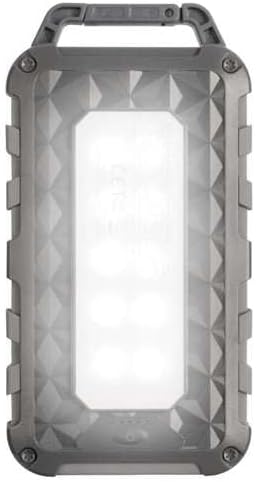
Enrere View (LED On): Shows the powerful LED light panel fully illuminated, indicating the flashlight function is active.

A dalt View: Highlights the sturdy integrated carabiner handle, designed for easy attachment to bags or gear.
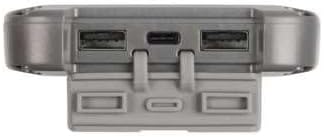
A baix View: Displays the USB-C PD input/output port and two USB-A Quick Charge 3.0 output ports, protected by a cover.
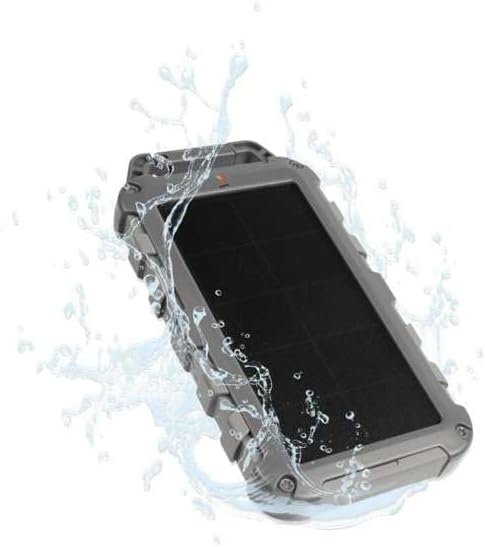
Durability Feature: Illustrates the power bank's splash-resistant design, suitable for outdoor conditions (IPX4 rated).
Configuració
Càrrega inicial
Before first use, it is recommended to fully charge the Xtorm FS405 Solar Powerbank via the USB-C port for optimal performance.
- Connecteu el cable USB-C proporcionat al port USB-C del banc d'alimentació.
- Connect the other end of the USB-C cable to a compatible USB wall adapter (not included) or a computer's USB port.
- The LED indicators on the power bank will show the charging status. A full charge via USB-C typically takes approximately 2 hours.
Instruccions de funcionament
Carregant el Power Bank
The Xtorm FS405 can be charged using two methods:
1. Via USB-C (Recommended for Fast Charging)
- Connect the power bank to a USB-C power source using the included cable.
- The power bank will begin charging. This method provides the fastest charging speed for the power bank itself.
2. Via Solar Panel
The integrated solar panel allows for convenient charging when outdoors. For best results, place the power bank directly under strong sunlight.
- Place the solar panel facing direct sunlight.
- A small indicator light (usually green) will illuminate when solar charging is active.
- Note on Solar Charging Speed: Solar charging is a supplementary method and is significantly slower than USB-C charging. Factors like season, location, time of day, and cloud cover heavily influence charging speed.
Approximate solar charging times for a full charge:
- Spring/Summer (mostly sunny day): Aproximadament 10 dies
- Autumn/Winter (mostly sunny day): Aproximadament 20 dies
Solar charging is not effective on mostly cloudy days.
Càrrega de dispositius externs
The power bank features one USB-C PD (Power Delivery) output and two USB-A Quick Charge 3.0 outputs.

Capacitat de càrrega ràpida: The power bank can charge compatible smartphones, such as an iPhone 14 or 12/13, up to 50% in approximately 30 minutes using the 20W USB-C PD output.
- Connect your device's charging cable to one of the available output ports (USB-C or USB-A) on the power bank.
- Connecteu l’altre extrem del cable al dispositiu.
- El banc d'energia començarà a carregar el dispositiu automàticament.
- Els indicadors LED del banc d'energia mostraran el nivell de bateria restant.
The 10,000mAh capacity is sufficient to charge most smartphones at least 2 times.
Utilització de la llanterna LED
The Xtorm FS405 includes a powerful integrated LED flashlight on its back.
- Locate the power button (usually on the side or near the ports).
- Press and hold the power button for a few seconds to turn the flashlight ON.
- Press and hold the power button again to turn the flashlight OFF.
Manteniment
- Netegeu el banc d'energia amb un drap suau i sec. No utilitzeu productes químics agressius ni materials abrasius.
- Guardeu el banc d'energia en un lloc fresc i sec quan no l'utilitzeu.
- For long-term storage, charge the power bank to about 50-70% every 3-6 months to preserve battery health.
- Ensure the port covers are properly sealed when exposed to water splashes.
Resolució de problemes
El banc d'energia no es carrega
- Comproveu el cable: Ensure the USB-C cable is securely connected to both the power bank and the power source. Try a different cable.
- Comproveu la font d'alimentació: Verify that the wall adapter or USB port is functioning correctly.
- Càrrega solar: For solar charging, ensure the panel is in direct, strong sunlight. Remember solar charging is slow and not effective in low light or cloudy conditions.
El dispositiu no es carrega des del banc d'alimentació
- Comprova la càrrega del banc d'energia: Assegureu-vos que el banc d'energia tingui prou càrrega.
- Comproveu els cables: Use the original charging cable for your device and ensure it's properly connected to both the power bank and your device. Try a different cable.
- Compatibilitat: Verify that your device is compatible with USB charging.
- Reinicia: Disconnect and reconnect the device.
La llanterna no funciona
- Comprova la càrrega del banc d'energia: Ensure the power bank has some charge remaining.
- Funcionament correcte: Ensure you are pressing and holding the power button correctly to activate the flashlight.
Especificacions
| Característica | Detall |
|---|---|
| Model | FS405 |
| Marca | Xtorm |
| Sèrie | Fuel Series 4 |
| Capacitat de la bateria | 10,000 mAh (polímer de liti) |
| Potència màxima de sortida | 20 W |
| Sortida 1 (USB-C PD) | 20 W |
| Output 2 (USB-A QC 3.0) | 18 W |
| Output 3 (USB-A QC 3.0) | 18 W |
| Nombre de sortides | 3 |
| Tipus d'entrada | USB-C PD |
| Potència del panell solar | 1 W (SunPower cells) |
| Dimensions (L x A x A) | 17 cm x 9 cm x 2 cm |
| Pes | 289 g |
| Material | PC, ABS |
| Resistència a l'aigua | IPX4 (resistent a esquitxades) |
| Llanterna integrada | Sí |
| Battery Charge Time (USB-C) | Aprox. 2 hores |
Garantia i Suport
For warranty information and customer support, please refer to the Xtorm official weblloc web o poseu-vos en contacte amb el vostre distribuïdor local. Conserveu el comprovant de compra per a qualsevol reclamació de garantia.
Assistència en línia: www.xtorm.eu
Ask a question about this manual
Ask about setup, troubleshooting, compatibility, parts, safety, or missing instructions. Manuals+ will review the question and use this page’s manual context to help answer it.