1. Introducció
Thank you for choosing the Irfora T58B Digital Multimeter. This instrument is a handheld, true RMS digital multimeter designed for accurate measurement of AC/DC voltage, AC/DC current, frequency, resistance, capacitance, and diodes. It is a versatile tool for solving industrial and household electrical problems, suitable for both DIY enthusiasts and professionals.
Please read this manual thoroughly before use to ensure safe and proper operation. Keep this manual for future reference.
2. Informació de seguretat
Avís: Per evitar descàrregues elèctriques o lesions personals, i per evitar danys al mesurador o a l'equip que s'està provant, observeu les normes de seguretat següents:
- Always ensure the meter is in the correct function and range for the measurement.
- No apliqueu més del volum nominaltage, tal com està marcat al comptador, entre els terminals o entre qualsevol terminal i terra.
- Tingueu precaució quan treballeu amb voltagper sobre de 30 V CA RMS, 42 V pic o 60 V CC. Aquest volumtagsuposen un risc de xoc.
- Before making current measurements, ensure the meter's fuses are intact and the test leads are connected to the correct input jacks.
- Disconnect the test leads from the circuit before changing functions or ranges.
- No utilitzeu el mesurador si sembla danyat o si l'aïllament dels cables de prova està compromès.
- Substituïu la bateria tan bon punt aparegui l'indicador de bateria baixa per evitar lectures incorrectes.
- Complir els codis de seguretat locals i nacionals.
3. Producte acabatview
The Irfora T58B Digital Multimeter features a robust design and a clear LCD display for easy readings.
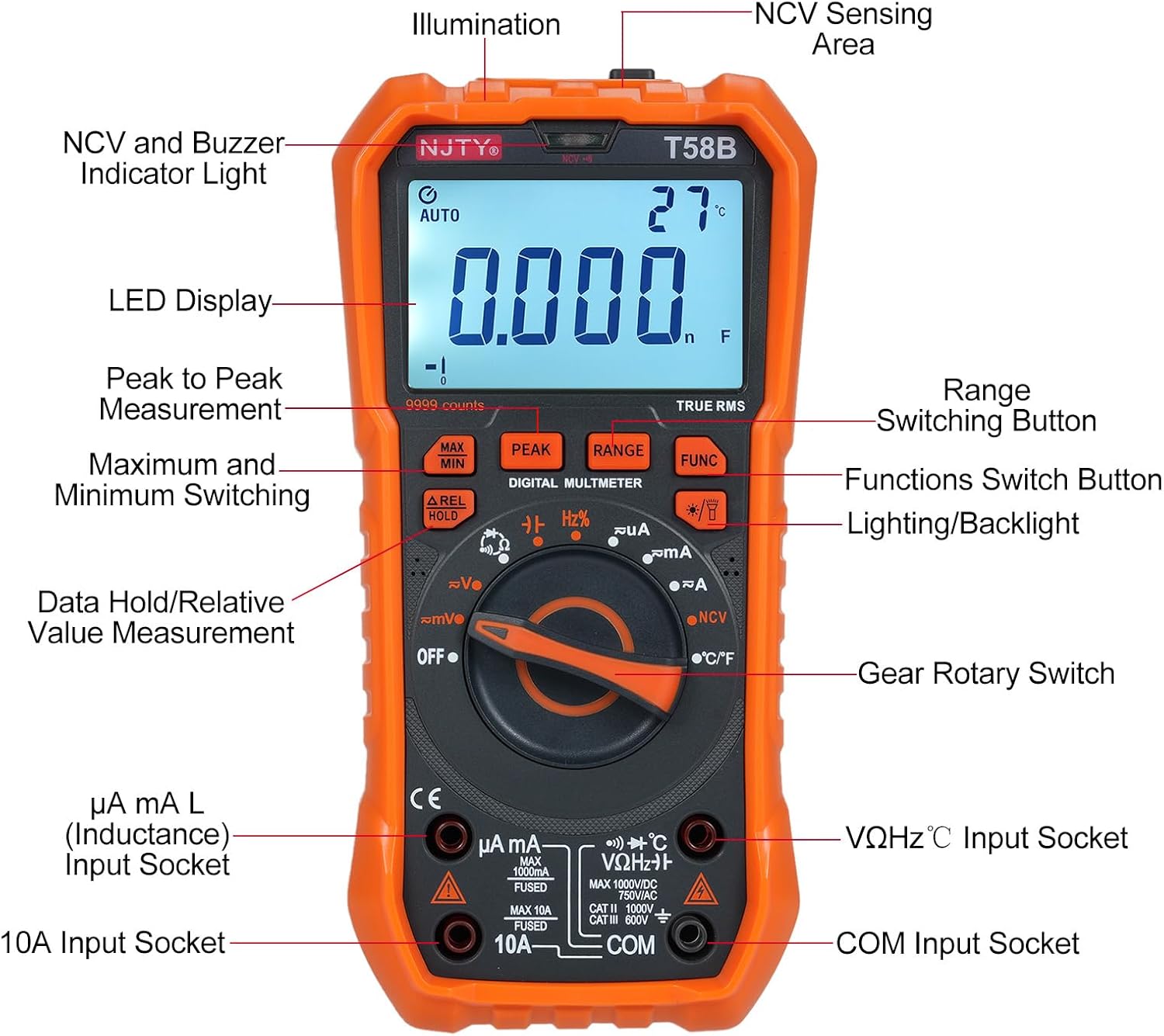
Figura 3.1: Davant view of the Irfora T58B Digital Multimeter with labeled components. Key features include the LED Display, NCV and Buzzer Indicator Light, Gear Rotary Switch, Input Sockets, and various function buttons.

Figura 3.2: Dimensions of the Irfora T58B Digital Multimeter. The device measures approximately 187mm (7.36in) in height, 95mm (3.74in) in width, and 55mm (2.16in) in depth.

Figura 3.3: posterior view of the multimeter showing the 90-degree adjustable support stand and integrated storage slots for test leads, designed for convenience and protection.

Figura 3.4: Acabatview of the Irfora T58B Digital Multimeter's capabilities, including 9999 counts display, and measurement of current, resistance, capacitance, temperature, and frequency.
Característiques principals:
- 9999 Counts LCD Digital Display with Backlight
- Mesurament RMS real
- Vol. Sense contactetage (NCV) Detecció
- Apagat automàtic
- Data Hold and Relative Value Measurement
- Flashlight Function for low-light conditions
- Mesures AC/DC Voltage, AC/DC Current, Resistance, Capacitance, Frequency, and Temperature
- Prova de díode i continuïtat
4. Configuració
4.1. Instal·lació de la bateria
The Irfora T58B Multimeter requires 3 x 1.5V AAA batteries (not included). To install or replace batteries:
- Assegureu-vos que el multímetre estigui apagat i desconnecteu tots els cables de prova dels terminals d'entrada.
- Localitzeu la tapa del compartiment de la bateria a la part posterior del mesurador.
- Feu servir un tornavís per afluixar el(s) cargol(s) que fixen la tapa de la bateria.
- Remove the cover and insert the 3 AAA batteries, observing the correct polarity (+ and -).
- Torneu a col·locar la tapa de la bateria i estrenyeu el(s) cargol(s).
Nota: Traieu les piles si el mesurador no s'utilitza durant un període prolongat per evitar fuites.
4.2. Connexió dels cables de prova
Always connect the black test lead to the "COM" (Common) input jack. Connect the red test lead to the appropriate input jack based on the measurement type:
- Per al voltage, Resistance, Capacitance, Frequency, Diode, and Temperature measurements: Connect the red lead to the "VΩHz°C" jack.
- For Current measurements (up to 600mA): Connect the red lead to the "µA mA" jack.
- For High Current measurements (up to 10A): Connect the red lead to the "10A" jack.
Ensure test leads are fully inserted into the jacks before use.
5. Instruccions de funcionament
To operate the multimeter, turn the Gear Rotary Switch to the desired function. The meter will automatically select the appropriate range in most modes (AUTO function).
5.1. AC/DC Voltage Mesura
- Gireu l'interruptor rotatiu a la posició "V~" (Volum ACtage) o "V-" (Volumen de CCtage) posició.
- Connect the black test lead to the "COM" jack and the red test lead to the "VΩHz°C" jack.
- Toqueu les sondes de prova als punts del circuit on el volumtage s'ha de mesurar.
- Llegeix el voltage valor a la pantalla LCD.
5.2. Mesura de corrent AC/DC
Precaució: Never connect the meter in parallel to a voltage source when measuring current. This can blow the fuse or damage the meter.
- Turn the rotary switch to the "µA mA" or "A" position for AC or DC current. Use the "FUNC" button to switch between AC and DC if necessary.
- Connect the black test lead to the "COM" jack. Connect the red test lead to the "µA mA" jack for currents up to 600mA, or to the "10A" jack for currents up to 10A.
- Open the circuit where current is to be measured and connect the meter in series with the load.
- Llegiu el valor actual a la pantalla LCD.
5.3. Mesura de Resistències
- Gireu l'interruptor rotatiu a la posició "Ω".
- Connect the black test lead to "COM" and the red test lead to "VΩHz°C".
- Assegureu-vos que el circuit estigui desenergitzat abans de mesurar la resistència.
- Toqueu les sondes de prova a través del component o circuit on s'ha de mesurar la resistència.
- Llegiu el valor de la resistència a la pantalla LCD.
5.4. Mesura de la capacitat
- Turn the rotary switch to the "Capacitance" position (often shared with other functions, use FUNC button if needed).
- Connect the black test lead to "COM" and the red test lead to "VΩHz°C".
- Discharge the capacitor completely before measurement to avoid damage to the meter.
- Toqueu les sondes de prova a través dels terminals del condensador.
- Llegiu el valor de la capacitat a la pantalla LCD.
5.5. Mesura de freqüència
- Gireu l'interruptor rotatiu a la posició "Hz".
- Connect the black test lead to "COM" and the red test lead to "VΩHz°C".
- Touch the test probes across the circuit where frequency is to be measured.
- Llegiu el valor de freqüència a la pantalla LCD.
5.6. Diode Test and Continuity
- Turn the rotary switch to the "Diode/Continuity" position. Use the "FUNC" button to toggle between diode test and continuity.
- Connect the black test lead to "COM" and the red test lead to "VΩHz°C".
- For Diode Test: Place the red probe on the anode and the black probe on the cathode. The display will show the forward voltagcaiguda de e. Invertiu les sondes; la pantalla hauria de mostrar "OL" (bucle obert) per a un bon díode.
- For Continuity Test: Touch the probes to the circuit points. If resistance is below approximately 50Ω, the buzzer will sound, indicating continuity.
5.7. Mesura de la temperatura
- Gireu l'interruptor rotatiu a la posició "°C/°F".
- Connect the thermocouple (included) to the "VΩHz°C" and "COM" jacks, observing polarity.
- Place the thermocouple tip on the object or area where temperature is to be measured.
- Read the temperature value on the LCD display. Use the "FUNC" button to switch between Celsius and Fahrenheit.
5.8. Vol sense contactetage (NCV) Detecció

Figura 5.1: Demonstrating NCV (Non-Contact Voltage) detection. The meter's top is placed near an AC voltage source, and the signal strength indicator lights up, accompanied by an audible alarm.
- Gireu l'interruptor rotatiu a la posició "NCV".
- Place the top of the meter (NCV sensing area) close to the conductor or outlet you suspect has AC voltage.
- Si AC voltage is detected, the corresponding signal strength indicator (low-yellow, high-red) will light up, and the buzzer will emit different frequency alarms based on signal strength.
5.9. Backlight and Flashlight
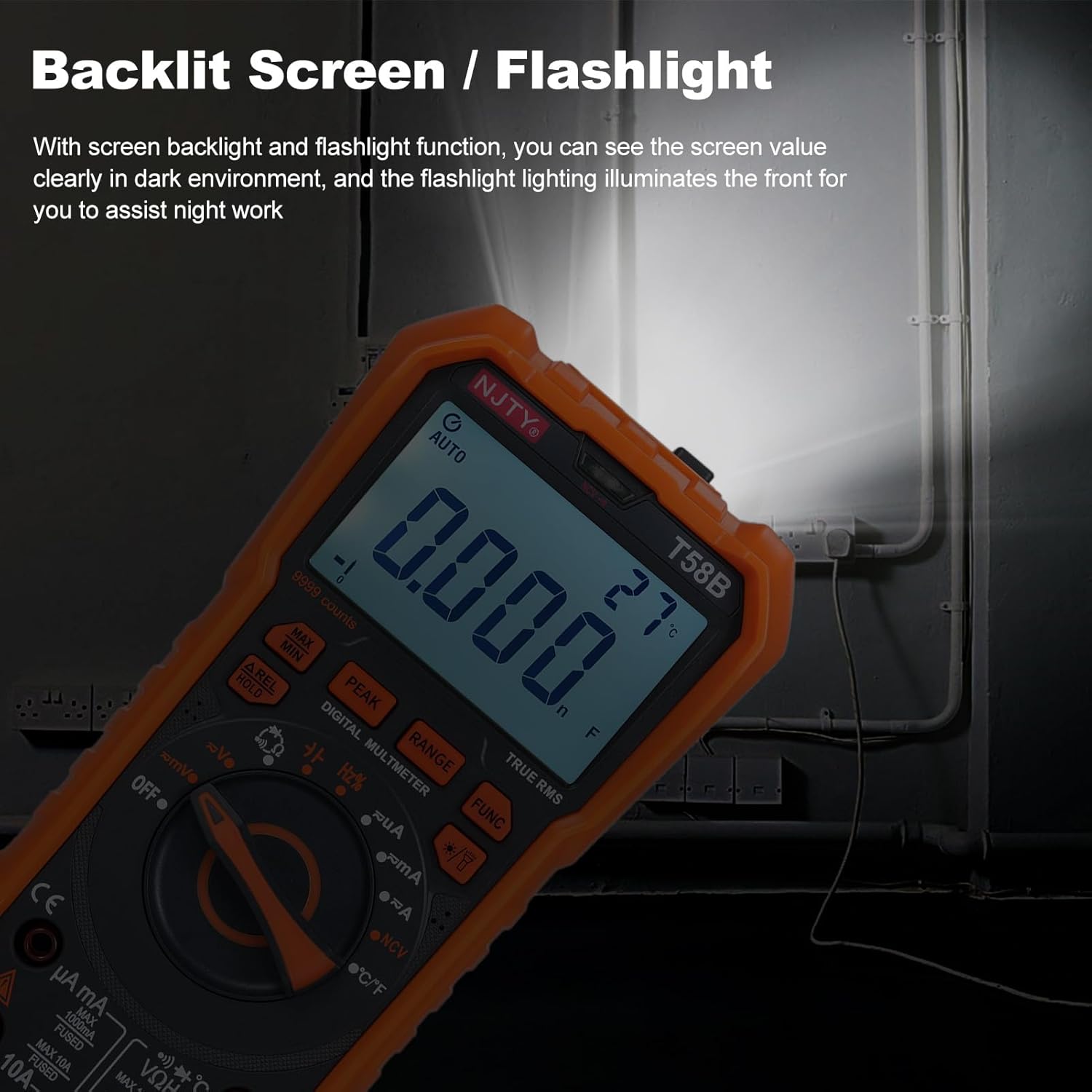
Figura 5.2: The multimeter's backlit screen and integrated flashlight illuminate the display and work area, enhancing visibility in dark environments.
Press the "Lighting/Backlight" button (often marked with a light bulb icon) to turn on the display backlight. Press and hold the same button to activate the flashlight located at the top of the meter. Press again to turn off.
5.10. Automatic Power Off

Figura 5.3: The multimeter features an automatic shutdown function, turning off after approximately 15 minutes of inactivity to conserve battery life.
The multimeter will automatically power off after approximately 15 minutes of inactivity to conserve battery life. An audible voice prompt will sound before shutdown. To restart the meter, press any button or turn the rotary switch.
6. Manteniment
6.1. Neteja
Netegeu el comptador amb anuncisamp drap i detergent suau. No utilitzeu abrasius ni dissolvents. Mantingueu els terminals d'entrada lliures de brutícia i humitat.
6.2. Substitució de la bateria
When the low battery indicator appears on the display, replace the batteries as described in Section 4.1. Prompt battery replacement ensures accurate readings.
6.3. Substitució de fusibles
If the meter fails to measure current, the fuse may be blown. To replace the fuse:
- Assegureu-vos que el multímetre estigui apagat i desconnecteu tots els cables de prova.
- Open the battery compartment cover as described in Section 4.1.
- Traieu amb cura el fusible vell.
- Replace with a fuse of the same type and rating:
- For µA mA input: F 600mA/250V
- For 10A input: F 10A/250V
- Torneu a col·locar la tapa de la bateria i estrenyeu el(s) cargol(s).
7. Solució De Problemes
| Problema | Causa possible | Solució |
|---|---|---|
| El mesurador no s'encén. | Piles gastades o instal·lades incorrectament. | Check battery polarity and replace batteries if necessary (Section 4.1). |
| No reading or "OL" displayed during measurement. | Incorrect range, open circuit, or blown fuse (for current). | Ensure correct function/range. Check test lead connections. For current, check and replace fuse (Section 6.3). Verify circuit continuity. |
| Lectures inexactes. | Low battery, incorrect connection, or external interference. | Replace batteries. Recheck test lead connections. Move away from strong electromagnetic fields. |
| Buzzer does not sound during continuity test. | Circuit resistance is too high. | Ensure resistance is below approximately 50Ω for continuity indication. |
Si el problema persisteix després d'intentar aquestes solucions, poseu-vos en contacte amb l'atenció al client.
8. Especificacions
The following specifications are for the Irfora T58B Digital Multimeter:
Especificacions generals:
- Display: 9999 Counts LCD display
- Safety Rating: CAT III 600V, CAT II 1000V
- Pollution Grade: 2
- Working Height: Under 2000m
- Working Temperature: 0-40°C (<80%RH, not considered <10°C)
- Storage Temperature: -10~60°C (<80%RH, remove battery)
- Test/Calibration Ambient Temperature: 20°C ± 2°C
- Volum màximtage between Measurement End and Ground: 1000V DC or 750V AC
- Protecció de fusibles:
- For µA mA input: F 600mA/250V
- For 10A input: F 10A/250V
- Conversion Rate: Approximately 3 readings/second
- Overload Display: "OL"
- Power Supply: 3 * 1.5V AAA batteries (Not included)
- Item Size: 187 * 95 * 55mm / 7.36 * 3.74 * 2.16in
- Item Weight: 331g / 11.67oz
Intervals de mesura:
- DC Voltage: 100mV, 600mV, 1V, 60V, 600V, 1000V
- Vol. ACtage: 100mV, 600mV, 1V, 60V, 600V, 750V
- DC Current: 600µA, 6mA, 60mA, 600mA, 6A, 10A
- AC Current: 600µA, 6mA, 60mA, 600mA, 6A, 10A
- Resistance: 600Ω, 6kΩ, 60kΩ, 600kΩ, 6MΩ, 60MΩ
- Capacitance: 6nF, 60nF, 600nF, 6µF, 60µF, 600µF, 6mF, 60mF
- Frequency: 100Hz, 1KHz, 10KHz, 100KHz, 1MHz, 10MHz, 25MHz
- Temperature: -50°C~1000°C / -58°F~1832°F
- Prova de díodes: Sí
- Buzzer (Continuity): Yes
9. Garantia i Suport
For warranty information or technical support, please refer to the purchase platform or contact Irfora customer service directly. Keep your purchase receipt as proof of purchase.
Informació de contacte: Please refer to the seller's contact details on the platform where the product was purchased.