
Headwolf FPad6
Manual d'instruccions de la tauleta Android Headwolf FPad6
Brand: Headwolf | Model: FPad6
1. Introducció
Welcome to the Headwolf FPad6 Android Tablet. This manual provides comprehensive instructions for setting up, operating, and maintaining your device. The FPad6 is an 8-inch tablet featuring the latest Android 15 operating system, a powerful Helio G99 processor, a high-resolution 2.5K display, and 4G LTE connectivity, designed for a versatile and efficient user experience.

Figure 1.1: Headwolf FPad6 Tablet with key specifications highlighted.
Vídeo 1.1: Un overview of the Headwolf FPad6 tablet's features and design. This video demonstrates the tablet's sleek profile, display quality, and general usage scenarios.
2. Configuració
2.1 Contingut del paquet
Verifiqueu que tots els elements siguin presents al paquet:
- Headwolf FPad6 Tablet
- Cable USB-Type C
- Adaptador d'alimentació
- Pin de la targeta SIM
- Manual d'usuari (japonès)

Figure 2.1: Contents of the Headwolf FPad6 package and device port layout.
2.2 Engegada i càrrega inicials
To power on your tablet for the first time, press and hold the Power button located on the side of the device until the Headwolf logo appears. If the battery is low, connect the tablet to the power adapter using the provided Type-C cable and charge it fully before first use.

Figure 2.2: Charging the Headwolf FPad6 tablet with the Type-C cable.
2.3 SIM Card and Storage Expansion
The FPad6 supports dual SIM cards or one SIM card and one microSD card for expanded storage up to 2TB. Use the provided SIM card pin to open the SIM tray. Insert your nano-SIM card(s) and/or microSD card into the appropriate slots as indicated on the tray.

Figure 2.3: Inserting SIM cards and understanding 4G LTE capabilities.
3. Com utilitzar la tauleta
3.1 Característiques d'Android 15
The FPad6 runs on the latest Android 15, offering enhanced privacy, productivity, and AI capabilities. Key features include:
- Espai privat: Secure sensitive apps and data with dual authentication.
- Single App Recording: Record specific app screens without capturing the entire display.
- App Pair: Pin app combinations to your home screen for quick split-screen multitasking.
- IA de Bessons: Google's advanced AI assists with text input, search, and translation.

Figure 3.1: New features available with Android 15 on the FPad6.
3.2 Visualització i elements visuals
Experience stunning visuals on the 8.4-inch 2.5K (2560x1600) In-Cell IPS display. With 500 Nits brightness, images are vibrant and clear from any angle. The tablet also supports Widevine L1, allowing you to stream 1080P HD content from major platforms like Netflix, Amazon Prime Video, and Disney+.

Figure 3.2: The FPad6's 2.5K In-Cell IPS display with Widevine L1 support.
3.3 Rendiment i emmagatzematge
Powered by the MTK Helio G99 octa-core processor and Mali G57 GPU, the FPad6 delivers smooth performance for gaming and graphic-intensive applications. It comes with 16GB (8GB physical + 8GB virtual) RAM and 128GB UFS 2.1 ROM, expandable up to 2TB via microSD card, providing ample space for all your apps, videos, and files.
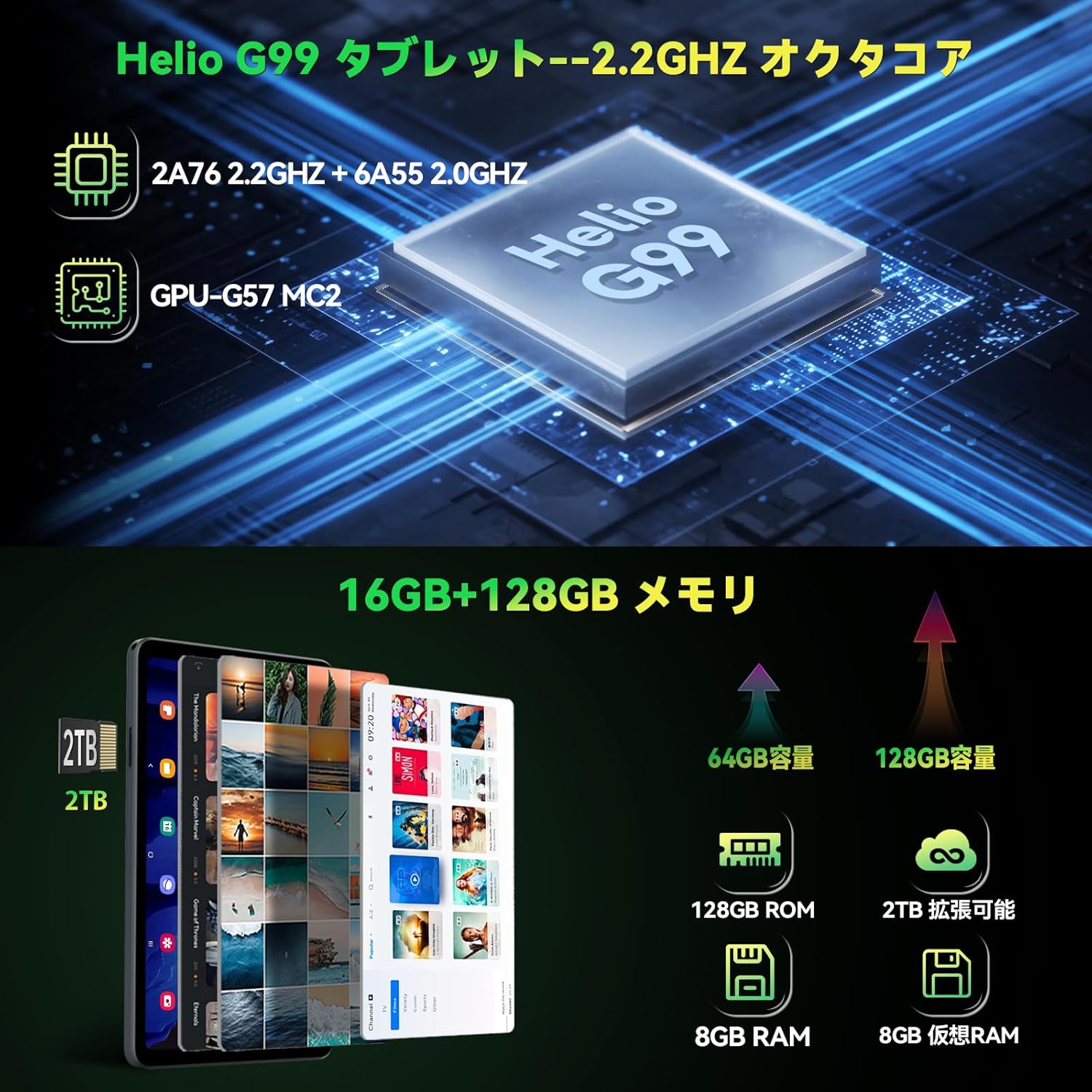
Figure 3.3: Helio G99 processor and memory specifications.
3.4 Funcions de la càmera
The FPad6 is equipped with an 8MP front camera for video calls and face recognition, and a 16MP rear camera with autofocus and background blur support for capturing clear photos and videos.

Figure 3.4: Front and rear camera capabilities.
3.5 Connectivitat
Stay connected with 4G LTE communication, 2.4/5G WiFi, and Bluetooth 5.2. The tablet also features a quad-satellite positioning system (GPS) for accurate navigation.

Figure 3.5: GPS navigation on the FPad6 tablet.
3.6 Gestió de la bateria
The 6500mAh cobalt acid lithium battery provides extended usage time. Charge your device using the Type-C port. The tablet also includes a 3.5mm headphone jack for audio connectivity.

Figure 3.6: Battery capacity and charging interface.
3.7 Gaming and Sensors
Enhance your gaming experience with the 6-axis gyroscope and geomagnetic sensor, providing precise control and improved immersion. These sensors also contribute to accurate navigation and orientation.

Figure 3.7: Gaming with the 6-axis gyroscope.
3.8 Basic Operations and Accessibility
The FPad6 offers convenient features such as screen splitting for multitasking, lift-to-wake functionality, and a three-finger screenshot gesture. Its lightweight (385g) and thin (8.5mm) metal body make it comfortable for one-handed use and highly portable.
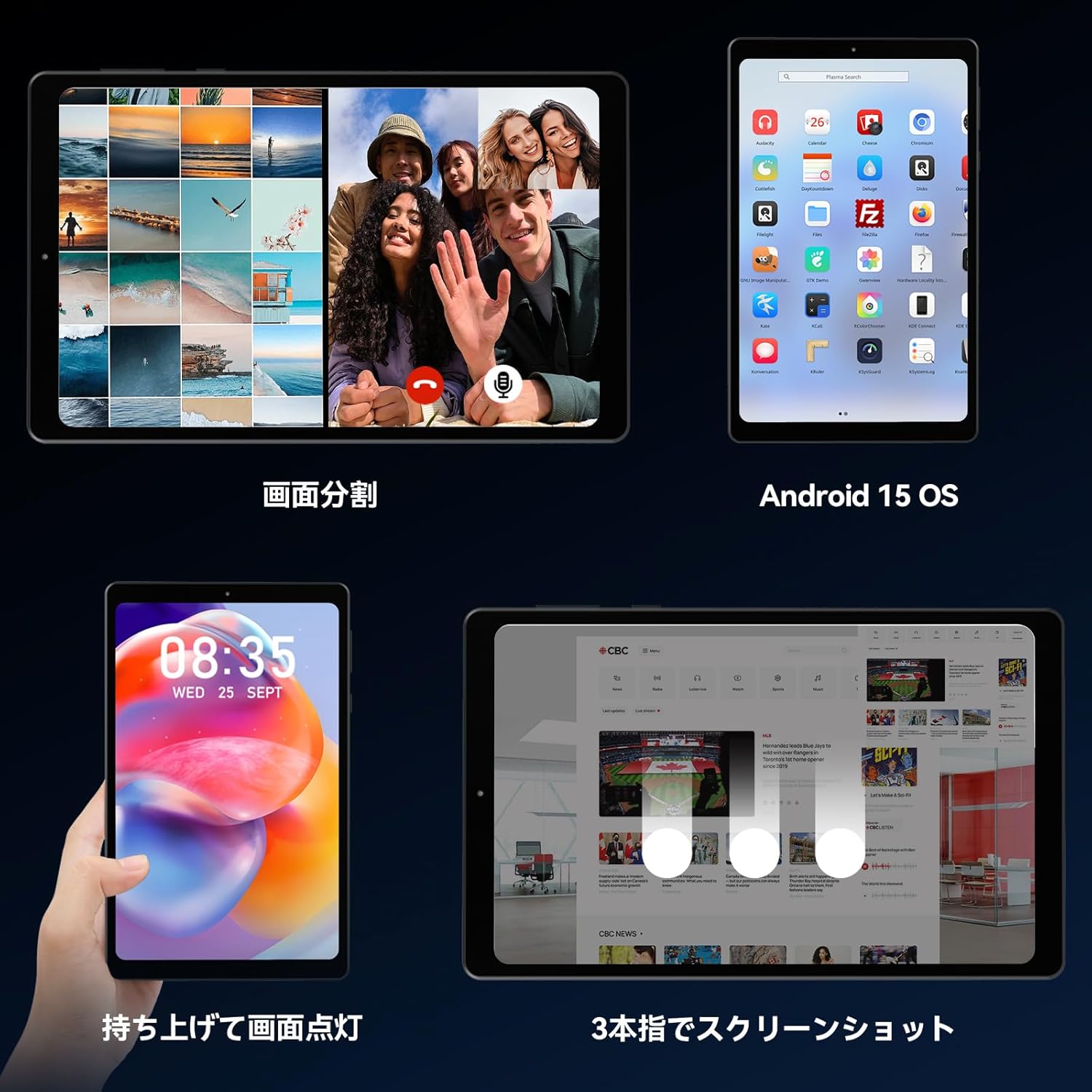
Figure 3.8: Various operational features of the FPad6.

Figure 3.9: Physical design and portability of the FPad6.
4. Manteniment
To ensure the longevity of your Headwolf FPad6 tablet, follow these maintenance guidelines:
- Neteja: Feu servir un drap suau i sense borrissol per netejar la pantalla i la carcassa. Eviteu materials abrasius o productes químics agressius.
- Emmagatzematge: Guardeu la tauleta en un lloc fresc i sec, allunyat de la llum solar directa i de temperatures extremes.
- Cura de la bateria: Avoid fully discharging the battery frequently. For long-term storage, charge the battery to about 50% to prevent deep discharge.
- Actualitzacions de programari: Comproveu i instal·leu regularment si hi ha actualitzacions del sistema per garantir un rendiment i una seguretat òptims.
5. Solució De Problemes
This section addresses common issues you might encounter with your Headwolf FPad6 tablet. If you experience problems not listed here, please refer to the support section.
| Problema | Causa possible | Solució |
|---|---|---|
| La tauleta no s'encén. | Bateria baixa; bloqueig del sistema. | Carrega la tauleta durant almenys 30 minuts. Prem i mantén premut el botó d'engegada durant 10-15 segons per forçar el reinici. |
| La pantalla no respon. | Software glitch; screen protector interference. | Restart the tablet. Ensure screen protector is properly applied and not damaged. |
| No es pot connectar a la Wi-Fi. | Contrasenya incorrecta; problema amb l'encaminador; Wi-Fi desactivat. | Verify Wi-Fi password. Restart router. Ensure Wi-Fi is enabled in settings. |
| Les aplicacions es bloquegen o es congelen. | Insufficient memory; app bug; outdated app. | Close background apps. Clear app cache. Update the app or reinstall it. |
| Rendiment lent. | Massa aplicacions en execució; poc espai d'emmagatzematge; programari obsolet. | Close unused apps. Free up storage space. Check for system updates. |
6. Especificacions
| Característica | Detall |
|---|---|
| Marca | Cap de llop |
| Nom del model | FPad6 |
| Sistema operatiu | Android 15 |
| Mida de la pantalla | 8.4 polzades |
| Resolució de visualització | 2560x1600 Pixels (2.5K) |
| Processador | Helio G99 |
| RAM | 16 GB (8 GB + 8 GB d'expansió) |
| Emmagatzematge intern | 128 GB UFS 2.1 |
| Emmagatzematge ampliable | Up to 2TB (microSD) |
| Capacitat de la bateria | 6500 mAh |
| Càmera frontal | 8MP |
| Càmera posterior | 16MP |
| Connectivitat | 4G LTE, 2.4/5G WiFi (802.11n), Bluetooth 5.2 |
| Sensors | 6-axis Gyroscope, Geomagnetic Sensor, GPS |
| Dimensions | 21.8 x 13.8 x 4.9 cm |
| Pes | 320 g |
7. Garantia i Suport
Headwolf provides customer support for its products. For warranty information, technical assistance, or service inquiries, please visit the official Headwolf store on Amazon or contact their customer service directly.
Official Headwolf Store: Headwolf Japan Official Store
Conserveu el vostre comprovant de compra per a reclamacions de garantia.
Ask a question about this manual
Ask about setup, troubleshooting, compatibility, parts, safety, or missing instructions. Manuals+ will review the question and use this page’s manual context to help answer it.