1. Introducció
Thank you for choosing the Generic T10PRO PLUS Smart Watch. This manual provides essential information for setting up, operating, and maintaining your device. Please read it carefully to ensure optimal performance and longevity of your smartwatch.
2. Contingut del paquet
Verifiqueu que tots els elements siguin presents al vostre paquet:
- T10PRO PLUS Smart Watch
- Cable de càrrega magnètica
- 3 x Additional Straps
- Manual d'usuari (aquest document)
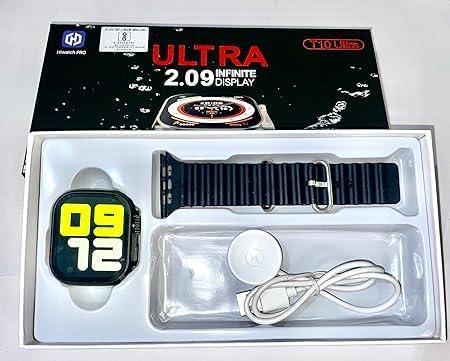
Image: The T10PRO PLUS Smart Watch, magnetic charging cable, and an extra strap neatly arranged within its retail packaging.
3. Producte acabatview
The T10PRO PLUS Smart Watch features a 2.30-inch display and offers various functionalities to enhance your daily life. Key features include Bluetooth connectivity for smartphone pairing, notification alerts, and basic health tracking capabilities.

Image: A close-up of the T10PRO PLUS Smart Watch, showcasinla seva pantalla vibrant i el seu disseny elegant.
4. Configuració
4.1. Càrrega del rellotge intel·ligent
- Connecteu el cable de càrrega magnètic a un adaptador de corrent USB (no inclòs) o al port USB d'un ordinador.
- Align the magnetic end of the cable with the charging contacts on the back of the smartwatch. The watch will snap into place and display a charging indicator.
- Charge the watch fully before first use. A full charge typically takes 1-2 hours.
4.2. Installing/Changing Straps
The T10PRO PLUS comes with interchangeable straps. To install or change a strap:
- Locate the quick-release pins on the back of the strap.
- Slide the pin inwards and align the strap with the lug on the watch body.
- Release the pin to secure the strap. Gently pull on the strap to ensure it is properly locked.
- Repetiu per a l'altre costat.

Image: Several T10PRO PLUS Smart Watches displayed with different colored straps, illustrating the interchangeable strap feature.
4.3. Emparellament amb el telèfon intel·ligent
- Assegureu-vos que el Bluetooth del vostre telèfon intel·ligent estigui activat.
- Download the companion app (refer to the watch screen or packaging for app name/QR code) from your phone's app store.
- Open the app and follow the on-screen instructions to create an account and pair your smartwatch.
- Confirma la sol·licitud d'emparellament tant al telèfon com al rellotge intel·ligent.
5. Instruccions de funcionament
5.1. Navegació bàsica
- Pantalla tàctil: Toca per seleccionar, llisca cap a l'esquerra/dreta/amunt/avall per navegar pels menús i les pantalles.
- Botó lateral: Typically used to wake the screen, return to the home screen, or access the app menu.
5.2. Característiques clau
- Notificacions: Receive alerts for calls, messages, and app notifications directly on your wrist after pairing with your smartphone.
- Seguiment de la salut: Monitor basic health metrics (e.g., steps, heart rate) through the watch and companion app.
- Esferes de rellotge personalitzables: Change the appearance of your watch face through the companion app.
6. Manteniment
6.1. Neteja
- Netegeu la pantalla i la carcassa del rellotge amb un drap suau iamp, drap sense pelusa.
- Eviteu utilitzar productes químics o materials abrasius.
- Assegureu-vos que els contactes de càrrega estiguin nets i secs abans de carregar.
6.2. Cura de la bateria
- Eviteu les temperatures extremes, que poden afectar la durada de la bateria.
- Do not leave the watch uncharged for extended periods.
7. Solució De Problemes
- El rellotge no s'encén: Assegura't que el rellotge estigui completament carregat. Connecta'l al carregador magnètic i espera uns minuts.
- No es pot emparellar amb el telèfon intel·ligent:
- Assegureu-vos que el Bluetooth estigui activat al telèfon.
- Assegureu-vos que l'aplicació complementària estigui instal·lada i en funcionament.
- Reinicieu tant el telèfon com el rellotge intel·ligent.
- Check if the watch is already paired with another device.
- Notificacions no rebudes:
- Verifiqueu que el rellotge s'hagi emparellat correctament amb el telèfon.
- Revisa la configuració de notificacions a l'aplicació complementària i al telèfon.
- Ensure the app has necessary permissions to access notifications.
8. Especificacions
| Nom de marca | Genèric |
| Nom del model | T10PRO PLUS |
| Número de model de l'article | T10PRP PLUS |
| Mida de la pantalla | 2.30 polzades |
| Forma de l'element | Rectangular |
| Sistema operatiu | Smart Watch OS |
| Característiques especials | Notificacions |
| Tecnologia de connectivitat | Bluetooth |
| Comunicació sense fils estàndard | Bluetooth |
| Composició de les cèl·lules de la bateria | Ió de liti |
| GPS | GPS mitjançant Smartphone |
| Dimensions del paquet | 21.2 x 11.4 x 2.2 cm; 50 grams |
9. Garantia i Suport
For warranty information and customer support, please refer to the retailer where you purchased the product or contact the manufacturer directly. Keep your proof of purchase for any warranty claims.


