
1. Introducció
Thank you for choosing the BLOW S18D Senior Phone. This device is designed for ease of use, featuring large buttons, a clear display, and essential functions for daily communication. Please read this manual carefully to understand how to operate your phone safely and efficiently.
2. Contingut del paquet
Ensure all items are present in your package. If anything is missing or damaged, please contact your retailer.
- BLOW S18D Senior Phone
- Base de càrrega
- Power Adapter (AC Charger)
- Bateria
- Manual d'usuari

Image: BLOW S18D phone with charging dock, power adapter, and product box.
3. Phone Layout
Familiarize yourself with the key components of your BLOW S18D phone.
3.1 Davant View
The front of the phone features the display screen, navigation buttons, call/end buttons, and the numeric keypad with large, easy-to-read characters.
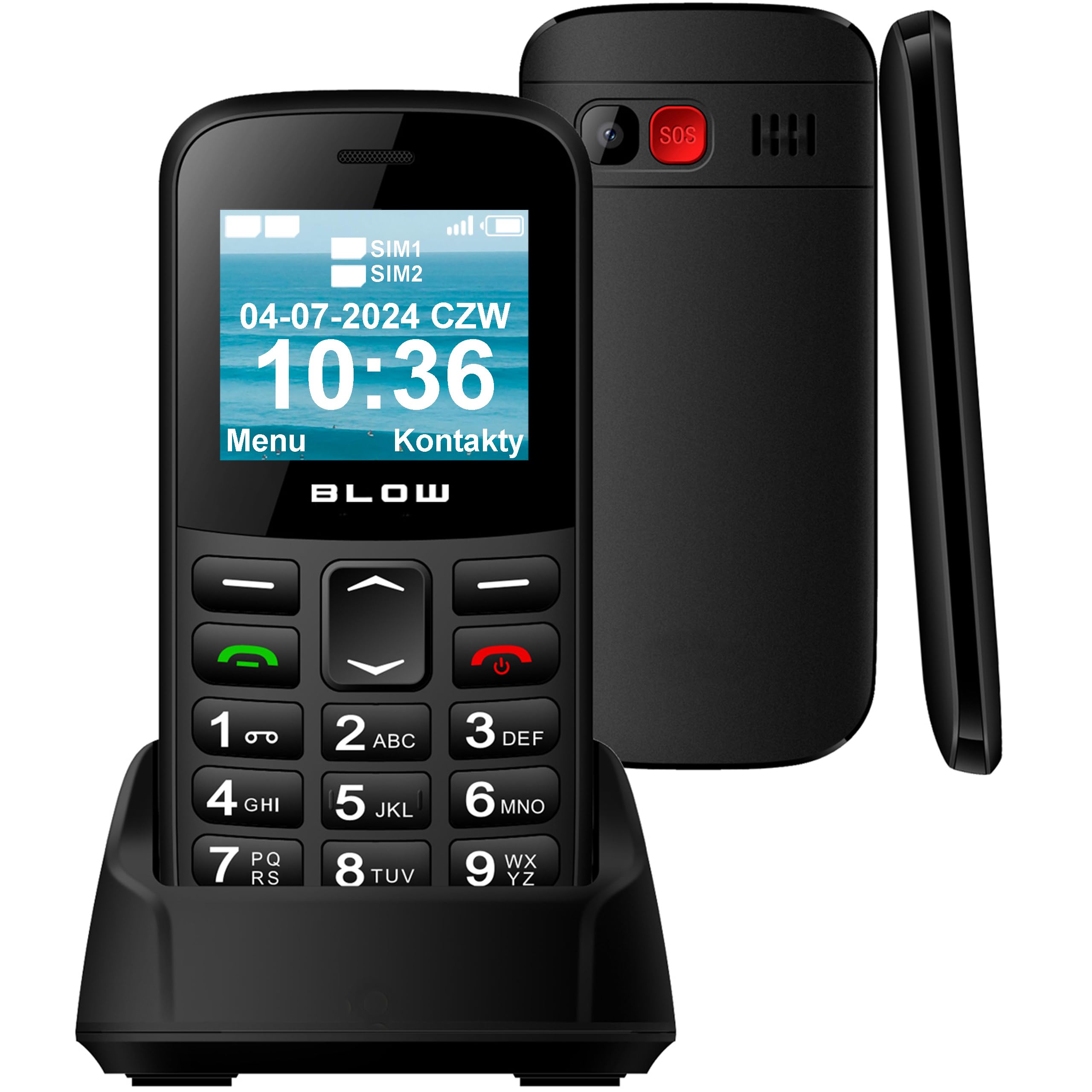
Imatge: Frontal view of the BLOW S18D senior phone in its charging dock, highlighting the large keypad and display.
3.2 Back and Side Views
The back of the phone includes the SOS emergency button, camera, and speaker. The sides may contain volume controls and the USB-C charging port.

Imatge: Lateral i posterior view of the BLOW S18D senior phone, illustrating its slim profile and the prominent SOS button on the rear.
4. Configuració
4.1 Inserting SIM Card(s) and Battery
- Traieu amb cura la tapa posterior del telèfon.
- Insert your SIM card(s) into the designated slot(s). The phone supports Dual SIM.
- If using an external memory card (up to 32 GB), insert it into the microSD card slot.
- Inseriu la bateria, assegurant-vos que els contactes estiguin correctament alineats.
- Torneu a col·locar la coberta posterior fins que encaixi al seu lloc.
4.2 Càrrega del telèfon
Abans del primer ús, carregueu completament la bateria del telèfon.
- Connecteu l'adaptador de corrent a una presa de corrent.
- Place the phone into the charging dock, ensuring it sits securely and the charging indicator appears on the screen. Alternatively, connect the USB-C cable directly to the phone.
- Una càrrega completa normalment triga unes hores.
4.3 Engegada/apagada
- Per engegar: premeu i manteniu premut el botó Engegar/Finalitzar trucada botó fins que la pantalla s'il·lumini.
- Per apagar: premeu i manteniu premut el botó Engegar/Finalitzar trucada button, then confirm power off on the screen.
5. Instruccions de funcionament
5.1 Fer i rebre trucades
- Fer una trucada: Introduïu el número de telèfon amb el teclat numèric i premeu la tecla Truca button (green).
- Recepció d'una trucada: Quan soni el telèfon, premeu la tecla Truca button (green) to answer. Press the Finalitzar la trucada button (red) to reject or end a call.
5.2 Enviament i recepció de SMS
- Navegueu fins a Missatges menú.
- Seleccioneu Escriu missatge to compose a new SMS.
- Introdueix el número del destinatari o selecciona'l dels contactes i, a continuació, escriu el missatge.
- Premeu Enviar.
5.3 Funció d'emergència SOS
The SOS button is located on the back of the phone. It allows you to quickly contact pre-set emergency numbers in critical situations.
- Configuració de números SOS: Vés a Configuració > Configuració SOS to add up to 5 emergency contacts.
- Activació de SOS: Manteniu premut el botó SOS button for a few seconds. The phone will automatically call the emergency contacts one by one until one answers, and send an emergency SMS.

Image: The BLOW S18D phone with its SOS button highlighted, set against a background suggesting emergency services.
5.4 Ràdio FM
- Accedeix al Ràdio FM application from the main menu.
- Feu servir els botons de navegació per cercar emissores o sintonitzar-les manualment.
- Headphones may be required to act as an antenna for optimal reception.
5.5 Llanterna
The phone includes a built-in flashlight for convenience.
- To turn on/off the flashlight, typically press and hold the '0' key or a dedicated side button (refer to your phone's specific key mapping).

Image: The BLOW S18D phone with its flashlight activated, shown illuminating a dark path.
5.6 Dual SIM Management
The BLOW S18D supports two SIM cards, allowing you to manage two different phone numbers simultaneously.
- You can select which SIM card to use for calls or messages from the phone's settings or directly before making a call/sending a message.
- The display will show the status of both SIM cards.

Image: The BLOW S18D phone display showing the status of two SIM cards (SIM1, SIM2) and the current date and time.
5.7 Connectivitat Bluetooth
The phone supports Bluetooth for connecting to compatible devices such as headsets or car kits.
- Vés a Configuració > Bluetooth.
- Turn Bluetooth On i cerca els dispositius disponibles.
- Select your desired device and pair them.
6. Manteniment
6.1 Neteja
- Use a soft, dry cloth to clean the phone's surface and screen.
- Eviteu utilitzar netejadors líquids o materials abrasius.
6.2 Cura de la bateria
- No exposeu la bateria a temperatures extremes.
- Use only the original charger provided with the phone.
- If the phone will not be used for an extended period, charge it partially and store it in a cool, dry place.
6.3 Emmagatzematge
- Store the phone in a dry environment, away from direct sunlight and moisture.
- Mantenir fora de l'abast dels nens i mascotes.
7. Solució De Problemes
If you encounter issues with your phone, try the following solutions before seeking professional assistance.
| Problema | Possible solució |
|---|---|
| El telèfon no s'encén | Assegureu-vos que la bateria estigui inserida correctament i completament carregada. |
| No puc fer ni rebre trucades | Comproveu si la targeta SIM està correctament inserida i activada. Verifiqueu la intensitat del senyal de xarxa. |
| Mala qualitat del so | Ensure the speaker/earpiece is not blocked. Adjust volume settings. |
| La bateria s'esgota ràpidament | Redueix la brillantor de la pantalla. Tanca les aplicacions no utilitzades. Limita l'ús de dades en segon pla. |
| El botó SOS no funciona | Verify that emergency contacts are correctly set in SOS settings. |
8. Especificacions
Below are the technical specifications for the BLOW S18D Senior Phone:
| Característica | Detall |
|---|---|
| Marca | COP |
| Nom del model | Blow S18D |
| Sistema operatiu | KaiOS |
| Mida de la RAM instal·lada | 32 MB |
| Max Supported Flash Memory Size | 32 GB (for external memory card) |
| Mida de la pantalla | 1.77 polzades |
| Operador sense fil | Tots els transportistes |
| Tecnologia cel·lular | 3G |
| Tecnologia de connectivitat | Bluetooth |
| Color | Negre |
| Tipus de connector | USB tipus C |
| Factor de forma | Pissarra |
| Nivell de resistència a l'aigua | No impermeable |
| Característiques especials | Dual SIM, Built-in Flashlight, FM Radio, SOS Button |
| Descripció de la càmera | posterior |
| Potència de la bateria | 800 mAh |
| Tipus de visualització | LCD |
| Densitat de píxels | 50 PPI |
| Any model | 2024 |
| País d'origen | Xina |
9. Informació de la garantia
The BLOW S18D Senior Phone comes with a Garantia del fabricant de 2 anys. This warranty covers defects in materials and workmanship under normal use. It does not cover damage caused by misuse, accidents, unauthorized modifications, or normal wear and tear.
Please retain your proof of purchase for warranty claims. For detailed warranty terms and conditions, refer to the documentation provided with your product or contact the manufacturer directly.
10. Suport
If you require further assistance or have questions not covered in this manual, please contact your retailer or the BLOW customer support. You can typically find contact information on the product packaging or the manufacturer's official weblloc.
When contacting support, please have your product model (S18D) and purchase details ready.