
1. Introducció
Gràcies per la compraasing the RCA SP550BT Portable Speaker. This manual provides important information regarding the setup, operation, and maintenance of your new speaker. Please read it thoroughly before use and keep it for future reference.
The RCA SP550BT is a versatile portable speaker featuring 50W output, Bluetooth connectivity, USB playback, FM radio, AUX input, True Wireless Stereo (TWS) function, LED lights, and a microphone input for an enhanced audio experience.
2. Contingut del paquet
Si us plau, comproveu el paquet per veure si hi ha els elements següents:
- RCA SP550BT Portable Speaker
- Control remot
- Cable d'alimentació
- Manual d'usuari (aquest document)
3. Producte acabatview
Familiarize yourself with the main components and features of your RCA SP550BT speaker.

Figura 3.1: Davant view of the RCA SP550BT portable speaker. This image displays the speaker in an upright position, highlighting the top control panel and the three prominent speaker cones with red illumination.

Figura 3.2: lateral view of the RCA SP550BT portable speaker. This perspective shows the depth of the speaker and the integrated handle for portability.

Figura 3.3: Horitzontal view of the RCA SP550BT portable speaker. This image illustrates the speaker's design when placed on its side, emphasizing the speaker grille and LED lighting.
3.1 Control remot
El comandament a distància inclòs permet un funcionament còmode de l'altaveu des de la distància.
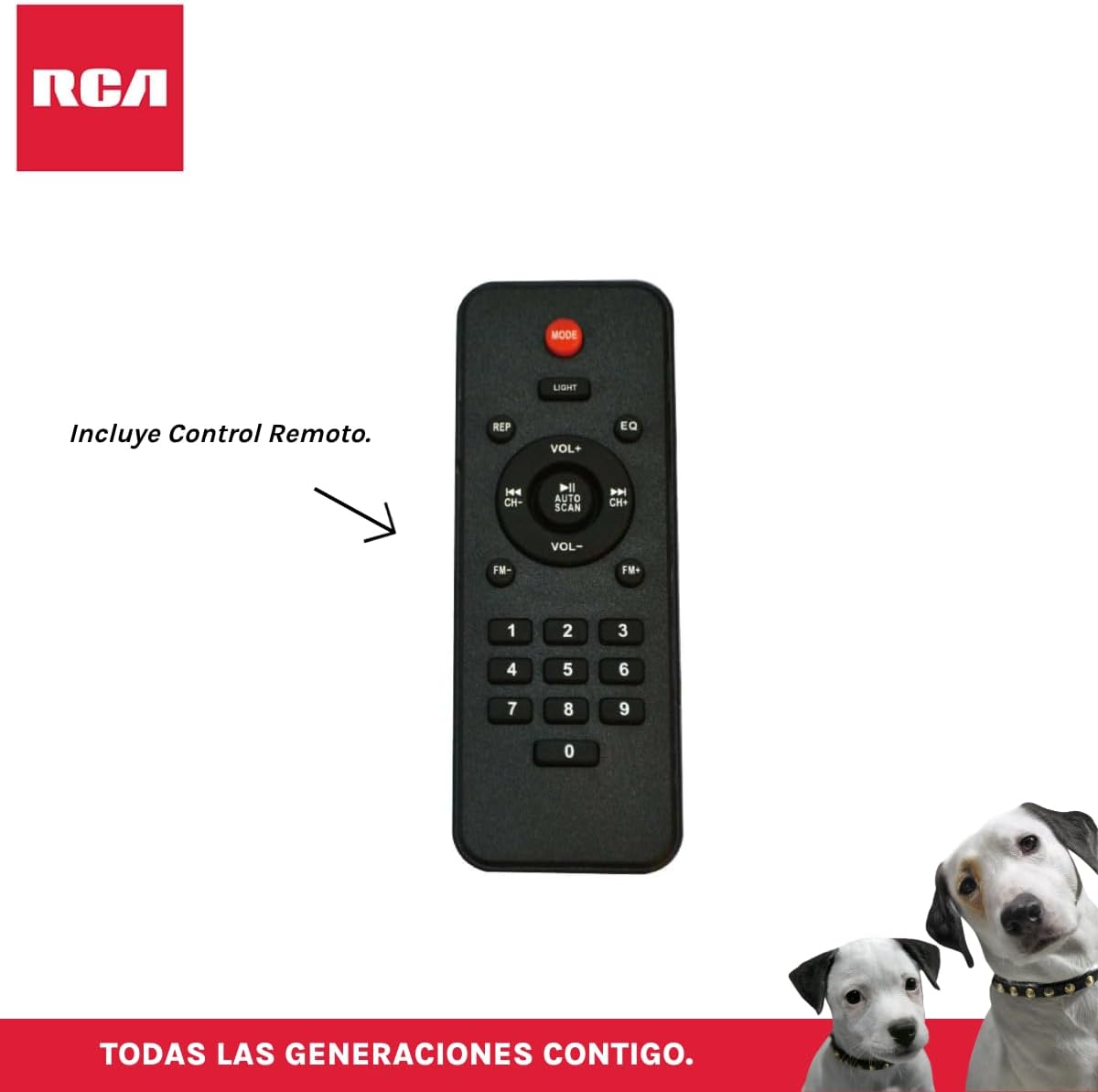
Figura 3.4: RCA SP550BT Remote Control. This image displays the full layout of the remote control, including buttons for power, mode selection, volume adjustment, track navigation, equalizer settings, and a numeric keypad.
4. Configuració
4.1 Connexió d'alimentació
- Ensure the speaker is placed on a stable, flat surface.
- Connect the power cable to the speaker's power input port.
- Plug the other end of the power cable into a standard electrical outlet (AC 100-240V, 50/60Hz).
- Press the power button on the speaker or remote control to turn it on.
5. Instruccions de funcionament
5.1 Encès/Apagat
- Per encendre l'altaveu, premeu el botó PODER button on the control panel or the remote control.
- Per apagar l'altaveu, premeu la tecla PODER botó de nou.
5.2 Selecció del mode
Premeu el botó MODE button on the control panel or remote control to switch between Bluetooth, USB, FM, and AUX input modes.
5.3 Vinculació Bluetooth
- Engegueu l'altaveu i seleccioneu el mode Bluetooth amb el botó MODE button. The display will show "BLUE" and a pairing indicator will flash.
- Activa el Bluetooth al teu dispositiu mòbil (telèfon intel·ligent, tauleta, etc.).
- Cerca "RCA SP550BT" in your device's Bluetooth list and select it to pair.
- Un cop emparellat, l'altaveu emetrà un so de confirmació i l'indicador Bluetooth deixarà de parpellejar.
- Ara pots reproduir àudio des del teu dispositiu a través de l'altaveu.
Reproducció USB 5.4
- Insert a USB flash drive (FAT32 format, max 32GB) containing MP3 audio files al port USB.
- The speaker will automatically switch to USB mode and begin playing the first track. If not, press the MODE botó per seleccionar el mode USB.
- Utilitza el REPRODUCCIÓ/PAUSA, ANTERIOR, i SEGÜENT buttons on the control panel or remote to control playback.
5.5 Ràdio FM
- Turn on the speaker and select FM mode using the MODE botó.
- Manteniu premut el botó REPRODUCCIÓ/PAUSA botó (o ESCÀNER AUTOMÀTIC al comandament a distància) per escanejar i desar automàticament les emissores de FM disponibles.
- Utilitza el ANTERIOR i SEGÜENT botons per navegar per les emissores desades.
5.6 Entrada AUX
- Connect an external audio device (e.g., MP3 player, laptop) to the speaker's AUX input port using a 3.5mm audio cable (not included).
- Seleccioneu el mode AUX amb el botó MODE botó.
- Controla la reproducció i el volum des del dispositiu connectat.
Funció 5.7 TWS (True Wireless Stereo)
The TWS function allows you to connect two RCA SP550BT speakers wirelessly for a stereo sound experience.
- Ensure both SP550BT speakers are powered on and in Bluetooth mode, but not yet paired with any device.
- En un dels altaveus, premeu i manteniu premut el botó TWS button (if available, or a dedicated TWS pairing button) until you hear a confirmation tone. The speakers will attempt to pair with each other.
- Once successfully paired, one speaker will act as the master (left channel) and the other as the slave (right channel).
- Now, pair your mobile device with the master speaker via Bluetooth as described in section 5.3.
5.8 llums LED
Premeu el botó LLUM button on the control panel or remote control to cycle through different LED light modes or to turn them off.
5.9 Ús del micròfon
Connect a wired microphone (not included) to the microphone input port on the speaker. Adjust the microphone volume using the dedicated knob (if available) or the main volume control.
6. Manteniment
- Neteja: Feu servir un drap suau i sec per netejar l'exterior de l'altaveu. No utilitzeu productes de neteja abrasius ni dissolvents.
- Emmagatzematge: Quan no l'utilitzeu durant períodes prolongats, guardeu l'altaveu en un lloc fresc i sec, allunyat de la llum solar directa i de temperatures extremes.
- Exposició a l'aigua: Aquest altaveu no és impermeable. Eviteu exposar-lo a l'aigua o a una humitat excessiva.
7. Solució De Problemes
Si teniu problemes amb l'altaveu, consulteu els problemes i solucions més comuns següents:
| Problema | Causa possible | Solució |
|---|---|---|
| Sense poder | Power cable not connected; Power outlet not working; Speaker off. | Check power cable connection; Try a different outlet; Press the POWER button. |
| Sense so | Volum massa baix; Mode incorrecte seleccionat; Dispositiu no connectat correctament. | Increase volume; Select correct input mode (Bluetooth, USB, AUX); Reconnect device. |
| L'aparellament de Bluetooth falla | Speaker not in pairing mode; Device Bluetooth off; Speaker already paired. | Ensure speaker is in Bluetooth pairing mode; Turn on device Bluetooth; Disconnect from other devices. |
| La reproducció USB no funciona | USB drive format incompatible; Corrupt files; USB drive not inserted correctly. | Ensure USB is FAT32 format; Check file integrity; Reinsert USB drive. |
| Mala recepció de la ràdio FM | Senyal feble; Interferències. | Relocate speaker; Extend antenna (if applicable). |
8. Especificacions
| Característica | Especificació |
|---|---|
| Model | SP550BT |
| Marca | RCA |
| Potència de sortida dels altaveus | 50 watts (màxim) |
| Tecnologia de connectivitat | Bluetooth, USB, AUX |
| Tecnologia sense fils | Bluetooth |
| Mode de sortida d'àudio | estèreo |
| Tipus d'altaveu | Portàtil, a l'aire lliure |
| Tipus de muntatge | Muntatge de taula |
| Mètode de control | Control remot |
| Mida de l'altaveu | 6.5 polzades |
| Diàmetre del woofer | 6.5 polzades |
| Capacitat de la bateria | 4400 milionsamp Hores |
| Font d'alimentació | Cable elèctric |
| Dispositius compatibles | Ordinador portàtil, reproductor MP3, telèfon intel·ligent, tauleta |
| GTIN / UPC | 044476152061 |
9. Garantia i Suport
This product comes with a limited warranty. Please refer to the warranty card included in your package for specific terms and conditions. For technical support or service inquiries, please contact RCA customer service through their official weblloc web o la informació de contacte proporcionada amb la compra.
Note: Warranty terms may vary by region. Keep your proof of purchase for warranty claims.