
1. Introducció
The LEOBOG HI75C Pro is a 75% TKL mechanical wireless keyboard designed for versatility and performance. It features an aluminum alloy case, tri-mode connectivity (Bluetooth 5.0, 2.4GHz wireless, and USB-C wired), RGB backlighting, a multi-functional knob, and hot-swappable switches. This manual provides detailed instructions for setting up, operating, and maintaining your keyboard.

Figure 1: LEOBOG HI75C Pro Mechanical Wireless Keyboard Overview
2. Contingut del paquet
Verifiqueu que tots els elements siguin presents al vostre paquet:
- LEOBOG HI75C Pro Mechanical Wireless Keyboard
- Extractor de tecles
- Cable USB (tipus C)
- Replace Switch (Spare Switches)
3. Característiques del producte
The LEOBOG HI75C Pro keyboard incorporates several advanced features for an enhanced user experience:
- Aluminium Alloy Cover: Provides superior heat dissipation, robustness, and durability. Features an exquisite powder coating process for a luxurious feel and fingerprint resistance.
- Disseny de la junta: Significantly reduces cavity noise and improves typing sound for a satisfying low-noise experience.
- 3-Mode Connection: Supports Bluetooth 5.0, 2.4GHz wireless, and USB wired connections, allowing connection to up to five devices simultaneously.
- Disseny del 75%: An 81-key layout that balances concise design with full functionality, saving desk space.
- Retroil·luminació RGB: Features 16.8 million RGB lighting colors with 17 lighting effects and 10 music rhythm modes.
- Dual-Mode Knob: A multi-functional knob for precise control over volume (office mode) and lighting brightness (game mode).
- High Speed Response: Equipped with an advanced gaming keyboard chip for a response speed of up to 2.8ms.
- Interruptors intercanviables en calent: Allows for easy replacement of switches without soldering.
- Bateria de 4000 mAh: Provides extended usage time, approximately one month without backlighting.

Figure 2: Key features of the LEOBOG HI75C Pro keyboard.

Figure 3: Diagram illustrating the multi-layered gasket structure for sound dampening.

Figure 4: Ergonomic keycap height design for comfortable typing.
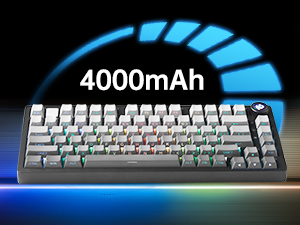
Figure 5: The keyboard is equipped with a 4000mAh battery.
4. Configuració i connectivitat
The LEOBOG HI75C Pro offers three connection modes: wired, 2.4GHz wireless, and Bluetooth. Use the switch on the side of the keyboard to select your desired mode.
4.1 Connexió per cable
- Ensure the mode switch on the side of the keyboard is set to the wired (USB-C) position.
- Connecteu el cable USB-C proporcionat al teclat i a un port USB disponible de l'ordinador.
- El teclat es reconeixerà automàticament i estarà llest per al seu ús.
Connexió sense fil 4.2 de 2.4 GHz
- Ensure the mode switch on the side of the keyboard is set to the 2.4GHz wireless position.
- Connecteu el receptor USB de 2.4 GHz a un port USB disponible de l'ordinador.
- El teclat s'hauria de connectar automàticament. Si no, premeu FN + ~ per iniciar l'aparellament.
Connexió Bluetooth 4.3 5.0
- Ensure the mode switch on the side of the keyboard is set to the Bluetooth position.
- On your device (PC, Mac, Android, iOS), enable Bluetooth and search for new devices.
- Mantén premut FN + 1, FN + 2, o FN + 3 for 3-5 seconds to enter pairing mode for BT1, BT2, or BT3 respectively. The indicator light will flash.
- Select "LEOBOG HI75C Pro" from the list of available Bluetooth devices on your device.
- Once connected, the indicator light will stop flashing. You can switch between paired Bluetooth devices using FN + 1/2/3.

Figure 6: The keyboard supports Type-C wired, 2.4GHz wireless, and Bluetooth connections.
Video 1: Official LEOBOG overview of the HI75C Pro Mechanical Gaming Keyboard, showcasing el seu disseny i les seves característiques.
5. Funcionament
5.1 Il·luminació de fons RGB
The keyboard features extensive RGB backlighting with 17 preset lighting effects. Additionally, it offers 10 music rhythm RGB lighting modes that synchronize with audio output. You can adjust lighting effects and brightness using the multi-functional knob or dedicated key combinations. To turn off the lights, use the knob in game mode.
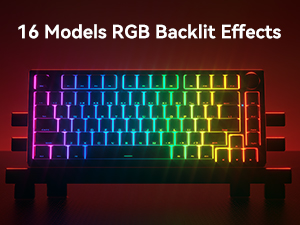
Figure 7: The keyboard offers 16 models of RGB backlit effects.
5.2 Dual-Mode Knob Control
The multi-functional knob allows for quick adjustments based on the selected mode:
- Canvi de modes: Press and hold the knob to toggle between Office Mode and Game Mode.
- Mode d'oficina: When the indicator light is continuously on, the keyboard is in office mode. Rotate the knob to adjust the system volume.
- Mode de joc: When the indicator light is breathing, the keyboard is in game mode. Rotate the knob to adjust the lighting brightness.

Figure 8: The multi-functional knob for volume and lighting control.
5.3 Commutadors intercanviables en calent
The LEOBOG HI75C Pro supports hot-swappable 3-pin/5-pin mechanical switches, allowing you to easily change switches without soldering. This feature enables customization of typing feel and sound.

Figure 9: The keyboard features hot-swappable switches for customization.
6. Manteniment
6.1 Neteja
Per mantenir un rendiment i un aspecte òptims, netegeu el teclat regularment:
- Desconnecteu el teclat de totes les fonts d'alimentació abans de netejar-lo.
- Utilitzeu un drap suau i sense pelusa lleugerament dampEsbandiu amb aigua o una solució netejadora suau per netejar les tecles i la carcassa.
- Per a una neteja més profunda, feu servir l'extractor de tecles inclòs per treure les tecles i netegeu-les per sota amb aire comprimit o un raspall petit.
- Ensure the keyboard is completely dry before reconnecting.
6.2 Substitució de la tapa de les tecles i l'interruptor
The hot-swappable design allows for easy replacement of keycaps and switches:
- Use the provided keycap puller to gently remove keycaps.
- Use a switch puller (not included, but often comes with replacement switches) to carefully remove switches. Grip the switch firmly and pull straight up.
- Align the pins of the new switch with the holes on the PCB and press down gently until it clicks into place. Ensure pins are not bent.
- Col·loqueu la tapa de tecla desitjada a la nova tija de l'interruptor.
7. Solució De Problemes
7.1 Problemes de connectivitat
- Sense conexió: Ensure the mode switch on the side of the keyboard is set correctly for wired, 2.4GHz, or Bluetooth.
- 2.4GHz Disconnection: Re-plug the USB receiver. Try pairing again by pressing FN + ~.
- Desconnexió Bluetooth: Ensure Bluetooth is enabled on your device. Re-enter pairing mode on the keyboard (FN + 1/2/3) and re-select the keyboard on your device.
- Interferència: Move the keyboard closer to the receiver/device or away from other wireless devices that might cause interference.
7.2 Programari i firmware
For advanced customization, macro programming, and firmware updates, please visit the official LEOBOG website or authorized distributors' websites. Ensure you download the correct software/firmware version specifically for the LEOBOG HI75C Pro model to avoid compatibility issues.
7.3 RGB Lighting Not Working
- Check if the keyboard is in Game Mode, where the knob controls brightness. Rotate the knob to increase brightness.
- Ensure the battery is sufficiently charged if using wireless mode.
- If using software, verify that lighting effects are enabled and configured correctly.
8. Especificacions
| Característica | Detall |
|---|---|
| Número de model | HI75C PRO |
| Dimensions del producte | 12.97 x 5.35 x 1.74 polzades |
| Pes de l'article | 3.41 lliures |
| Tecnologia de connectivitat | Bluetooth, USB-C, sense fil de 2.4 GHz |
| Descripció del teclat | Mecànica |
| Dispositius compatibles | Consola de jocs, ordinador portàtil, PC, telèfon intel·ligent, tauleta |
| Característiques especials | Customizable Display Keys, Ergonomic, Hot-Swappable, Hotkeys and Media Keys, Programmable Keys |
| Il·luminació del teclat | RGB |
| Bateria | 1 A battery required (included), 4000mAh |
9. Garantia i Suport
LEOBOG provides a 2 any de garantia for the HI75C Pro Mechanical Wireless Keyboard, covering manufacturing defects from the date of purchase. For warranty claims, technical assistance, or product inquiries, please contact LEOBOG customer support through their official weblloc web o el venedor on es va comprar el producte.

Figure 10: LEOBOG customer service is available for support.