
1. Introducció
This manual provides comprehensive instructions for the safe and effective operation of the Jesverty SPS-12003V DC Power Supply. This device is a variable 0-120V, 0-3A switching bench power supply designed for various electronic applications, including laboratories, educational settings, manufacturing tests, maintenance, battery charging, and DIY projects. It features encoder coarse and fine adjustment knobs, an output ON/OFF switch, and integrated USB-A and Type-C quick-charge ports.

Figura 1: Frontal view of the Jesverty SPS-12003V DC Power Supply, showcasing its compact design and clear LED display.
2. Instruccions de seguretat
Adherence to the following safety guidelines is crucial for preventing electric shock, fire, or damage to the unit and connected devices. Always read and understand these instructions before operation.
- Font d'alimentació: Ensure the power supply is connected to an AC outlet with the correct voltage (AC115V/230V selectable input). Verify the input voltage switch setting matches your local power grid before connecting.
- Ventilació: Do not block the ventilation openings. Ensure adequate airflow around the unit to prevent overheating. The integrated cooling fan activates automatically when necessary.
- Medi ambient: Operate the power supply in a dry, well-ventilated area, away from direct sunlight, high temperatures, humidity, and corrosive gases.
- Posada a terra: Connecteu sempre la font d'alimentació a una presa de corrent amb connexió a terra.
- Connexions de sortida: Ensure all output connections are secure and correct before turning on the output. Avoid short circuits.
- Protecció contra sobreintensitat (OCP): Utilize the OCP function to protect your load from excessive current.
- Cables de prova: Use test leads with sufficient current capacity for your application, especially for long-term high-current use. The included test leads are for general use.
- Manteniment: No intenteu fer el manteniment de la unitat vosaltres mateixos. Encarregueu totes les tasques de manteniment a personal qualificat.
3. Característiques del producte
The Jesverty SPS-12003V DC Power Supply incorporates several advanced features for enhanced precision and convenience:
- Botons d'ajustament gruixut i fi del codificador: Digital encoder knobs replace traditional potentiometers for precise voltage and current setting. The coarse knob adjusts values before the decimal point, while the fine knob adjusts values after the decimal point (0.01V/0.001A resolution).
- Ports de càrrega ràpida USB-A i USB-C de 20 W: Equipped with dual charging ports supporting 20W fast charging, ideal for smartphones, Arduino UNO, Raspberry Pi, and other electronic modules.
- Botó d'activació/desactivació de la sortida: A dedicated button to easily switch the output ON or OFF, allowing adjustments without disconnecting the load or powering down the unit.
- Pantalla LED de 4 dígits: Provides accurate readings for voltage, current, and power (watts) with high resolution.
- Proteccions múltiples: Includes Over-Current Protection (OCP) and a temperature-regulated cooling fan for safe and stable operation.
- OPN Output Status Setting: A function that allows the unit to output voltage and current immediately upon power-on without requiring the "OUTPUT" button press.
- Disseny compacte i lleuger: Measuring approximately 7.1(D)x3.6(W)x6.2(H) inches and weighing 2.5 lbs, it saves valuable workbench space.

Figure 2: Close-up of the accurate 4-digit LED display, showing voltage, corrent i wattage lectures.
4. Components i controls
Familiarize yourself with the various components and controls of the SPS-12003V power supply:

Figure 3: Detailed diagram identifying the front and rear components of the power supply.
- Voltage Visualització: Mostra el volum definit o de sortidatage.
- Indicador del mode CV: S'il·lumina quan la unitat funciona a Volum Constanttagmode e.
- Indicador del mode CC: S'il·lumina quan la unitat funciona en mode de corrent constant.
- Visualització actual: Mostra el corrent configurat o de sortida.
- LED d'estat de l'OCP: Indica l'estat de la protecció contra sobrecorrent.
- LED d'estat de l'OPN: Indicates OPN (Output Power ON) function status.
- Pantalla de potència: Shows the output power in Watts.
- Port de càrrega ràpida USB-C: Type-C port for fast charging compatible devices.
- Port de càrrega ràpida USB-A: Type-A port for fast charging compatible devices.
- Botó de configuració de l'OCP: Press to enable/disable Over-Current Protection.
- Botó de control de sortida: Activa/desactiva la sortida principal.
- VoltagManeta e (gruixuda): Adjusts the integer part of the voltage.
- VoltagManeta e (Fi): Adjusts the decimal part of the voltage.
- Botó de corrent (gruixut): Adjusts the integer part of the current.
- Botó actual (Fi): Adjusts the decimal part of the current.
- Interruptor d'alimentació: Interruptor principal d'encesa/apagada de la unitat.
- Terminal de sortida - (Negre): Terminal de sortida negativa.
- Terminal de connexió a terra (verd): Terminal de connexió a terra.
- Terminal de sortida + (vermell): Terminal de sortida positiu.
- Ventilador de refrigeració: Automatically regulates temperature.
- Interruptor seleccionable d'entrada: Selects AC115V or AC230V input voltage.
- Entrada d'alimentació CA: Connecta el cable d'alimentació a la unitat.
- Caixa de fusibles (fusible de recanvi a l'interior): Contains the main fuse and a spare.
5. Guia de configuració
- Desembalatge: Carefully remove the power supply and all accessories from the packaging. Verify that all items listed in the "What's in the Box" section are present.
- Col·locació: Place the unit on a stable, flat surface with adequate ventilation space around it. Ensure no objects obstruct the cooling fan or vents.
- Entrada Voltage Selecció: Locate the Input Selectable Switch (21) on the rear of the unit. Set it to match your local AC mains voltage (115V o 230V). Incorrect setting can damage the unit.
- Connexió d'alimentació: Connect the provided power cord to the AC Power Inlet (22) on the rear of the unit, then plug the other end into a grounded AC outlet.
- Encesa inicial: Turn on the Power Switch (16) on the front panel. The LED display should illuminate.
- Output Terminal Connection: Connect your test leads to the Output Terminal + (Red, 19) and Output Terminal - (Black, 17). If grounding is required for your application, connect to the Grounding Terminal (Green, 18).
6. Instruccions de funcionament
6.1 Configuració Voltage i Actual
The SPS-12003V uses encoder knobs for precise adjustments:
- Voltage Ajust:
- Gira el Voltage Pom (gruixut) (12) to adjust the integer part of the desired voltage.
- Gira el Voltage Pom (Fi) (13) to adjust the decimal part of the desired voltage (0.01V resolution).
- Ajust actual:
- Gira el Control actual (gruixut) (14) to adjust the integer part of the desired current.
- Gira el Control actual (Fi) (15) to adjust the decimal part of the desired current (0.001A resolution).
The display will show the set values. Pressing the knobs allows you to switch the active digit for adjustment, providing finer control.
6.2 Control de sortida ON/OFF
Després d'ajustar el volum desitjattage and current, press the Botó de control de sortida (11) to enable or disable the output. This allows you to adjust settings without disconnecting the load.
6.3 Protecció contra sobrecorrent (OCP)
The OCP function protects your connected load from excessive current. To use OCP:
- Premeu el botó Botó de configuració de l'OCP (10) to activate OCP. The OCP Status LED (5) will illuminate.
- Set the desired maximum current limit using the Current Knobs.
- If the output current exceeds this set limit, the power supply will automatically cut off the output and trigger an alarm, protecting the load.
- To reset OCP after an event, resolve the overcurrent condition and press the OCP Setting Button again.
6.4 OPN (Output Power ON) Function
The OPN function allows the power supply to automatically enable its output upon powering on the unit, bypassing the need to press the Output Control Button (11).
- To enable OPN, refer to the specific instructions in the full manual (usually involves a combination of button presses during power-on). When active, the OPN Status LED (6) will illuminate.
- When OPN is enabled, the unit will immediately output the previously set voltage and current upon turning on the main Power Switch (16).
7. Funció de càrrega USB
The SPS-12003V is equipped with 20W USB-A (9) and USB-C (8) quick-charge ports on the front panel. These ports are independent of the main DC output and can be used to charge compatible devices simultaneously.
- Simply connect your device's USB charging cable to the appropriate USB-A or USB-C port.
- The ports support various fast charging protocols, providing up to 20W of power.
- These ports are ideal for powering or charging small electronic devices like smartphones, tablets, or microcontrollers (e.g., Arduino, Raspberry Pi) during your projects.

Figure 4: The power supply demonstrating its USB-A and USB-C quick-charge capabilities.
8. Manteniment
Proper maintenance ensures the longevity and reliable operation of your Jesverty SPS-12003V power supply:
- Neteja: Desconnecteu l'alimentació de la presa de corrent abans de netejar-lo. Feu servir un drap suau i sec per netejar l'exterior. No utilitzeu productes de neteja abrasius ni dissolvents.
- Ventilació: Regularly check that the cooling fan and ventilation openings are free from dust and debris. Use compressed air to clear any blockages if necessary.
- Emmagatzematge: Quan no l'utilitzeu durant períodes prolongats, guardeu la unitat en un lloc fresc i sec, allunyat de la llum solar directa i de temperatures extremes.
- Substitució de fusibles: If the unit does not power on, check the fuse located in the Fuse Box (23) on the rear panel. Replace it with a fuse of the same type and rating (a spare fuse is typically included inside the fuse box). Always disconnect the power cord before replacing the fuse.
9. Solució De Problemes
| Problema | Causa possible | Solució |
|---|---|---|
| La unitat no s'encén. | No AC power; Power cord loose; Blown fuse; Input voltagl'interruptor és incorrecte. | Check AC outlet and power cord connection. Verify Input Selectable Switch (21) setting. Check and replace fuse (23) if blown. |
| Sense sortida voltage / actual. | Output is OFF; OCP activated; Short circuit in load; Incorrect connections. | Press Output Control Button (11) to turn ON. Check OCP Status LED (5) and reset if active. Verify load connections and check for short circuits. |
| Volum de sortidatagcorrent elèctric inestable. | Poor connections; Overheating; Load impedance fluctuations. | Ensure all connections are secure. Check for adequate ventilation. Reduce load or adjust settings if operating near limits. |
| Cooling fan is loud or constantly running. | Temperatura ambient alta; Càrrega pesada; Reixetes de ventilació bloquejades. | Ensure proper ventilation. Reduce load if possible. Clean vents if dusty. Fan operation is temperature-regulated and normal under load. |
10. Especificacions
| Paràmetre | Valor |
|---|---|
| Número de model | SPS-12003V |
| Entrada Voltage | CA 115V/230V (seleccionable) |
| Vol. De sortidatage Rang | 0-120V DC |
| Interval de corrent de sortida | 0-3 A DC |
| Voltage Resolució | 0.01 V |
| Resolució actual | 0.001A |
| Potència de sortidatage (USB) | 20W (USB-A, USB-C) |
| Dimensions (L x A x A) | Aprox. 7.1 x 3.6 x 6.2 polzades (18 x 9 x 16 cm) |
| Pes de l'article | Aprox. 2.5 kg (1.14 lliures) |
| Mostra | LED de 4 dígits (Volum)tage, Corrent, Potència) |
| Característiques de protecció | OCP (Over-Current Protection), Over-Temperature Protection |
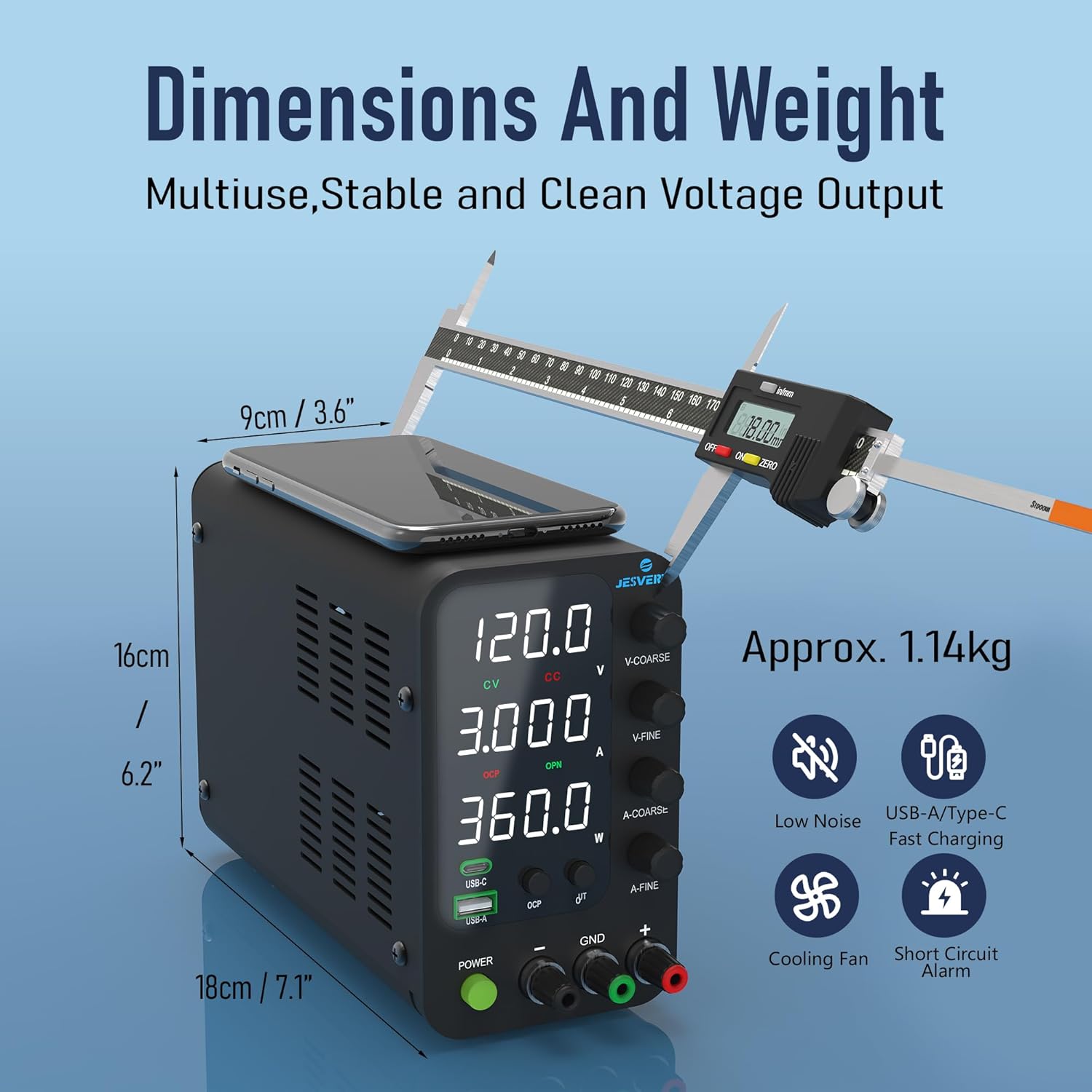
Figure 5: Visual representation of the compact dimensions and weight of the power supply.
11. Garantia i atenció al client
Jesverty provides professional technical support for its products. If you encounter any problems or have questions regarding your SPS-12003V DC Power Supply, please contact Jesverty Customer Service.
- Informació de contacte: Refer to the back of the instruction manual included with your unit for specific contact details (e.g., email address).
- Garantia: Information regarding the product warranty period and terms is typically provided with the purchase documentation or can be obtained by contacting customer service.
- Articles inclosos: Your package should contain: 1 x SPS-V Unit, 1 x Power Cord*, 1 set of test leads*, 1 x instruction manual. (*Note: Power cords and AC input settings may vary by destination. Test leads are general-purpose; use higher capacity leads for long-term high-current projects.)