
Introducció
This manual provides comprehensive instructions for the safe and efficient operation of your Jesverty SPS-6005V DC Power Supply. This variable switching bench power supply offers a 0-60V and 0-5A output range, featuring 20W USB & Type-C quick-charge ports, encoder coarse & fine adjustment knobs, an output switch, and a 4-digit LED display. It is designed for various applications including laboratories, educational sites, factory manufacturing tests, maintenance repairs, battery charging, anodizing, and electronic DIY projects.
Què s'inclou
En desempaquetar, assegureu-vos que hi hagi tots els elements següents:
- 1 x SPS-V Unit (DC Power Supply)
- 1 x Power Cord (Note: Power cords and AC input settings may vary by destination)
- 1 set of Test Leads (Note: These are basic leads; for long-term high current use, prepare leads with sufficient capacity)
- 1 x manual d'instruccions
Producte acabatview

Figura 1: Davant view of the Jesverty SPS-6005V DC Power Supply, showcasing its clear 4-digit LED display and control knobs.

Figura 2: Detallada view of the power supply with numbered labels indicating key components such as Voltage Display, Current Display, USB Quick-Charge ports, Power Switch, Output Terminals, and Cooling Fan.
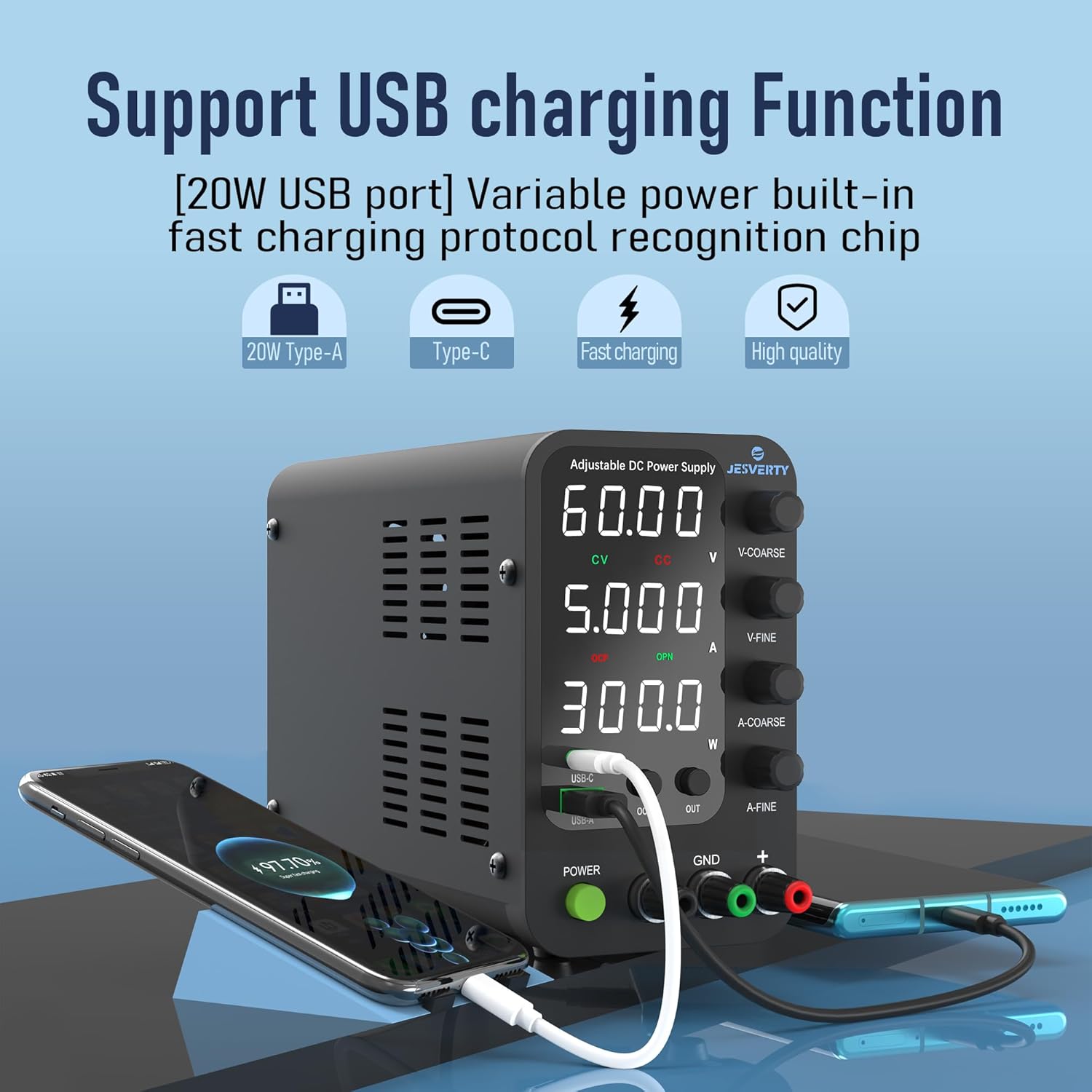
Figura 3: The power supply features integrated USB-A and USB-C ports, both supporting 20W fast charging, ideal for powering and charging various electronic devices.

Figura 4: The unit boasts an accurate 4-digit LED display with a resolution of up to 0.01V, 0.001A, and 0.1W, ensuring precise readings for voltage, corrent i potència.

Figura 5: Compact and lightweight design, measuring approximately 7.1(D)x3.6(W)x6.2(H) inches and weighing about 2.5 lbs (1.14 kg), saving valuable workbench space.

Figura 6: The power supply is versatile and suitable for various applications, including DIY electronics, educational purposes, electronic laboratories, and auto repair shops.
Configuració
- Desempaquetar la unitat: Carefully remove the SPS-6005V unit, power cord, and test leads from the packaging. Inspect all components for any signs of damage.
- Seleccioneu Input Voltage: Locate the AC input voltage selector switch on the rear of the unit. Ensure it is set to the correct voltage for your region (AC115V or AC230V).
- Connecteu el cable d'alimentació: Plug the provided power cord into the AC power inlet on the rear of the unit, then connect the other end to a suitable wall outlet.
- Connecteu els cables de prova: Connect the red test lead to the positive (+) output terminal and the black test lead to the negative (-) output terminal. The green terminal (GND) is for grounding purposes.
- Encès: Press the green "POWER" button on the front panel to turn on the unit. The LED display will illuminate.
Instruccions de funcionament
Voltage i Ajust de corrent
- V-COARSE Knob: Use this encoder knob for coarse adjustment of the output voltage. It controls the digits before the decimal point (e.g., 1V, 10V).
- V-FINE Knob: Use this encoder knob for fine adjustment of the output voltage. It controls the digits after the decimal point (e.g., 0.01V, 0.001V).
- A-COARSE Knob: Use this encoder knob for coarse adjustment of the output current. It controls the first two digits of the current display.
- A-FINE Knob: Use this encoder knob for fine adjustment of the output current. It controls the last two digits of the current display.
- Digit Selection: Pressing any of the coarse/fine adjustment knobs allows you to switch between the digits to be adjusted, providing precise control over voltage and current settings (resolution 0.01V/0.001A).
Control de sortida
- Botó SORTIDA: Press this button to toggle the output ON or OFF. This allows you to adjust settings without disconnecting the load or turning off the power supply.
Protecció contra sobrecorrent (OCP)
- OCP Button: Press this button to enter the OCP configuration interface. You can set a maximum current limit. If the output current exceeds this limit, the OCP indicator will flash, and the output will be turned off to protect the connected device.
Output Status Setting (OPN)
- Funció OPN: This feature allows the unit to output voltage and current automatically as soon as the power switch is turned on, without needing to press the "OUT" button. To enable/disable, press and hold the "OUT" button for 3 seconds to enter the OPN configuration interface. The OPN indicator will light up when enabled.
Ports de càrrega USB
- USB-A & USB-C: The front panel includes USB-A and USB-C ports, both supporting 20W fast charging. These are convenient for charging smartphones or powering small electronic modules like Arduino UNO or Raspberry Pi.
Vídeo de demostració
Vídeo: An official Jesverty video demonstrating the features and operation of the DC power supply, including knob adjustments, output control, and USB charging capabilities.
Manteniment
- Neteja: Netegeu la unitat regularment amb un drap suau i sec. No utilitzeu productes de neteja abrasius ni dissolvents.
- Ventilació: Assegureu-vos que el ventilador de refrigeració i les ranures de ventilació estiguin lliures de pols i obstruccions per mantenir un flux d'aire adequat i evitar el sobreescalfament.
- Emmagatzematge: Quan no la feu servir durant períodes prolongats, guardeu la font d'alimentació en un lloc fresc i sec, allunyat de la llum solar directa i de temperatures extremes.
Resolució de problemes
| Problema | Causa possible | Solució |
|---|---|---|
| Sense alimentació/pantalla | Power cord not connected; incorrect input voltage; blown fuse. | Check power cord connection; verify input voltage selector; check/replace fuse (spare fuse inside). |
| Sense sortida voltage/actual | Output is OFF; OCP activated; faulty test leads. | Press "OUT" button to turn ON; check OCP settings; inspect/replace test leads. |
| Lectures inexactes | Calibration needed; external interference. | Contact customer service for calibration; ensure proper grounding and minimize interference. |
| Fan constantly running/loud | High load/temperature; obstructed ventilation. | This is normal under high load; ensure clear ventilation paths. |
Especificacions
| Característica | Detall |
|---|---|
| Nom del model | SPS-V |
| Número de model de l'article | SPS-6005V |
| Marca | Jesverty |
| Vol. De sortidatage Rang | 0-60V |
| Interval de corrent de sortida | 0-5A |
| Potència de sortidatage | 20 watts (USB/Tipus C) |
| Mostra | LED de 4 dígits |
| Perilles d'ajust | Encoder Coarse & Fine (Voltage & actual) |
| Ports USB | USB-A, USB-C (20W Quick-Charge) |
| Característiques de protecció | OCP (Over-Current Protection), Temperature-regulated cooling fan |
| Dimensions (PxAxA) | 7.1 x 3.6 x 6.2 polzades |
| Pes de l'article | 3.39 lliures (1.54 kg) |
| País d'origen | Xina |
Garantia i Suport
Jesverty provides professional technical support for this product. Should you encounter any problems or have questions regarding your order or the product's operation, please feel free to contact Jesverty Customer Service via Amazon message or the email address provided on the back of the instruction manual.