
1. Introducció
Aquest manual proporciona instruccions detallades per als auriculars de joc sense fil EKSA E5000 BT. Cobreix la configuració, el funcionament, el manteniment i la resolució de problemes per garantir un rendiment i una experiència d'usuari òptims. Llegiu aquest manual detingudament abans d'utilitzar els auriculars.

Imatge 1.1: Els auriculars de joc sense fil EKSA E5000 BT, mostraasing el seu disseny i el dongle USB inclòs.
2. Contingut del paquet
Verifiqueu que tots els elements siguin presents al vostre paquet:
- Auriculars de joc sense fil EKSA E5000 BT
- Micròfon desmuntable amb cancel·lació de soroll
- Transmissor sense fil USB-A de 2.4 GHz
- Adaptador USB-C a USB-A (integrat amb transmissor de 2.4 GHz)
- Cable d'àudio de 3.5 mm
- Cable de càrrega USB (tipus C)
- Manual d'usuari
- Bossa de transport (si s'inclou amb la variant específica del vostre model)
3. Producte acabatview i Controls
Familiaritzeu-vos amb els components i els controls dels auriculars.
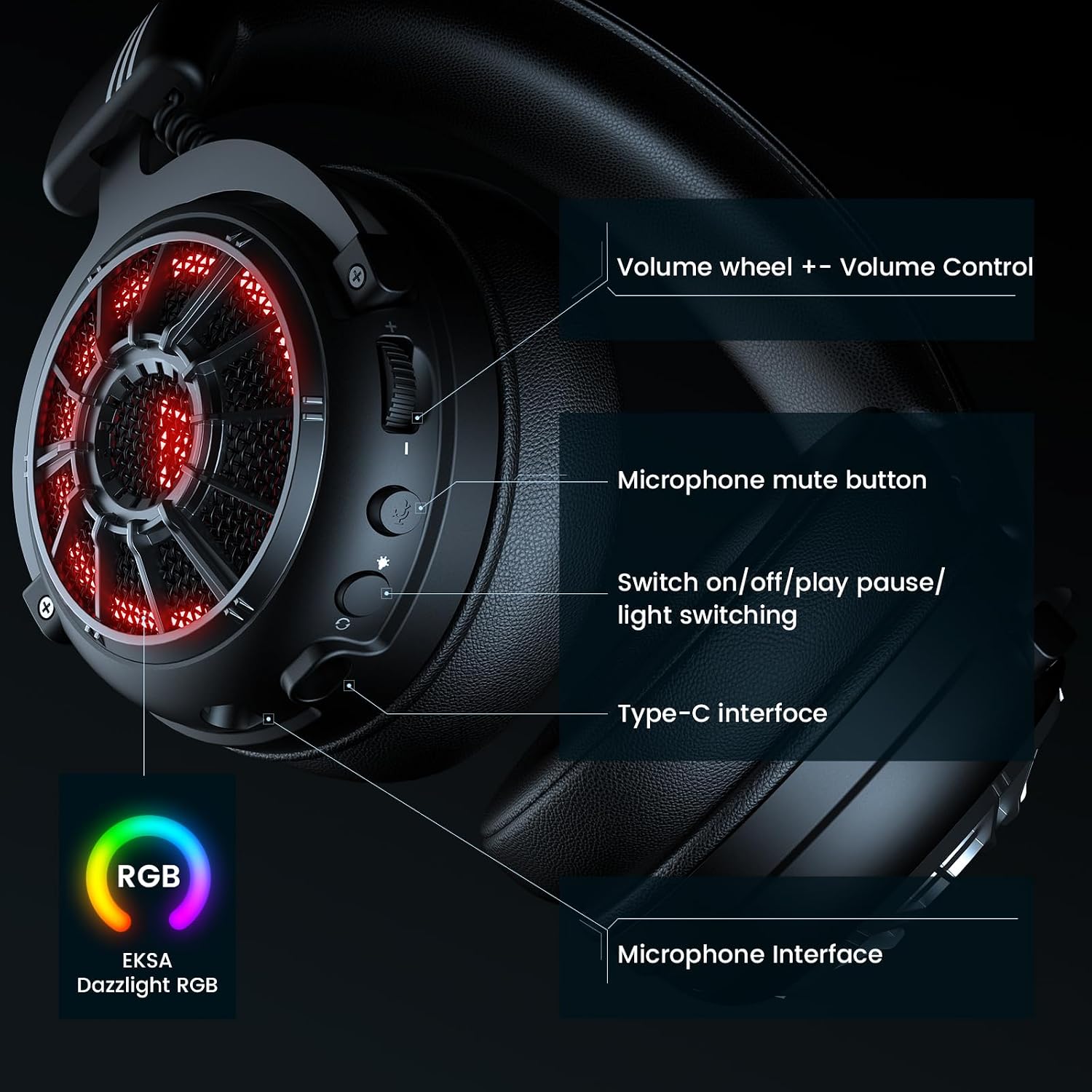
Imatge 3.1: acabatview de controls dels auriculars, incloent-hi la roda de volum, el silenci del micròfon, l'interruptor d'engegada/llum, la interfície tipus C i la interfície del micròfon.
- Roda de volum: Ajusta el nivell de sortida d'àudio.
- Botó de silenci del micròfon: Activa/desactiva el micròfon.
- Botó d'encesa/llum: Encén/apaga els auriculars, controla els modes d'il·luminació RGB i gestiona les funcions de reproducció/pausa en mode Bluetooth.
- Interfície tipus C: S'utilitza per a la càrrega i la connexió sense fil de 2.4 GHz (quan el transmissor està connectat).
- Interfície de micròfon: Port per connectar el micròfon desmuntable.
4. Modes de configuració i connexió
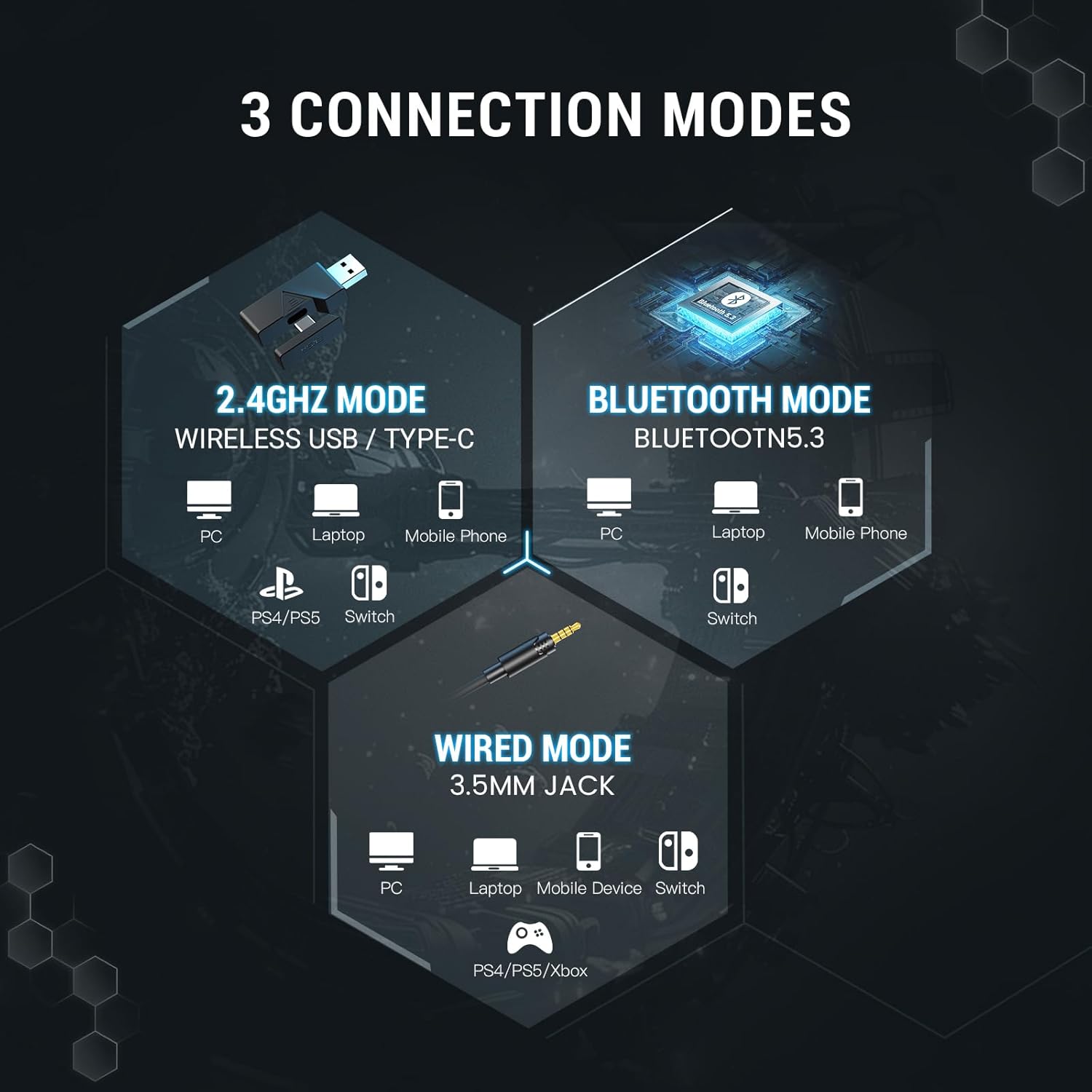
Els auriculars BT EKSA E5000 admeten tres modes de connexió: sense fil de 2.4 GHz, Bluetooth 5.3 i amb cable de 3.5 mm.

Imatge 4.1: Representació visual dels tres modes de connexió disponibles i els seus dispositius compatibles.
4.1. Connexió sense fil de 2.4 GHz
Aquest mode proporciona una connexió sense fil de baixa latència i sense pèrdues per a PC, PS5, PS4, Mac i Nintendo Switch (mode acoblat).
- Connecteu el transmissor sense fil USB-A de 2.4 GHz a un port USB disponible del vostre dispositiu (PC, PS5, PS4, Mac, base per a Switch).
- Si el dispositiu només té un port USB-C, feu servir l'adaptador USB-C integrat al transmissor.
- Engegueu els auriculars prement i mantenint premut el botó d'engegada fins que s'il·lumini l'indicador lluminós.
- Els auriculars s'aparellaran automàticament amb el transmissor. L'indicador lluminós s'il·luminarà de color blau fix quan estigui connectat.
- Assegureu-vos que els auriculars estiguin seleccionats com a dispositiu d'entrada i sortida d'àudio a la configuració del sistema.
Nota: El xip del transmissor sense fil es troba dins del port tipus C del dongle. El dongle s'ha de connectar a un port USB o tipus C perquè la connexió de 2.4 GHz funcioni.
Imatge 4.2: El transmissor sense fil de 2.4 GHz i la seva connexió amb els auriculars, destacant una tecnologia estable i de latència ultrabaixa.
4.2. Connexió Bluetooth 5.3
Connecteu-vos sense fil a dispositius compatibles amb Bluetooth, com ara PC, ordinadors portàtils, telèfons mòbils i Nintendo Switch (desacoblada).
- Encendre els auriculars.
- Premeu i manteniu premut el botó d'engegada/llum durant aproximadament 5 segons fins que la llum indicadora parpellegi en blau i vermell, cosa que indica el mode d'emparellament.
- Al dispositiu, aneu a la configuració de Bluetooth i cerqueu "EKSA E5000 BT".
- Seleccioneu els auriculars per emparellar-los. L'indicador lluminós es tornarà blau fix quan la connexió es posi correctament en marxa.
4.3. Connexió amb cable de 3.5 mm
Feu servir el cable d'àudio de 3.5 mm per a una compatibilitat universal amb dispositius com ara PC, ordinadors portàtils, dispositius mòbils, Nintendo Switch, PS4, PS5 i Xbox Series X/S.
- Connecteu un extrem del cable d'àudio de 3.5 mm al connector de 3.5 mm dels auriculars.
- Connecteu l'altre extrem al port d'àudio de 3.5 mm del dispositiu.
- Els auriculars funcionaran en mode passiu amb cable. No cal alimentació per a l'àudio bàsic.
Nota: Les consoles Xbox Series només admeten connexions amb cable de 3.5 mm per a aquests auriculars. La il·luminació RGB no funcionarà en mode amb cable.

Imatge 4.3: Matriu de compatibilitat detallada que mostra la compatibilitat amb les funcions d'auriculars, micròfon i silenci per a diversos dispositius a través de connexions Bluetooth, dongle USB sense fil, dongle tipus C sense fil i àudio amb cable de 3.5 mm.
5. Funcions i programari d'àudio
5.1. So envoltant 7.1
Els auriculars EKSA E5000 BT inclouen so envoltant 7.1 per a una experiència d'àudio immersiva, especialment beneficiosa per a jocs. Aquesta funció s'activa mitjançant el programari EKSA SoundBase.

Imatge 5.1: Representació visual de la tecnologia de so envoltant 7.1 que millora l'experiència de joc.
- Descarrega del controlador: Per utilitzar el so envoltant 7.1, descarregueu el controlador EKSA 7.1 des del lloc web oficial d'EKSA. weblloc.
- Compatibilitat: El controlador de so envoltant EKSA 7.1 només és compatible amb els sistemes operatius Windows 10/11.
- Activació: Després d'instal·lar el controlador i assegurar-vos que el transmissor de 2.4 GHz està connectat, seleccioneu el mode de so envoltant 7.1 dins del programari.

Imatge 5.2: La interfície del programari EKSA SoundBase, que ofereix opcions de personalització de so, com ara so envoltant 7.1, so estèreo i micròfon ENC.
5.2. Controladors de neodimi de 50 mm
Els auriculars estan equipats amb potents controladors d'imant de neodimi de 50 mm que ofereixen un àudio nítid, millorant la percepció dels sons del joc, com ara passos i àudio posicional.

Imatge 5.3: Detallada view del controlador de neodimi magnètic de 50 mm, que il·lustra el seu paper en la producció d'àudio d'alta resolució i un potent so de baixa freqüència.
5.3. Disseny de doble cambra
Un innovador disseny de doble cambra processa els sons de baixa i alta freqüència per separat. Aquesta optimització garanteix efectes de greus millorats i aguts nítids, contribuint a una experiència sonora més rica i detallada.

Imatge 5.4: Diagrama de secció transversal dels controladors de doble cambra, que mostra cambres separades per a freqüències altes, mitjanes i greus per reduir la distorsió i millorar la claredat.
5.4. Latència ultrabaixa
Els auriculars presenten una latència ultrabaixa (menys de 30 ms) en mode sense fil de 2.4 GHz, cosa que garanteix una sincronització precisa entre les indicacions d'àudio i visuals per a jocs competitius.
6. Micròfon desmuntable amb cancel·lació de soroll
Els auriculars inclouen un micròfon desmuntable d'alt rendiment amb capacitats de cancel·lació de soroll.
- Cancel·lació de soroll: Filtra eficaçment el soroll de fons, garantint una comunicació de veu clara durant els jocs o les trucades.
- Flexibilitat: El micròfon es pot connectar o treure fàcilment segons calgui per a més comoditat i emmagatzematge.
- Ús: Inseriu el micròfon a la interfície de micròfon dedicada dels auriculars. Feu servir el botó de silenciament del micròfon dels auriculars per activar-lo.

Imatge 6.1: Il·lustració del micròfon desmuntable amb cancel·lació de soroll, que demostra la seva capacitat de suprimir els sons ambientals per a una captació clara de la veu.
7. Característiques de confort i disseny
Els auriculars EKSA E5000 BT estan dissenyats per a una major comoditat durant sessions de joc llargues.
- Disseny ergonòmic: Compta amb coixinets suaus per a les orelles i una diadema ajustable.
- Apte per a ulleres: Les coixinetes especialment dissenyades redueixen la pressió per als usuaris que porten ulleres.
- Diadema ajustable: Ajusta fàcilment l'alçada de la diadema per a un ajust personalitzat.

Imatge 7.1: Característiques que contribueixen a la comoditat dels auriculars, com ara l'alçada ajustable, els auriculars d'escuma viscoelàstica, la rotació de 45 graus i un disseny apte per a ulleres.
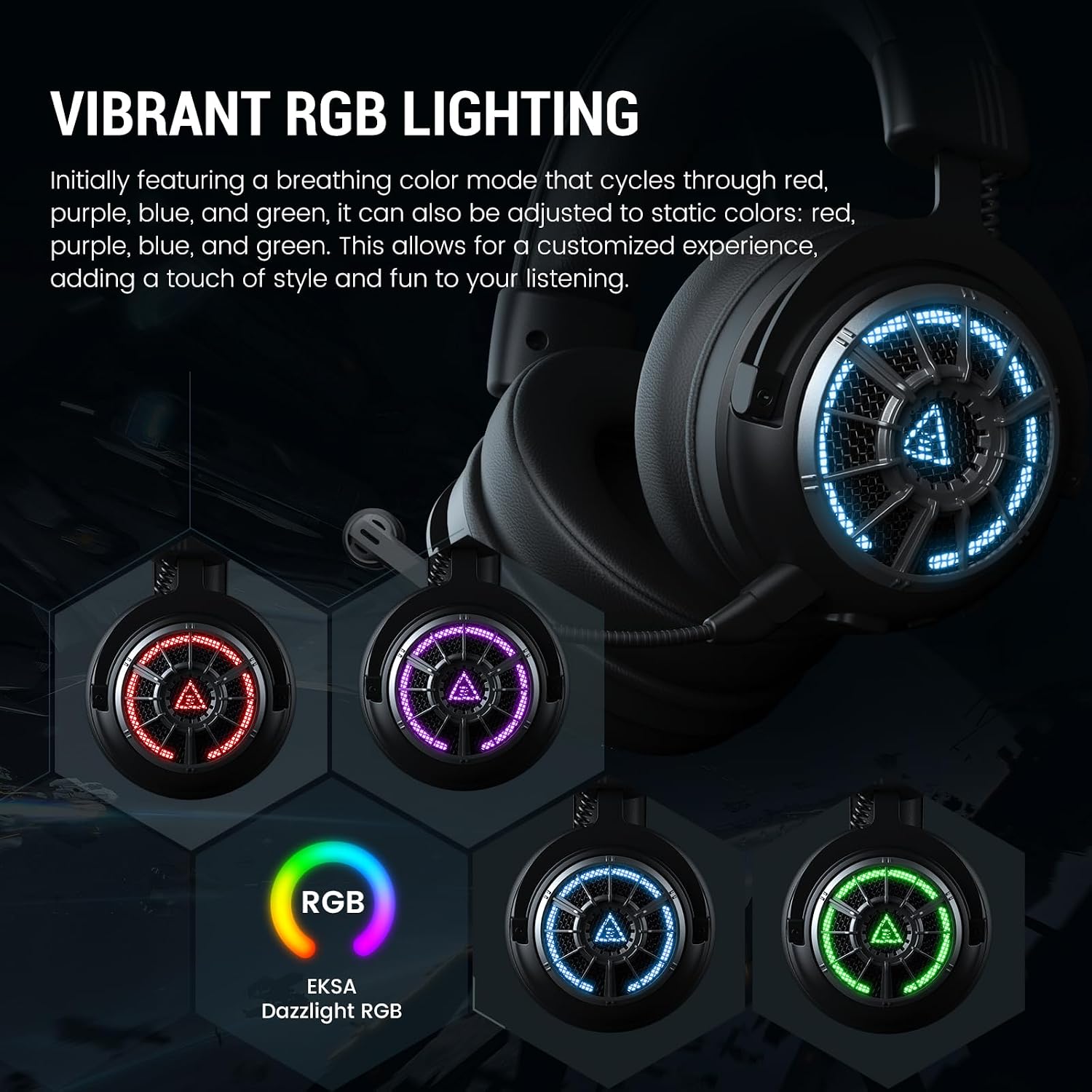
7.1. Il·luminació RGB
Els auriculars presenten una il·luminació RGB vibrant als auriculars.
- Modes: Inicialment presenta un mode de color de respiració que cicla entre el vermell, el morat, el blau i el verd.
- Personalització: Es pot ajustar a colors estàtics (vermell, lila, blau, verd) mitjançant el botó d'engegada/llum.
- Nota: La il·luminació RGB no està activa en el mode amb cable de 3.5 mm.

Imatge 7.2: Els auriculars BT EKSA E5000 mostren la seva vibrant il·luminació RGB en diferents colors.
8. Instruccions de funcionament
8.1. Encendre/apagar
- Encès: Premeu i manteniu premut el botó d'encesa/llum durant 3 segons.
- Apagar: Premeu i manteniu premut el botó d'encesa/llum durant 3 segons.
8.2. Control de volum
- Gira el Roda de volum fins a augmentar el volum.
- Gira el Roda de volum cap avall per disminuir el volum.
8.3. Silència del micròfon
- Premeu el botó Botó de silenci del micròfon una vegada per silenciar el micròfon. L'indicador lluminós del micròfon es tornarà vermell.
- Premeu el botó de nou per activar el so. L'indicador lluminós s'apagarà.
8.4. Commutació de llum RGB
- Premeu breument Botó d'engegada/llum per alternar entre els modes d'il·luminació RGB (respiració, colors estàtics, apagat).
8.5. Bateria i càrrega
Els auriculars tenen una bateria recarregable integrada.
- Temps de càrrega: Aproximadament 2.5 hores per a una càrrega completa.
- Durada de la bateria: Fins a 100 hores (Bluetooth, llums apagats) / 45 hores (Bluetooth, llums encesos); 80 hores (2.4 GHz, llums apagats) / 25 hores (2.4 GHz, llums encesos).
- Càrrega: Connecteu el cable de càrrega USB al port tipus C dels auriculars i a una font d'alimentació (per exemple, un port USB de l'ordinador, un adaptador de paret USB). L'indicador lluminós mostrarà l'estat de càrrega.
Imatge 8.1: Especificacions de durada de la bateria per als modes sense fil de 2.4 GHz i Bluetooth, amb i sense il·luminació RGB, i temps de càrrega.
9. Manteniment
Un manteniment adequat garanteix la longevitat i el rendiment dels auriculars.
- Neteja: Feu servir un drap suau i sec per netejar els auriculars. Eviteu productes químics agressius o materials abrasius.
- Emmagatzematge: Guardeu els auriculars en un lloc fresc i sec, allunyats de la llum solar directa i de temperatures extremes. Feu servir la funda de transport proporcionada per protegir-los durant el viatge o l'emmagatzematge.
- Cura del cable: Eviteu doblegar o torçar els cables bruscament per evitar danys.
- Resistència a l'aigua: Els auriculars no són resistents a l'aigua. Eviteu l'exposició a líquids.
10. Solució De Problemes
Si teniu problemes amb els auriculars, consulteu les solucions habituals següents.
| Problema | Causa possible | Solució |
|---|---|---|
| No hi ha so dels auriculars |
|
|
| El micròfon no funciona |
|
|
| Connexió sense fil de 2.4 GHz inestable/no connectable |
|
|
| Problemes de vinculació de Bluetooth |
|
|
| El so envoltant 7.1 no funciona |
|
|
Per a més ajuda, visiteu el suport oficial d'EKSA. weblloc.
11. Especificacions
| Característica | Detall |
|---|---|
| Nom del model | E5000 BT |
| Tecnologia de connectivitat | Sense fil de 2.4 GHz, Bluetooth 5.3, cable de 3.5 mm |
| Tipus de controlador d'àudio | Conductor dinàmic |
| Mida del controlador | Neodimi de 50 mm |
| Interval de freqüència | 20 Hz - 20,000 Hz |
| Micròfon | Desmuntable, amb cancel·lació de soroll |
| Característiques especials | So envoltant 7.1 (només per a PC), disseny de doble cambra, latència ultrabaixa, il·luminació RGB, diadema ajustable, auriculars de viscoelàstica |
| Durada de la bateria (llums apagades) | Bluetooth: 100 hores, 2.4 GHz: 80 hores |
| Durada de la bateria (llums enceses) | Bluetooth: 45 hores, 2.4 GHz: 25 hores |
| Temps de càrrega | 2.5 hores |
| Dispositius compatibles | PC, PS5, PS4, Mac, Switch, Portàtils, Ordinadors de sobretaula, Consoles de jocs, Tauletes, Telèfons, Telèfons intel·ligents |
| Pes | 2.12 lliures |
| Color | X-Black sense fil |
12. Garantia i Suport
Els productes EKSA estan dissenyats per a la fiabilitat i el rendiment. Per obtenir informació sobre la cobertura de la garantia, l'assistència tècnica o per registrar el vostre producte, visiteu el lloc web oficial d'EKSA. weblloc.


