
1. Introducció
Thank you for choosing the CNBRO YX30 Touch Screen ANC Wireless Earbuds. This manual provides detailed instructions on how to set up, operate, and maintain your new earbuds. Please read this manual carefully before use to ensure optimal performance and longevity of your device. Keep this manual for future reference.
Nota important: If you receive a defective product or have any questions during use, please contact customer support for assistance.
2. Contingut del paquet
Assegureu-vos que tots els elements estiguin presents a l'embalatge:
- 1 Pair of CNBRO YX30 Active Noise Cancelling Earbuds with Touch Screen Charging Case
- 1 cable de càrrega TIPUS C
- 1 Manual d'usuari (aquest document)
- 1 Exquisite Packaging Box
3. Producte acabatview
The CNBRO YX30 earbuds feature advanced Active Noise Cancellation (ANC) and Environmental Noise Cancellation (ENC) technology, paired with a unique touch screen charging case for intuitive control and enhanced functionality.
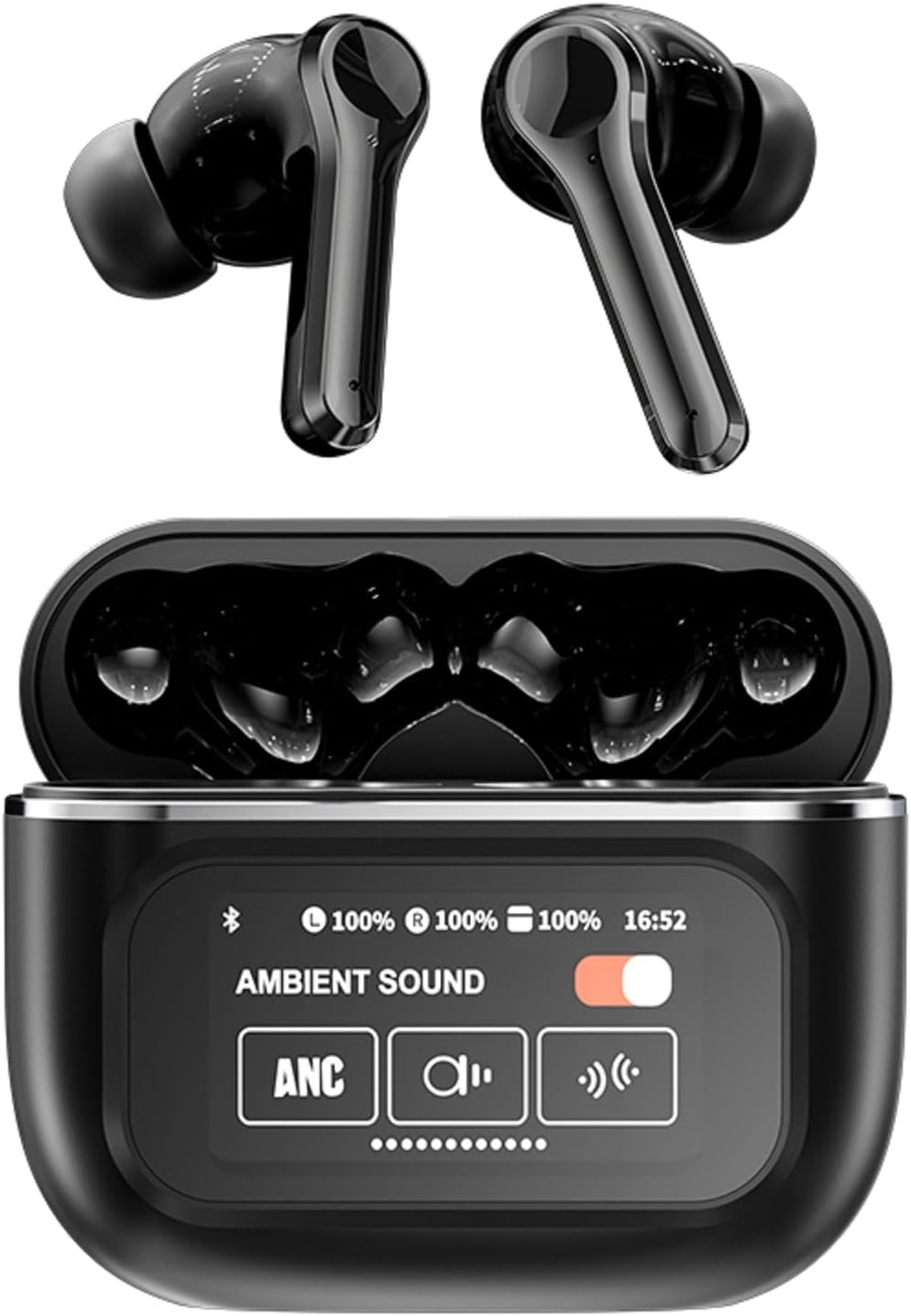
This image displays the CNBRO YX30 wireless earbuds in black, placed within their open charging case, revealing the earbuds and its integrated touch screen interface, which shows battery levels and ambient sound settings.

This image presents both the black and white color variants of the CNBRO YX30 earbuds and their charging cases. It emphasizes the sleek design and the full-color LED touch screen on the charging case.

Un primer pla view of the CNBRO YX30 charging case's touch screen, illustrating its diverse functionalities. Icons and text indicate features such as music playback control, volume adjustment, equalizer settings, timer alarm, screen brightness, language switching, wallpaper customization, 'Find my headphones' feature, Bluetooth camera control, and short video playback.
4. Configuració
4.1 Càrrega dels auriculars i l'estoig
Abans del primer ús, carregueu completament els auriculars i l'estoig de càrrega.
- Connect the provided TYPE-C cable to the charging port on the case and to a USB power source.
- The touch screen on the case will display the charging status.
- Col·loca els auriculars a l'estoig de càrrega. Començaran a carregar-se automàticament.
- A full charge for the case and earbuds typically takes approximately 1 hour.

The earbuds offer up to 5 hours of single playtime, with the charging case extending total usage to 24 hours.
4.2 Vinculació amb un dispositiu
Els auriculars utilitzen Bluetooth 5.4 per a una connexió estable i eficient.
- Assegureu-vos que els auriculars estiguin carregats i col·locats a l'estoig de càrrega.
- Obre l'estoig de càrrega. Els auriculars entraran automàticament en mode d'emparellament.
- Al telèfon mòbil o al dispositiu amb Bluetooth, aneu a la configuració de Bluetooth.
- Cerca available devices and select "CNBRO YX30" from the list.
- Once connected, the touch screen on the case will indicate a successful connection, and you will hear an audio prompt.
- The earbuds support all devices and mobile phones that support Bluetooth.
5. Instruccions de funcionament
Controls tàctils dels auriculars 5.1
The earbuds feature touch-sensitive areas for various functions:
- Toc senzill: Reproduir/Pausar música, Respondre/Finalitzar trucada.
- Doble toc (auricular esquerre): Pista anterior.
- Doble toc (auricular dret): Pista següent.
- Triple toc (auricular esquerre): Baixar el volum.
- Triple toc (auricular dret): Puja el volum.
- Premda llarga (2 segons): Reject call, Activate voice assistant.
5.2 Active Noise Cancellation (ANC) and Environmental Noise Cancellation (ENC)
The CNBRO YX30 earbuds feature dual noise cancellation technology to enhance your listening experience.

This diagram visually explains the Active Noise Cancellation (ANC) and Environmental Noise Cancellation (ENC) technology of the earbuds, highlighting microphones and ear caps for noise reduction up to -35dB.
- Mode ANC: Blocks out external noise, ideal for travel or noisy environments.
- ENC Mode: Enhances call clarity by reducing background noise during phone conversations.
- Mode de transparència: Et permet escoltar el teu entorn mentre escoltes àudio.
You can switch between ANC, ENC, and Transparency modes directly from the touch screen on the charging case or via the earbud touch controls (refer to the touch control section on the case screen for specific gestures).

The CNBRO YX30 earbuds are designed for versatility, suitable for various settings including indoor use, commuting, and outdoor activities.
5.3 Touch Screen Case Functions
The smart LED full-color touch screen on the charging case provides access to multiple functions:
- Reproducció de música: Control de reproducció/pausa, salt de pistes.
- Ajust de volum: Augmenta o disminueix el volum d'àudio.
- Modes d'equalització: Select from various equalizer presets for different audio experiences.
- Timer Alarm Clock: Configura alarmes directament des de la funda.
- Brillantor de la pantalla: Adjust the display brightness of the touch screen.
- Canvi d'idioma: Change the interface language.
- Canvia el fons de pantalla: Customize the touch screen background.
- Troba els meus auriculars: Locate misplaced earbuds (if supported by the feature).
- Càmera Bluetooth: Activa l'obturador de la càmera del telèfon de forma remota.
- Watch Short Videos: Play short video clips directly on the case screen.
- Configuració de l'hora: Adjust the displayed time.
6. Manteniment
Proper maintenance ensures the longevity and performance of your earbuds:
- Neteja: Netegeu regularment els auriculars i l'estoig de càrrega amb un drap suau, sec i sense borrissol. No utilitzeu productes químics agressius ni materials abrasius.
- Consells per a les orelles: Traieu les puntes de les orelles i netegeu-les amb aigua i sabó suau si cal. Assegureu-vos que estiguin completament seques abans de tornar-les a col·locar.
- Ports de càrrega: Keep the TYPE-C charging port free of dust and debris.
- Emmagatzematge: Quan no els utilitzeu, guardeu els auriculars a la seva funda de càrrega per protegir-los i mantenir-los carregats.
- Resistència a l'aigua: The earbuds are rated IPX5 waterproof. This means they are resistant to splashes and sweat, but should not be submerged in water. Avoid exposure to heavy rain or extreme moisture.
7. Solució De Problemes
Si trobeu problemes, proveu les solucions següents:
- Auriculars que no s'emparellan:
- Assegureu-vos que els auriculars estiguin carregats.
- Desactiva i activa el Bluetooth del dispositiu.
- Forget "CNBRO YX30" in your device's Bluetooth settings and re-pair.
- Place earbuds back in the case, close, then open again to reset pairing mode.
- No se sent cap so d'un auricular:
- Assegureu-vos que els dos auriculars estiguin carregats.
- Prova de tornar a col·locar els dos auriculars a la funda i de tornar-los a treure.
- Netegeu els contactes de càrrega dels dos auriculars i de l'interior de la funda.
- La caixa de càrrega no es carrega:
- Check the TYPE-C cable and power adapter.
- Assegureu-vos que el port de càrrega estigui net i lliure de residus.
- La pantalla tàctil no respon:
- Ensure the case is charged.
- Restart the case by closing and reopening it.
If the issue persists, please refer to the warranty and support section.
8. Especificacions
Key technical specifications for the CNBRO YX30 Earbuds:
| Versió Bluetooth | 5.4 |
| Capacitat de la bateria dels auriculars | 30 mAh |
| Caixa de càrrega Capacitat de la bateria | 400 mAh |
| Distància de transmissió | Aproximadament 15 metres |
| Single Playing Time | Fins a 5 hores |
| Temps de reproducció total (amb estoig) | Fins a 24 hores |
| Temps de càrrega | Aproximadament 1 hora |
| Nivell impermeable | IPX5 |
| Control de soroll | Active Noise Cancellation (ANC) & Environmental Noise Cancellation (ENC) |
| Mètode de control | Touch (Earbuds) & Touch Screen (Case) |
| Dispositius compatibles | All Bluetooth-enabled devices and mobile phones |
| Tipus de controlador d'àudio | Dynamic Driver with PU Composite Diaphragm |
| Pes de l'article | 0.64 unces (auriculars) |

A cutaway diagram illustrating the internal structure of the earbud's speaker, focusing on the PU Composite Diaphragm, which contributes to the premium sound quality.
9. Garantia i Suport
CNBRO is committed to providing high-quality products and customer satisfaction. Your CNBRO YX30 earbuds come with a standard manufacturer's warranty against defects in materials and workmanship.
Atenció al client:
If you encounter any issues, have questions, or require assistance with your product, please do not hesitate to contact our customer support team. Details for contacting support are typically found on the product packaging or the official CNBRO weblloc.
Conserveu el vostre comprovant de compra per a reclamacions de garantia.