
1. Introducció
This manual provides detailed instructions for the installation, operation, and maintenance of your ASRock DeskMini B760 Series Ultra-Compact Mini-PC Barebone System. The DeskMini B760 is designed to offer a powerful computing solution in a compact form factor, supporting 14th, 13th, and 12th Gen Intel Core processors. Please read this manual thoroughly before proceeding with any installation or operation to ensure proper setup and to maximize the performance and longevity of your system.

Figure 1: ASRock DeskMini B760 Series Mini-PC (Angled Front View)
2. Què hi ha a la caixa
Your ASRock DeskMini B760 package should contain the following items:
- ASRock DeskMini B760 Barebone System (Chassis and Motherboard)
- 1 x Audio Header
- 1 x Internal Speaker Header
- 2 x 4-Pin fan connectors
- 1 x Capçalera del panell frontal
- 1 x Capçalera USB 2.0
- Guia d'instal·lació ràpida (aquest document)
- Accessory pack (screws, cables, etc. - contents may vary)
Nota: This is a barebone system. You will need to provide your own CPU, CPU cooler, DDR4 SO-DIMM memory, storage devices (M.2 SSDs, 2.5" SATA drives), and operating system.
3. Instruccions de configuració
Follow these steps to assemble and prepare your DeskMini B760 for first use. Ensure the system is unplugged from any power source before beginning.
3.1. Instal·lació de la CPU
- Obriu amb cura el braç de retenció del sòcol de la CPU.
- Align the notches on your 12th, 13th, or 14th Gen Intel LGA1700 CPU with the socket.
- Col·loca suaument la CPU al sòcol sense forçar-la.
- Tanqueu el braç de retenció per fixar la CPU.
3.2. Instal·lació del refrigerador de la CPU
Install a compatible CPU cooler (up to 65W TDP) according to its manufacturer's instructions. Ensure proper thermal paste application for optimal cooling.
3.3. Installing DDR4 SO-DIMM Memory
- Locate the two DDR4 SO-DIMM slots on the motherboard.
- Alineeu l'osca del mòdul de memòria amb la clau de la ranura.
- Insert the module firmly at an angle, then push down until the side clips snap into place.
- Repeat for the second module if installing dual channel memory.
3.4. Instal·lació de SSD M.2
The DeskMini B760 supports one Blazing M.2 PCIe Gen5 x4 slot and one Hyper M.2 PCIe Gen4 x4 slot.
- Localitza les ranures M.2 a la placa base.
- Remove the retaining screw/standoff.
- Inseriu l'SSD M.2 a la ranura en angle.
- Gently push down the SSD and secure it with the retaining screw.
3.5. Installing 2.5" SATA Drives
The system includes two 2.5" drive bays.
- Mount your 2.5" SATA SSD/HDD into the designated drive bays using the provided screws.
- Connect the SATA data and power cables to the drive and the motherboard.
3.6. Connexió de perifèrics i alimentació
- Connect your monitor(s) to the DisplayPort, HDMI, or VGA outputs.
- Connect your keyboard, mouse, and other USB devices to the available USB ports.
- Connect an Ethernet cable for wired network access, or install a compatible M.2 Key-E WiFi/Bluetooth module for wireless connectivity.
- Connect the external power adapter to the system and then to a power outlet.
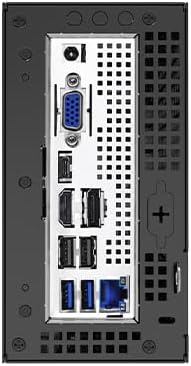
Figure 2: Rear I/O Ports of ASRock DeskMini B760
4. Instruccions de funcionament
4.1. Encès / apagat
- Encès: Premeu el botó d'encesa situat al tauler frontal.
- Apagar:
- Standard Shutdown: Use the operating system's shutdown function.
- Apagada forçada: Press and hold the power button for 5-7 seconds until the system powers off. Use this only when the system is unresponsive.
4.2. Initial Boot and OS Installation
Upon first power-on, the system will typically enter the BIOS/UEFI setup utility or attempt to boot from an installed operating system.
- To enter BIOS/UEFI, press Del or F2 durant l'arrencada.
- Install your preferred operating system (e.g., Windows 10, Windows 11) from a bootable USB drive or other media. Refer to your operating system's installation guide for detailed steps.
- Install all necessary drivers, which can be found on the ASRock support weblloc web per al vostre model específic.
4.3. Configuració de diverses pantalles
The DeskMini B760 supports triple display output via DisplayPort, HDMI, and VGA.
- Connect up to three monitors to the available ports.
- Configure display settings within your operating system to extend or duplicate your desktop.
5. Manteniment
5.1. Neteja
- Regularly clean the exterior of the system with a soft, dry cloth.
- Use compressed air to clear dust from ventilation openings and internal components (when powered off and unplugged) to maintain optimal airflow and cooling.
- Avoid using liquid cleaners directly on the system.
5.2. Actualitzacions de programari
- Keep your operating system, drivers, and BIOS/UEFI firmware updated to ensure system stability, security, and performance.
- Visit the official ASRock website for the latest BIOS/UEFI updates and drivers for your DeskMini B760.
5.3. Consideracions ambientals
- Operate the system in a well-ventilated area.
- Avoid exposing the system to extreme temperatures, direct sunlight, or high humidity.
6. Solució De Problemes
If you encounter issues with your DeskMini B760, refer to the following common troubleshooting steps:
- Sense energia:
- Ensure the power adapter is securely connected to both the system and a working power outlet.
- Verifiqueu que el botó d'engegada funciona correctament.
- Sense pantalla:
- Check all monitor cable connections (DisplayPort, HDMI, VGA).
- Assegureu-vos que el monitor estigui encès i configurat a la font d'entrada correcta.
- Verify that the CPU and RAM are correctly installed.
- El sistema operatiu no arrenca:
- Check if your storage drive (M.2 SSD, 2.5" SATA) is properly installed and connected.
- Enter BIOS/UEFI setup to confirm the boot order is correct and the drive is detected.
- If recently installed, ensure the operating system installation was successful.
- Inestabilitat/Avaries del sistema:
- Ensure all components (CPU, RAM, SSDs) are seated correctly.
- Check CPU cooler installation and thermal paste application to prevent overheating.
- Update drivers and BIOS/UEFI firmware.
For persistent issues, refer to the ASRock support weblloc o contacteu amb l'assistència tècnica.
7. Especificacions
Key technical specifications for the ASRock DeskMini B760 Series:
| Característica | Detall |
|---|---|
| Marca | ASRock |
| Nom del model | DESKMINI B760W |
| Socket de CPU | LGA 1700 |
| Processadors compatibles | 14th, 13th, 12th Gen Intel Core Processors (up to 65W TDP) |
| Tipus de memòria | DDR4 SODIMM |
| Ranures de memòria | 2 (canal dual) |
| Capacitat màxima de memòria | 64 GB |
| Velocitat de memòria | DDR4-3200MHz |
| M.2 Storage Slots | 1 x Blazing M.2 (PCIe Gen5 x4), 1 x Hyper M.2 (PCIe Gen4 x4) |
| Badies d'unitat de 2.5" | 2 (with RAID 0/1 support) |
| Gràfics | Integrated Intel UHD Graphics (CPU dependent) |
| Sortides de vídeo | DisplayPort, HDMI, D-Sub (VGA) |
| Ports USB | USB 3.2 Gen2x2 Type-C (20Gb/s), USB 3.2 Gen2 Type-C (10Gb/s with Alt Mode), USB 3.2 Gen2 Type-A, USB 2.0 |
| Xarxa | Ethernet, M.2 Key-E slot for WiFi/Bluetooth module |
| Suport del sistema operatiu | Windows 10, Windows 11 |
| Dimensions (aprox.) | Ultra-compact Mini PC form factor |
| Pes (aprox.) | 3.93 lliures |
8. Informació de la garantia
The ASRock DeskMini B760 Series Barebone System comes with a 90 dies de garantia from the date of purchase. This warranty covers defects in materials and workmanship under normal use. For full warranty terms and conditions, please refer to the documentation included with your product or visit the official ASRock weblloc.
9. Suport
For technical assistance, driver downloads, BIOS updates, or further inquiries regarding your ASRock DeskMini B760, please utilize the following resources:
- ASRock Official Weblloc: Visita www.asrock.com for product support pages, FAQs, and downloads.
- Suport d'Amazon: For product questions or assistance related to your purchase, you may contact ASRock directly through Amazon.
- Online Forums/Communities: Engage with other users and ASRock representatives in online communities for shared knowledge and solutions.