
Introducció
The SteelSeries Arctis GameBuds are advanced wireless gaming earbuds designed to provide an immersive audio experience across multiple platforms. Featuring a next-generation chipset, Active Noise Cancellation (ANC), and versatile connectivity options, these earbuds are engineered for performance and comfort.

Image: The SteelSeries Arctis GameBuds earbuds and their charging case.

Image: A user engaged in PC gaming while wearing the Arctis GameBuds.
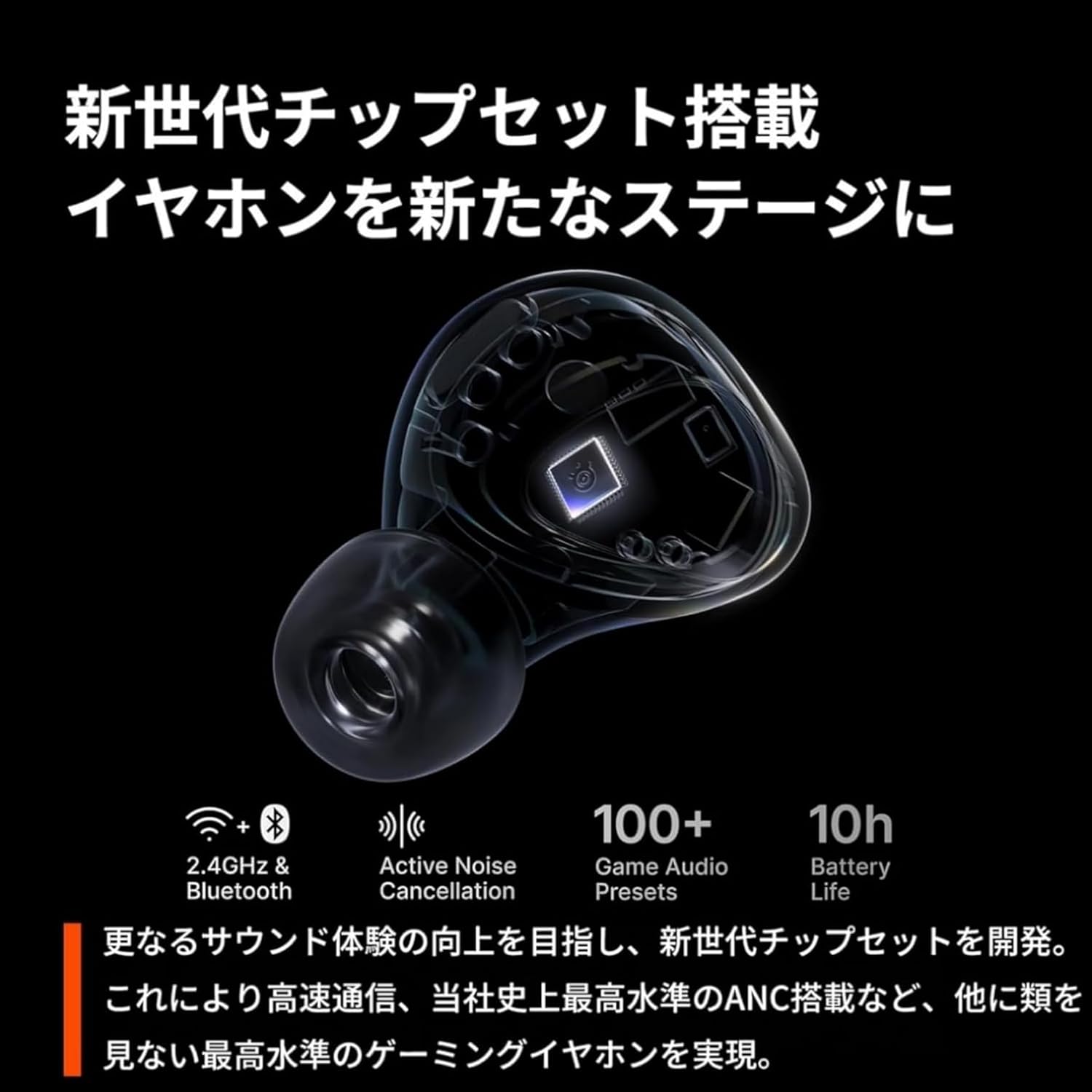
Image: A visual representation of the advanced internal chipset within the Arctis GameBuds.
Contingut del paquet
Verifiqueu que tots els elements siguin presents al vostre paquet:
- Arctis GameBuds Wireless Earbuds
- Estoig de càrrega
- USB-C Wireless Dongle (2.4GHz)
- Cable de càrrega USB-C
- Adaptador USB-C a USB-A
- Puntes per a les orelles (talles S/M/L)
- Manual d'instruccions (aquest document)
Configuració
1. Càrrega inicial
Before first use, fully charge your Arctis GameBuds and the charging case. Connect the USB-C charging cable to the charging case and a power source. The LED indicator on the case will show charging status.
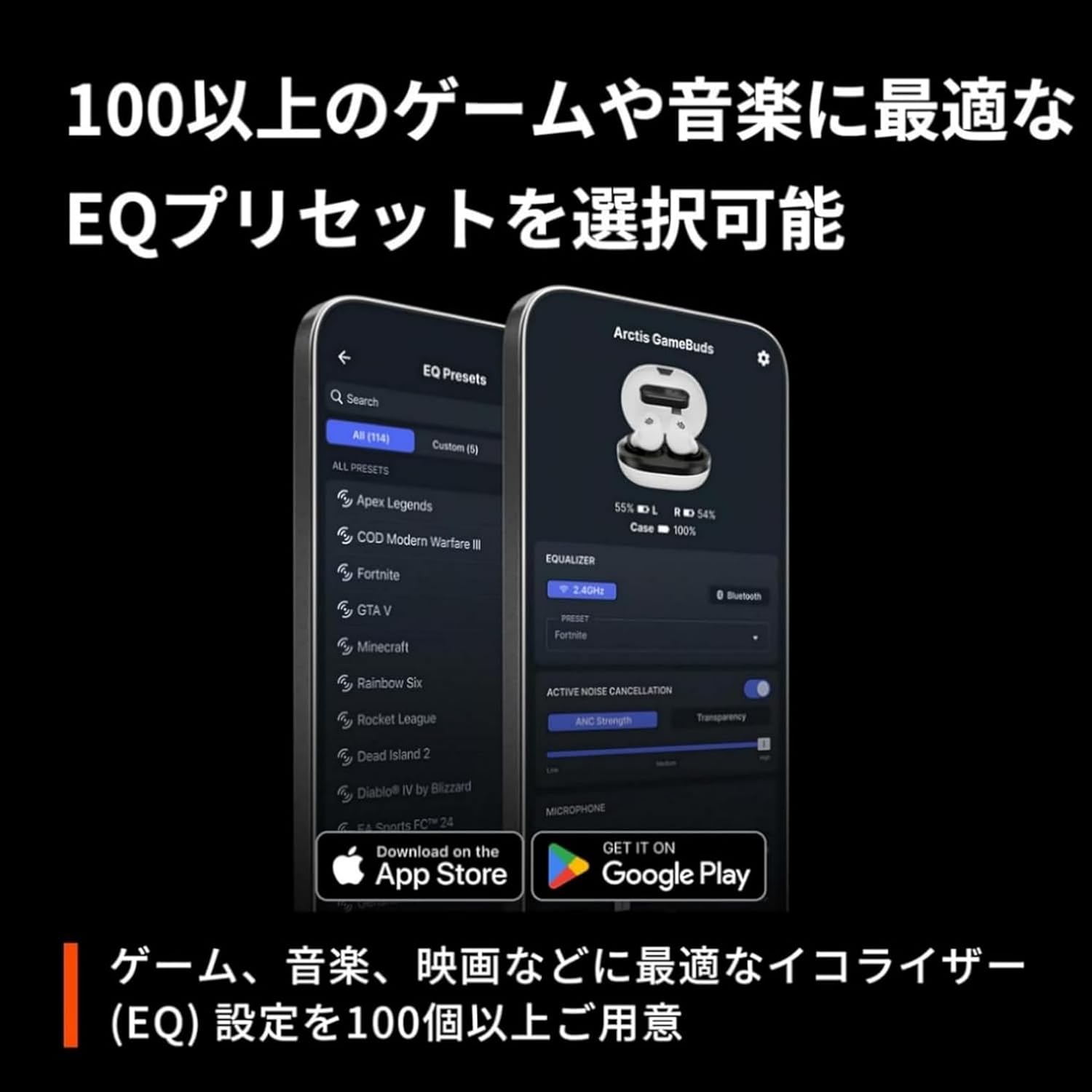
Image: The Arctis GameBuds charging case with a USB-C cable connected, indicating charging.
2. Selecció i ajust de les puntes d'orella
Select the ear tips that provide the most comfortable and secure fit for your ears. A proper seal is crucial for optimal sound quality and Active Noise Cancellation performance. Gently insert the earbuds into your ear canal and twist slightly to ensure a snug fit.

Image: A diagram illustrating the correct placement of the earbud within the ear for a secure and comfortable fit.
Instruccions de funcionament
Connectivitat
The Arctis GameBuds offer dual wireless connectivity: 2.4GHz via USB-C dongle for low-latency gaming and Bluetooth 5.3 for mobile devices.
2.4GHz Wireless Connection (for PC, PlayStation, Switch, Meta Quest)
- Insert the USB-C wireless dongle into an available USB-C port on your device (PC, PS5, PS4, Nintendo Switch, Meta Quest, etc.). Use the USB-C to USB-A adapter if needed.
- The earbuds will automatically connect to the dongle. A successful connection is indicated by a solid light on the dongle.
- Ensure the Arctis GameBuds are selected as the audio output device in your system settings.

Image: The Arctis GameBuds shown with the USB-C dongle, illustrating the 2.4GHz wireless connection.
Bluetooth 5.3 Connection (for Mobile, Tablet)
- Traieu els auriculars de la funda de càrrega.
- Al dispositiu mòbil, aneu a la configuració de Bluetooth i activeu el Bluetooth.
- Select "Arctis GameBuds" from the list of available devices to pair.
Quick Switch Wireless
The Quick Switch Wireless feature allows seamless switching between 2.4GHz and Bluetooth connections. Triple-tap either earbud to switch between the two modes instantly.
Cancel·lació activa de soroll (ANC) i mode de transparència
The Arctis GameBuds feature Hybrid Active Noise Cancellation (ANC) to block out external distractions and a Transparency Mode to allow ambient sounds in.
- Activació de l'ANC: ANC is typically enabled by default or can be toggled via the companion app.
- Mode de transparència: This mode allows you to hear your surroundings without removing the earbuds. Refer to the companion app for specific controls.

Imatge: Una imatge interna view of the Arctis GameBuds, illustrating the components responsible for Active Noise Cancellation.
Audio Customization (EQ Presets)
Utilize the Arctis Companion App (for mobile) or SteelSeries GG software (for PC) to access over 100 game-specific EQ presets and customize your audio experience.
- Arctis Companion App: Download from the App Store (iOS 15.6+) or Google Play (Android 9+).
- SteelSeries GG Software: Download for Windows (8.1+) or Mac OS (10.13+). This software also enables ChatMix functionality on PC (Windows 10+).

Image: A screenshot of the companion app interface, displaying various equalizer presets optimized for different games.
Physical Button Controls
The Arctis GameBuds feature physical buttons to prevent accidental touches and provide precise control over your audio and calls.

Imatge: Un primer pla view of the physical buttons on the earbuds, designed for precise control.
Specific button functions can be customized via the SteelSeries GG software.
WearSense Feature
The WearSense feature automatically pauses media playback when you remove an earbud and resumes when you put it back in. This feature can be toggled on or off in the companion app.
Càrrega i durada de la bateria
The Arctis GameBuds offer extended battery life and convenient charging options.
- Temps de reproducció de l'auricular: Up to 10 hours on a single charge (with 2.4GHz active, Bluetooth connected, ANC off, 100% volume).
- Temps total de reproducció amb estoig: Up to 40 hours (10 hours from earbuds + 30 hours from case).
- Càrrega ràpida: 15 minuts de càrrega proporcionen fins a 3 hores de reproducció.
- Càrrega sense fils: The charging case supports Qi wireless charging for added convenience.
Image: The Arctis GameBuds charging case connected via USB-C, illustrating charging capabilities.
Manteniment
Resistent a la pols i l'aigua IP55
The Arctis GameBuds are rated IP55 for dust and water resistance, meaning they are protected against dust ingress and low-pressure water jets from any direction. This makes them suitable for use during workouts or light rain, but they are not designed for submersion.

Image: An earbud being splashed with water, demonstrating its IP55 dust and water resistance.
To clean your earbuds, gently wipe them with a soft, dry cloth. Do not use abrasive materials or immerse them in water.
Resolució de problemes
- Sense so: Ensure earbuds are charged and properly connected (2.4GHz dongle or Bluetooth). Check device audio output settings.
- Problemes de connexió: Try re-pairing Bluetooth or re-inserting the 2.4GHz dongle. Ensure no other devices are interfering with the wireless signal.
- ANC no funciona: Verify ANC is enabled in the companion app. Ensure a proper ear tip seal.
- Problemes amb el micròfon: Check microphone settings on your device. Ensure the earbuds are properly seated.
- Software Update Issues (Mac OS): Some users have reported difficulties updating firmware via Mac OS. If encountering this, consider using a Windows PC for updates if available, or contact SteelSeries support.
Especificacions
| Característica | Detall |
|---|---|
| Marca | SteelSeries |
| Número de model | 61680 |
| Pes de l'auricular | 5.3 g cadascun |
| Pes de la caixa | 48.7 g |
| Connectivitat | Sense fil de 2.4 GHz, Bluetooth 5.3 |
| Interval Bluetooth | 10 metres |
| Compatibilitat | PS4, PS5, Mac, Switch, Switch 2, iPhone (USB-C), Android, Tablet (USB-C), Handheld, Meta Quest 2/3, PC |
| Controladors d'àudio | Neodymium Magnetic Dynamic Drivers, 6mm |
| Resposta de freqüència | 20 - 20,000 Hz |
| Sensibilitat | 102 dB |
| Impedància | 32 ohms |
| Latència d'àudio | 34.4 ms |
| Control de soroll | Active Noise Cancellation (Hybrid, 4-mic), Transparency Mode |
| Micròfon | Integrated (4-mic hybrid system) |
| Durada de la bateria dels auriculars | Fins a 10 hores |
| Durada total de la bateria (amb funda) | Fins a 40 hores |
| Càrrega ràpida | Càrrega de 15 minuts per a 3 hores de reproducció |
| Càrrega sense fils | Qi Wireless Charging (case) |
| Resistència a la pols/aigua | IP55 |
| Controls | Physical buttons, App control |
| Suport de programari | Arctis Companion App (iOS 15.6+, Android 9+), SteelSeries GG + Engine (Windows 8.1+, Mac OS 10.13+), SteelSeries GG + Sonar (Windows 10+ for ChatMix) |
Garantia i Suport
The SteelSeries Arctis GameBuds come with a manufacturer's warranty of 1 year. For technical support, warranty claims, or additional information, please visit the official SteelSeries support weblloc o poseu-vos en contacte amb el seu servei d'atenció al client.
SteelSeries oficial Weblloc: steelseries.com
Producte acabatview Vídeo
Vídeo: Un producte oficial acabatview video demonstrating the features and usage of the SteelSeries Arctis GameBuds.