
H3C H3C Magic NX15-UK
Manual d'usuari del router Wi-Fi Gigabit de doble banda H3C Magic NX15 AX1500
Model: H3C Magic NX15-UK
1. Introducció
The H3C Magic NX15 is a high-performance Gigabit Wi-Fi 6 router designed to provide a fast and reliable internet experience. Featuring a vertical design, full gigabit network ports, and Wi-Fi 6 (802.11ax) technology on the 5GHz band, it ensures high-speed connectivity. Equipped with four high-gain external antennas and EasyMesh compatibility, it offers wide and flexible network signal coverage. Enhanced security is provided through WPA3 encryption. This manual provides essential information for setting up, operating, and maintaining your H3C Magic NX15 router.
2. Contingut del paquet
Si us plau, reviseu atentament el contingut del paquet. Si falta algun article o hi ha algun dany, poseu-vos en contacte amb el vostre distribuïdor.
- H3C Magic NX15 AX1500 Dual Band Gigabit Wi-Fi 6 Router
- Adaptador d'alimentació
- Cable Ethernet
- Guia d'instal·lació ràpida (aquest manual)
3. Producte acabatview
Familiarize yourself with the components and interfaces of your H3C Magic NX15 router.
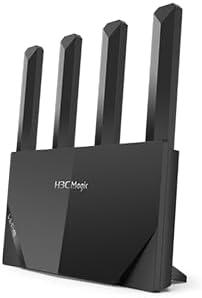
Figura 3.1: Davant view of the H3C Magic NX15 router, showcasing its vertical design and four external antennas.
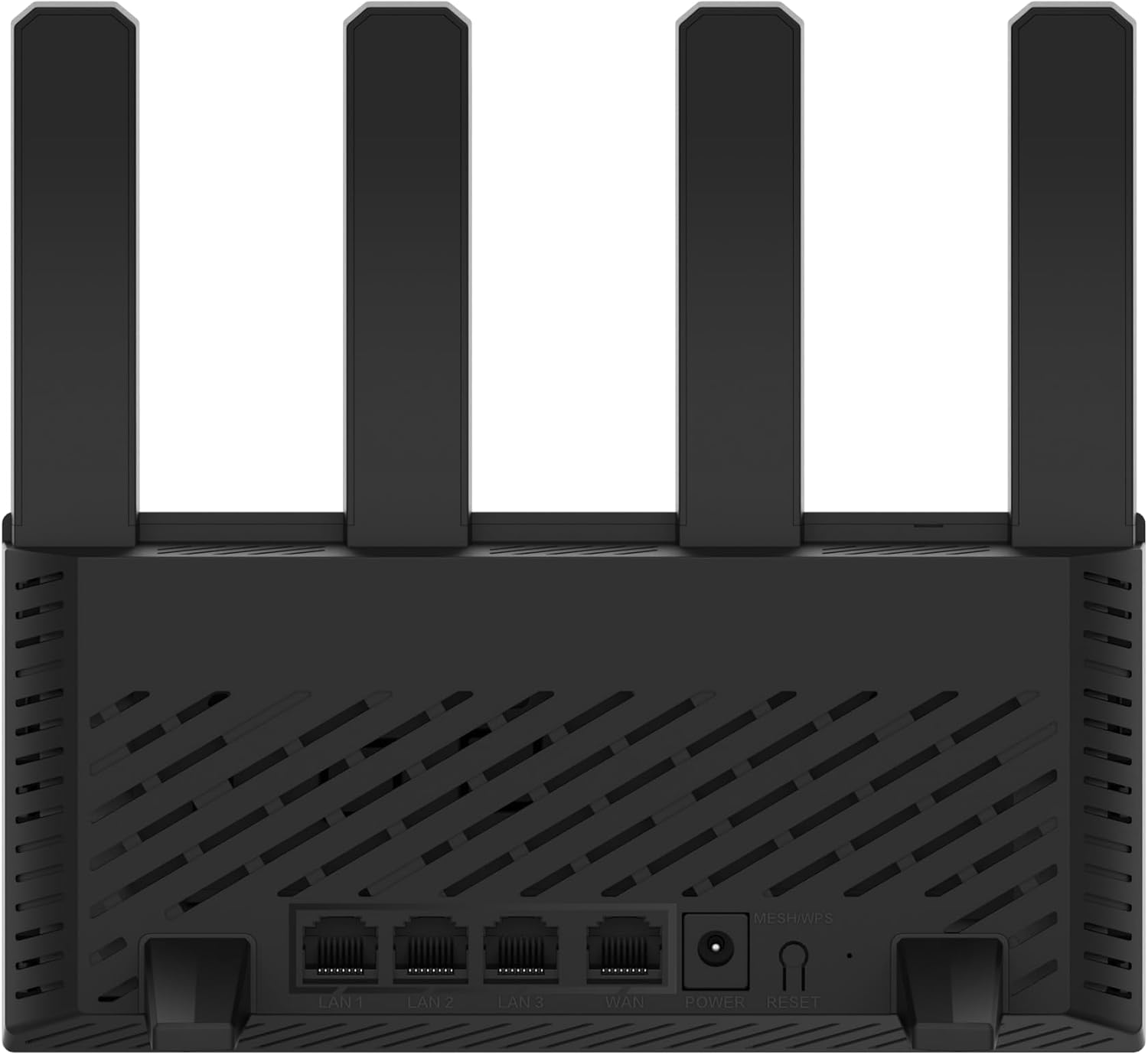
Figura 3.2: posterior view of the H3C Magic NX15 router, displaying the LAN ports, WAN port, power input, and Reset/WPS button.

Figura 3.3: A dalt view of the H3C Magic NX15 router, highlighting the ventilation design for heat dissipation.

Figura 3.4: lateral view of the H3C Magic NX15 router, showing the sleek profile and additional ventilation slots.
Descripcions de ports i botons:
- Port WAN: Es connecta al mòdem o a la xarxa del proveïdor de serveis d'Internet (ISP).
- Ports LAN (LAN1, LAN2, LAN3): Connecteu-vos a dispositius amb cable com ara ordinadors, consoles de jocs o televisors intel·ligents.
- Port d'alimentació: Es connecta a l'adaptador de corrent inclòs.
- Botó de restabliment/WPS:
- Press briefly to activate WPS (Wi-Fi Protected Setup) for easy connection of compatible devices.
- Press and hold for approximately 5-10 seconds to restore the router to factory default settings.
- Antenes: Four high-gain external antennas for optimal Wi-Fi signal coverage.
4. Guia de configuració
Follow these steps to set up your H3C Magic NX15 router for the first time.
- Desempaquetar el router: Traieu amb cura el router i tots els accessoris de l'embalatge.
- Posicioneu el router: Place the router in a central location in your home or office, away from obstructions and sources of interference (e.g., microwaves, cordless phones). Ensure good ventilation.
- Connecteu-vos a l'alimentació: Connect the included power adapter to the router's power port and then plug the adapter into a power outlet. Wait for the router to power on and its indicator lights to stabilize.
- Connectar-se al mòdem: Connect one end of the provided Ethernet cable to the WAN port on your H3C Magic NX15 router and the other end to your modem's LAN port.
- Connectar dispositius (opcional): For wired connections, connect an Ethernet cable from one of the router's LAN ports to your computer or other network device.
- Connecta't a Wi-Fi:
- A l'ordinador o al dispositiu mòbil, cerca les xarxes Wi-Fi disponibles.
- Seleccioneu el nom de la xarxa Wi-Fi (SSID) que hi ha imprès a l'etiqueta de la part inferior del router.
- Enter the Wi-Fi password (also printed on the router's label) when prompted.
- Pàgina de gestió del router d'accés:
- Obre a web navegador (per exemple, Chrome, Firefox, Edge).
- Type the default IP address (usually
192.168.1.1orh3cmagic.com) into the address bar and press Enter. Refer to the router's label for the exact address. - Follow the on-screen instructions to complete the initial setup, including setting a new administrator password and configuring your internet connection type (e.g., PPPoE, DHCP, Static IP).
5. Instruccions de funcionament
This section details the key features and how to operate your H3C Magic NX15 router.
5.1 Dual-Band Wi-Fi Operation
The H3C Magic NX15 supports dual-band Wi-Fi (2.4GHz and 5GHz) for optimal performance. It features intelligent band steering, which automatically directs your devices to the best available band (2.4GHz for wider coverage, 5GHz for higher speeds) without manual selection.
- Banda de 2.4 GHz: Provides wider coverage and better penetration through walls, suitable for general browsing and devices further from the router.
- Banda de 5 GHz: Offers higher speeds and lower latency, ideal for streaming 4K video, online gaming, and high-bandwidth applications, typically for devices closer to the router.
5.2 Intelligent Management via Mobile App
Manage your router conveniently using the dedicated H3C mobile application. The app allows for easy network settings configuration, network speed optimization, and various other operations.
- Descarrega l'aplicació: Cerca the "H3C Magic" app in your device's app store (Google Play Store for Android or Apple App Store for iOS).
- Instal·lació i llançament: Instal·leu l'aplicació i obriu-la.
- Inicieu sessió: Use your router's administrator credentials to log in to the app.
- Gestiona la configuració: Des de l'aplicació, podeu:
- Change Wi-Fi names and passwords.
- Monitor connected devices.
- Configura els controls parentals.
- Configure guest Wi-Fi networks.
- Optimize network performance.
5.3 EasyMesh for Whole-Home Wi-Fi
The H3C Magic NX15 supports EasyMesh technology, allowing you to expand your Wi-Fi coverage by adding additional compatible H3C mesh units. This creates a seamless whole-home Wi-Fi network, eliminating dead zones in large or complex house types.
- Refer to the EasyMesh setup guide provided with your additional mesh units for detailed instructions on expanding your network.
- Ensure all mesh units are compatible with the EasyMesh standard.
5.4 Característiques de seguretat de xarxa
The router includes multiple functions to enhance your private network's security:
- Xifratge WPA3: Provides the latest and strongest Wi-Fi security protocol.
- Access Allowlist/Denylist: Control which devices can connect to your network based on their MAC addresses.
- Wi-Fi per a convidats: Crea una xarxa Wi-Fi separada per als convidats, mantenint la teva xarxa principal segura i privada.
- Control parental: Manage internet access times and block inappropriate content for specific devices.
These security features can be configured via the router's web management interface or the H3C mobile app.
6. Manteniment
Proper maintenance ensures the longevity and optimal performance of your H3C Magic NX15 router.
- Col·locació: Keep the router in a well-ventilated area, away from direct sunlight, heat sources, and moisture. The stereoscopic heat dissipation design with a large metal heat sink helps maintain stable operation.
- Neteja: Regularly dust the router's exterior and ventilation slots with a soft, dry cloth. Do not use liquid cleaners or aerosols.
- Actualitzacions de firmware: Comproveu i instal·leu periòdicament si hi ha actualitzacions de firmware a través del router. web management interface or the mobile app. Firmware updates often include performance improvements, new features, and security patches.
- Reiniciant: Si teniu problemes de xarxa, proveu de reiniciar el router desendollant l'adaptador de corrent durant 10 segons i després tornant-lo a connectar.
- Seguretat: Regularly change your Wi-Fi password and router administrator password to strong, unique combinations.
7. Solució De Problemes
Aquesta secció aborda problemes comuns que podeu trobar i ofereix solucions.
| Problema | Causa possible | Solució |
|---|---|---|
| Sense accés a Internet |
|
|
| Wi-Fi Signal Weak or Unstable |
|
|
| No es pot accedir a la pàgina de gestió del router |
|
|
| Forgot Router Administrator Password | S'ha perdut la contrasenya | Press and hold the Reset/WPS button on the router for 5-10 seconds to restore factory default settings. You will then need to reconfigure the router. |
8. Especificacions
Detailed technical specifications for the H3C Magic NX15 router.
| Característica | Detall |
|---|---|
| Nom del model | H3C Magic NX15 |
| Número de model de l'article | H3C Magic NX15-UK |
| Marca | H3C |
| Estàndard sense fils | 802.11ax (Wi-Fi 6) |
| Classe de banda de freqüència | Doble banda (2.4 GHz i 5 GHz) |
| Antenes | 4 High-Gain External Antennas |
| Ports | Gigabit WAN, Gigabit LAN (x3) |
| Característiques especials | Access Point Mode, EasyMesh, WPA3 Security, Parental Control, Guest Wi-Fi, App Management |
| Dimensions (paquet) | 21 x 19.4 x 6.3 cm |
| Pes (paquet) | 500 g |
| Fabricant | H3C |
| País d'origen | Xina |
| Primera data disponible | 24 d'agost de 2024 |
9. Garantia i Suport
The H3C Magic NX15 router comes with a standard manufacturer's warranty. For specific warranty terms and conditions, please refer to the warranty card included in your product packaging or visit the official H3C weblloc.
Suport tècnic:
If you encounter any issues or have questions regarding your H3C Magic NX15 router, please contact H3C technical support.
- Assistència en línia: Visit the official H3C support website for FAQs, troubleshooting guides, and driver/firmware downloads.
- Informació de contacte: Refer to the H3C website or your product documentation for regional contact numbers and email support.
Please have your product model number (H3C Magic NX15-UK) and serial number ready when contacting support.
Ask a question about this manual
Ask about setup, troubleshooting, compatibility, parts, safety, or missing instructions. Manuals+ will review the question and use this page’s manual context to help answer it.