
Introducció
The MAXSafes 10005NV Drawer Safe provides secure and quick access storage for your valuables and firearms. It features advanced finger vein recognition technology, a programmable electronic keypad, and a manual key override. Designed for discreet placement, this safe offers robust protection with its heavy-duty construction and convenient features like internal LED lighting and emergency power options.

Imatge: Més deview of MAXSafes 10005NV Drawer Safe with key features labeled.
Configuració i instal·lació
Components inclosos
- 1 x MAXSafes 10005NV Biometric Safe
- 1 x Manual d'usuari
- 2 claus de sobreescriptura
- Mounting Hardware (screws, mounting bracket)
Instal·lació de la bateria
- Open the safe using the override key (see 'Manual Key Override' in Operation section).
- Locate the battery compartment inside the safe.
- Traieu la tapa de la bateria.
- Introduïu una pila alcalina nova de 9 V, assegurant-vos de la polaritat correcta.
- Substituïu la tapa de la bateria.
Mounting the Safe
The safe can be installed under a desk, inside a cabinet, or on a nightstand using the provided mounting bracket and hardware. Ensure the mounting surface is sturdy enough to support the safe's weight (approximately 14.3 lbs).
- Position the mounting bracket in your desired location.
- Mark the drilling points through the pre-drilled holes on the bracket.
- Perforeu forats pilot si cal.
- Fixeu el suport de muntatge amb els cargols proporcionats.
- Slide the safe onto the mounted bracket until it locks securely into place.
Video: Instructions on how to install the MAXSafes drawer safe.
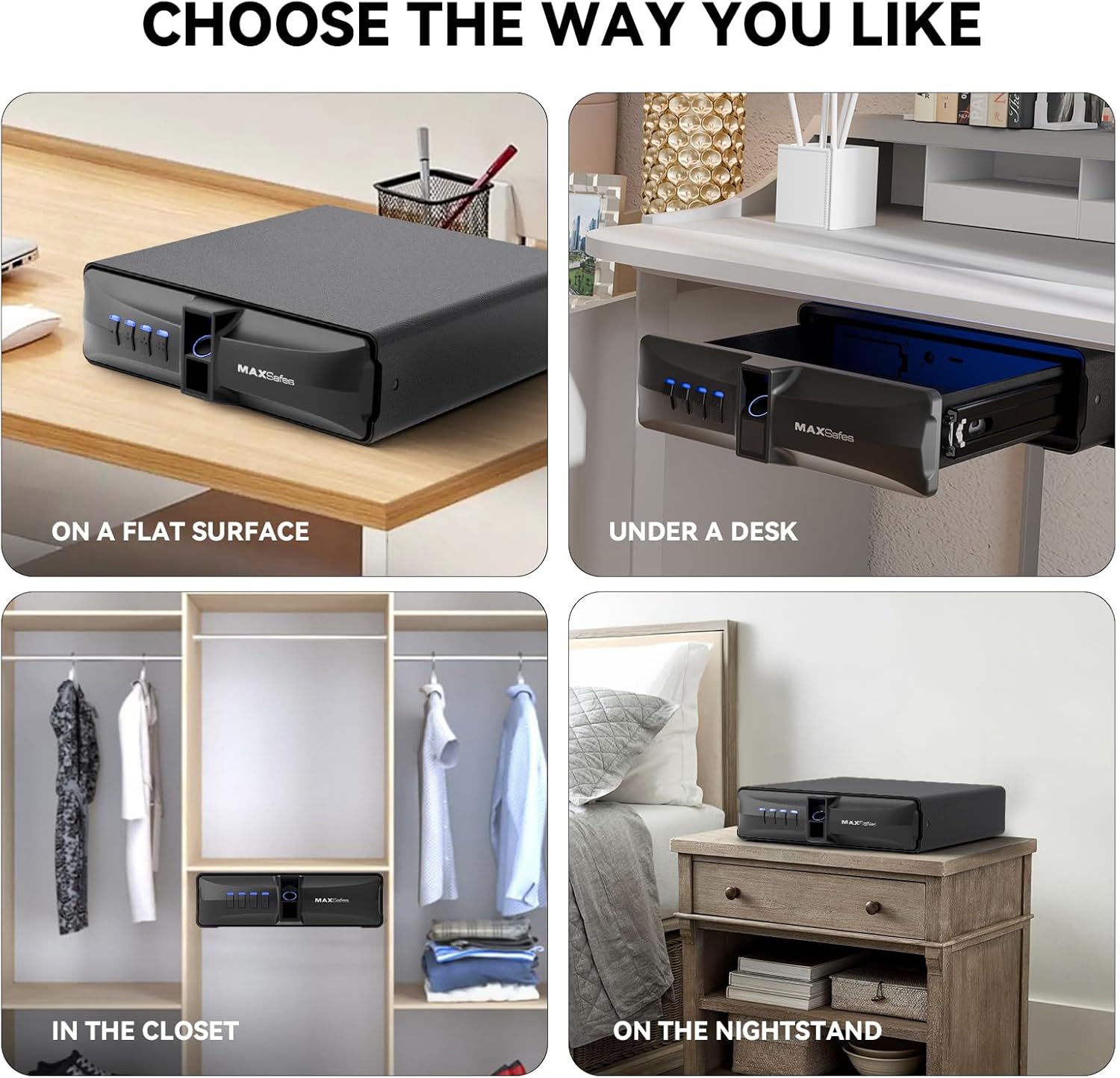
Image: Various installation options for the MAXSafes 10005NV Drawer Safe.
Funcionament
Desbloqueig de la caixa forta
The MAXSafes 10005NV offers three methods for unlocking:
- Finger Vein Recognition: Place a registered finger on the scanner. The safe will unlock in approximately 0.3 seconds.
- Codi PIN: Enter your programmed 4-8 digit PIN code on the backlit digital keypad.
- Anul·lació manual de la clau: In case of battery failure or forgotten codes, use one of the provided override keys to manually open the safe. The keyhole is located on the side of the safe.
Video: Demonstration of how to use the MAXSafes drawer safe, including unlocking methods.

Image: Three unlocking methods: Manual Key, Password Quick Access, and Finger Vein Recognition Quick Access.
Programming Finger Vein IDs
The safe can store up to 50 unique finger vein patterns.
- Obre la caixa forta.
- Locate the program button inside the safe (under a rubber cover).
- Press the program button. The indicator lights will flash.
- Place the finger you wish to register on the finger vein scanner.
- Lift and place the same finger on the scanner two more times (total of three scans).
- The indicator lights will confirm successful registration.
- Repeat for additional finger vein IDs.
Programació d'un codi PIN
Only one PIN code can be stored at a time. Programming a new code will overwrite the previous one.
- Obre la caixa forta.
- Locate the program button inside the safe.
- Press the program button. The indicator lights will flash.
- Introduïu el codi PIN desitjat de 4 a 8 dígits al teclat numèric.
- Premeu de nou el botó del programa per confirmar.
- Re-enter the same 4-8 digit PIN code to verify.
- The indicator lights will confirm successful programming.
Erasing All Finger Vein IDs
- Obre la caixa forta.
- Locate the program button inside the safe.
- Press and hold the program button for 5 seconds.
- While still holding the program button, press the '4' key on the keypad.
- All registered finger vein IDs will be erased.
Mode d'alarma
If three incorrect finger vein scans or PIN code entries are made consecutively, the safe's alarm will activate, and a 2-minute lockout period will begin. During this time, the safe cannot be opened using biometric or PIN methods. To end the lockout, enter a correct passcode, use a registered finger vein ID (if available), or remove and reinsert the 9V battery.
Manteniment
Canvi de bateria
The safe requires one 9V alkaline battery. Replace the battery when the low battery indicator lights up or if the safe fails to respond. Always keep spare override keys in a secure location outside the safe.
Potència d'emergència
In case the 9V battery is completely depleted, the safe features a Type-C emergency power outlet. Connect a Type-C cable to an external power source (e.g., power bank) to temporarily power the safe and gain access. This allows you to replace the internal 9V battery.

Image: Battery compartment design for easy 9V battery replacement.

Image: Type-C emergency outlet for temporary power when the battery is low.
Neteja
Netegeu l'exterior de la caixa forta amb un drap suau iamp cloth. Do not use abrasive cleaners or solvents. Keep the finger vein scanner clean and dry for optimal performance.
Resolució de problemes
- Safe does not open with finger vein: Ensure your finger is clean and dry. Try repositioning your finger on the scanner. If multiple attempts fail, use the PIN code or manual key.
- La caixa forta no s'obre amb el codi PIN: Double-check the entered code. Ensure the keypad is responsive. If the alarm is active, wait for the lockout period to end or use the manual key.
- Sense alimentació/Caixa forta no respon: Replace the 9V battery. If the battery is completely dead, use the Type-C emergency power outlet to temporarily power the safe and then replace the internal battery.
- L'alarma sona amb freqüència: Review recent access attempts. Ensure no unauthorized attempts are being made.
If you encounter persistent issues not covered here, please contact MAXSafes customer support for assistance.
Especificacions
| Marca | MAXSafes |
| Número de model | 10005NV |
| Dimensions del producte | 11.8 "P x 10.63" W x 3.11" H |
| Tipus de bloqueig | Biometric (Finger Vein), Electronic Combination Lock, Key |
| Color | Negre |
| Material | Acer d'aliatge |
| Característiques especials | Alarm System, Anti-Theft, Biometric Fingerprint, Internal LED Light, Type-C Emergency Power |
| Tipus de muntatge | Sota el taulell |
| Pes de l'article | 14.33 lliures |
| Necessites piles? | Yes (1 x 9V Alkaline Battery) |
| UPC | 762736659784 |
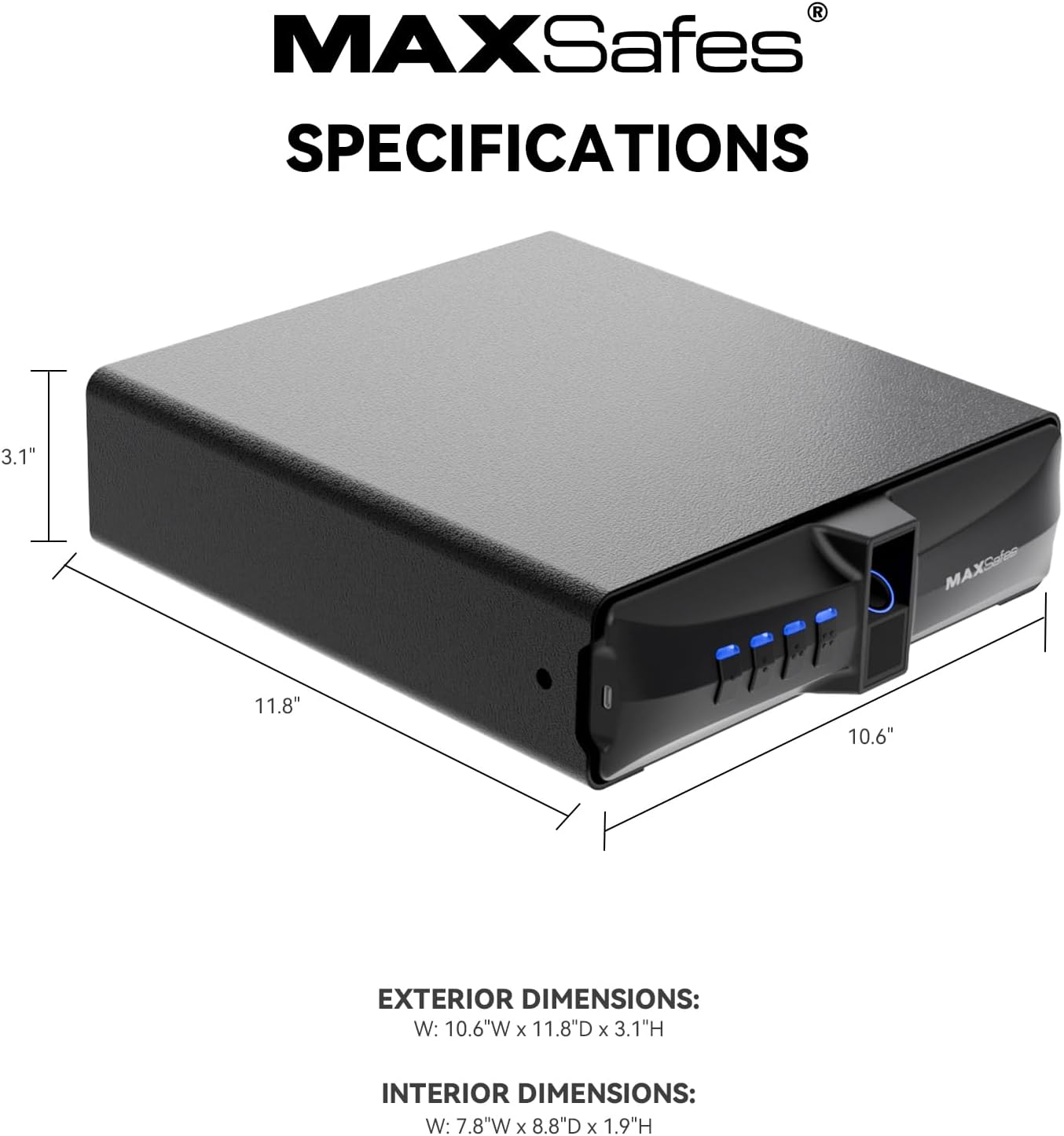
Image: Exterior and interior dimensions of the safe.
Garantia i Suport
For warranty information or technical support, please refer to the contact details provided with your product packaging or visit the official MAXSafes weblloc web. Conserveu el rebut de compra com a comprovant de compra per a qualsevol reclamació de garantia.