
MoKo 840401434772
MoKo 3-Pack Rechargeable Motion Sensor Under Cabinet Lights User Manual
Model: 11.8in-3Pack
Introducció
This manual provides detailed instructions for the installation, operation, and maintenance of your MoKo 3-Pack Rechargeable Motion Sensor Under Cabinet Lights. Please read this manual thoroughly before use to ensure proper function and longevity of the product.
Informació de seguretat
- Fully charge the product before first use to ensure optimal performance.
- Keep the product away from fire or explosive materials.
- Do not use this product in high temperature or humid environments.
- Do not use a charging device with an output voltage greater than 5V to charge the battery.
- Aquest producte està dissenyat només per a ús interior i no és resistent a l'aigua.
Contingut del paquet
- 3 x MoKo Under Cabinet Light Bars
- 1 x cable de càrrega USB
- 6 làmines adhesives de ferro
- 1 x Manual d'usuari
Característiques del producte
- Motion Sensor with 3 Modes: Features Always On, Night Sensor Mode (light activates only in dark environments when motion is detected), and Day Sensor Mode (light activates anytime motion is detected). Lights turn off automatically after 15 seconds of no movement.
- Bateria recarregable: Built-in 2500mAh high-capacity battery. Provides 9-10 hours of continuous light at maximum brightness or 60-90 days in sensor mode (based on 10-20 uses/day, 30 seconds each). Full charge in 3-4 hours via USB.
- 3 Color Temperatures & Dimmable Brightness: Choose between warm light, natural light, and white light. Brightness is infinitely adjustable by pressing and holding the adjustment button.
- Fàcil instal·lació magnètica: Can be attached directly to iron surfaces or using the provided adhesive iron sheets for non-iron surfaces.
- Aplicació versàtil: Ideal for kitchens, bedrooms, nurseries, wardrobes, counters, corridors, workshops, basements, garages, stairwells, and storage rooms.

Image: Three MoKo under cabinet light bars are displayed, illustrating their sleek design and the three available light color temperatures: warm, natural, and cool white.

Image: The wireless motion sensor light strip is shown installed in various indoor locations, including a kitchen, cabinet, bedside area, corridor, and an RV, demonstrating its versatile application.
Configuració i instal·lació
- Carrega els llums: Before first use, fully charge each light bar using the provided USB cable. The charging indicator will light up red while charging and turn off when fully charged.
- Preparació de la superfície de muntatge: Assegureu-vos que la superfície d'instal·lació desitjada estigui neta i seca.
- Instal·lació magnètica:
- For iron surfaces: The light bars have built-in magnets and can be directly attached.
- For non-iron surfaces: Peel the protective film from the adhesive iron sheets and stick them to your desired location. The light bar can then be magnetically attached to these sheets.

Image: A visual guide demonstrating the three-step installation process: attaching adhesive iron sheets, removing protective films, and sticking the light bar to the desired surface.

Image: A diagram illustrating the two mounting methods: direct attachment to iron surfaces and using adhesive iron sheets for non-iron surfaces, highlighting the strong built-in magnets.
Instruccions de funcionament
Switching Modes (Power Button)
The light bar features a multi-function button to cycle through its operating modes:
- Primera premsa: Mode sempre activat
- Segona premsa: Night Sensor Mode (light activates only in dark environments when motion is detected)
- Tercera premsa: Day Sensor Mode (light activates anytime motion is detected)
- Quarta premsa: Llum apagada
The motion sensor automatically turns the light off after 15 seconds of no movement in sensor modes.
Adjusting Color Temperature and Brightness (Light Colors & Brightness Adjustment Button)
- Canvia la temperatura del color: Press the light colors & brightness adjustment button to cycle through warm light, natural light, and white light.
- Ajusta la brillantor: Press and hold the light colors & brightness adjustment button for 3 seconds to infinitely adjust the brightness level. Release the button when the desired brightness is reached.
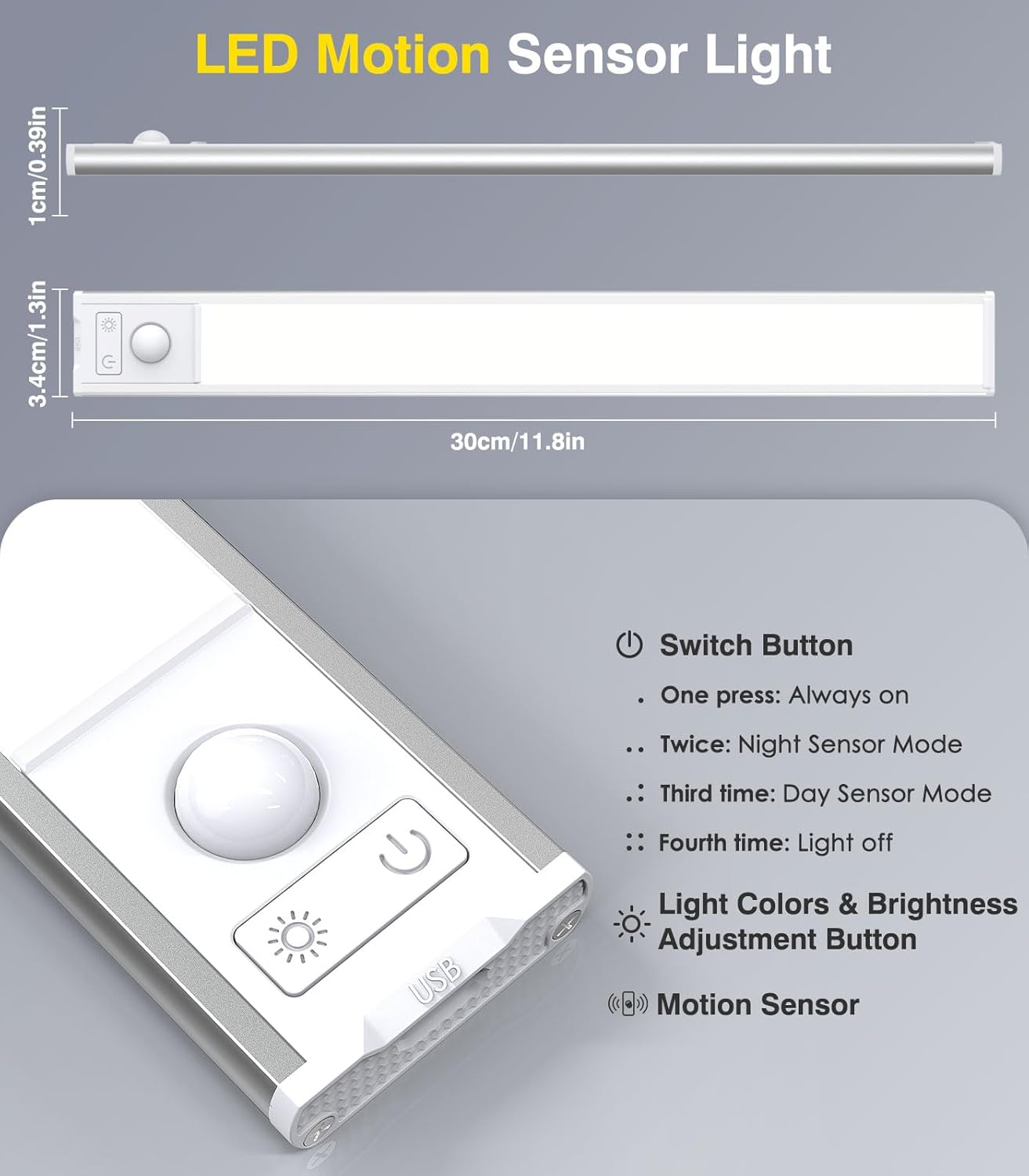
Image: A diagram showing the dimensions of the light bar (30cm/11.8in length) and labeling the Switch Button, Light Colors & Brightness Adjustment Button, and Motion Sensor.
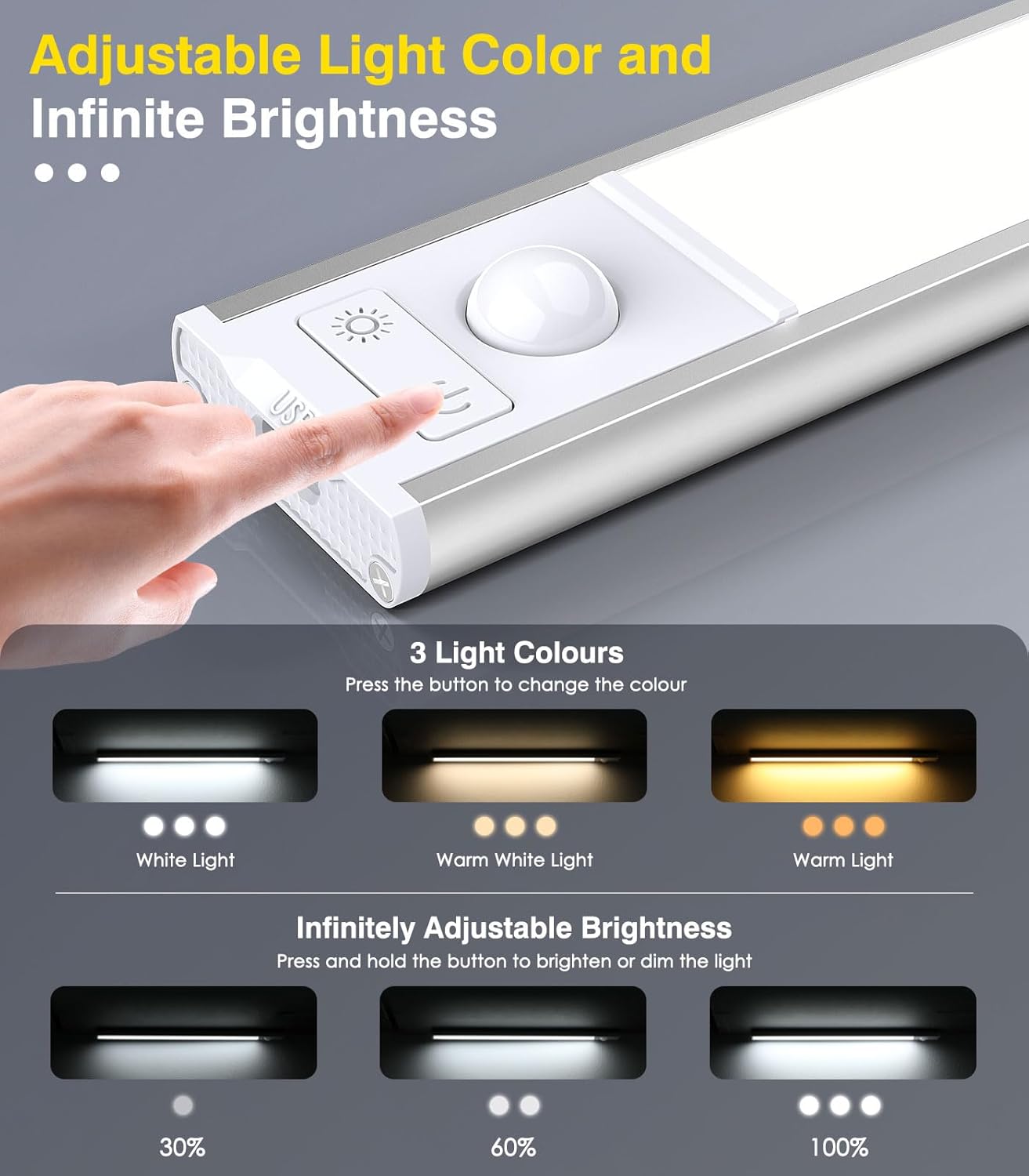
Image: A detailed diagram illustrating how to change between three light colors (White, Warm White, Warm Light) by pressing a button, and how to infinitely adjust brightness (30%, 60%, 100%) by pressing and holding the button.

Image: A diagram illustrating the motion sensor's capabilities, including a 120-degree wide-range lighting area and a 9.8ft (3 meters) sensing range, with a person in a kitchen setting.
Carregant
When the battery is low, the light output may decrease. To charge the light bar:
- Gently detach the light bar from its magnetic mounting.
- Connect the provided USB charging cable to the light bar's charging port.
- Plug the other end of the USB cable into a compatible 5V USB power adapter (not included).
- The charging indicator light will be red during charging and turn off when the battery is fully charged.
- Normalment, una càrrega completa triga entre 3 i 4 hores.

Image: A close-up of the light bar showing the USB charging port and a visual representation of the 2500mAh rechargeable battery. Text indicates the light illuminates red when charging and turns off when fully charged.
Manteniment
- Clean the light bar with a soft, dry cloth. Do not use abrasive cleaners or solvents.
- Avoid exposing the light bar to direct water or excessive moisture.
- Emmagatzemar en un lloc fresc i sec quan no s'utilitzi durant períodes prolongats.
Resolució de problemes
| Problema | Causa possible | Solució |
|---|---|---|
| La llum no s’encén. | La bateria està esgotada. Mode incorrecte seleccionat. | Carrega la barra de llums. Press the power button to cycle through modes (Always On, Night Sensor, Day Sensor). |
| El sensor de moviment no funciona. | Mode incorrecte seleccionat. Ambient light too bright (in Night Sensor Mode). Sensor obstruït. | Ensure Night Sensor or Day Sensor Mode is active. Night Sensor Mode only works in dark conditions. Assegureu-vos que el sensor estigui lliure d'obstruccions. |
| La llum s'apaga massa ràpid. | No s'ha detectat cap moviment continu. | The light is designed to turn off after 15 seconds of no motion in sensor modes. If continuous light is needed, select Always On Mode. |
| No es pot ajustar la brillantor ni la temperatura del color. | Ús incorrecte del botó. | For color temperature, press the light colors & brightness adjustment button. For brightness, press and hold the same button. |
Especificacions
- Marca: MoKo
- Nom del model: 11.8in-3Pack
- Número de model: 840401434772
- Dimensions (per light): 11.81 x 1.57 x 0.35 polzades
- Weight (per light): 4.2 unces
- Material: Alumini, plàstic
- Font de llum: LED (48 LEDs per light bar, 144 total for 3-pack)
- Colors clars: Warm White, Natural White, White (3 adjustable color temperatures)
- Brillantor: Regulable infinitament
- Font d'alimentació: Rechargeable Lithium Polymer Battery (2500mAh capacity)
- Voltage: 5 Volts
- Mètode de control: Touch, Motion Sensor
- Interval del sensor de moviment: Fins a 9.8 peus (3 metres)
- Motion Sensor Angle: 120 graus
- Instal·lació: Suport magnètic / adhesiu
- Ús interior/exterior: Només interior
- Resistència a l'aigua: No resistent a l'aigua
Garantia i Suport
This MoKo product comes with a lifetime warranty. For any support inquiries, please refer to the contact information provided with your purchase or visit the official MoKo weblloc.
Manufacturer: MoKo
Ask a question about this manual
Ask about setup, troubleshooting, compatibility, parts, safety, or missing instructions. Manuals+ will review the question and use this page’s manual context to help answer it.