
MageGee LIGHT100
MageGee LIGHT100 Wireless Mechanical Keyboard User Manual
Model: LIGHT100
Producte acabatview
The MageGee LIGHT100 is a versatile mechanical keyboard designed for various computing environments, offering multiple connectivity options and customizable features. It features a compact 96% layout, durable PBT keycaps, and a gasket-mounted structure for enhanced typing comfort and sound dampening.
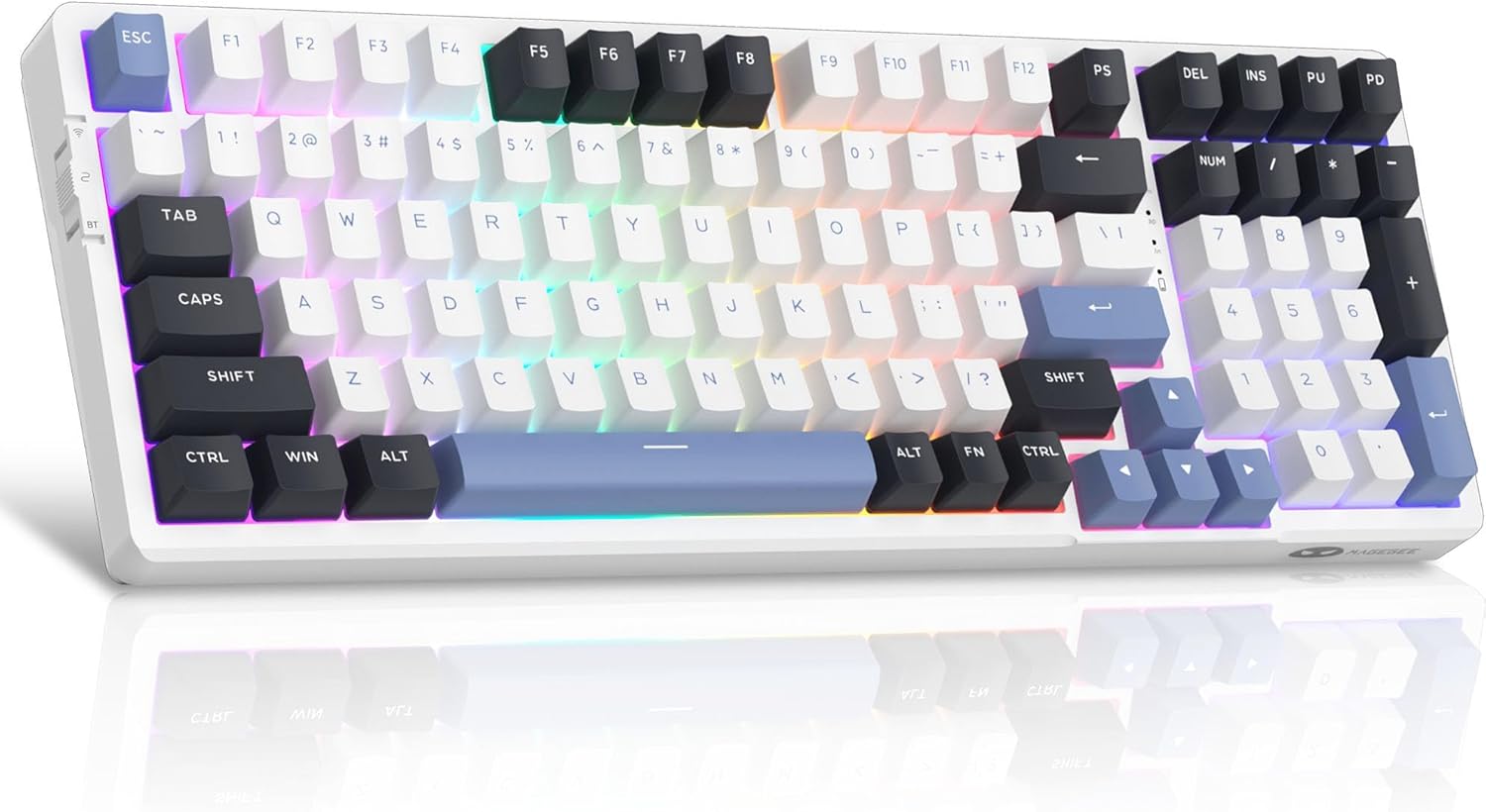
Figure 1: MageGee LIGHT100 Wireless Mechanical Keyboard with RGB backlighting.
Característiques principals:
- Connectivitat trimodal: Supports Bluetooth 5.0, 2.4GHz wireless, and USB-C wired connections for broad compatibility across devices.
- Gasket-Mounted Structure: Incorporates a gasket design with five layers of sound-absorbing foam to reduce noise and provide a softer, more comfortable typing experience.
- Interruptors intercanviables en calent: Equipped with quiet linear ivory white switches that are hot-swappable, allowing for easy replacement of 3-pin or 5-pin switches without soldering.
- Retroil·luminació RGB dinàmica: Features 16.8 million customizable RGB colors with various static and dynamic lighting effects.
- Bateria de llarga durada: Built-in 8000mAh battery provides extended usage, supporting both RGB-on and RGB-off modes.
- Tecles PBT duradores: Comes with high-quality PBT keycaps for enhanced durability and a premium feel.
- Disseny compacte al 96%: Offers a space-saving design while retaining essential function and arrow keys.
Guia de configuració
Contingut del paquet:
Abans de la configuració, assegureu-vos que hi hagi tots els components:
- MageGee LIGHT100 Wireless Mechanical Keyboard
- Cable USB-C
- Extractor de tecles
- Tirador de commutació
- Spare Switches (Ivory White Linear)
- Guia de l'usuari (aquest manual)

Figure 2: Included components with the MageGee LIGHT100 keyboard.
Connexió del teclat:
The LIGHT100 keyboard offers three connection methods:
- Mode amb cable USB-C:
Connect the provided USB-C cable to the keyboard's port and the other end to your computer's USB port. The keyboard will automatically be recognized and ready for use. This mode also charges the keyboard's internal battery.

Figure 3: Keyboard connected via USB-C cable, illustrating wired connection.
- Mode sense fil de 2.4 GHz:
Locate the 2.4GHz USB receiver (dongle) usually stored in a compartment on the keyboard. Plug the receiver into an available USB port on your computer. On the keyboard, toggle the switch to the "2.4G" position (often indicated by a wireless icon). The keyboard should connect automatically. If not, press Fn + 4 per iniciar l'aparellament.
- Mode Bluetooth 5.0:
The keyboard can connect to up to three different Bluetooth devices. Toggle the switch on the keyboard to the "BT" position. To pair with a device, press Fn + 1, Fn + 2, o Fn + 3 to select a Bluetooth channel. The indicator light for the selected channel will blink, indicating pairing mode. On your device (PC, laptop, tablet, smartphone), search for Bluetooth devices and select "MageGee LIGHT100" to connect. Once connected, the indicator light will become solid. Repeat for other channels to pair additional devices.
Video 1: Official product video demonstrating the MageGee LIGHT100 Wireless Gasket Creamy Keyboard features, including tri-mode connectivity and RGB lighting.
Instruccions de funcionament
Control de retroiluminació RGB:
The LIGHT100 keyboard features extensive RGB customization:
- Toggle Backlight Modes: Premeu Fn + Intro to cycle through approximately 20 different backlight modes (static and dynamic).
- Adjust Backlight Colors: Premeu Fn + ← or Fn + → to change the backlight colors within certain modes.
- Ajustar la brillantor de la llum de fons: Premeu Fn + ↑ per augmentar la brillantor i Fn + ↓ per disminuir la brillantor.
- Ajusta la velocitat de la llum de fons: Premeu Fn + =+ to increase animation speed and Fn + _- to decrease animation speed.

Figure 4: RGB backlight control functions on the keyboard.
Substitució de la tapa de les tecles i l'interruptor:
The LIGHT100 keyboard supports hot-swappable switches, allowing for easy customization:
- Eliminació de les tecles: Feu servir l'extractor de tecles proporcionat per estirar suaument les tecles cap amunt.
- Eliminació dels interruptors: Use the provided switch puller to carefully grip the switch and pull it straight up. Ensure the switch is aligned correctly when re-inserting.
- Instal·lació d'interruptors: Align the pins of the new 3-pin or 5-pin switch with the holes on the PCB and press down firmly until it clicks into place. Do not force the switch if it doesn't align easily to avoid bending pins.

Figure 5: Hot-swappable switch mechanism for easy customization.
Manteniment
- Neteja: Use a soft, dry cloth to wipe the keyboard surface. For deeper cleaning, remove keycaps and use compressed air to clear debris from between switches.
- Cura de la bateria: To prolong battery life, avoid fully discharging the keyboard frequently. Charge it regularly using the provided USB-C cable.
- Emmagatzematge: Guardeu el teclat en un lloc fresc i sec, allunyat de la llum solar directa i de temperatures extremes.
- Exposició líquida: Avoid exposing the keyboard to liquids. In case of spills, immediately disconnect the keyboard and allow it to dry completely before re-use.
Resolució de problemes
| Problema | Solució |
|---|---|
| El teclat no respon en mode sense fil. | Ensure the keyboard is switched to the correct wireless mode (2.4GHz or BT). For 2.4GHz, check if the USB receiver is properly plugged in. For Bluetooth, ensure the correct channel (Fn+1/2/3) is selected and the device's Bluetooth is enabled and paired. Try re-pairing if necessary. |
| La retroiluminació no funciona o està enganxada. | Press Fn + Enter to cycle through backlight modes. Check brightness settings using Fn + ↑/↓. Ensure the keyboard battery has sufficient charge. |
| Les claus no es registren o s'escriuen dues vegades. | This might indicate a loose or faulty switch. Use the switch puller to remove the affected switch and re-insert it firmly. If the issue persists, replace the switch with a spare one. |
| Connexió Bluetooth inestable. | Ensure the keyboard is within range of the device. Minimize interference from other wireless devices. Try forgetting the keyboard on your device and re-pairing. |
| Keyboard not charging. | Verify the USB-C cable is securely connected to both the keyboard and a power source/computer. Try a different USB port or cable. |
Especificacions
| Característica | Detall |
|---|---|
| Model | LLUM100 |
| Marca | MageGee |
| Connectivitat | Bluetooth 5.0, sense fil de 2.4 GHz, USB-C amb cable |
| Disseny | 96% (99 tecles) |
| Taps de claus | PBT |
| Interruptors | Hot-Swappable Linear Ivory White |
| Llum de fons | 16.8 milions de RGB |
| Capacitat de la bateria | 8000 mAh |
| Sistema operatiu compatible | Windows, macOS, PC, Laptops, Tablets, Smartphones |
| Pes de l'article | 2.97 lliures (aprox. 1.35 kg) |
| Dimensions | 17.76 x 7.68 x 2.52 polzades |
Garantia i Suport
For warranty information, technical support, or further assistance, please refer to the official MageGee weblloc web o contacteu directament amb el servei d'atenció al client. Conserveu el rebut de compra per a reclamacions de garantia.
Podeu visitar el MageGee Store on Amazon per obtenir més informació sobre el producte i recursos d'assistència.
Documents relacionats - LLUM100
 |
Guia d'usuari del teclat mecànic sense fil MAGEGEE SKY 81 Guia d'usuari completa per al teclat mecànic sense fil MAGEGEE SKY 81, que cobreix les característiques, les combinacions de tecles, la connectivitat, les funcions dels botons, les especificacions i el compliment de la normativa FCC. |
 |
Manual d'usuari del teclat mecànic MAGEGEE Captain87 Manual d'usuari del teclat mecànic MAGEGEE Captain87, que detalla les especificacions, les característiques, les tecles multimèdia, les instruccions de les tecles de combinació, la instal·lació del controlador i la informació de la garantia. |
 |
Manual d'usuari del teclat mecànic MAGEGEE Captain72 Manual d'usuari oficial del teclat mecànic MAGEGEE Captain72, que detalla les especificacions, les característiques, les funcions de les tecles multimèdia, la instal·lació del controlador, la informació sobre la garantia i el compliment de la normativa de la UE. |
 |
Guia d'usuari i garantia del teclat mecànic MageGee SKY87 Guia d'usuari completa per al teclat mecànic MageGee SKY87, que detalla les seves característiques, tecles multifunció, efectes d'il·luminació i informació sobre la garantia. Inclou especificacions del producte i consells per a la resolució de problemes. |
 |
MageGee 75% Mechanical Gaming Keyboard User Manual User manual for the MageGee 75% Mechanical Gaming Keyboard, detailing key combinations, lighting effects, knob controls, and technical specifications. |
 |
MageGee V80 Wireless Mouse User Guide User manual for the MageGee V80 Wireless Mouse, including features, setup instructions, specifications, and FCC compliance information. |
Ask a question about this manual
Ask about setup, troubleshooting, compatibility, parts, safety, or missing instructions. Manuals+ will review the question and use this page’s manual context to help answer it.