
AKEEYO AKEEYO-EYES-01
AKEEYO EYES 3-Channel Dash Cam User Manual
Model: AKEEYO-EYES-01
1. Introducció
This manual provides comprehensive instructions for the installation, operation, and maintenance of your AKEEYO EYES 3-Channel Dash Cam. This device is designed to enhance driving safety and provide reliable video evidence with its advanced features, including AI driver assistance, multi-lens recording, and 24/7 parking surveillance.
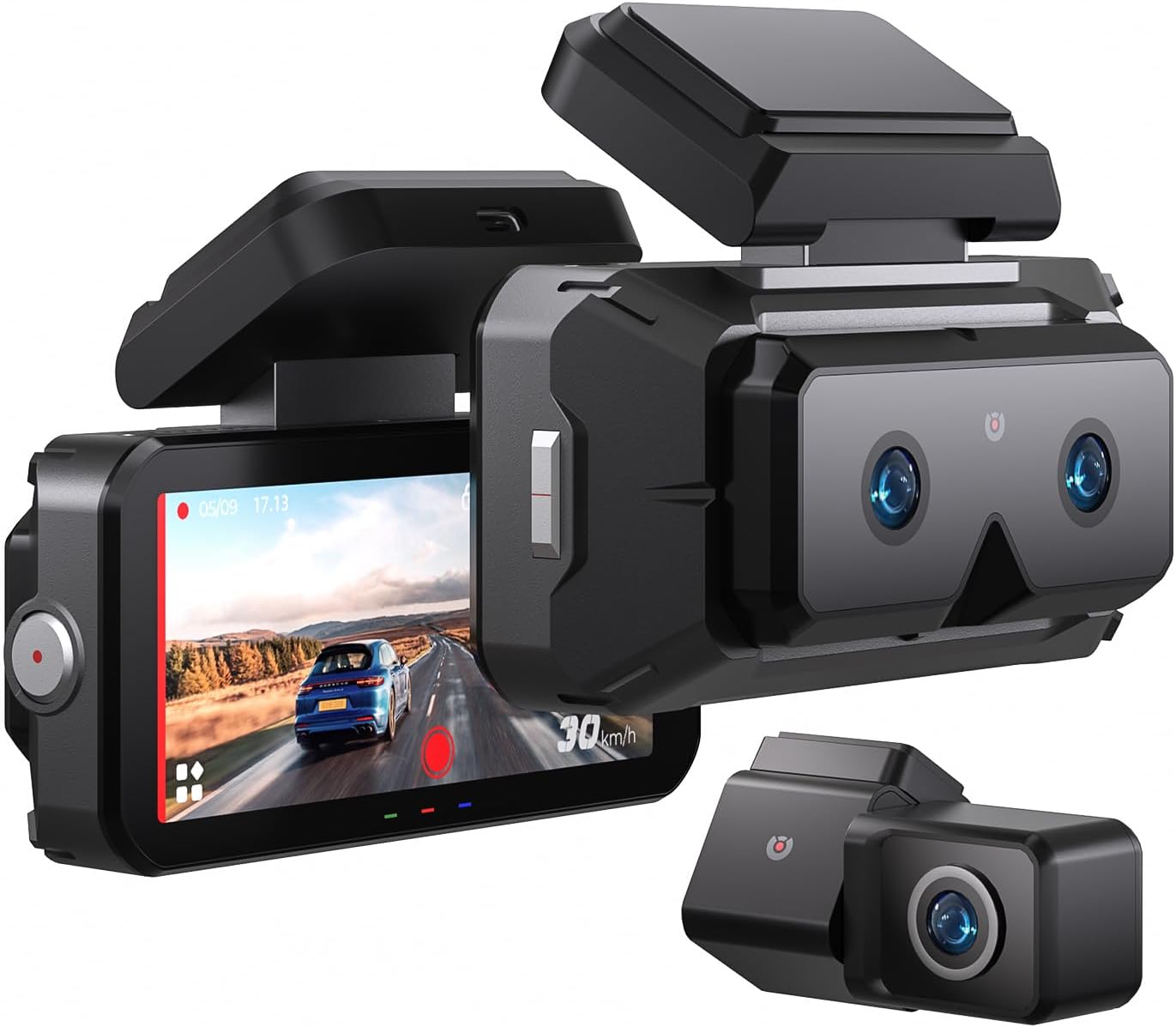
Image 1.1: The AKEEYO EYES 3-Channel Dash Cam, showing the main unit with its 4-inch IPS touchscreen and the separate rear camera.
2. Característiques del producte
- Gravació de 3 canals: Simultaneous recording from front (telephoto and wide-angle) and rear cameras.
- Resolució 2K: High-definition video capture for clear details.
- Pantalla tàctil IPS de 4 polzades: Intuitive interface for live view i ajust de la configuració.
- AI Driver Assistance (ADAS & BSD): Real-time alerts for collision, lane departure, blind spot detection, pedestrian detection, and front vehicle start reminders.
- WDR Night Vision: Enhanced clarity in low-light conditions.
- Control de veu: Hands-free operation for key functions.
- GPS integrat: Records speed and location data.
- Connectivitat Wi-Fi 5G: Fast data transfer to mobile devices via app.
- Sensor G: Automatic emergency recording upon impact.
- Enregistrament en bucle: Continuous recording, overwriting oldest files when storage is full (emergency videos are protected).
- Mode d'aparcament 24/7: Monitors vehicle activity when parked (requires separate hardware kit).
- Supercondensador: Provides durability and resistance to extreme temperatures.
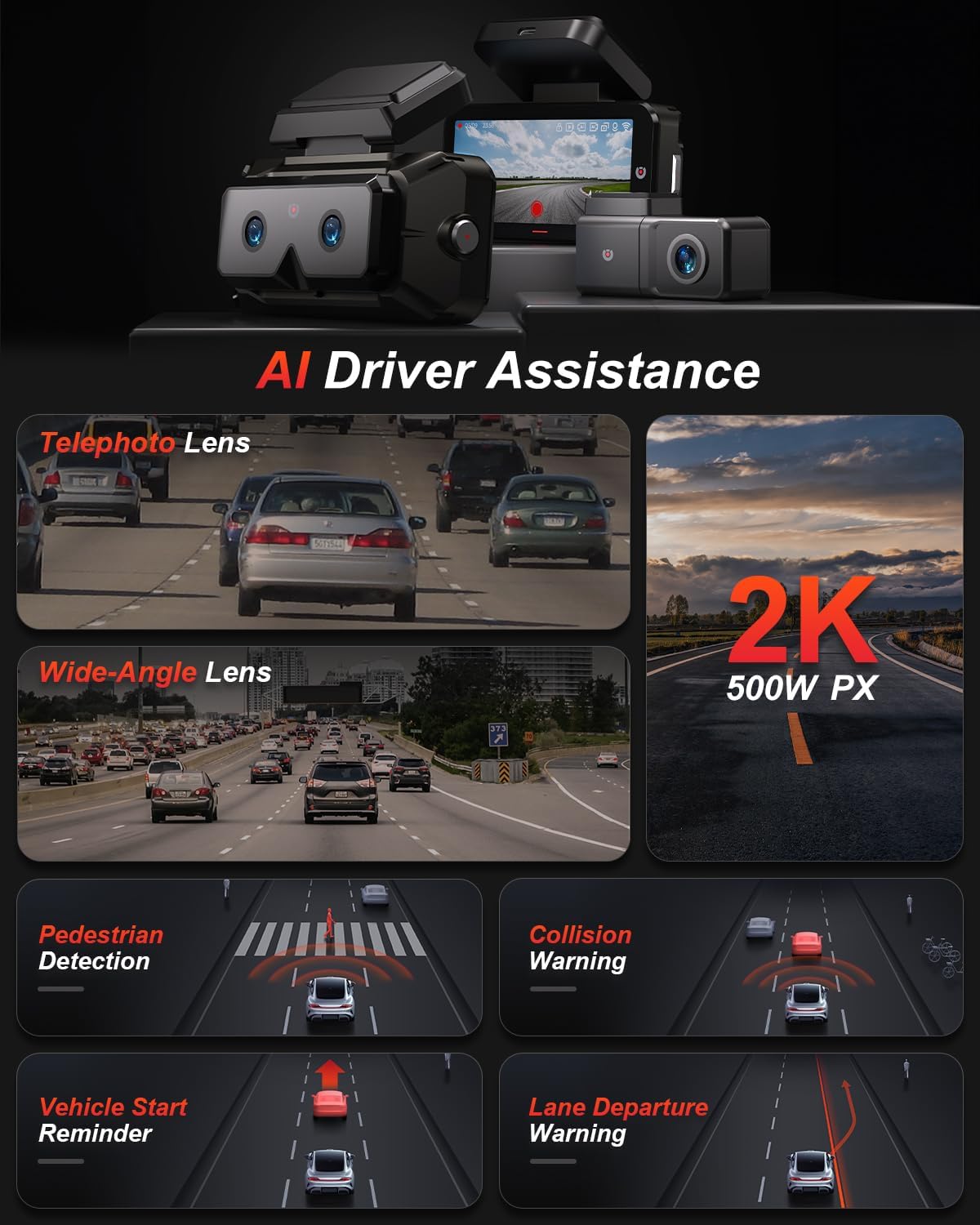
Imatge 2.1: acabatview of AI Driver Assistance features, including ADAS and BSD.

Imatge 2.2: Detallada view of the dash cam's main unit and rear camera, highlighting the 3.99-inch display, wide-angle and telephoto lenses, and 360-degree rotating rear camera.
3. Contingut del paquet
Verifiqueu que tots els elements siguin presents al paquet:
- AKEEYO EYES Dash Cam (Main Unit)
- Càmera posterior
- Carregador de cotxe
- Cable de la càmera posterior
- PC Data Transmission Wire
- Palanca (per al cablejat)
- Static Electricity Sticker
- Muntatge del cos
- Coixinets adhesius 3M

Image 3.1: All components included in the AKEEYO EYES Dash Cam package.
4. Configuració i instal·lació
4.1 Instal·lació de la targeta MicroSD
- Assegureu-vos que la càmera del salpicader estigui apagada.
- Insert a compatible MicroSD card (Class 10 or higher, U3 V30 A2 recommended, up to 256GB) into the designated slot on the main unit until it clicks.
- Per treure-la, premeu suaument la targeta fins que surti.
4.2 Instal·lació de la càmera frontal del salpicader
- Netegeu la zona del parabrisa on es muntarà la càmera del salpicader.
- Attach the static electricity sticker to the chosen area on the windshield.
- Affix the body mount with 3M adhesive to the static electricity sticker.
- Slide the main dash cam unit onto the body mount.
- Ajusteu l'angle de la càmera de tauler per assegurar-ne una clara view del camí per davant.
4.3 Instal·lació de la càmera posterior
- Choose a mounting location for the rear camera, either inside the rear window or outside near the license plate (IP67 rated for outdoor use).
- Netegeu bé la superfície de muntatge.
- Fixeu la càmera posterior amb l'adhesiu 3M proporcionat.
- Route the rear camera cable to the main dash cam unit, ensuring it does not interfere with airbags or vehicle operation. Use the crowbar to tuck cables neatly.
- Connect the rear camera cable to the AV-IN port on the main unit.
- If the rear camera is installed upside down, detach it from its quick-release mount and reattach it in the correct orientation. No software adjustment is needed.
4.4 Connexió d'alimentació
- Connect the car charger to the Type-C port on the main dash cam unit.
- Connecteu el carregador del cotxe a la presa de l'encenedor del vostre vehicle.
- Col·loca el cable d'alimentació amb cura per evitar obstruccions.

Image 4.1: Visual guide for the installation of the dash cam system.
5. Instruccions de funcionament
5.1 Encès/Apagat
- La càmera del salpicader s'encendrà automàticament i començarà a gravar quan s'activi el contacte del vehicle.
- S'apagarà automàticament quan s'apagui el contacte.
- To manually power on/off, press and hold the power button.
5.2 Using the 4-inch IPS Touchscreen
The touchscreen allows for easy navigation and viewing:
- Viu View: Mostra foo en temps realtage from the cameras. You can view all three channels simultaneously or focus on a single camera.
- Configuració: Access various settings such as resolution, loop recording duration, G-sensor sensitivity, and Wi-Fi.
- Reproducció: Review recorded videos directly on the screen.
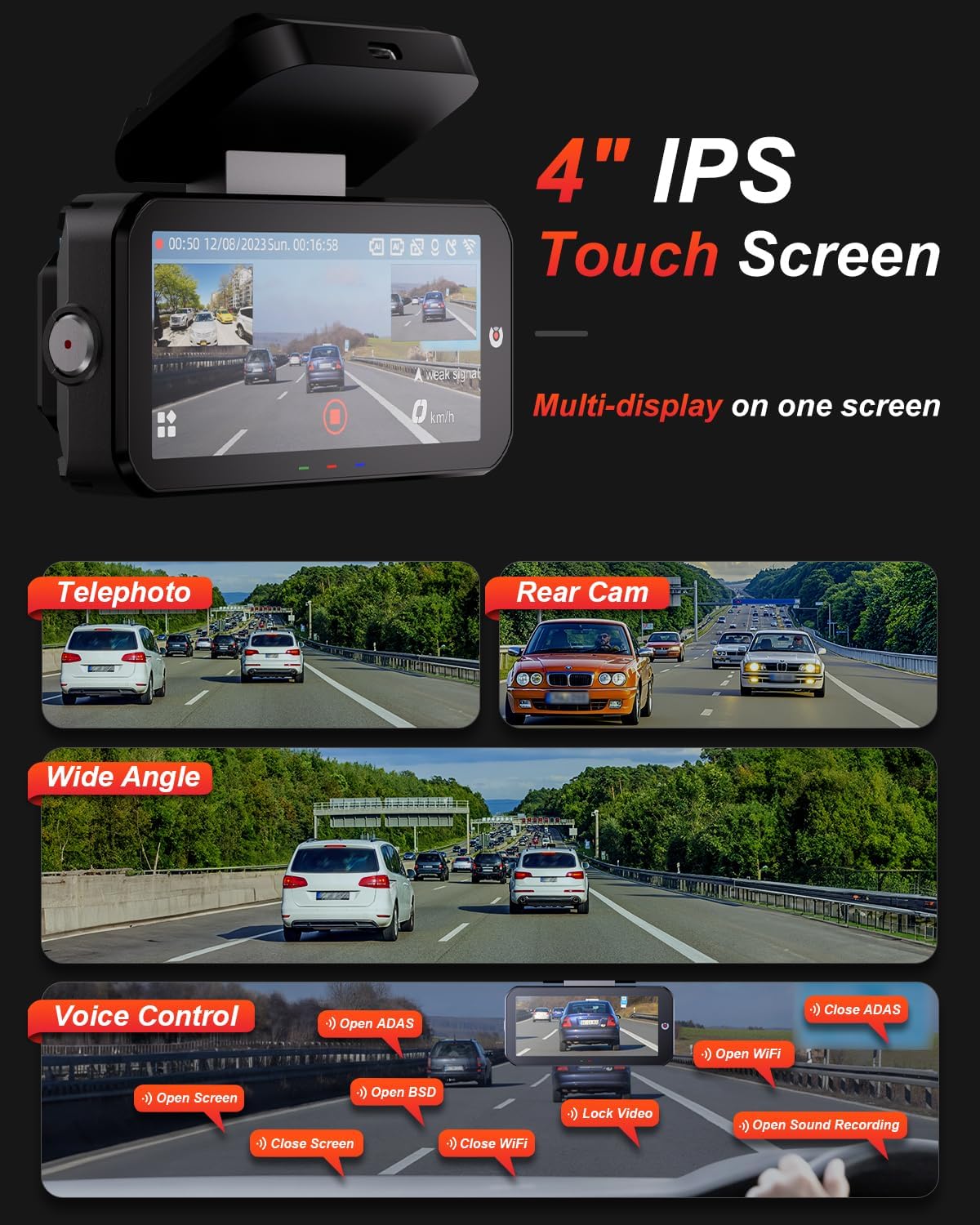
Image 5.1: The dash cam's 4-inch IPS touchscreen interface.
5.3 Control de veu
Operate key functions hands-free using voice commands. Examples inclouen:
- "Open ADAS" / "Close ADAS"
- "Open BSD" / "Close BSD"
- "Open Screen" / "Close Screen"
- "Open WiFi" / "Close WiFi"
- "Lock Video" (to protect current recording)
- "Open Sound Recording"

Image 5.2: Voice control commands for hands-free operation.
5.4 Modes d'enregistrament
- Enregistrament en bucle: The dash cam records continuously in segments. When the memory card is full, it automatically overwrites the oldest unlocked files.
- Sensor G: In the event of a sudden impact or collision, the built-in G-sensor automatically detects the event and locks the current video segment to prevent it from being overwritten.

Image 5.3: Loop Recording mechanism.
5.5 Mode d'aparcament 24/7
When properly configured with the optional AKEEYO hardware kit (ASIN B0DHZPR4XW, sold separately), the dash cam can monitor your vehicle 24/7. It detects vibrations and records abnormal events, providing security against theft or collisions while parked. Low framerate recording can conserve storage during parking surveillance.

Image 5.4: 24/7 Parking Monitor functionality.
5.6 GPS and Wi-Fi Connectivity
- GPS: The built-in GPS module records your vehicle's speed and location data, which can be reviewed via the mobile app or PC player.
- Wi-Fi 5G: Connect your smartphone to the dash cam via the AKEEYO app (available on App Store and Google Play) using 5G Wi-Fi for fast video download, playback, editing, and sharing.

Image 5.5: 5G Wi-Fi and Global GPS connectivity.
5.7 AI Driver Assistance (ADAS & BSD)
The dash cam provides real-time alerts to enhance driving safety:
- Collision Warning: Alerts you if your vehicle is too close to the vehicle ahead or if a car slows down abruptly.
- Avís de sortida de carril: T'avisa si el vehicle surt del seu carril sense posar l'intermitent.
- Blind Spot Detection (BSD): Monitors vehicles in your blind spots and provides alerts when changing lanes.
- Pedestrian Detection: Identifies pedestrians in front of you at low speeds and issues an alarm.
- Front Vehicle Start Reminder: Reminds you when the vehicle ahead starts to move.

Image 5.6: Collision Warning system in action.

Image 5.7: Blind Spot Detection system.
6. Manteniment
6.1 Neteja del dispositiu
- Feu servir un drap suau i sec per netejar el cos i la pantalla de la càmera del salpicader.
- For lenses, use a specialized lens cleaning cloth to avoid scratches.
- No utilitzeu netejadors abrasius ni dissolvents.
6.2 Gestió de targetes MicroSD
- Regularly format the MicroSD card (at least once a month) through the dash cam's settings to ensure optimal performance and prevent data corruption.
- Replace the MicroSD card periodically, as continuous overwriting can degrade its lifespan.
6.3 Consideracions de temperatura
The dash cam is designed to withstand temperatures up to 176°F (80°C). However, prolonged exposure to extreme heat can affect performance. If the device becomes excessively hot, allow it to cool down before handling or removing the SD card.
7. Solució De Problemes
- La càmera del cotxe no s'encén: Check the power connection to the car charger and ensure the vehicle's cigarette lighter socket is functional.
- Problemes de gravació: Ensure a compatible MicroSD card is inserted and formatted. Check if the card is full or corrupted. Try formatting the card or using a new one.
- Camera shutting down randomly: This could be due to a faulty SD card or extreme temperatures. Try replacing the SD card. If the issue persists, contact customer support.
- Rear camera fogging/malfunctioning: Ensure the rear camera is properly sealed if mounted externally. If mounted internally, check for condensation.
- AI features (ADAS/BSD) providing false alerts or not working: Ensure the camera lenses are clean and unobstructed. Calibrate the system if an option is available in settings. Adjust sensitivity if alerts are too frequent.
- Problemes de connexió Wi-Fi: Ensure Wi-Fi is enabled on the dash cam and your smartphone. Restart both devices and try connecting again.
- GPS no rastreja: Assegureu-vos que la càmera del salpicader tingui una visió clara view del cel.
For further assistance, please contact AKEEYO customer support.
8. Especificacions
| Característica | Especificació |
|---|---|
| Dimensions del producte | 10.24 x 7.48 x 2.76 polzades |
| Pes de l'article | 2.34 lliures |
| Número de model | AKEEYO-EYES-01 |
| Resolució de captura de vídeo | 1440p (2K) |
| Mostra | Pantalla tàctil IPS de 4 polzades |
| Tecnologia de connectivitat | Powerline, USB, Voice, Wi-Fi (5G) |
| Característiques especials | 3-Channel 2K+2K+2K, GPS, Night Vision, Voice Control, Touch Control, AI ADAS & BSD Assistance, Wide-Angle, Loop Recording, G-Sensor, Telephoto Lens, 24H Parking Mode |
| Tipus de muntatge | Muntatge del parabrisa |
| Color | Negre |
| Camp de View | 160 Feet (Front Telephoto) / 135° (Front Wide-Angle) / 154° (Rear) |
| Suport d'emmagatzematge | Up to 256GB MicroSD (Class 10, U3 V30 A2 recommended) |
| Temperatura de funcionament | Fins a 176 °F (80 °C) |
9. Garantia i Suport
- Garantia: The AKEEYO EYES Dash Cam comes with an 18-month warranty.
- Devolucions: You are eligible for returns within 30 days of purchase.
- Atenció al client: AKEEYO provides 24-hour customer service. For support, please visit the official AKEEYO weblloc web o contacteu directament amb el seu equip d'atenció al client.
Documents relacionatsAKEEYO-EYES-01


Ask a question about this manual
Ask about setup, troubleshooting, compatibility, parts, safety, or missing instructions. Manuals+ will review the question and use this page’s manual context to help answer it.