
Introducció
This manual provides detailed instructions for the OMOTON Bluetooth Wireless Backlit Keyboard (FR-Layout). Designed for versatility and ease of use, this keyboard offers multi-system compatibility, a comfortable typing experience with large, silent keys, and adjustable backlighting. Please read this manual thoroughly to ensure proper setup and operation of your device.
Producte acabatview
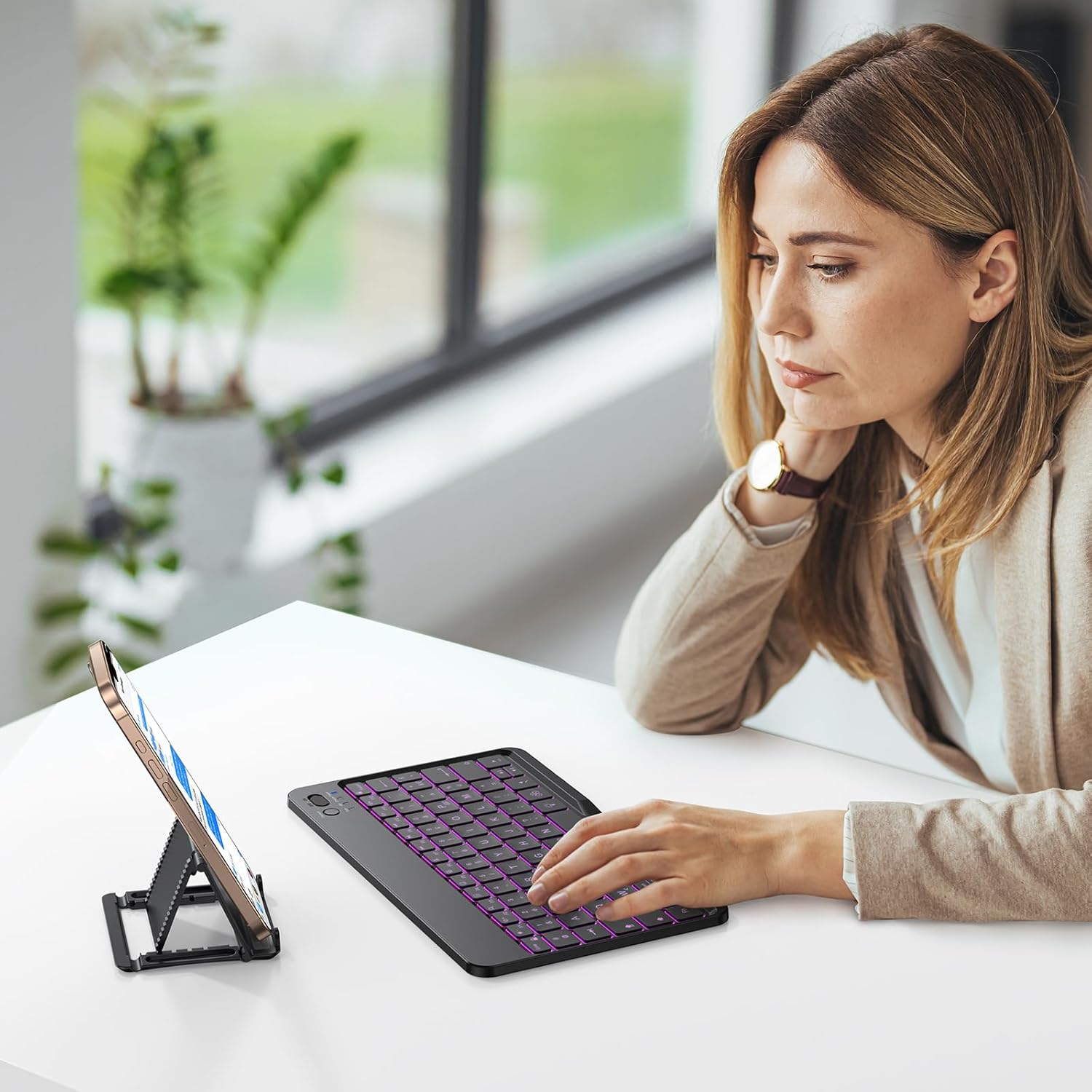
The OMOTON Bluetooth keyboard features a compact design with an integrated phone stand, making it suitable for various mobile setups. Its keys are designed for comfort and efficiency.

Image: OMOTON Bluetooth Wireless Backlit Keyboard with integrated phone stand.
Característiques clau
- Large Keycap Design: Keys are 12% larger than standard, improving typing accuracy and comfort.
- Silent Scissor-Type Key Structure: Provides a quiet and responsive typing experience with a lifespan of 3 million keystrokes.
- 7-Color Adjustable Backlight: Customize your typing environment with 7 backlight colors and 3 brightness levels.
- Tecles de drecera multimèdia: 12 dedicated shortcut keys for quick access to functions.
- Ultra-Thin and Portable: Lleuger i compacte per facilitar el transport.

Image: Comparison illustrating the OMOTON keyboard's larger keycap design for enhanced usability.
Imatge: Detallada view of the silent scissor-type key mechanism, highlighting its construction.
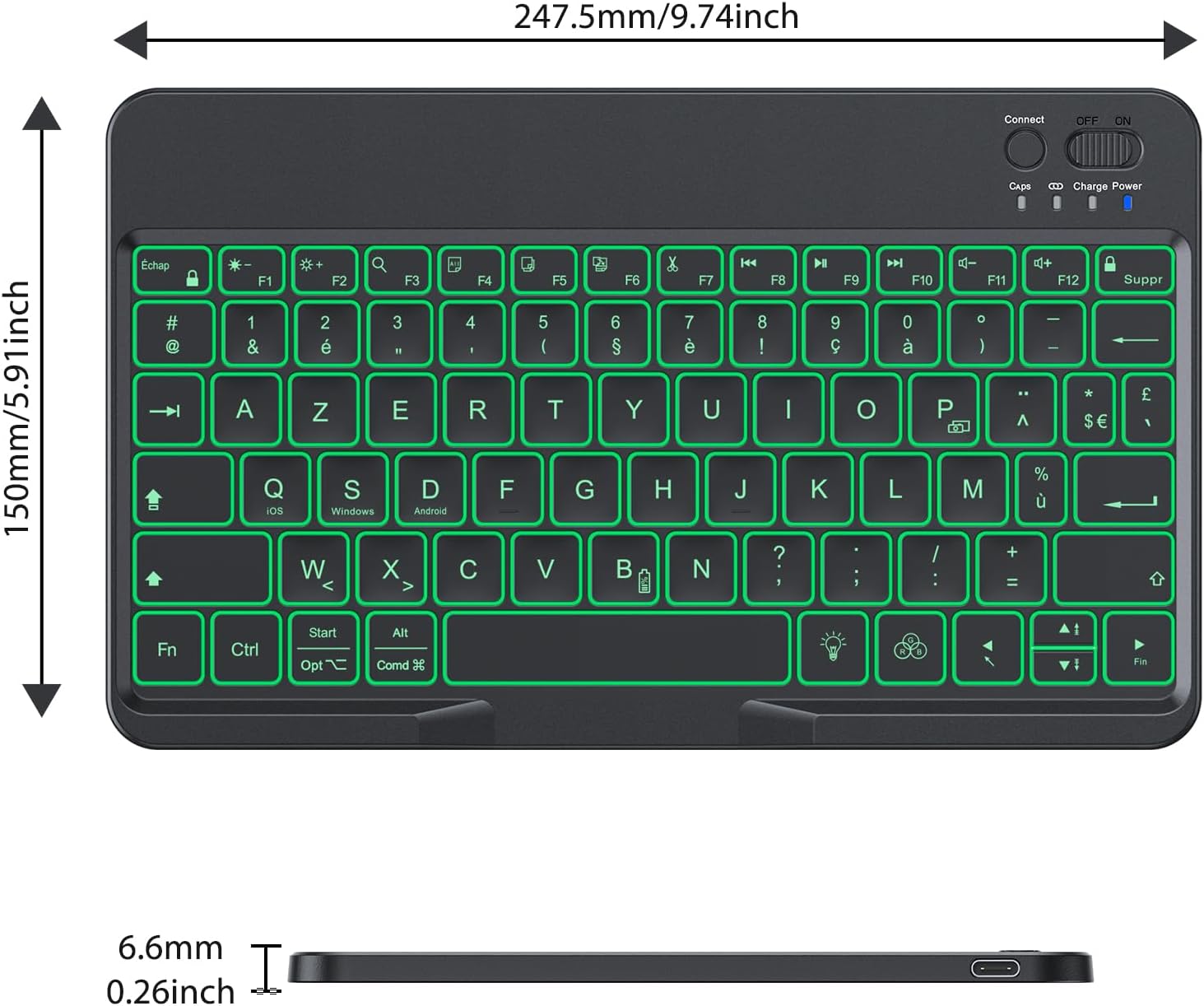
Image: The OMOTON keyboard being stored in a bag, emphasizing its ultra-thin and portable design.
Configuració
Carregant el teclat
Before first use, fully charge the keyboard. Connect the provided Type-C charging cable to the keyboard's charging port and a USB power source. The charging indicator light will show the charging status.
- Temps de càrrega: aproximadament 2-3 hores.
- Working Hours (backlight off): Up to 200 hours.
- Working Hours (backlight on): 3-5 hours.

Image: The OMOTON keyboard connected to a power source for charging, showing estimated charging and working times.
Emparellament Bluetooth
Follow these steps to connect your keyboard via Bluetooth:
- Turn on the keyboard using the power switch located on the top right.
- Press the 'Connect' button (usually near the power switch) to enter pairing mode. The Bluetooth indicator light will flash.
- Al dispositiu (tauleta, telèfon intel·ligent, PC), aneu a la configuració de Bluetooth i activeu-lo.
- Cerca available devices. The keyboard will appear as 'OMOTON Keyboard' or similar.
- Select the keyboard to pair. Your device may prompt you to enter a code displayed on the screen, then press Enter on the keyboard.
- Once paired, the Bluetooth indicator light will stop flashing.
System Compatibility and Switching
The keyboard is compatible with iOS, Android, and Windows operating systems. To optimize key functions for your specific device, switch the keyboard mode:
- Per a dispositius iOS: premeu Fn+A
- Per a dispositius Android: premeu Fn + D
- Per a dispositius Windows: premeu Fn + S
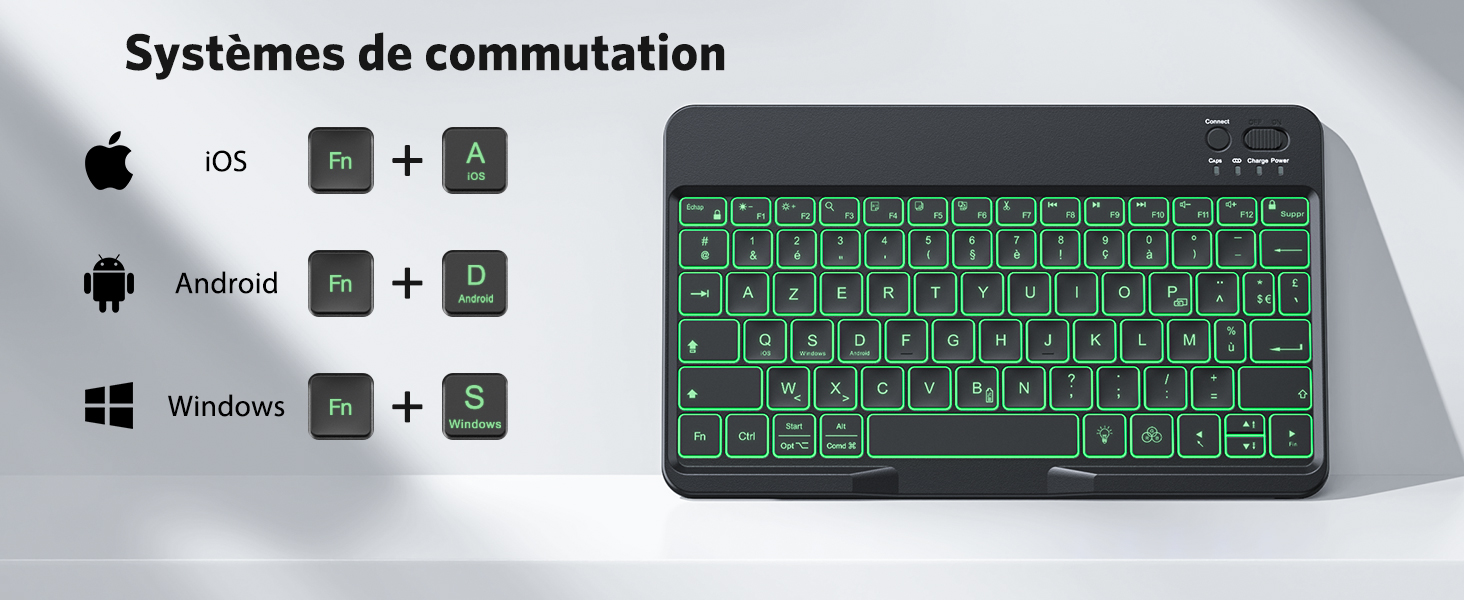
Image: Visual guide for switching keyboard modes between iOS, Android, and Windows using Fn key combinations.

Image: The OMOTON keyboard demonstrating wide compatibility with iOS, Android, and Windows devices.
Instruccions de funcionament
Control de la llum de fons
The keyboard features an adjustable backlight for typing in low-light conditions.
- Premeu el botó lightbulb icon key once to turn on the backlight.
- Premeu el botó lightbulb icon key a second time to activate breathing light mode.
- Premeu el botó lightbulb icon key a third time to turn off the backlight.
To change backlight colors (7 available colors) when the backlight is on, press Fn + lightbulb icon key.
To adjust backlight brightness (3 levels), press Fn + Fletxa amunt (augmentar) o Fn + Fletxa avall (disminució).

Image: The OMOTON keyboard showcasing its 7-color adjustable backlight feature.
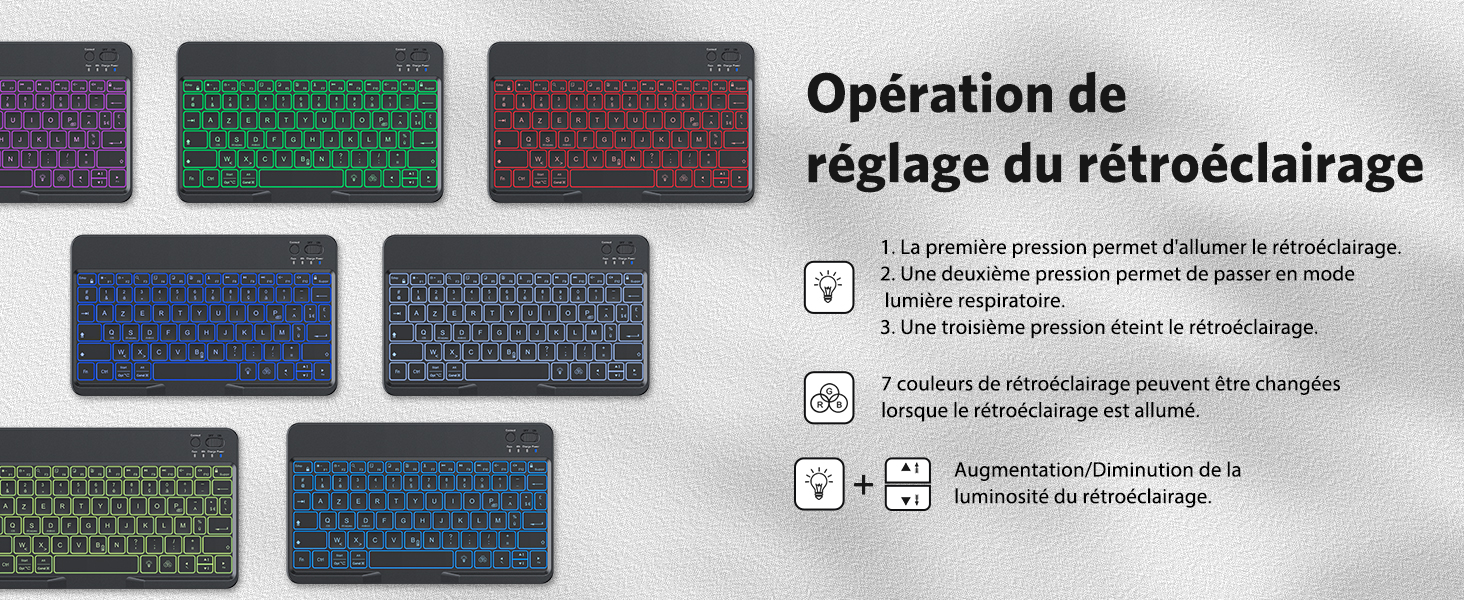
Image: A diagram illustrating the steps to operate and adjust the keyboard's backlight settings.
Tecles de drecera multimèdia
The top row of keys (F1-F12) provides quick access to multimedia and system functions. These functions are typically accessed by pressing the Fn simultàniament amb la tecla de funció desitjada.
- Fn+F1: Casa
- Fn+F2: Cerca
- Fn+F3: Seleccioneu Tot
- Fn+F4: Còpia
- Fn+F5: Enganxa
- Fn+F6: Tallar
- Fn+F7: Pista anterior
- Fn+F8: Reproduir/Pausa
- Fn+F9: Pista següent
- Fn+F10: Silenciar
- Fn+F11: Baixa el volum
- Fn+F12: Puja el volum
Cura i Manteniment
To ensure the longevity and optimal performance of your OMOTON keyboard, follow these maintenance guidelines:
- Neteja: Utilitzeu un drap suau i sense pelusa lleugerament dampened with water or a mild cleaning solution. Avoid harsh chemicals, abrasives, or excessive moisture.
- Emmagatzematge: Guardeu el teclat en un lloc fresc i sec, allunyat de la llum solar directa i de temperatures extremes.
- Manipulació: Avoid dropping the keyboard or exposing it to strong impacts. Do not place heavy objects on it.
- Exposició líquida: Prevent liquids from entering the keyboard. In case of accidental spills, immediately power off the keyboard and allow it to dry completely before reuse.
Resolució de problemes
Si teniu problemes amb el teclat, consulteu els problemes i solucions més comuns següents:
- El teclat no es connecta per Bluetooth:
- Assegureu-vos que el teclat estigui carregat i encès.
- Assegureu-vos que el Bluetooth estigui habilitat al vostre dispositiu.
- Press the 'Connect' button on the keyboard to enter pairing mode.
- Forget the keyboard from your device's Bluetooth settings and attempt to re-pair.
- Reinicieu tant el teclat com el dispositiu.
- Keys not responding or incorrect characters:
- Verify that the keyboard is set to the correct operating system mode (Fn+A for iOS, Fn+D for Android, Fn+S for Windows).
- Check your device's language and keyboard layout settings to ensure they match the FR-Layout.
- Assegureu-vos que el teclat estigui completament carregat.
- La retroiluminació no funciona:
- Press the lightbulb icon key to cycle through backlight modes (on, breathing, off).
- Assegureu-vos que el teclat tingui prou bateria carregada.
- Durada de la bateria més curta del que s'esperava:
- Using the backlight continuously will significantly reduce battery life. Turn off the backlight when not needed.
- Assegureu-vos que el teclat estigui completament carregat abans d'utilitzar-lo.
Especificacions tècniques
| Característica | Especificació |
|---|---|
| Marca | OMOTON |
| Número de model de l'article | FR-Layout |
| Color | Negre |
| Descripció del teclat | Multifuncional |
| Tipus de font d'alimentació | Funciona amb bateria |
| Tipus de connector | Bluetooth |
| Orientació de la mà | Ambidextre |
| Compatibilitat de dispositius | Ordinador portàtil, PC, telèfon intel·ligent, tauleta |
| Característiques especials | Portable, Rechargeable, Backlit |
| Material | Plàstic |
| Usos recomanats | Ús diari |
| Tecnologia de connectivitat | Bluetooth |
| ASIN | B0DFWKHBPK |
| Data de primera disponibilitat | 24 de febrer de 2025 |
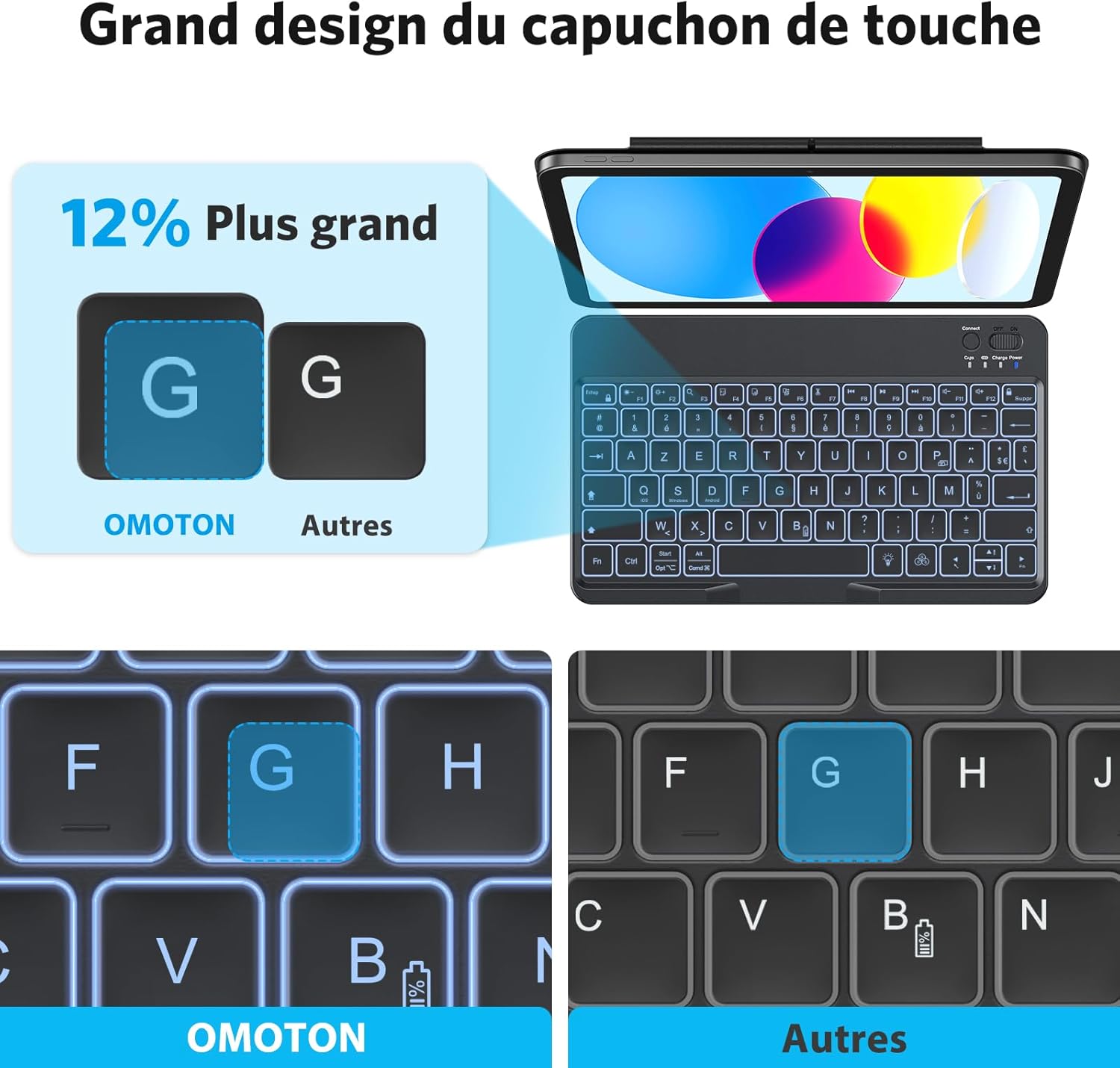
Image: Technical drawing showing the dimensions of the OMOTON Bluetooth Keyboard.
Garantia i Suport
Garantia del fabricant
This OMOTON product comes with a 1-year manufacturer's warranty from the date of purchase. Please retain your proof of purchase for warranty claims.
Atenció al client
For further assistance, technical support, or warranty inquiries, please refer to the contact information provided with your product packaging or visit the official OMOTON weblloc.