
Cuifati CUIFATIvpa8mfs61c
Cuifati 2K Body Camera User Manual
Model: CUIFATIvpa8mfs61c | Brand: Cuifati
1. Introducció
Thank you for choosing the Cuifati 2K Body Camera. This device is designed for reliable video and photo capture in various professional and outdoor environments, including law enforcement, security, and personal use. Featuring 2K video resolution, 56MP dual lenses, and robust IP68 waterproofing, it is built to perform in challenging conditions. This manual will guide you through the features and functions of your new body camera.

Figura 1.1: Frontal view of the Cuifati 2K Body Camera.
2. Contingut del paquet
Marqueu la casella per als elements següents:
- 1 x 2K Body Worn Camera
- 1 cable USB (tipus C)
- 1 x Manual d'usuari
- 1 x Clip
3. Producte acabatview
Familiarize yourself with the various parts and controls of your Cuifati 2K Body Camera:
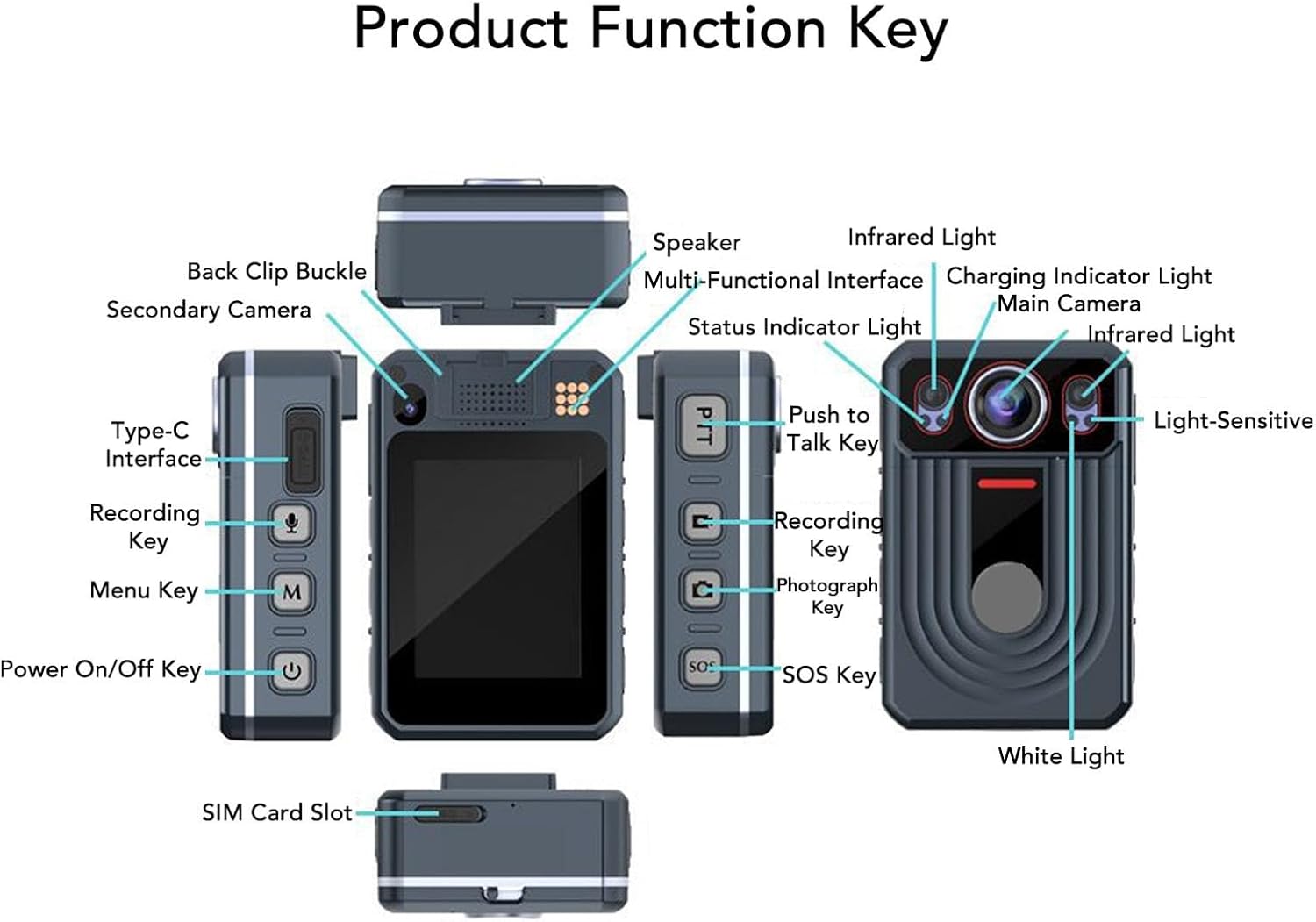
Figure 3.1: Labeled diagram of the Cuifati 2K Body Camera's components and keys.
Els components clau inclouen:
- Càmera principal: Primary lens for video and photo capture.
- Càmera secundària: Additional lens for specific functions (e.g., rear recording).
- Llum infraroja: For night vision recording.
- Llum blanca: For illumination.
- Light-Sensitive Sensor: Detects ambient light for automatic mode switching.
- Ponent: For audio playback and alerts.
- Multi-Functional Interface: For various connections.
- Llum indicador de càrrega: Mostra l'estat de càrrega.
- Llum indicador d'estat: Indicates device status (recording, standby, etc.).
- Interfície tipus C: Per a càrrega i transferència de dades.
- Recording Key: Initiates video or audio recording.
- Tecla de menú: Accedeix a la configuració i les opcions del dispositiu.
- Tecla d'encesa/apagada: Encén o apaga el dispositiu.
- Push to Talk Key (PTT): For intercom functionality.
- Photograph Key: Captura imatges fixes.
- Clau SOS: Activates SOS recording or marks important points.
- Back Clip Buckle: Per fixar la càmera a la roba o a l'equipament.
- Ranura per a targeta SIM: For network connectivity (if applicable to specific models).
4. Configuració
4.1. Càrrega del dispositiu
Before first use, fully charge the body camera. Connect the provided USB Type-C cable to the camera's Type-C interface and the other end to a compatible USB power adapter (not included) or a computer's USB port. The Charging Indicator Light will show the charging status.
4.2. Memory Storage
The camera has a built-in 64GB memory card. It supports an external memory card up to 128GB (not included) for extended storage. Ensure the memory card is properly inserted if you choose to use an external one.
4.3. Encès / apagat
Per encendre el dispositiu, premsa llarga the Power On/Off Key. To power off, premsa llarga the Power On/Off Key again until the device shuts down.
5. Instruccions de funcionament
5.1. Gravació de vídeo
To start video recording, premsa curta the Recording Key. The Status Indicator Light will change to indicate recording is in progress. To stop recording, premsa curta the Recording Key again. The camera also supports pre-recording; premsa llarga the Recording Key to activate this feature.
5.2. Gravació d'àudio
To start audio-only recording, premsa curta the Sound Recording button (often integrated with the Recording Key or a dedicated button). To stop, premsa curta de nou.
5.3. Infrared (Night Vision) Light
The camera features HD Infrared Night Vision. To manually activate the infrared light, premsa llarga the Sound Recording button. The camera can also automatically switch to infrared mode in low light conditions.
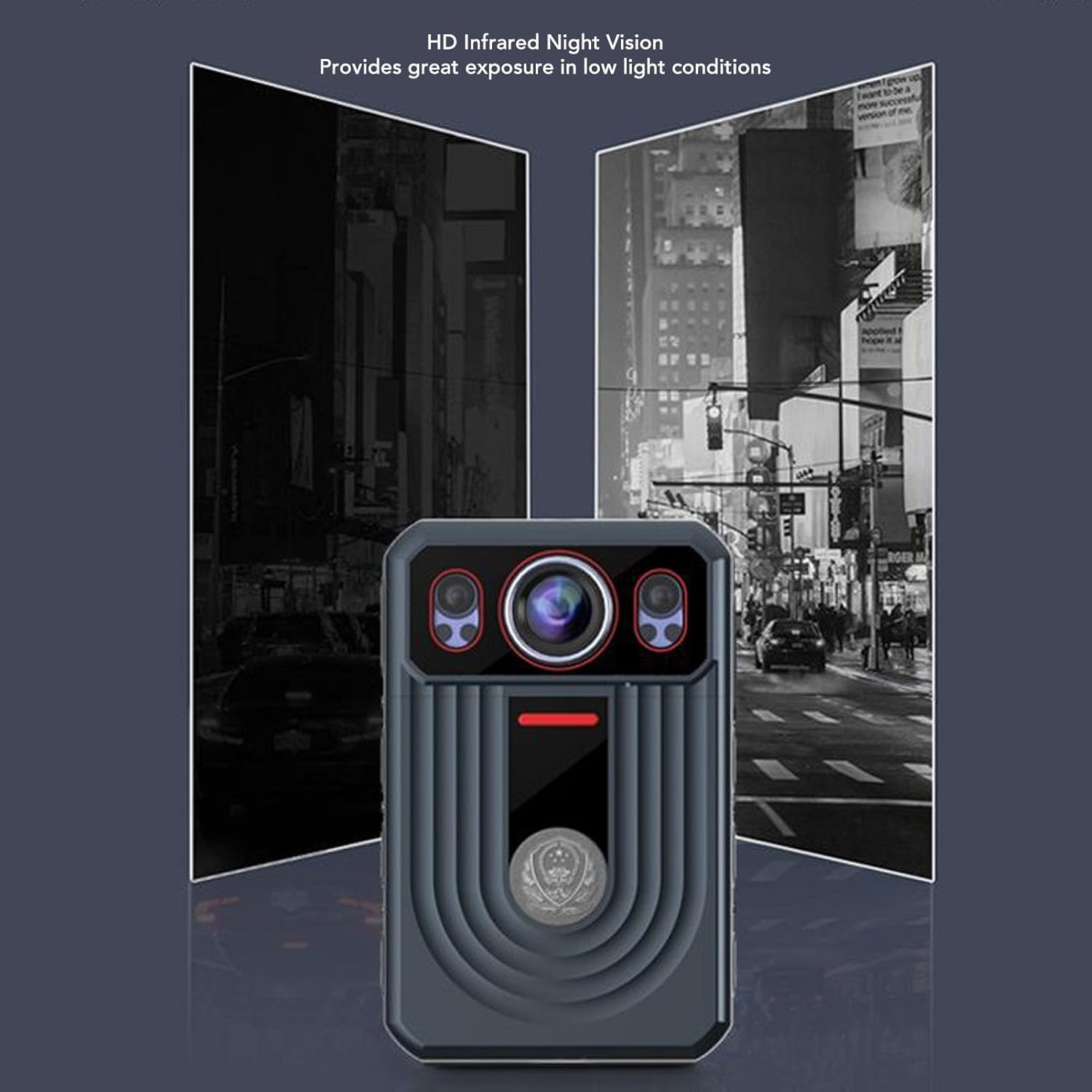
Figure 5.1: Demonstration of HD Infrared Night Vision capability.
5.4. Fer fotos
Per fer una foto, premsa curta the Photograph Key. To switch video resolution settings, premsa llarga the Photograph Key.
5.5. Funció SOS
The SOS function allows you to mark important points in your video and sound recordings. Premsa curta the SOS Key to mark a point. To activate SOS recording (which may trigger specific alerts or actions depending on configuration), premsa llarga the SOS Key.
5.6. Push to Talk (PTT)
If your device supports Push to Talk functionality, premsa llarga the PTT Key to talk. Release the key to listen for a response.
5.7. Navegació del menú
To return to the previous screen or exit a menu, premsa única the Menu Key. To activate the white light, premsa llarga the Menu Key.
6. Característiques clau
- Vídeo 2K i fotos de 56MP: Capture high-resolution video and still images with dual lenses, adjustable focus, and true-to-life color reproduction.
- Estabilització electrònica d'imatge (EIS): Reduces camera shake for smoother footage.
- 2.4-inch Capacitive Touchscreen: Easily playback videos and photos directly on the device.
- 120-degree Wide Angle Lens: Provides comprehensive scene coverage.
- HD Infrared Night Vision: Automatically switches to infrared mode in low light for clear recording.
- Detecció de moviment: Automatically detects movement for seamless recording.
- Enregistrament en bucle: Automatically overwrites old videos when memory is full to save space.
- Llarga vida útil de la bateria: Built-in 3300mAh lithium polymer battery provides up to 9 hours of continuous recording.
- IP68 Waterproof & Durable: Designed to resist rough weather, including storms and snow, and is resistant to falls and explosions.
- Funcions addicionals: Includes SOS, cluster intercom, remote monitoring, and the ability to record driving routes with location information.

Figure 6.1: Various application scenarios for the Cuifati 2K Body Camera.
7. Manteniment
7.1. Neteja
Wipe the camera body with a soft, dry cloth. For the lens, use a specialized lens cleaning cloth and solution. Avoid using harsh chemicals or abrasive materials that could damage the device or lens coating.
7.2. Emmagatzematge
Store the camera in a cool, dry place away from direct sunlight and extreme temperatures. If storing for an extended period, ensure the battery is partially charged (around 50%) to preserve its lifespan.
7.3. Cura de la bateria
To maximize battery life, avoid fully discharging the battery frequently. Charge the device regularly, even if not in constant use.
8. Solució De Problemes
If you encounter issues with your Cuifati 2K Body Camera, please refer to the following common problems and solutions:
- El dispositiu no s'encén: Assegureu-vos que la bateria estigui carregada. Connecteu la càmera a una font d'alimentació i torneu-ho a provar.
- Cannot record video/photo: Check if the memory card is full or properly inserted. Format the memory card if necessary (this will erase all data).
- Poor video/audio quality: Ensure the lens is clean. Check recording settings (resolution, frame rate). For audio, ensure the microphone is not obstructed.
- El dispositiu es bloqueja o deixa de respondre: Try performing a soft reset by holding the Power On/Off Key for an extended period (e.g., 10-15 seconds) until the device restarts.
- La visió nocturna no funciona: Ensure the infrared light is enabled (either manually or automatically). Check if there's sufficient darkness for automatic activation.
Si el problema persisteix, poseu-vos en contacte amb l'atenció al client.
9. Especificacions
| Característica | Especificació |
|---|---|
| Marca | Cuifati |
| Nom del model | CUIFATIvpa8mfs61c |
| Highest Video Resolution | 2K |
| Mida de la pantalla | 2.4 polzades |
| Tipus de bateria | Bateria de liti de 3300 mAh integrada |
| Emmagatzematge intern | 64 GB |
| Max. External Storage Support | 128GB (Memory Card Not Included) |
| Classificació impermeable | IP68 |
| Estabilització d'imatge | Sí |
| Pes de l'article | 13.4 unces (aproximadament 380 g) |
| Dimensions del paquet | 6.69 x 4.33 x 2.76 polzades |
10. Garantia i Suport
Your Cuifati 2K Body Camera comes with a standard manufacturer's warranty. Please refer to the warranty card included in your package or visit the official Cuifati weblloc web per obtenir informació detallada sobre els termes i condicions de la garantia.
For technical support, troubleshooting assistance, or any inquiries regarding your product, please contact Cuifati customer service. Contact information can typically be found on the product packaging or the official Cuifati weblloc.
Ask a question about this manual
Ask about setup, troubleshooting, compatibility, parts, safety, or missing instructions. Manuals+ will review the question and use this page’s manual context to help answer it.