1. Introducció
Thank you for choosing the Erazers XP2 Over The Ear Wireless Earbuds. These earbuds are designed to provide a superior audio experience with advanced features for convenience and versatility. This manual will guide you through the setup, operation, and maintenance of your new earbuds.
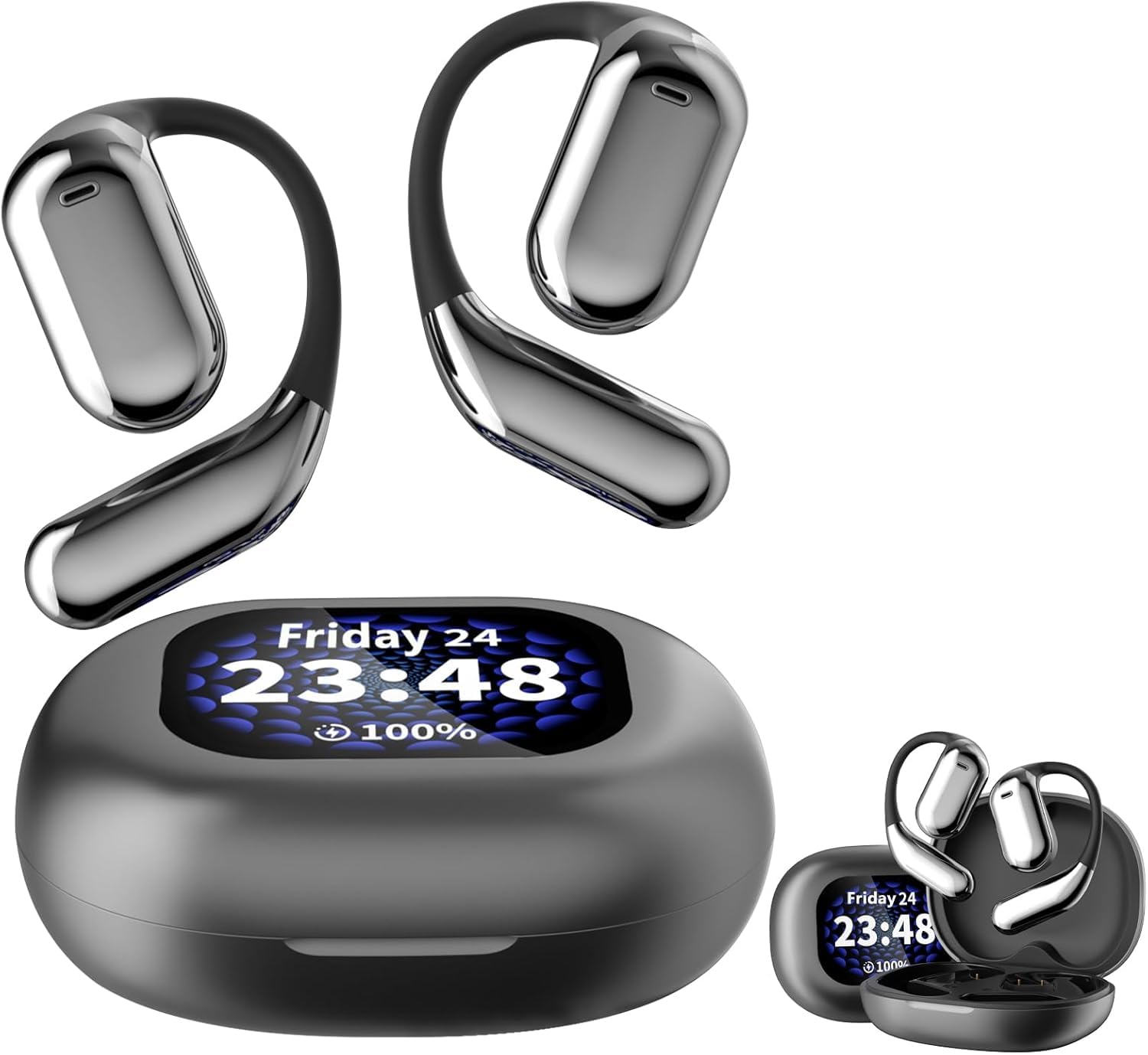
Figure 1: Erazers XP2 Earbuds and Charging Case
2. Contingut del paquet
Assegureu-vos que tots els elements estiguin presents al vostre paquet:
- Erazers XP2 Over The Ear Wireless Earbuds (Left and Right)
- Intelligent Touch Screen Charging Case
- Cable de càrrega USB-C
- Manual d'usuari
3. Producte acabatview
The Erazers XP2 earbuds feature an over-the-ear design for secure and comfortable fit, ideal for various activities including running, exercising, cycling, and gaming. The accompanying charging case is equipped with an intelligent touch screen for enhanced control.
3.1 Auriculars
- Forma de l'auricular: Over-ear for secure fit.
- Mètode de control: Touch-sensitive controls for media and calls.
- Resistència a l'aigua: IPX5 rated for sweatproof protection.
- Controlador d'àudio: Dynamic Driver for superior sound quality.
3.2 Estoig de càrrega
- Visualització: Intelligent full-color touch screen for easy navigation.
- Indicador de bateria: LED display shows battery life of both earbuds and case.
- Interfície de càrrega: USB-C for fast charging.
- Característiques addicionals: Flashlight, alarm clock, find my earphone function.
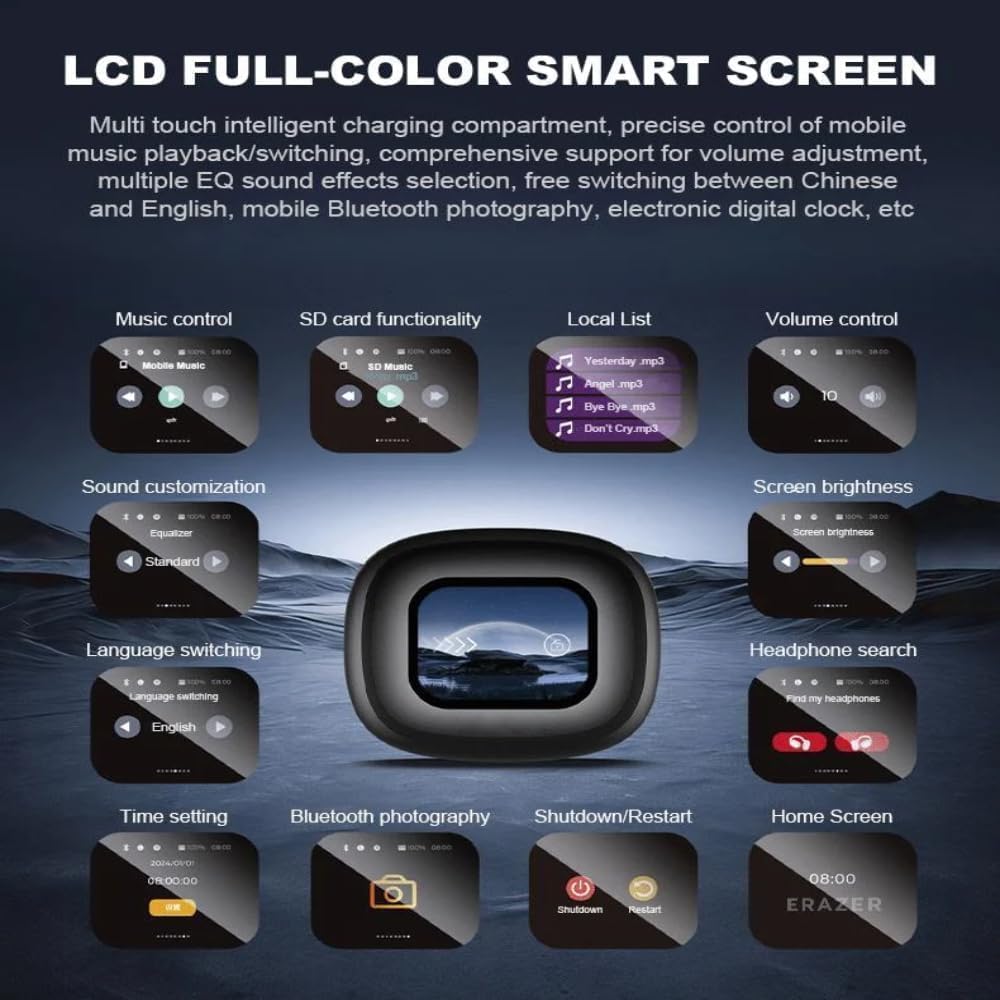
Figura 2: Auriculars a l'estoig de càrrega
4. Configuració
4.1 Càrrega inicial
Abans del primer ús, carregueu completament l'estoig de càrrega i els auriculars.
- Col·loqueu els dos auriculars a la caixa de càrrega.
- Connecteu el cable de càrrega USB-C al port de càrrega de la funda i a una font d'alimentació.
- The LED display on the case will show the charging status. A full charge takes approximately 1 hour for the earbuds and 1.5 hours for the case.

Figure 3: Charging Time Overview
4.2 Emparellament amb el dispositiu
The earbuds will automatically enter pairing mode when removed from the case.
- Obriu l'estoig de càrrega i retireu els dos auriculars.
- On your Bluetooth-enabled device (e.g., smartphone, tablet), go to Bluetooth settings.
- Cerca "Erazers XP2" in the list of available devices and select it to connect.
- Un cop connectats, els auriculars indicaran que l'emparellament s'ha realitzat correctament.
5. Instruccions de funcionament
5.1 Touch Screen Controls (Charging Case)
The intelligent touch screen on the charging case provides intuitive control over various functions:
- Control de música: Play/pause, skip tracks, adjust volume.
- SD Card Functionality: Access and play music directly from a TF card inserted into the case.
- Control de volum: Adjust audio output directly from the case.
- Personalització del so: Select from multiple equalizer presets (Normal, Pop, Rock, Jazz, Classical, Folk, Custom) and spatial sound settings (movie mode, game mode).
- Brillantor de la pantalla: Adjust the display brightness for comfort and battery saving.
- Canvi d'idioma: Change the display language (English, Mandarin, German, Spanish, Portuguese, French).
- Cerca d'auriculars: Use the "Find my earphone" feature to locate misplaced earbuds by emitting a sound.
- Configuració de l'hora: Set the current time and use the alarm clock function.
- Fotografia Bluetooth: Controla la càmera del teu telèfon de forma remota.
- Apagada/Reinici: Power off or restart the device.

Figure 4: Charging Case Touch Screen Functions
Controls tàctils dels auriculars 5.2
The earbuds themselves feature touch-sensitive areas for direct control:
- Reproduir/pausa: Click Left or Right earbud once.
- Cançó anterior: Hold Left earbud for 1 second.
- Següent cançó: Hold Right earbud for 1 second.
- Respondre/penjar la trucada: Click Left or Right earbud once.
- Rebutja la trucada: Hold Left or Right earbud for 2 seconds.
- Volum +: Double-click Left earbud to increase volume by 1 level.
- Volum -: Double-click Right earbud to decrease volume by 1 level.
- Activa Siri: Three clicks on the Left earbud.
- Switch Games/Movies Musical Pattern: Three clicks on the Right earbud.
- Switch to Transparent/Default ENC/Normal Mode: Four clicks on Left or Right earbud.

Figura 5: Funcions de control tàctil dels auriculars
5.3 Personalització del so
The Erazers XP2 offers various sound modes to optimize your listening experience:
- Preajustos de l'equalitzador: Choose from Normal, Pop, Rock, Jazz, Classical, Folk, or create a Custom setting.
- So espacial: Dedicated modes for movies and games enhance audio immersion.
- Control de soroll: Adaptive Noise Cancellation (ANC) and Transparent/Normal modes are available.

Figure 6: Music Preferences and Sound Adjustment

Figure 7: Game Mode and Movie Mode Sound Enhancements
6. Càrrega
The charging case provides extended battery life for your earbuds. The case itself can be charged via USB-C.
- Earbud Endurance: Approximately 10 hours of single use.
- Overall Endurance (with case): Fins a 40 hores.
- Capacitat de la bateria de la caixa: 500 mAh.

Figure 8: Battery Life and Charging Case Capacity
7. Manteniment
7.1 Neteja
Una neteja regular garanteix un rendiment i una higiene òptims:
- Netegeu els auriculars i l'estoig de càrrega amb un drap suau, sec i sense borrissol.
- No utilitzeu netejadors abrasius, alcohol ni dissolvents químics.
- Assegureu-vos que els contactes de càrrega estiguin nets i secs abans de col·locar els auriculars a l'estoig.
7.2 Emmagatzematge
Guardeu els auriculars a la funda de càrrega quan no els feu servir per protegir-los i mantenir-los carregats.
7.3 Resistència a l'aigua (IPX5)
The earbuds are IPX5 water resistant, meaning they can withstand splashes and sweat. They are not designed for submersion in water. Avoid exposing them to high-pressure water or prolonged immersion.
8. Solució De Problemes
If you encounter issues with your Erazers XP2 earbuds, try the following solutions:
| Problema | Solució |
|---|---|
| Els auriculars no s'aparellen | Ensure earbuds are charged. Turn off and on Bluetooth on your device. Try resetting the earbuds (refer to case touch screen options). |
| Sense so ni volum baix | Check device volume and earbud volume controls. Ensure earbuds are properly seated in your ears. Clean any debris from earbud speakers. |
| La funda de càrrega no es carrega | Ensure USB-C cable is securely connected to both the case and power source. Try a different cable or power adapter. |
| Els controls tàctils no responen | Ensure earbuds are clean and dry. Restart the earbuds by placing them in the case and closing/opening the lid. |
| "Find my earphone" feature not working | Assegureu-vos que els auriculars estiguin dins de l'abast del Bluetooth de l'estoig de càrrega. |
9. Especificacions
| Característica | Detall |
|---|---|
| Nom del model | Erazers Over The Ear Earbuds Xp2 |
| Marca | Genèric |
| Tecnologia de connectivitat | Sense fil (Bluetooth 5.4) |
| Interval Bluetooth | 10 meters (Barrier free) |
| Control de soroll | Cancel·lació adaptativa del soroll |
| Durada de la bateria dels auriculars (un sol ús) | Aprox. 10 hores |
| Durada total de la bateria (amb funda) | Aprox. 40 hores |
| Caixa de càrrega Capacitat de la bateria | 500 mAh |
| Temps de càrrega | Approx. 1 hour (earbuds), 1.5 hours (case) |
| Interfície de càrrega | USB-C |
| Nivell de resistència a l'aigua | IPX5 (resistent a l'aigua) |
| Interval de freqüència | 20 Hz - 20,000 Hz |
| Impedància | 80 ohms |
| Material | Plastic, Protein Leather, Silicone, Glass |
| País d'origen | Xina |

Figura 9: Paràmetres detallats del producte
10. Vídeo oficial del producte
Video 1: Erazers Xp2 Over The Ear Earbuds - An official overview of the product's features and design.
11. Garantia i Suport
For warranty information and customer support, please refer to the contact details provided on the product packaging or the official Generic brand weblloc web. Conserveu el rebut de compra per a qualsevol reclamació de garantia.


