
Introducció
Thank you for choosing the Hangrui H3 Instant Print Kids Camera. This digital camera is designed for children aged 3-12, offering instant black and white photo printing, 1080p video recording, and various creative features. This manual provides essential information for safe and effective use of your camera. Please read it thoroughly before operation and retain it for future reference.
Producte acabatview
Característiques principals:
- Funció d'impressió instantània: Print black and white photos instantly using thermal printing technology.
- Digital Photo & Video: Capture 1080p videos and store color photos on the included 32GB SD card.
- Pantalla HD de 2.4 polzades: Clear display for viewfent fotos i vídeos.
- Zoom digital 10x: Magnify subjects for detailed shots.
- Llanterna incorporada: Proporciona il·luminació en condicions de poca llum.
- Modes creatius: Time-lapse, burst shooting, fun stickers, and photo frames.
- Reproductor mp3: Enjoy music on the go.
- DIY Coloring: Customize printed photos with included color pens.
- Bateria recarregable: Bateria de 1000 mAh per a un ús prolongat.
Contingut del paquet:
- 1 x Hangrui H3 Instant Print Kids Camera
- 3 rotlles de paper d'impressora
- 1 x cable de càrrega USB-C
- 1 x 32GB SD Card (pre-installed)
- 1 x cordó
- 5 x Color Pens
- 1 x Manual d'usuari

Image: The Hangrui H3 Instant Print Kids Camera in pink, showcasing its 2.4-inch HD screen, print photo function, 1080p video, 10x zoom, MP3 player, time-lapse, DIY graffiti, flashlight, and included 32GB card. Dimensions are also indicated.
Configuració
1. Charging the Camera:
Before first use, fully charge the camera. Connect the provided USB-C cable to the camera's charging port and the other end to a USB power adapter (not included) or a computer USB port. The charging indicator light will show the charging status.
2. Inserting/Removing the SD Card:
The camera comes with a 32GB SD card pre-installed. If you need to remove or replace it, gently push the card into its slot until it clicks, then release to eject. Ensure the camera is powered off before inserting or removing the SD card.
3. Loading Print Paper:
- Open the paper compartment cover on the side of the camera.
- Insert a new roll of thermal print paper, ensuring the paper feeds out from the top of the roll.
- Pull a small length of paper out and close the cover, making sure the paper protrudes slightly from the printing slot.
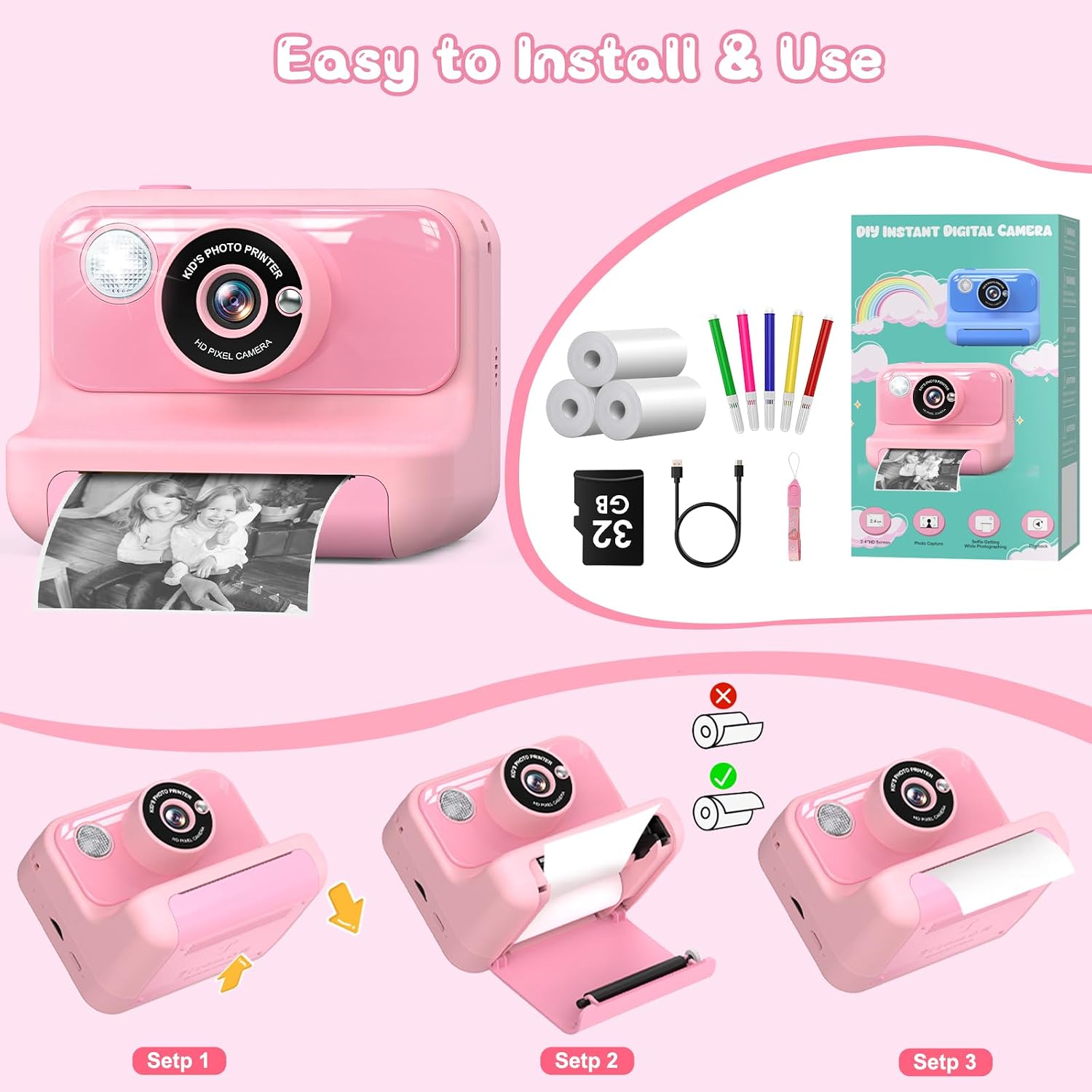
Image: A visual guide demonstrating the three steps to correctly load the thermal print paper into the camera's paper compartment.
4. Attaching the Lanyard:
Attach the included lanyard to the designated loop on the camera for easy and secure carrying.
Instruccions de funcionament
1. Encendre/apagar:
Press and hold the Power button for a few seconds to turn the camera on or off.
2. Fer fotos:
- In photo mode, frame your shot using the screen.
- Premeu el botó de l'obturador per fer una foto.
- The camera will automatically save the color photo to the SD card and, if instant print is enabled, print a black and white version.

Image: The camera screen showing different fun frames and photo filters that can be applied to pictures, enhancing creativity.
3. Gravació de vídeos:
- Switch to video mode using the mode button.
- Press the Shutter button to start recording. Press again to stop.
- Videos are saved to the SD card in 1080p resolution.

Image: This image illustrates the camera's capabilities for 1080p video recording, time-lapse photography (3s, 5s, 10s options), and burst shooting for capturing multiple rapid photos.
4. Funció de zoom:
Use the zoom buttons (usually up/down navigation buttons) to digitally zoom in or out up to 10x.

Image: The camera's 10x zoom capability is shown with examples of 4x, 6x, 8x, and 10x magnification. The flashlight function, with 'Flash ON' and 'Flash OFF' examples, is also depicted.
5. Flashlight:
Activate the built-in flashlight for additional lighting in dark environments. Refer to the camera's on-screen menu for flashlight controls.
6. Creative Features (Time-Lapse, Burst, Filters, Frames):
Navigate through the camera's menu to access various creative modes:
- Time-lapse: Set a delay (e.g., 3s, 5s, 10s) before a photo is taken.
- Tirs en ràfega: Captura diverses fotos en una successió ràpida.
- Photo Filters & Frames: Apply fun effects and borders to your pictures before or after taking them.
7. DIY Coloring:
After printing black and white photos, use the included color pens to add your own creative touch and personalize the prints.

Image: A child and an adult engaged in coloring instant black and white photos using the provided DIY color pens, demonstrating a creative activity with the camera's prints.
8. Reproductor d'MP3:
The camera supports MP3 playback. Transfer MP3 files to the SD card and access them through the camera's menu to listen to music.
Manteniment
- Neteja: Use a soft, dry cloth to clean the camera body. For the lens, use a specialized lens cleaning cloth. Do not use liquid cleaners or abrasive materials.
- Emmagatzematge: Guardeu la càmera en un lloc fresc i sec, allunyat de la llum solar directa i de temperatures extremes.
- Cura de la bateria: To prolong battery life, avoid fully discharging the battery frequently. Charge the camera regularly, even if not in use for extended periods.
- Emmagatzematge de paper: Store thermal paper rolls in a cool, dark place to prevent premature fading or damage.
- Targeta SD: Periodically back up important photos and videos from the SD card to a computer.
Resolució de problemes
La càmera no s'encén:
- Ensure the battery is charged. Connect the camera to a charger and wait a few minutes before attempting to power on again.
- Premeu i manteniu premut fermament el botó d'engegada durant uns segons.
Photos Not Printing:
- Check if the thermal paper is loaded correctly and not jammed. Refer to the "Loading Print Paper" section.
- Assegureu-vos que hi hagi prou paper al compartiment.
- Verify that the instant print function is enabled in the camera settings.
- The camera uses thermal paper; ensure you are using the correct type.
Mala qualitat d'impressió:
- Check the print density settings in the camera menu. Adjust for darker or lighter prints.
- Ensure the thermal paper is not old or damaged.
- Clean the print head gently with a soft, dry cloth if smudges appear.
Cannot Save Photos/Videos:
- Check if the SD card is properly inserted.
- Ensure the SD card is not full. Delete unnecessary files o substituir la targeta.
- The SD card might be corrupted. Try formatting the card (this will erase all data) or use a different SD card.
Camera Freezes:
- If the camera freezes, try resetting it by pressing the reset button (if available, usually a small pinhole) or by holding down the power button until it turns off.
- Assegureu-vos que la bateria estigui prou carregada.
Especificacions
| Nom del model | H3 |
| Mida de la pantalla | 2.4 polzades |
| Resolució de vídeo | 1080p |
| Effective Photo Resolution | 14 megapíxels |
| Zoom digital | Fins a 10x |
| Capacitat de la bateria | 1000 mAh (recarregable) |
| Emmagatzematge | Targeta Micro SD de 32 GB (inclosa) |
| Dimensions (L x A x A) | 7.3 x 10 x 8 cm |
| Pes | 400 grams |
| Admet File Formats | JPEG (images), MP3 (audio) |
| Característiques especials | Instant Print, Time-Lapse, Burst Shooting, Flashlight, MP3 Player |
Garantia i Suport
For warranty information and customer support, please refer to the documentation included with your purchase or contact Hangrui customer service through the retailer where the product was purchased. Keep your proof of purchase for warranty claims.