
ODK B040104
ODK Gaming Desk User Manual
Model: B040104 | Brand: ODK
Introducció
This manual provides detailed instructions for the assembly, operation, and maintenance of your ODK Gaming Desk. Please read this manual thoroughly before assembly and use to ensure proper function and safety.

Figure 1: ODK Gaming Desk, showcasing its integrated monitor stand, LED lighting, and accessories.
Informació de seguretat
- Assegureu-vos que tots els components siguin presents i no estiguin danyats abans del muntatge.
- Follow assembly instructions carefully. Do not overtighten screws.
- Mantingueu les peces petites allunyades dels nens per evitar perills d'asfixia.
- No supereu la capacitat màxima de pes de l'escriptori.
- Col·loqueu l'escriptori sobre una superfície plana per evitar la inestabilitat.
- Disconnect power before cleaning or moving the desk.
Contingut del paquet
Verifiqueu que tots els components següents estiguin inclosos al paquet:
- Desk tabletop (main piece)
- Monitor stand shelf
- Desk legs (T-shaped design)
- Regleta integrada amb 3 preses de corrent altern i 2 ports USB
- tires d'il·luminació LED
- RGB light controller
- Ganxo per a auriculars
- Portavasos
- Maquinari de muntatge (cargols, perns, clau Allen)
- Manual d'instruccions
Muntatge i muntatge
This gaming desk is designed for quick and straightforward installation. Follow the steps below for assembly.
1. Desempaquetar i identificar els components
Carefully remove all parts from the packaging. Lay them out on a clean, soft surface to prevent scratches. Refer to the parts list to ensure all components are present.

Figure 2: Desk dimensions. The desk measures 80cm (length) x 50cm (width) x 88.1cm (height). The monitor stand is 80cm long and 18.8cm deep, positioned 13.2cm above the main desk surface.
2. Assemble the Desk Frame
Attach the T-shaped desk legs to the main tabletop using the provided screws and tools. Ensure all connections are secure but do not overtighten until the desk is fully assembled and leveled.
3. Install the Monitor Stand
Secure the monitor stand shelf to the designated mounting points on the main tabletop. This stand is designed to accommodate multiple monitors and accessories, promoting a comfortable posture.
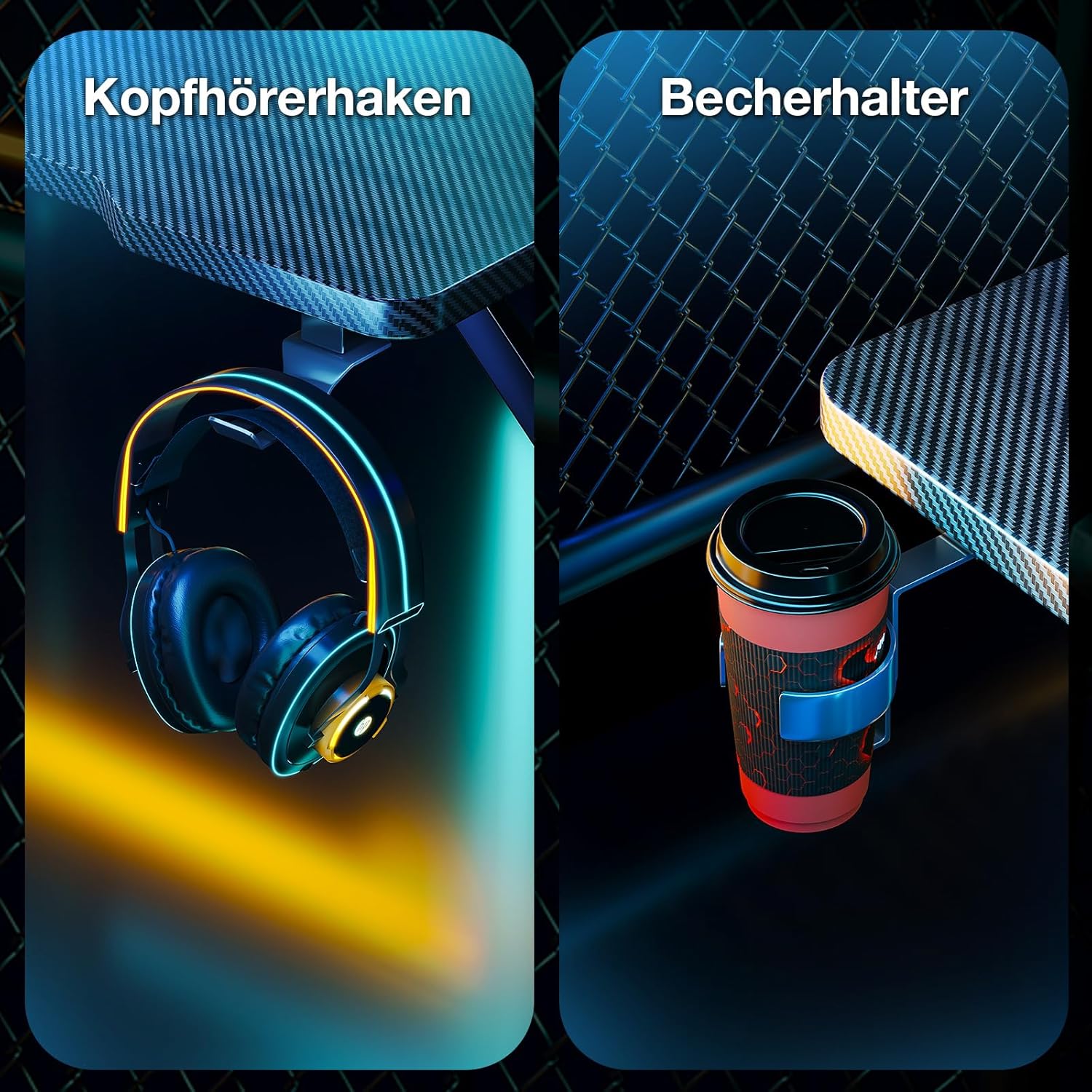
Figure 3: The full-size monitor shelf provides ample space for monitors and helps maintain proper seating posture compared to desks without a raised shelf.
4. Attach Accessories
Install the headphone hook and cup holder to the sides of the desk as desired. These are designed for convenience and organization.

Figure 4: The integrated headphone hook and cup holder offer convenient storage solutions for your gaming setup.
Instruccions de funcionament
1. Power and LED Lighting
The desk features an integrated power strip and LED lighting system. Connect the desk's power cable to a standard wall outlet.

Figure 5: The integrated power strip includes 3 AC outlets (220-250V/16A) and 2 USB ports (5V/2A) for convenient device charging.

Figure 6: The LED lighting offers 7 lighting modes, 10 bright colors, and 20 dynamic modes to customize your gaming atmosphere.

Figure 7: The RGB lights controller allows you to switch between static colors (C button), dynamic modes (M button), and adjust brightness/speed (ON/OFF button).
- Preses de corrent: Use the 3 AC outlets and 2 USB ports to power and charge your devices.
- Control LED: Use the included RGB light controller to cycle through 7 lighting modes, 10 bright colors, and 20 dynamic modes.
- Funcions del controlador:
- Botó C: Static Color selection.
- Botó M: Dynamic Mode selection.
- Botó ON/OFF: Power on/off, also used to increase speed/brightness in dynamic modes.
Manteniment
- Neteja: Netegeu la superfície de l'escriptori amb un damp drap. Eviteu productes de neteja abrasius o productes químics agressius.
- Gestió de cables: Reviseu i organitzeu els cables regularment per evitar embolics i danys.
- Elements de fixació: Reviseu periòdicament tots els cargols i perns per assegurar-vos que romanen ajustats. Torneu a apretar-los si cal.
Resolució de problemes
| Problema | Causa possible | Solució |
|---|---|---|
| L'escriptori està inestable/trencant. | Sòl irregular; fixacions fluixes. | Ensure desk is on a level surface. Tighten all assembly screws. |
| Els llums LED no funcionen. | Power cable disconnected; controller issue. | Check if the desk is plugged in. Ensure the LED strip is properly connected to the controller. Try pressing the ON/OFF button on the controller. |
| Les preses de corrent/ports USB no funcionen. | Desk not plugged in; power surge. | Verify the desk's power cable is securely plugged into a working wall outlet. Check if the wall outlet itself is functional. |
Especificacions
| Marca | ODK |
| Número de model | B040104 |
| Dimensions (L x A x A) | 80 cm x 50 cm x 88.1 cm (31.5 polzades x 19.7 polzades x 34.7 polzades) |
| Pes | 9.6 kg (21.2 lliures) |
| Color | Negre |
| Preses de corrent | 3 x AC (220-250V/16A) |
| Ports USB | 2 USB (5V/2A) |
| Il·luminació LED | 20 dynamic modes, 10 bright colors, 7 lighting modes |
| Muntatge obligatori | Sí |
| Components inclosos | Integrated USB port, Headphone hook, Cup holder |
Garantia i Suport
For warranty information or technical support, please refer to the product packaging or contact ODK customer service directly. Keep your purchase receipt for warranty claims.
For further assistance, please visit the official ODK weblloc o poseu-vos en contacte amb el seu equip d'assistència.
Ask a question about this manual
Ask about setup, troubleshooting, compatibility, parts, safety, or missing instructions. Manuals+ will review the question and use this page’s manual context to help answer it.