
1. Introducció
Welcome to the user manual for your DOOGEE V Max Pro 5G Rugged Smartphone. This guide provides essential information to help you set up, operate, and maintain your device. Designed for durability and high performance, the V Max Pro is built to withstand challenging environments while offering advanced features for everyday use.

Figura 1: Davant i darrere view of the DOOGEE V Max Pro 5G Rugged Smartphone, highlighting its robust design and key features like the 22000mAh battery and 108MP camera.
2. Contingut del paquet
Si us plau, verifiqueu que tots els elements estiguin presents al paquet del producte:
- 1 x V MAX Pro 5G Rugged Phone
- 1 x cable USB tipus C
- 1 x Carregador
- 1 x Anti-explosion film (pre-applied)
- 1 x Additional Anti-explosion film
- 1 x Caixa d'embalatge
- 1 x manual
3. Configuració
3.1 Instal·lació de la targeta SIM i l'emmagatzematge
The DOOGEE V Max Pro supports dual SIM cards and expandable storage. Locate the SIM card tray on the side of the device. Use the provided SIM ejector tool to open the tray. Insert your Nano-SIM cards and/or a microSD card (up to 2TB, sold separately) into the designated slots. Ensure the tray is securely reinserted to maintain water and dust resistance.
3.2 Càrrega inicial
Before first use, fully charge your DOOGEE V Max Pro. Connect the provided Type-C USB cable to the phone's charging port and the other end to the 33W fast charger. Plug the charger into a power outlet. The device features a massive 22000mAh battery, designed for extended usage. The OTG (On-The-Go) function allows your phone to act as a power bank to charge other compatible devices.
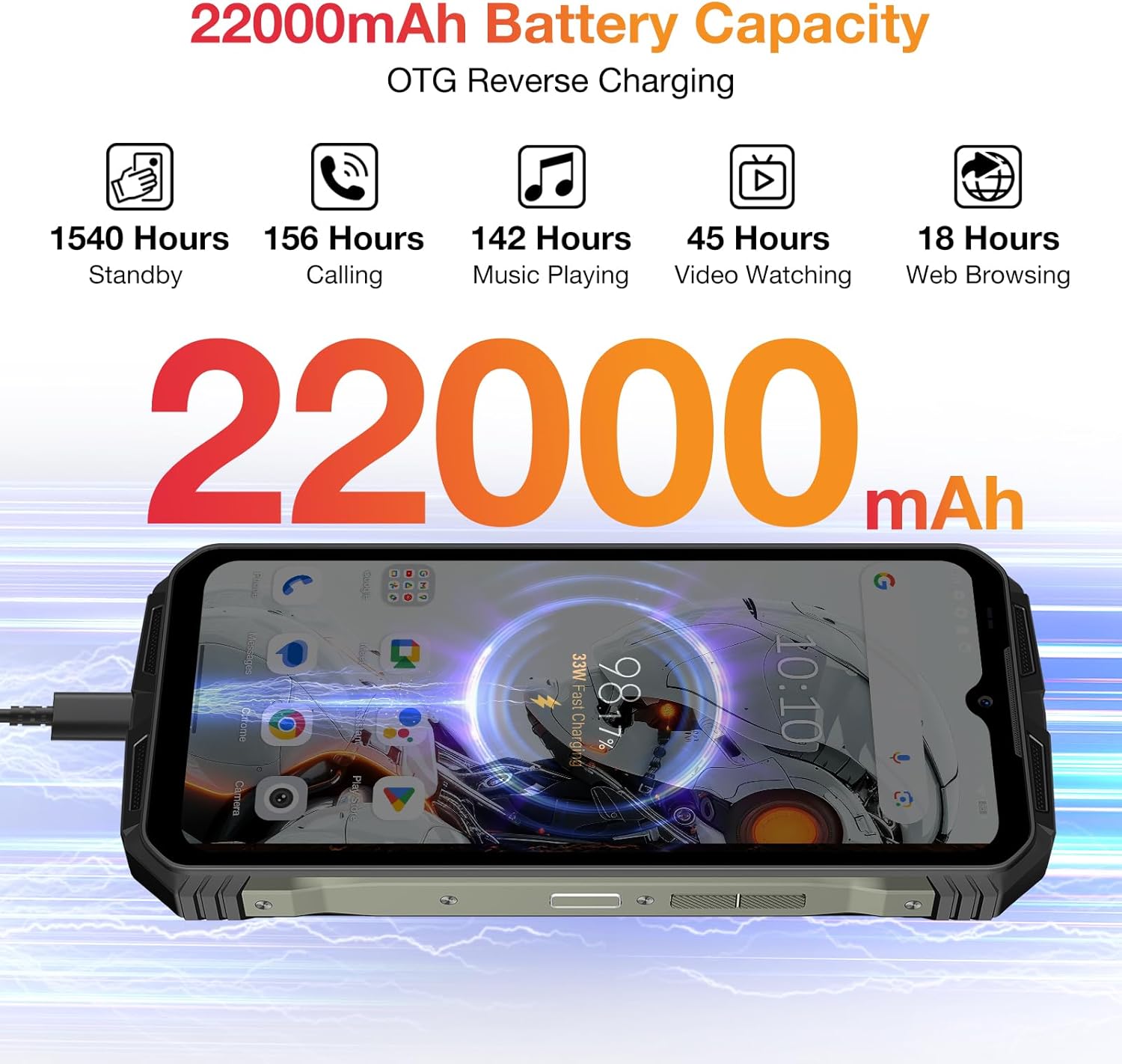
Figure 2: Visual representation of the DOOGEE V Max Pro's 22000mAh battery capacity and its OTG reverse charging capability.
4. Instruccions de funcionament
4.1 Encès/Apagat
To power on your device, press and hold the Power button located on the side until the DOOGEE logo appears. To power off, press and hold the Power button, then select 'Power off' from the options displayed on the screen.
4.2 Pantalla i experiència visual
The DOOGEE V Max Pro features a 6.58-inch FHD+ IPS Waterdrop Display with a 120Hz refresh rate. This provides a smooth and immersive visual experience for all your content, from browsing to gaming and video playback.

Figure 3: The 6.58-inch FHD+ 120Hz IPS Waterdrop Display offers vibrant colors and smooth visuals.
4.3 Rendiment i emmagatzematge
Powered by the Dimensity 7050 5G Octa-core processor and equipped with 32GB RAM (12GB + up to 20GB Extended RAM) and 512GB ROM, expandable up to 2TB via TF card, the V Max Pro ensures smooth multitasking and ample storage for all your applications, photos, and videos. It runs on the latest Android 14 system for enhanced user experience and security.

Figure 4: The Dimensity 7050 5G Octa-core Processor provides robust performance for demanding tasks.

Figure 5: The phone offers 32GB RAM and 512GB ROM for smooth operation and extensive storage.

Figure 6: The DOOGEE V Max Pro runs on the latest Android 14 system, offering enhanced features and security.
Sistema de 4.4 càmeres
Capture stunning photos and videos with the V Max Pro's versatile camera setup:
- Càmera principal amb IA de 108 MP: Per a fotografies detallades d'alta resolució.
- Càmera de visió nocturna de 20MP: Allows for clear photography in low-light or dark conditions.
- 8MP Wide-angle & Macro Camera: Capture expansive landscapes or intricate close-ups.
- Càmera frontal de 16MP: Per a selfies i videotrucades d'alta qualitat.

Figura 7: Mésview of the DOOGEE V Max Pro's triple camera system, including the 108MP main camera, 20MP night vision, and 8MP wide-angle/macro lenses.
4.5 Smart Interaction Lights
The V Max Pro features intelligent interaction lights on the back, which can be customized to provide visual notifications for incoming calls, SMS messages, music playback, and charging status. These lights enhance user interaction and provide quick visual cues.

Figure 8: The smart interaction lights on the back of the DOOGEE V Max Pro provide visual feedback for various notifications.
4.6 Funcions de seguretat
For enhanced security and convenience, the DOOGEE V Max Pro supports multiple unlock methods, including facial recognition and fingerprint unlock. The fingerprint sensor is conveniently located for quick and secure access to your device.
4.7 Connectivitat
The device supports 5G cellular technology for fast network speeds, Wi-Fi 6 for reliable wireless connectivity, and NFC for convenient mobile payments and data exchange.
5. Integració de mitjans
5.1 Producte acabatview Vídeo
Vídeo 1: Presentació oficial del producte en vídeoasing the DOOGEE V Max Pro's overall features, including its ruggedness, large battery, and performance.
5.2 Battery and Charging Demonstration
Video 2: A short video demonstrating the DOOGEE V Max Pro's 22000mAh battery and its OTG reverse charging capability, allowing it to charge other devices.
5.3 Característiques de seguretat anteriorsview
Video 3: This video highlights the various security features of the DOOGEE V Max Pro, including NFC, Face ID, and fingerprint unlock for convenient and secure access.
5.4 Ruggedness Demonstration
Video 4: A brief demonstration of the DOOGEE V Max Pro's IP68/IP69K waterproof and dustproof capabilities, showcasing its resilience in challenging environments.
6. Especificacions tècniques
| Característica | Especificació |
|---|---|
| Dimensions del producte | 7.02 x 3.27 x 1.03 polzades |
| Pes de l'article | 1.56 lliures |
| Número de model de l'article | VMAXPRO |
| Bateries | Necessites 1 piles de ions de liti (incloses) |
| Sistema operatiu | Android 14 |
| Tecnologies de connectivitat | WIFi 6, Fingerprint, OTG, Face ID, NFC |
| Característiques especials | NFC/Face ID/Fingerprint/OTG/WIFi 6 |
| Resolució de l'escàner | 1080 x 2408 |
| Altres funcions de la càmera | Darrera, davantera |
| Jack d'àudio | 3.5 mm |
| Color | Gris |
| Potència nominal de la bateria | 22000 milionsamp Hores |
| Temps de conversa telefònica | 156 hores |
| Fabricant | DOOGEE |
| Capacitat d'emmagatzematge de memòria | 512 GB |
| Mida de la pantalla de peu | 6.58 polzades |
| Freqüència d'actualització | 120 Hz |
| Operador sense fil | Desbloquejat per a tots els transportistes |
7. Manteniment i cura
To ensure the longevity and optimal performance of your DOOGEE V Max Pro, follow these maintenance guidelines:
- Neteja: Netegeu el dispositiu regularment amb un drap suau iamp tela. Eviteu utilitzar productes químics o materials abrasius.
- Temperatura: Do not expose the phone to extreme temperatures (hot or cold) for prolonged periods.
- Resistència a l'aigua i a la pols: While the phone is IP68/IP69K rated, ensure all ports and covers are securely closed before exposing it to water or dust. Avoid intentional submersion in corrosive liquids.
- Protecció contra impactes: Despite its rugged design, avoid unnecessary drops or impacts to prevent potential damage to internal components.
- Actualitzacions de programari: Comproveu i instal·leu regularment si hi ha actualitzacions de programari per assegurar-vos que el vostre dispositiu tingui les funcions i els pegats de seguretat més recents.

Figure 9: The DOOGEE V Max Pro is built to IP68/IP69K and MIL-STD-810H standards for superior ruggedness.
8. Resolució de problemes comuns
If you encounter any issues with your DOOGEE V Max Pro, please refer to the following common troubleshooting steps:
- El dispositiu no s'encén: Assegureu-vos que la bateria estigui carregada. Connecteu el carregador i espereu uns minuts abans d'intentar tornar-lo a engegar. Si no respon, proveu un reinici forçat mantenint premut el botó d'engegada durant 10-15 segons.
- Problemes de càrrega: Check if the charging cable and adapter are securely connected and undamaged. Try using a different power outlet. Ensure the charging port is clean and free of debris.
- App Crashes/Freezing: Close the problematic app and reopen it. Clear the app's cache and data in Settings > Apps. If the issue persists, uninstall and reinstall the app.
- Senyal de xarxa deficient: Check your SIM card installation. Restart the device. Ensure you are within network coverage. If issues persist, contact your service provider.
- Desbloqueig d'empremta digital/facial no funciona: Ensure your fingers are clean and dry for fingerprint recognition. For face unlock, ensure adequate lighting and that your face is clearly visible to the front camera. Re-register your fingerprint or face ID if necessary.
- Sobreescalfament: Avoid using the phone while charging for extended periods or running multiple demanding applications simultaneously. Close background apps and reduce screen brightness if the device feels excessively warm.
- Restabliment de fàbrica: As a last resort for persistent software issues, you may perform a factory reset. Avís: Això esborrarà totes les dades del telèfon. Fes una còpia de seguretat de les dades importants abans de continuar. Ves a Configuració > Sistema > Opcions de restabliment > Esborra totes les dades (restabliment de fàbrica).
9. Garantia i atenció al client
Gràcies per la compraasing your DOOGEE V Max Pro 5G Rugged Phone. We value your experience and are committed to providing excellent customer service.
- Garantia: Your device comes with a 2-Year Limited Warranty. Please refer to the warranty card included in your package for detailed terms and conditions.
- Garantia de devolució de diners: We offer a 30-Days Money Back Guarantee and Free Return policy.
- Atenció al client: If you encounter any issues or have questions regarding your product, please do not hesitate to contact us. You can reach our official customer support through Amazon's messaging system. We promise to respond within 24 hours and assist in resolving any issues you may have.
- Assistència en línia: 24/7 One-on-One Online Support is available for your convenience.