
1. Introducció
Thank you for choosing the KAISER KXB-3008 8-inch Studio Speaker. This manual provides essential information for the safe and efficient operation of your new portable speaker. Please read this manual thoroughly before use and retain it for future reference.
2. Producte acabatview
2.1 Característiques clau
- Bluetooth Connectivity: Seamlessly connect your devices wirelessly.
- LED Lights: Enhance your audio experience with dynamic LED lighting.
- Karaoke Function: Enjoy singing along with built-in karaoke features.
- Voice Effects: Experiment with various voice effects for entertainment.
- Rechargeable Battery: Portable design with a long-lasting rechargeable battery.
- KSR-Link Technology: Connect with another compatible KAISER speaker for enhanced stereo sound.
2.2 Components inclosos
- 1 x KAISER KXB-3008 Speaker
- 1 x micròfon amb cable
- 1 x Manual d'usuari
- 1 x cable d'alimentació

Figura 1: Frontal view of the KAISER KXB-3008 speaker, showcasing its grille and dynamic LED lighting.

Figure 2: The wired microphone provided with the speaker, featuring an on/off switch.
3. Configuració
3.1 Càrrega inicial
Before first use, fully charge the speaker for at least 4 hours. Connect the power cable to the speaker's power input and a suitable power outlet. The charging indicator light will show the charging status.
3.2 Engegada/apagada
- To turn on the speaker, locate the ON/OFF switch on the control panel and slide it to the "ON" position.
- To turn off the speaker, slide the ON/OFF switch to the "OFF" position.

Figure 3: Top control panel showing the power switch and other function buttons.
4. Funcionament
4.1 Connexió Bluetooth
- Enceneu l'altaveu.
- Press the "MODE" button until "BLUE" appears on the display, indicating Bluetooth mode.
- Activa el Bluetooth al teu dispositiu (telèfon intel·ligent, tauleta, etc.).
- Cerca "KXB-3008" in your device's Bluetooth list and select it to pair.
- Un so de confirmació indicarà que l'aparellament s'ha realitzat correctament.
4.2 KSR-Link Technology (True Wireless Stereo)
KSR-Link allows you to connect two KAISER KXB-3008 speakers wirelessly for a stereo sound experience.
- Ensure both KXB-3008 speakers are powered on and in Bluetooth mode.
- On one speaker (this will be the master speaker), press and hold the "MODE" button for a few seconds until you hear a pairing tone.
- Els dos altaveus es connectaran automàticament entre si.
- Once connected, pair your device to the master speaker via Bluetooth as described in section 4.1.
4.3 Using USB/Micro SD
Insert a USB flash drive or Micro SD card into the respective port on the control panel. The speaker will automatically switch to USB/SD mode and begin playing compatible audio files (per exemple, MP3).
4.4 Ràdio FM
Press the "MODE" button to switch to FM radio mode. Use the playback control buttons (previous/next track) to scan for stations. The display will show the current frequency.
4.5 Funció de karaoke
Connect the wired microphone to the "MIC" input. Adjust the microphone volume and echo effects using the dedicated knobs on the control panel. Play your music and sing along.
Video 1: Demonstration of a Kaiser 8-inch speaker, highlighting its features and controls. Note: This video features a similar 8-inch Kaiser speaker model.
5. Controls i connexions
5.1 Tauler de control acabatview
The top panel of the speaker features various buttons and knobs for controlling playback, volume, and other functions.
Figura 4: Detallada view of the top control panel, including volume, mode, playback, and bass controls.
- VOL (Volume Knob): Ajusta el volum principal de l'altaveu.
- MIC VOL (Microphone Volume Knob): Ajusta el volum del micròfon connectat.
- ECHO (Echo Knob): Ajusta l'efecte d'eco del micròfon.
- BASS (Bass Button): Activates or adjusts the bass boost.
- Botó MODE: Switches between input modes (Bluetooth, FM Radio, USB, Micro SD, AUX).
- Botó de llum: Activa o canvia els patrons de llum LED.
- Controls de reproducció: Play/Pause, Previous Track, Next Track.
5.2 Ports d'entrada/sortida
The rear panel of the speaker provides various ports for connectivity.
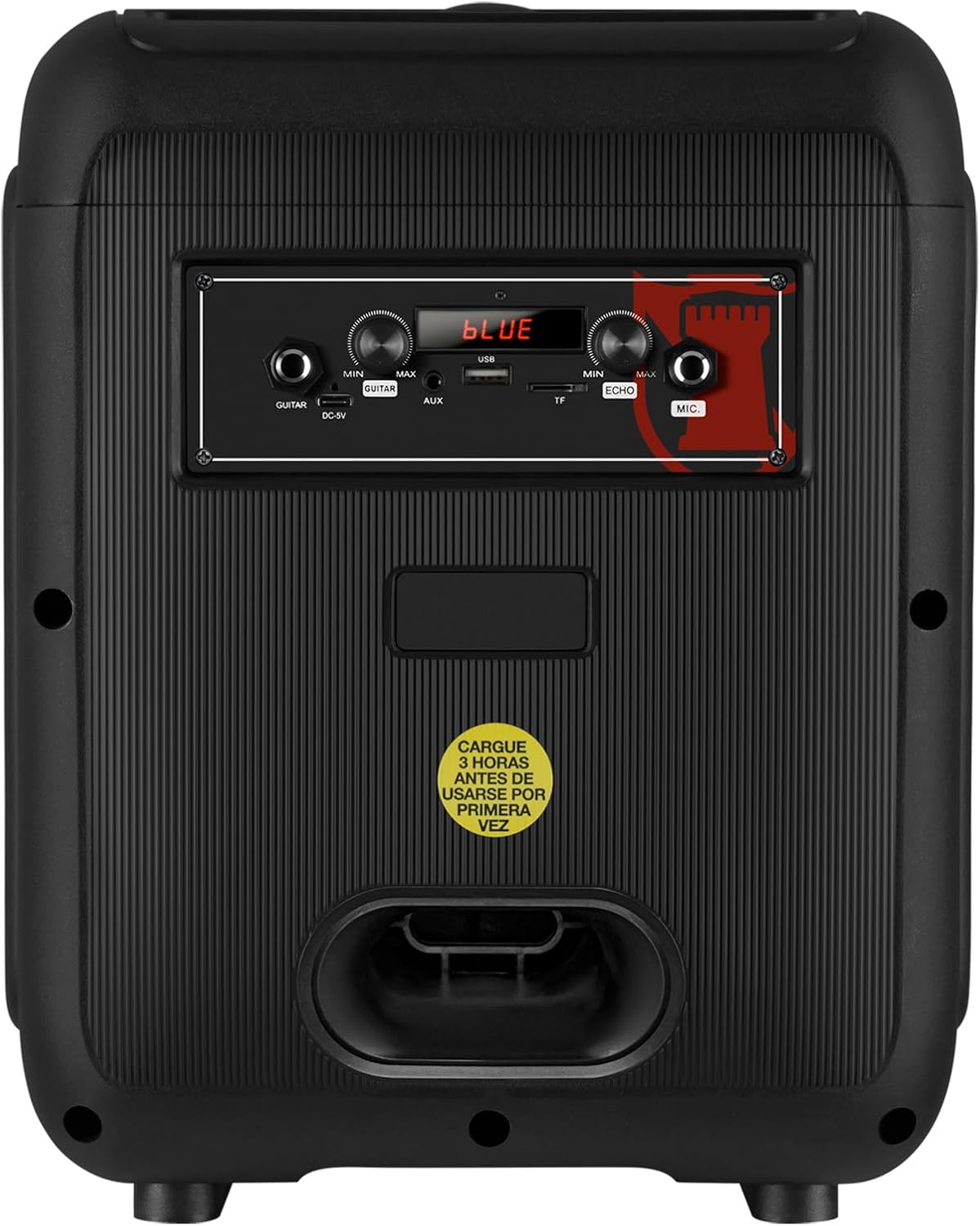
Figure 5: Rear panel showing the AUX, USB, Micro SD, and Microphone input ports, along with the power input.
- Entrada AUX: Connecteu dispositius d'àudio externs amb un cable d'àudio de 3.5 mm.
- Port USB: Inseriu una unitat flash USB per reproduir MP3.
- Ranura Micro SD: Insert a Micro SD card for MP3 playback.
- Entrada MIC: Connect a wired microphone for karaoke or announcements.
- DC-9V Input: Entrada d'alimentació per carregar l'altaveu.
6. Especificacions
| Característica | Descripció |
|---|---|
| Nom del model | KXB-3008 |
| Tipus d'altaveu | Altaveu portàtil |
| Característiques especials | Lightweight, LED Light, Karaoke Function |
| Usos recomanats | Gaming Consoles, Laptops, Smartphones, Tablets |
| Dispositius compatibles | Smartphone, Tablet, Laptop, Gaming Console |
| Diàmetre del subwoofer | 8 polzades |
| Color | Negre |
| Dimensions del producte | 31 cm (profunditat) x 29 cm (amplada) x 42 cm (alçada) |
| Pes del producte | 5 quilos |
| Impermeable | Fals |
| Mètode de control | Control remot |
| Tecnologia sense fils | Bluetooth |
| Font d'alimentació | Bateria |
| Max Speaker Output | 30 watts |
| Durada mitjana de la bateria | 6 hores |
| Mode de sortida d'àudio | Estèreo, Envoltant |
| Tipus de muntatge | Muntatge a terra, muntatge a taula |
7. Manteniment
- Neteja: Feu servir un drap suau i sec per netejar l'exterior de l'altaveu. No utilitzeu productes de neteja abrasius ni dissolvents.
- Emmagatzematge: Guardeu l'altaveu en un lloc fresc i sec, allunyat de la llum solar directa i de temperatures extremes.
- Cura de la bateria: Per allargar la durada de la bateria, eviteu descarregar-la completament amb freqüència. Carregueu l'altaveu regularment, fins i tot si no l'utilitzeu durant períodes prolongats.
- Eviteu l'aigua: This speaker is not waterproof. Keep it away from liquids to prevent damage.
8. Solució De Problemes
| Problema | Possible solució |
|---|---|
| L'altaveu no s'encén. | Ensure the battery is charged. Connect the power cable and try again. Check the power switch position. |
| Sense so. | Check the volume level on both the speaker and your connected device. Ensure the correct input mode is selected (Bluetooth, AUX, USB/SD). |
| L'aparellament de Bluetooth falla. | Ensure the speaker is in Bluetooth mode. Make sure your device's Bluetooth is enabled and within range. Forget previous pairings on your device and try pairing again. |
| El micròfon no funciona. | Ensure the microphone is properly connected to the MIC input. Check the microphone's ON/OFF switch and adjust the MIC VOL knob. |
| KSR-Link connection issues. | Ensure both speakers are KXB-3008 models and are in Bluetooth mode. Try re-initiating the KSR-Link pairing process. |
9. Garantia i Suport
This product comes with a Limited Warranty. Please refer to the warranty card included in the packaging for detailed terms and conditions.
For technical support or customer service, please visit the official Kaiser weblloc o poseu-vos en contacte amb el vostre distribuïdor local.