
Introducció
Thank you for choosing the KLIM K7 Cassette Tape Player and MP3 Converter. This device allows you to enjoy your classic cassette tapes and convert them into digital MP3 files for modern playback. It features a built-in microphone for recording, an integrated speaker, and a rechargeable battery for portability. This manual provides detailed instructions for setup, operation, and maintenance of your KLIM K7.
Producte acabatview
Característiques clau
- Cassette to MP3 Converter: Effortlessly convert cassette tapes to digital MP3 files directly onto an SD card.
- Disseny portàtil: Lightweight and compact for on-the-go listening.
- Micròfon integrat: Record audio directly to the SD card.
- Altaveu integrat: Share your audio without external devices.
- Bateria recarregable: Integrated 1000mAh battery provides extended playback.
- SD Card Player: Reprodueix MP3 files'emmagatzemen a la targeta SD.
- Presa d'auriculars de 3.5 mm: For private listening with included earphones.
Components i controls del dispositiu
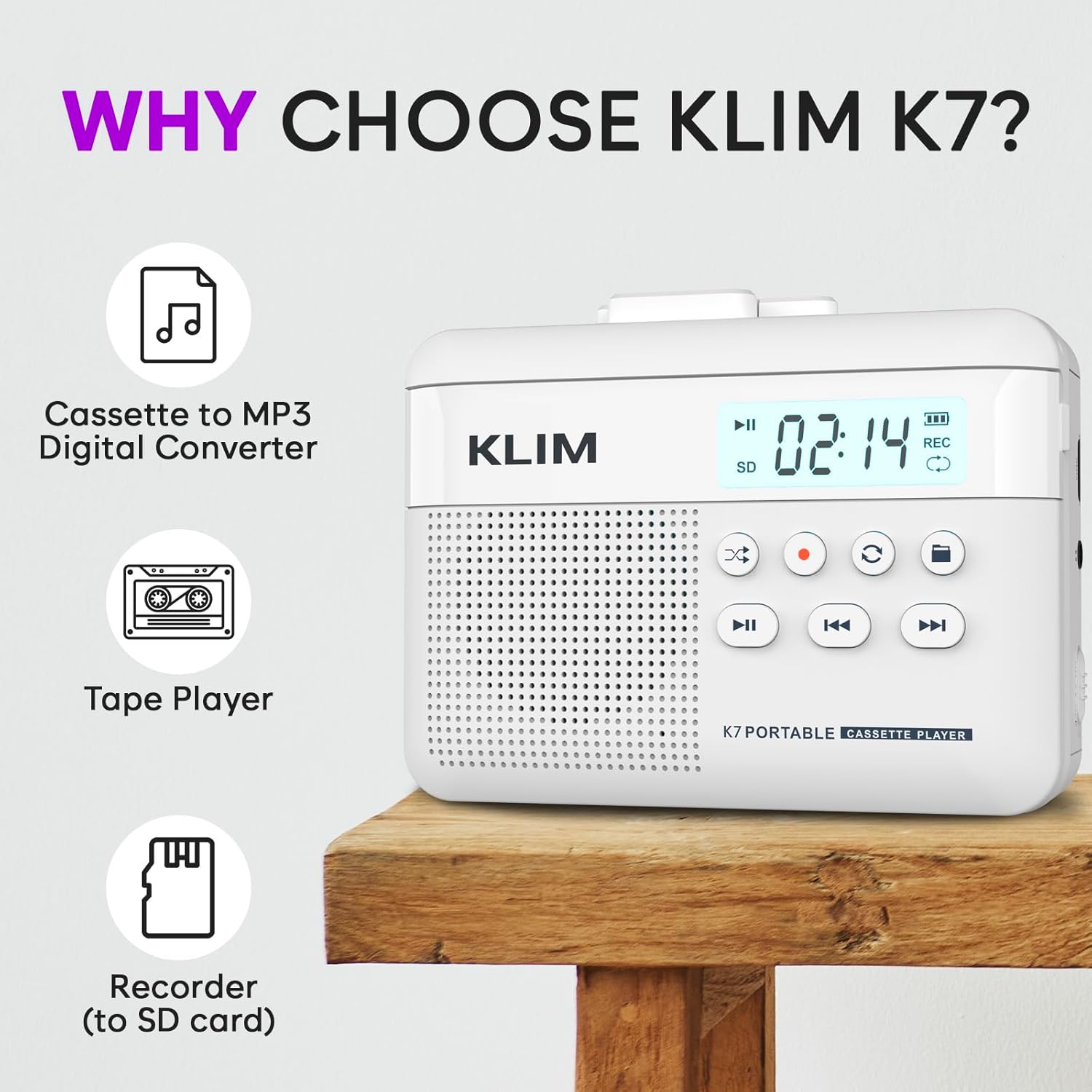
Figura 1: Davant view of the KLIM K7 Cassette Player, showing the speaker grille, LCD display, and control buttons (Play/Pause, Rewind, Fast Forward, Stop, Record, Mode, Folder, Loop).
- Pantalla LCD: Shows track number, recording status, and battery level.
- Ponent: Altaveu integrat per a la reproducció d'àudio.
- Play/Pause Button (►▮): Inicia o posa en pausa la reproducció.
- Rewind Button (◀◀): Rewinds the cassette tape or navigates backward through MP3 tracks.
- Fast Forward Button (►►): Fast forwards the cassette tape or navigates forward through MP3 tracks.
- Botó d'aturada (■): Atura la reproducció o la gravació.
- Record Button (●): Inicia o atura l'enregistrament.
- Botó de mode (↻): Switches between cassette playback and SD card MP3 playback.
- Folder Button (🖿): Navigates through folders on the SD card.
- Loop Button (⟳): Repeats the current track or all tracks.

Figura 2: lateral view of the KLIM K7 Cassette Player, highlighting the SD card slot, 3.5mm headphone jack, and On/Off switch.
- Ranura per a targeta SD: Insert your Micro SD card here for recording and MP3 playback.
- Presa d'auriculars de 3.5 mm: Connect the included earphones or other standard headphones.
- Interruptor d'encesa/apagada: Encén o apaga el dispositiu.
- Control de volum: Ajusta el nivell de sortida d'àudio.

Figura 3: A dalt view of the KLIM K7 Cassette Player with the cassette compartment open, showing the tape mechanism.
- Compartiment de casset: Insert your cassette tapes here.
- Cassette Door Release: Opens the cassette compartment.
Configuració
1. Carregant la bateria
Before first use, fully charge the KLIM K7. The device comes with a 1000mAh rechargeable battery.
- Locate the Type-C USB charging port on the side of the device.
- Connect the included Type-C USB cable to the charging port and the other end to a USB power adapter (not included) or a computer's USB port.
- The charging indicator on the LCD display will show charging status. A full charge typically takes approximately 2 hours.

Figura 4: The KLIM K7 connected to a Type-C USB cable for charging.
2. Inserció d'una targeta SD
An SD card (16GB included) is required for converting tapes to MP3 and for recording with the built-in microphone.
- Locate the SD card slot on the side of the device (refer to Figure 2).
- Gently insert the Micro SD card into the slot with the gold contacts facing down until it clicks into place.
- To remove, push the SD card inward until it clicks, then release, and it will eject.

Figura 5: Inserting the Micro SD card into the KLIM K7.
3. Inserting a Cassette Tape
- Press the Cassette Door Release button to open the cassette compartment.
- Insert your cassette tape with the open side facing upwards and the tape reels aligned with the player's mechanism.
- Tanqueu fermament la porta del compartiment del casset fins que sentiu un clic.
Instruccions de funcionament
1. Reproducció de cintes de casset
- Ensure the device is powered on using the On/Off switch.
- Insert a cassette tape as described in the Setup section.
- Premeu el botó Play/Pause (►▮) per iniciar la reproducció.
- Ajusteu el volum amb el control de volum.
- Utilitza el Rewind (◀◀) i Fast Forward (►►) botons per navegar per la cinta.
- Premeu el botó Atura (■) botó per finalitzar la reproducció.
2. Converting Cassette Tapes to MP3
The KLIM K7 allows direct conversion of cassette audio to MP3 files on the inserted SD card, without needing a computer or additional software.
- Ensure an SD card is inserted and the device is powered on.
- Insert the cassette tape you wish to convert.
- Premeu el botó Play/Pause (►▮) button to start playing the tape.
- Premsa llarga el Record (●) button. The 'REC' indicator on the LCD display will illuminate, indicating that recording has started.
- Per aturar la gravació, premeu el botó Record (●) button again. The 'REC' indicator will turn off. The recorded audio will be saved as an MP3 file a la targeta SD.
- You can then remove the SD card and use the included SD card reader to transfer the MP3 files to a computer or other device.

Figura 6: Visual guide for converting cassette audio to MP3 files.
3. Using the Built-in Microphone for Recording
The KLIM K7 can also record audio directly from its built-in microphone to the SD card.
- Ensure an SD card is inserted and the device is powered on.
- Premeu el botó Mode (↻) button until the device is in SD card mode (no cassette playing).
- Premsa llarga el Record (●) button. The 'REC' indicator will light up, and the device will start recording audio from its microphone.
- Per aturar la gravació, premeu el botó Record (●) button again. The 'REC' indicator will turn off, and the recording will be saved as an MP3 file.

Figura 7: Using the KLIM K7's built-in microphone for recording.
4. Playing MP3 Files from SD Card
- Ensure an SD card with MP3 files is inserted and the device is powered on.
- Premeu el botó Mode (↻) button to switch to SD card playback mode. The LCD display will show track information.
- Premeu el botó Play/Pause (►▮) per iniciar la reproducció.
- Utilitza el Rewind (◀◀) i Fast Forward (►►) botons per saltar pistes.
- El Folder (🖿) button allows navigation through different folders on the SD card.
- El Loop (⟳) button can be used to repeat the current track or all tracks.
- Ajusteu el volum amb el control de volum.
- Premeu el botó Atura (■) botó per finalitzar la reproducció.

Figura 8: Enjoying audio with the KLIM K7 and included earphones.
Manteniment
Proper maintenance ensures the longevity and optimal performance of your KLIM K7.
- Neteja: Feu servir un drap suau i sec per netejar l'exterior del dispositiu. No utilitzeu netejadors líquids ni dissolvents.
- Compartiment de casset: Periodically clean the tape heads and pinch rollers with a cotton swab lightly dampened with isopropyl alcohol to prevent audio quality degradation. Ensure the device is off and dry before use.
- Emmagatzematge: Guardeu el dispositiu en un lloc fresc i sec, allunyat de la llum solar directa i de temperatures extremes.
- Cura de la bateria: For long-term storage, charge the battery to about 50% every few months to maintain battery health.
Resolució de problemes
If you encounter any issues with your KLIM K7, please refer to the following common solutions:
| Problema | Causa possible | Solució |
|---|---|---|
| El dispositiu no s'encén. | La bateria està esgotada. | Charge the device using the provided Type-C USB cable. |
| No sound during cassette playback. | Volume is too low or headphones are not connected properly. | Increase the volume. Ensure headphones are fully plugged into the 3.5mm jack. |
| Recording to MP3 fails or produces no file. | SD card is full, not inserted correctly, or corrupted. | Check SD card insertion. Ensure sufficient space on the SD card. Try reformatting the SD card (this will erase all data). |
| Poor audio quality from cassette. | Dirty tape heads or worn-out cassette tape. | Clean the tape heads and pinch rollers. Try a different cassette tape to determine if the issue is with the tape itself. |
| El dispositiu es bloqueja o deixa de respondre. | Error temporal de programari. | Turn the device off and then on again. If the issue persists, allow the battery to fully discharge and then recharge. |
Especificacions
- Dimensions del producte: 4.76 x 3.61 x 1.56 polzades
- Pes de l'article: 9.9 unces
- Bateria: 1 bateria de ions de liti (inclosa), 1000 mAh
- Temps de càrrega: Aproximadament 2 hores
- Emmagatzematge: Supports Micro SD card (16GB included)
- Sortida d'àudio: Built-in speaker, 3.5mm headphone jack
- Format d'enregistrament: MP3

Figura 9: Dimensions of the KLIM K7 Cassette Player.
Garantia i Suport
KLIM is committed to producing quality electronics. The KLIM K7 Cassette Tape Player comes with a Garantia de 5 anys. If you encounter any problems with your device, please contact KLIM customer support for assistance.
Pot ser que hi hagi plans de protecció addicionals disponibles per a la compra:
- Pla de protecció de 2 anys: $3.99 (one-time)
- Pla de protecció de 3 anys: $5.99 (one-time)
- NEW Complete Protect: $16.99 (monthly)
Per a més ajuda, visiteu el Botiga KLIM a Amazon.