
AZZA CSAZ-290
AZZA CSAZ-290 Fighter Mid-Tower Computer Case User Manual
Model: CSAZ-290 | Marca: AZZA
1. Introducció
Thank you for choosing the AZZA CSAZ-290 Fighter Mid-Tower Computer Case. This manual provides detailed instructions for the installation, operation, and maintenance of your new computer case. Please read this manual thoroughly before beginning installation to ensure proper setup and optimal performance.
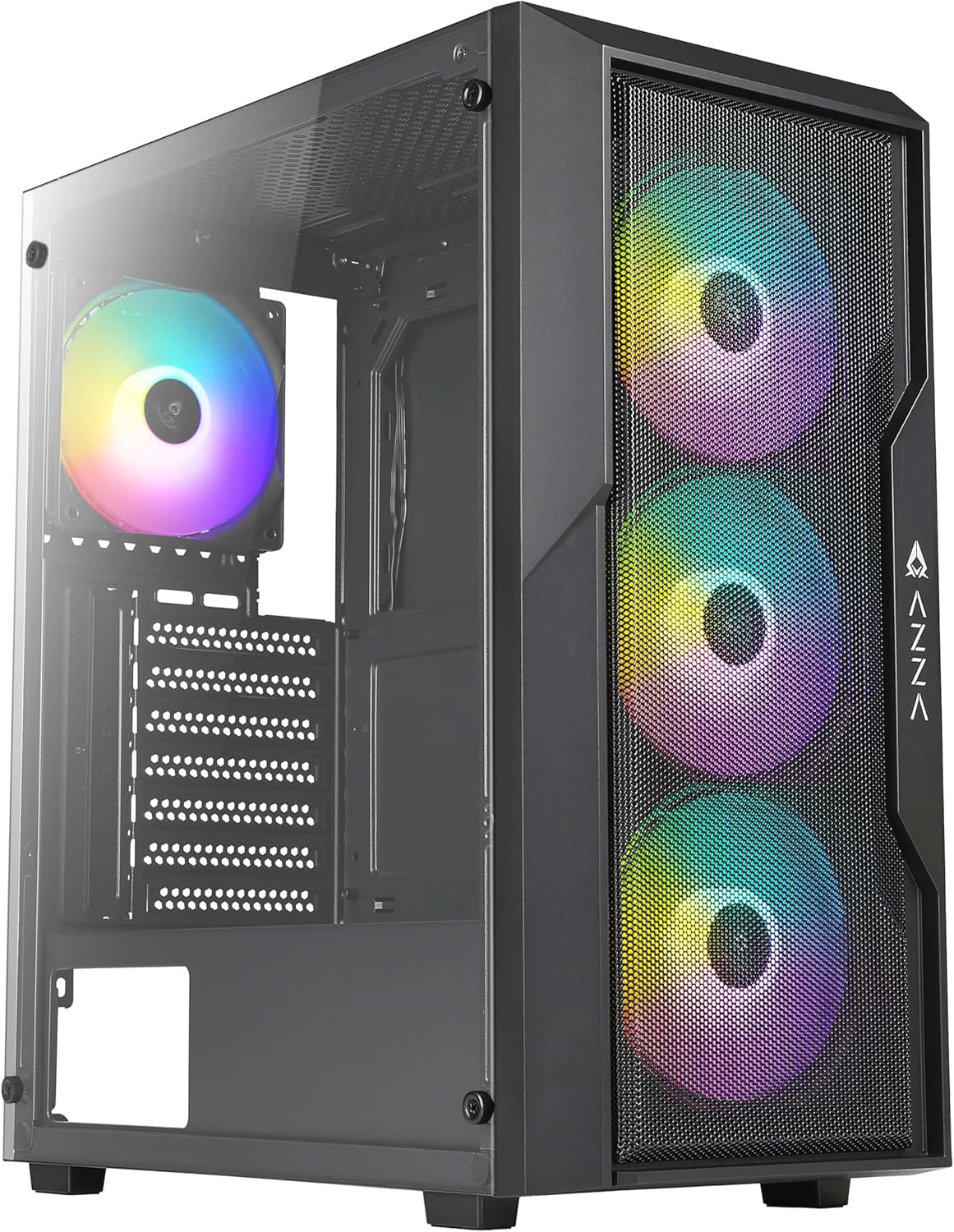
Figura 1: Part frontal view of the AZZA CSAZ-290 Fighter Mid-Tower Computer Case, showcasing the tempered glass side panel and the three pre-installed addressable RGB fans on the mesh front panel.
2. Característiques clau
The AZZA CSAZ-290 is designed for performance and aesthetics, offering a robust platform for your gaming or high-performance PC build. Key features include:
- Performance Optimized Airflow: Full mesh front panel with three pre-installed 120mm addressable RGB fans for excellent airflow.
- Suport de flux d'aire multifacètic: Supports up to 8 x 120mm fans, including options for direct GPU airflow.
- Il·luminació RGB personalitzable: Controllable fan lighting via a top panel LED button, with motherboard RGB software synchronization support.
- Intuitive I/O Panel: Conveniently located top panel with Power button, LED button, Combo HD Audio, and USB 3.0 x 2 ports.
- Panell lateral de vidre temperat: Proporciona un clar view de components interns.
- Àmplia compatibilitat: Supports ATX, Micro ATX, and Mini ITX motherboards, with ample space for CPU coolers and GPUs.

Figura 2: Primer pla frontal view of the case, emphasizing the full mesh design and the vibrant illumination of the three 120mm addressable RGB fans.
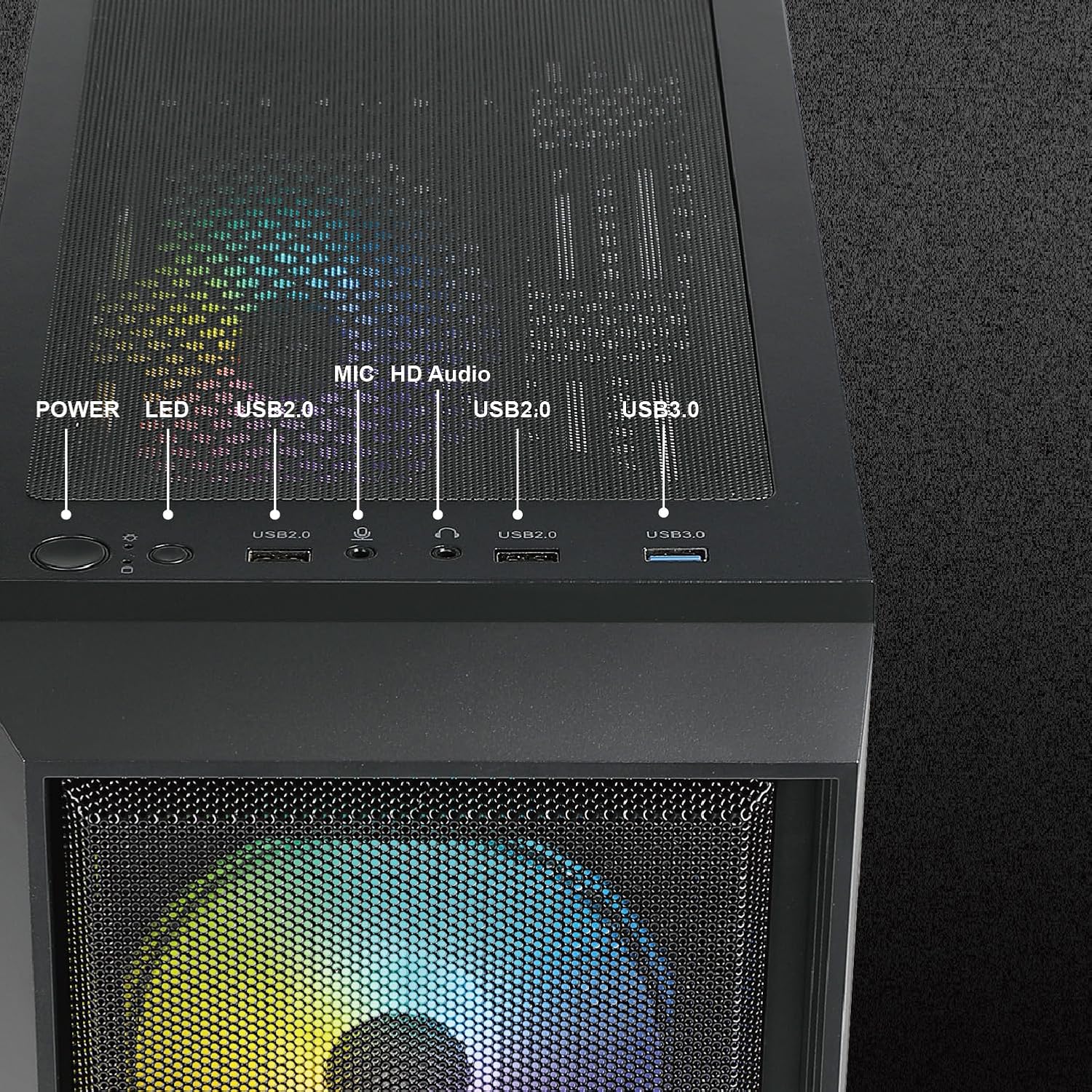
Figura 3: Detallada view of the top I/O panel, illustrating the Power button, LED button for RGB control, USB 2.0 ports, HD Audio jack, and USB 3.0 ports.
3. Especificacions tècniques
| Característica | Especificació |
|---|---|
| Nom del model | CSAZ-290 |
| Tipus de cas | Torre mitja |
| Color | Negre |
| Material | Vidre temperat, plàstic |
| Dimensions (L x A x A) | 15.4 x 7.7 x 17.7 polzades (390 x 195 x 450 mm) |
| Pes de l'article | 13.2 lliures |
| Compatibilitat amb la placa base | ATX, Micro ATX, Mini ITX |
| Ranures d'expansió | 7 |
| Ports d'E/S | 2 x USB 3.0, HD Audio, Mic, Power Button, LED Button |
| Ventiladors preinstal·lats | 3 x 120 mm ARGB (frontal) |
| Suport màxim del ventilador | Ventiladors de fins a 8 x 120 mm |
| Suport del radiador | Davant: Fins a 360 mm |
| Alçada màxima del refrigerador de la CPU | 155 mm |
| Longitud màxima de la GPU | 320 mm |
| Muntatge de la font d'alimentació | Muntatge inferior |

Figura 4: Dimensionalment sobrepassatview of the AZZA CSAZ-290 case, indicating its length (390mm), width (195mm), and height (450mm).
4. Configuració i instal·lació
Abans de començar la instal·lació, assegureu-vos que teniu tots els components i eines necessaris. Manipuleu sempre els components amb cura i seguiu les precaucions antiestàtiques.
4.1 Preparació del cas
- Desembaleu la caixa amb cura i traieu tots els materials d'embalatge.
- Locate the accessory box inside the case, which contains screws, zip ties, and other small parts.
- Remove the tempered glass side panel by unscrewing the thumb screws. Set it aside on a soft, flat surface to prevent scratches.
4.2 Instal·lació de la placa base
- Identify the correct standoff positions for your ATX, Micro ATX, or Mini ITX motherboard. The case comes with pre-installed standoffs for standard ATX.
- Install any additional standoffs required for your motherboard form factor.
- Col·loca amb cura la placa base sobre els separadors, alineant els forats dels cargols.
- Fixeu la placa base amb els cargols proporcionats.

Figure 5: Internal layout indicating compatibility zones for Motherboard (A), maximum CPU Cooler Height (B - 155mm), and maximum GPU Length (C - 320mm).
4.3 Instal·lació del dispositiu d'emmagatzematge
The case offers flexible storage options for 3.5" HDDs and 2.5" SSDs.
- 3.5" HDD / 2.5" SSD (Cage): Install drives into the multifunctional hard disk cage located under the PSU shroud.
- 3.5" HDD (Bracket): Utilize the multifunctional hard disk bracket for additional 3.5" HDD installation.
- 2.5" SSD (Hole Support): Mount 2.5" SSDs directly onto the dedicated holes on the motherboard tray.

Figure 6: Illustration of flexible storage options, showing locations for 3.5" HDD (A), 3.5" HDD or 2.5" SSD (B), and 2.5" SSD x2 (C).
4.4 Instal·lació de la font d'alimentació
La font d'alimentació es munta a la part inferior de la carcassa.
- Slide the power supply into its designated compartment from the rear of the case.
- Secure the power supply with screws from the rear.
4.5 Instal·lació del ventilador i del radiador
The case supports extensive cooling configurations.
- Davant: Supports 3 x 120mm fans (pre-installed) or up to a 360mm radiator.
- posterior: Admet 1 ventilador de 120 mm.
- A dalt: Admet 2 ventiladors de 120 mm o 2 de 140 mm.
- Carcassa PSU: Admet 2 ventiladors de 120 mm per a un flux d'aire directe a la GPU.

Figure 7: Depiction of the massive cooling potential, showing support for up to a 360mm radiator in the front.

Figura 8: Mésview of ultimate thermal performance, illustrating fan support locations: 3x120mm front, 1x120mm rear, 2x120mm/140mm top, and 2x120mm above PSU shroud, totaling up to 8 fans.
5. Instruccions de funcionament
5.1 Encès
After all components are installed and cables are connected, press the Power button on the top I/O panel to turn on your system.
5.2 Control de la il·luminació RGB
Els ventiladors ARGB preinstal·lats es poden controlar de dues maneres:
- Botó LED: Press the LED button on the top I/O panel to cycle through various pre-set lighting modes and effects.
- Sincronització del programari de la placa base: If your motherboard supports Addressable RGB (ARGB) synchronization, connect the case's ARGB cable to the appropriate header on your motherboard. You can then use your motherboard's RGB software (e.g., ASUS Aura Sync, MSI Mystic Light Sync, GIGABYTE RGB Fusion) to control and synchronize the fan lighting directly.
6. Manteniment
Un manteniment regular ajuda a garantir un rendiment òptim i una major longevitat de la carcassa de l'ordinador.
- Filtres de pols: The AZZA CSAZ-290 features dust filters on the top and bottom. Regularly remove and clean these filters to maintain good airflow and prevent dust buildup inside the case.
- Neteja de caixa: Utilitzeu un suau, damp cloth to wipe down the exterior of the case. For the tempered glass panel, use a glass cleaner and a microfiber cloth to avoid streaks.
- Pols interna: Periodically use compressed air to blow out dust from inside the case, especially from fan blades and heatsinks. Ensure the system is powered off and unplugged before performing internal cleaning.
7. Solució De Problemes
Aquesta secció tracta problemes comuns que podeu trobar.
7.1 System Does Not Power On
- Cable de corrent: Ensure the power supply unit (PSU) is properly connected to the wall outlet and the PSU switch is in the 'ON' position.
- Connectors del panell frontal: Verify that the power button cable from the case's front panel is correctly connected to the motherboard's front panel header (usually labeled F_PANEL or similar). Refer to your motherboard manual for exact pinouts.
- Funcionalitat de la font d'alimentació: Si és possible, proveu la font d'alimentació de manera independent o proveu-ne una que se sàpiga que funciona.
7.2 RGB Fans Not Lighting Up or Responding
- Connexió d'alimentació: Ensure the fans' power cables are securely connected to the fan headers on the motherboard or a fan controller.
- Connexió ARGB: Verify that the ARGB cables from the fans are correctly connected to the motherboard's 3-pin 5V ARGB header (not 4-pin 12V RGB header).
- Botó LED: If using the case's LED button, ensure it is functioning and cycle through modes.
- Conflicte de programari: If using motherboard software, ensure no other RGB software is running that might conflict. Reinstall or update the motherboard's RGB software.
7.3 Poor Airflow or Overheating
- Acumulació de pols: Netegeu els filtres de pols i els components interns tal com es descriu a la secció Manteniment.
- Orientació del ventilador: Ensure fans are oriented correctly for optimal airflow (front fans typically intake, rear/top fans exhaust).
- Gestió de cables: Poor cable management can obstruct airflow. Reroute cables behind the motherboard tray where possible.
- Ventiladors addicionals: Consider installing additional fans in available slots, especially above the PSU shroud for GPU cooling.
8. Garantia i Suport
AZZA products are manufactured to the highest quality standards. For specific warranty terms and conditions, please refer to the warranty information provided with your purchase or visit the official AZZA weblloc web. Conserveu el comprovant de compra per a reclamacions de garantia.
For technical support or further assistance, please contact AZZA customer service through their official website or the retailer where you purchased the product. When contacting support, please have your product model (CSAZ-290) and purchase details ready.
Documents relacionatsCSAZ-290


Ask a question about this manual
Ask about setup, troubleshooting, compatibility, parts, safety, or missing instructions. Manuals+ will review the question and use this page’s manual context to help answer it.