
SJOYBRING 7-Inch Double Din Car Stereo
SJoyBring 7-Inch Double Din Car Stereo User Manual
Model: 7-Inch Double Din Car Stereo
Introducció
Thank you for choosing the SJoyBring 7-Inch Double Din Car Stereo. This manual provides essential information for the proper installation, operation, and maintenance of your new car stereo. Please read it thoroughly before use to ensure optimal performance and safety.
Característiques del producte
- CarPlay sense fil i Android Auto: Seamless smartphone integration for navigation, music, and calls without cables.
- 4.2-Channel Audio Output: Supports 4 channels RCA audio out for aftermarket amplifiers and 2 separate subwoofer outputs for enhanced sound.
- Bluetooth 5.3 actualitzat: Independent Bluetooth module and antenna ensure stable, fast, and clear wireless streaming and hands-free calling.
- HD QLED Touchscreen: 7-inch screen with 1280x720 resolution, supporting 1920x1080P video playback and MirrorLink functionality.
- Darrera i darrera View Suport de càmera: Automatically displays camera feed when reversing, includes an HD night vision rear view càmera.
- AM/FM Car Radio: Sintonitzador integrat per a la recepció de ràdio.
- Physical Buttons & Rotary Volume Control: For easy and safe operation while driving.
- Control de veu intel·ligent: Utilize intelligent voice assistants for calls, navigation, and music playback.
- Suport al control del volant: Integrate with your vehicle's steering wheel controls for convenience.
Què hi ha a la caixa
En obrir el paquet, comproveu que tots els components hi siguin presents i que estiguin en bon estat:
- SJoyBring 7-Inch Double Din Car Stereo Unit
- HD Night Vision Rear View Càmera
- Necessary Wiring Harnesses and Connectors
- Maquinari de muntatge
- Manual d'usuari (aquest document)
If any items are missing or damaged, please contact SJoyBring customer support.
Configuració i instal·lació
Proper installation is crucial for the performance and longevity of your car stereo. It is highly recommended to have this unit installed by a professional car audio technician.
- Check Dash Opening Size: Before installation, ensure your vehicle's dashboard opening size is compatible with the double din stereo. An additional dash kit may be required for a proper fit.
- Connexions de cablejat: Carefully follow the wiring diagram provided. Ensure all connections are secure to prevent electrical issues. Some vehicles may require a wire harness adapter and a radio antenna adapter.
- Muntatge: Utilize the plentiful mounting holes on the unit for secure installation and optimal cooling.
- Instal·lació de la càmera: Install the included rear view camera according to the instructions. Ensure proper routing of cables and secure mounting for a clear view.

Image: Detailed diagram showing the dimensions of the car stereo and various wiring connections for power, speakers, cameras, and external amplifiers. It also highlights the mounting holes for installation.
Instruccions de funcionament
1. Engegada/Apagada i Controls Bàsics
- Botó d'encesa: Press and hold to turn the unit on or off. A short press may mute/unmute audio.
- Pom de volum: Gireu en sentit horari per augmentar el volum, en sentit antihorari per disminuir-lo.
- Botó d'inici: Torna al menú principal.
- Reset Button (RST): A small pinhole button for factory reset if the unit malfunctions. Use a thin object to press.
2. CarPlay sense fil i Android Auto
Connect your compatible smartphone wirelessly to access navigation, music, calls, and messages directly on the stereo's display.
- Assegureu-vos que el Bluetooth i la Wi-Fi estiguin activats al vostre telèfon intel·ligent.
- On the car stereo, select the "CarPlay" or "Android Auto" icon.
- Segueix les instruccions que apareixen a la pantalla per emparellar el telèfon.
- Once connected, your phone's interface will be mirrored on the stereo, allowing for voice control and touch interaction.

Image: The car stereo screen showing both Apple CarPlay and Android Auto interfaces, demonstrating wireless connectivity for navigation, music, and voice commands.
3. Connectivitat Bluetooth
The upgraded Bluetooth 5.3 ensures stable connections for hands-free calls and audio streaming.
- Go to the "Bluetooth" menu on the stereo.
- Activa el Bluetooth al telèfon i busca els dispositius disponibles.
- Select "SJoyBring" from the list and confirm pairing.
- You can now make/receive calls and stream music wirelessly.

Image: A visual representation of the car stereo's Bluetooth system, showing a phone call interface on the screen and a smartphone connected via Bluetooth, emphasizing stable and clear communication.
4. Audio Output and Equalizer
The unit features 4.2-channel audio output and a 10-band equalizer for customized sound.
- Access the "EQ Setup" menu to adjust frequency bands (30Hz to 16KHz).
- Select preset modes (Jazz, Classic, Rock, Pop, Soft) or create a custom "User" profile.
- Adjust subwoofer output and sound field balance for optimal listening experience.
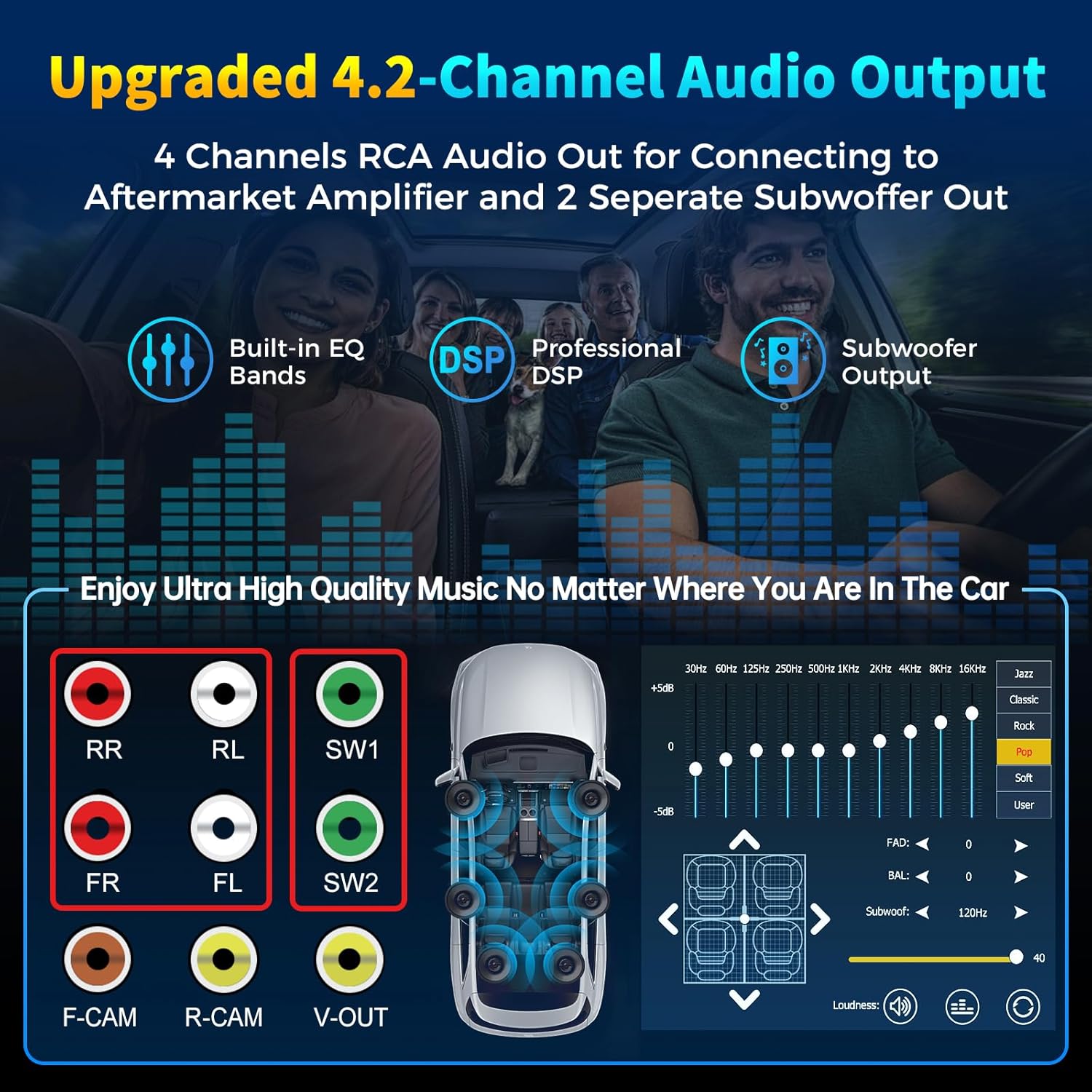
Image: Diagram illustrating the 4-channel RCA audio outputs and 2 subwoofer outputs on the back of the stereo, alongside a screen capture of the 10-band equalizer settings for sound customization.
5. HD QLED Touchscreen and MirrorLink
The 7-inch QLED screen offers high-definition visuals and supports MirrorLink for screen mirroring.
- Funcionament de la pantalla tàctil: Navigate menus and control functions by touching the screen.
- Enllaç de mirall: Connect your iOS or Android phone via USB to mirror its screen content (e.g., Google Maps, Spotify, YouTube) onto the stereo display.

Image: An illustration detailing the layers of the QLED HD screen, emphasizing its 1280x720 resolution and touch capabilities, comparing it to other screens.
6. Camera Functionality (Rear and Front View)
The stereo supports both rear and front view cameras, automatically switching to the rear view en fer marxa enrere.
- When the vehicle is shifted into reverse, the screen will automatically display the rear camera feed with parking guidelines.
- The included HD night vision camera provides a 170° ultra-wide viewing angle and is waterproof.
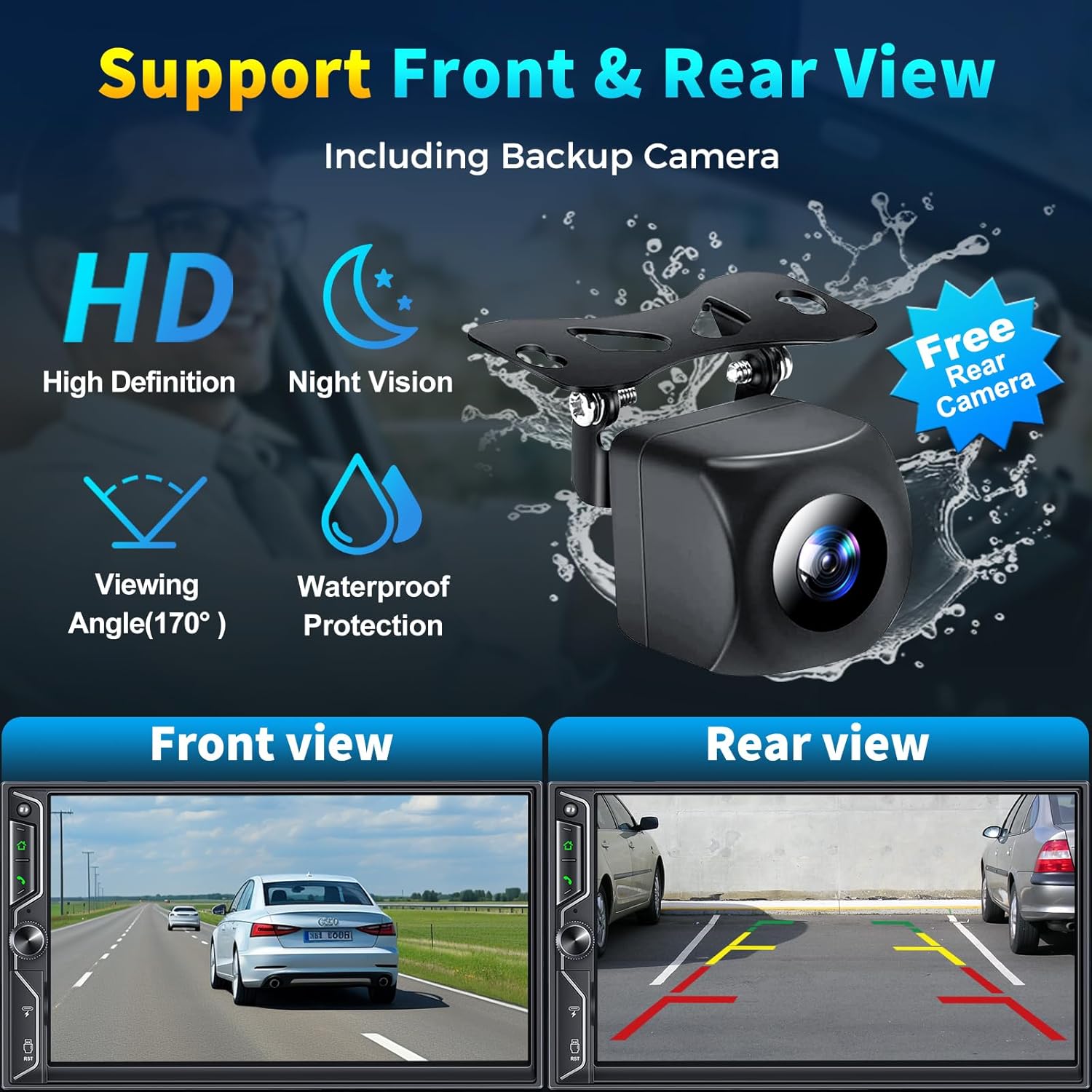
Image: A graphic demonstrating the car stereo's support for front and rear view cameras, showing example views from both perspectives and an image of the included HD night vision backup camera.
7. Ràdio AM/FM
Access the "Radio" application to tune into your favorite AM/FM stations.
- Use the scan function to find available stations.
- Save preferred stations to presets for quick access.
8. Control de veu intel·ligent
Utilize your smartphone's voice assistant (Siri, Google Assistant) through the car stereo for hands-free operation.
- Activate your voice assistant via the stereo's interface or a dedicated button (if available).
- Issue commands for navigation, making calls, playing music, and more.
9. Control del volant
If your vehicle supports it, you can connect the stereo to your steering wheel controls for convenient operation without taking your hands off the wheel.
- Refer to your vehicle's manual and the stereo's wiring diagram for proper connection.
- Configuration may be required in the stereo's settings menu to map steering wheel buttons.
10. Reproducció i càrrega USB
The unit includes USB ports for media playback and charging your devices.
- Insert a USB flash drive into the designated port to play audio or video files.
- The USB port can also be used to charge compatible smartphones.
Vídeo oficial del producte
Video: An official product video demonstrating the SJoyBring Double Din Car Stereo's features, including its design, smart chip, independent Bluetooth module, audio outputs, QLED screen, CarPlay, Android Auto, voice control, steering wheel control, radio, charging, and MirrorLink capabilities.
Manteniment
- Neteja de pantalla: Use a soft, lint-free cloth to gently wipe the QLED touchscreen. Avoid abrasive cleaners or solvents.
- Neteja general: Keep the unit free from dust and debris. Use a dry cloth for exterior cleaning.
- Actualitzacions de programari: Periodically check the SJoyBring official website or contact customer support for any available software or firmware updates to ensure optimal performance and compatibility.
- Inspecció del cable: Regularly inspect all connected cables for any signs of wear or damage.
Resolució de problemes
| Problema | Causa possible | Solució |
|---|---|---|
| Sense poder | Incorrect wiring; Blown fuse; Vehicle power issue. | Check power connections (ACC, B+); Inspect vehicle fuses; Consult a professional installer. |
| Sense so | Speaker wiring incorrect; Volume too low; Mute function active; Ampqüestió de lifier. | Verify speaker connections; Increase volume; Check mute status; Ensure external amplifier is powered (if applicable). |
| Bluetooth no connectat | Bluetooth off on phone/stereo; Incorrect pairing; Interference. | Ensure Bluetooth is on; Delete previous pairings and re-pair; Move phone closer to unit. |
| CarPlay/Android Auto no funciona | Phone not compatible; Incorrect connection; Software glitch. | Ensure phone is compatible and updated; Reconnect wirelessly or via USB (for MirrorLink); Restart phone and stereo. |
| La càmera posterior no es mostra | Camera wiring incorrect; Reverse trigger wire not connected. | Check camera power and video input connections; Verify reverse trigger wire connection. |
| La pantalla tàctil no respon | Temporary software issue; Screen damage. | Perform a soft reset using the RST button; If issue persists, contact support. |
If you encounter issues not listed here or if the suggested solutions do not resolve the problem, please contact SJoyBring customer support for further assistance.
Especificacions
| Característica | Detall |
|---|---|
| Marca | SJOYBRING |
| Número de model | 7-Inch Double Din Car Stereo |
| Mida de la pantalla | 7-Inch QLED HD Touchscreen |
| Resolució de pantalla | 1280 x 720 |
| Suport de reproducció de vídeo | Up to 1920 x 1080P |
| Tecnologia de connectivitat | Auxiliary, Bluetooth, Wi-Fi, USB |
| Versió Bluetooth | 5.3 |
| Canals de sortida d'àudio | 4.2 (4 Channels RCA Audio Out, 2 Subwoofer Out) |
| Potència de sortida | 240 watts |
| Dispositius compatibles | Smartphone (iOS & Android) |
| Mètode de control | App, Remote, Touch, Steering Wheel Control |
| Mitjans integrats | Car stereo, Backup camera |
| Pes de l'article | 2.64 lliures |
Garantia i Suport
The SJoyBring 7-Inch Double Din Car Stereo comes with a 1 anys de garantia des de la data de compra.
For warranty claims, technical assistance, or any inquiries, please contact SJoyBring customer support. You can also visit the official SJoyBring store for more information and resources:
Ask a question about this manual
Ask about setup, troubleshooting, compatibility, parts, safety, or missing instructions. Manuals+ will review the question and use this page’s manual context to help answer it.