
Hiicam Speed 60
Manual d'usuari de la càmera d'acció Hiicam Speed 60
Model: Speed 60 | Brand: Hiicam
Introducció
The Hiicam Speed 60 is a high-performance action camera designed to capture your adventures in stunning 4K resolution. Featuring a 48MP photo sensor, dual screens including a 2.35-inch HDR touch screen, advanced EIS 2.0 stabilization, and built-in 5G Wi-Fi, this camera is built for dynamic environments. It is natively waterproof up to 10 meters (33 feet) and can be used with an external waterproof housing for depths up to 40 meters (131 feet).

Figure 1: Hiicam Speed 60 Action Camera and included batteries.
Què hi ha a la caixa
Verifiqueu que tots els elements siguin presents al vostre paquet:
- 1 x Hiicam Speed 60 Action Camera
- 2 bateries de 2150 mAh
- 1 x carregador de bateria
- 1 x cable USB
- 1 x funda impermeable
- 1 x Wireless Mic & Remote
- Various Mounts and Accessories (Buckle Mount, AE Mount, C Mount, D Mount, F Mount, H Mount, Helmet Mount)
- Double-Sided Adhesive Pads
- Corda de filferro
- Embenats
- 1 x Manual d'usuari
- 1 x Lens Cloth
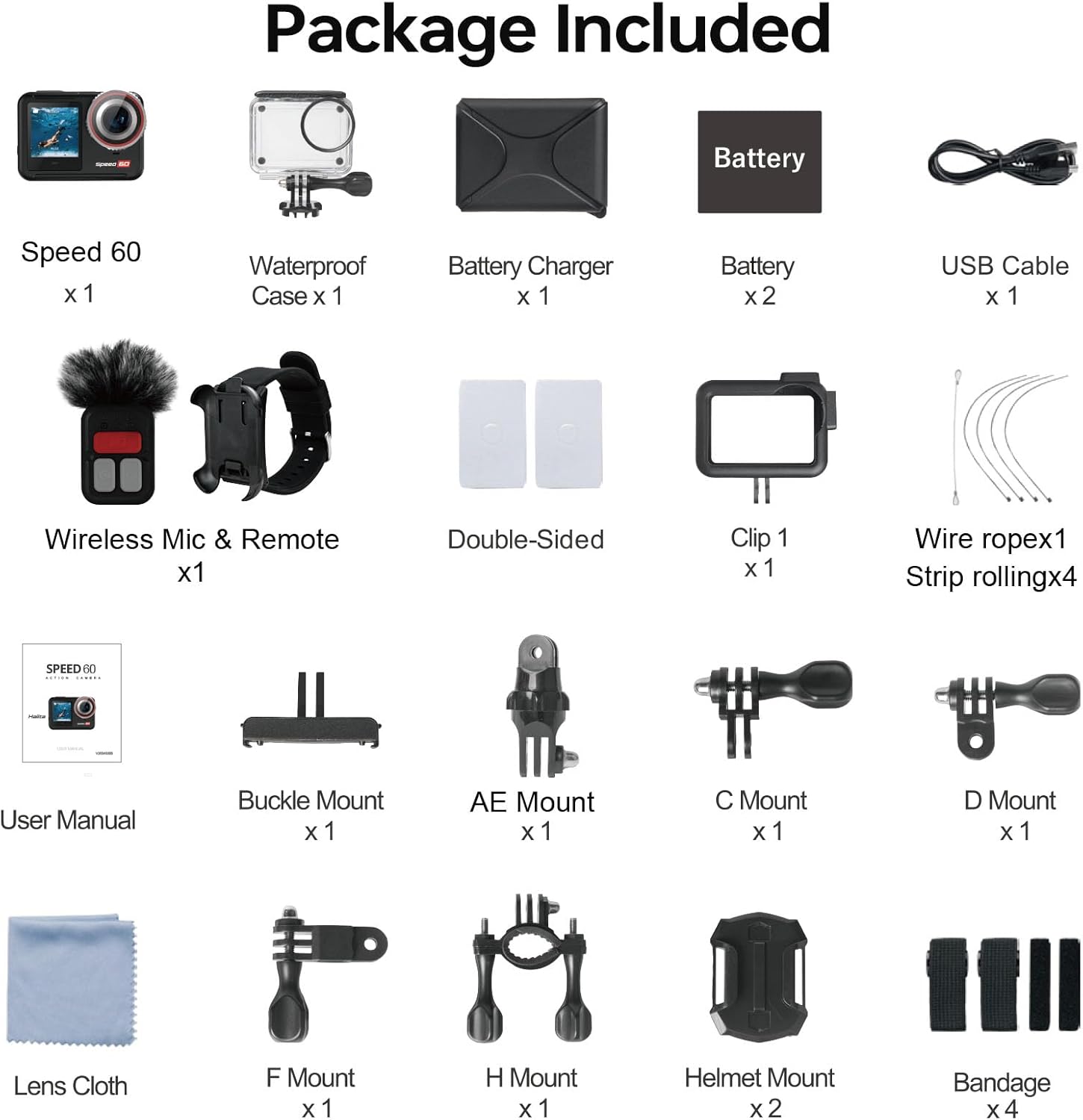
Figure 2: Complete package contents of the Hiicam Speed 60.
Configuració
1. Instal·lació i càrrega de la bateria
The Speed 60 comes with two 2150 mAh lithium-ion batteries. For optimal performance, fully charge both batteries before first use.
- Obriu la tapa del compartiment de la bateria de la càmera.
- Insert a charged battery, ensuring the contacts align correctly.
- Tanqueu bé la tapa del compartiment de la bateria.
- To charge batteries, use the included battery charger and USB-C cable. The charger supports sequential charging of both batteries.

Figure 3: Battery charging and capacity.
2. Inserció de la targeta de memòria
The camera supports SD flash memory cards. A high-speed (U3 or V30 recommended) microSD card is required for 4K video recording.
- Localitza la ranura per a targetes microSD al lateral de la càmera.
- Insert the microSD card with the contacts facing the front of the camera until it clicks into place.
- Per treure-la, premeu suaument la targeta fins que surti.
Instruccions de funcionament
Controls bàsics
- Botó d'encesa: Press and hold to turn the camera on/off. Short press to switch modes (Video, Photo, Playback).
- Botó de l'obturador: Premeu per iniciar/aturar la gravació de vídeo o fer una foto.
- Pantalla tàctil: Navigate menus and settings by swiping and tapping on the 2.35-inch rear touch screen.

Figure 4: Touch screen operation for intuitive control.
Video Recording (4K60FPS, EIS 2.0, HDR)
The Speed 60 captures video at up to 4K resolution at 60 frames per second (FPS). Ensure EIS 2.0 (Electronic Image Stabilization) is enabled for smooth footage, especially during dynamic activities.
- Navigate to Video mode using the Power button or touch screen.
- Access video settings to select resolution (e.g., 4K/60FPS), enable EIS 2.0, and activate HDR for improved dynamic range.
- Press the Shutter button to start recording. Press again to stop.

Figure 5: EIS 2.0 for stable video recording.

Figure 6: HDR function for vivid and detailed images.
Photo Capture (48MP)
Capture high-resolution still images up to 48 megapixels.
- Canvia al mode Foto.
- Adjust photo settings as needed (e.g., resolution, wide-angle).
- Premeu el botó de l'obturador per fer una foto.

Figure 7: High-resolution video and photo capabilities.
Ús impermeable
The Speed 60 is natively waterproof to 10 meters (33 feet) without an additional case. For deeper dives up to 40 meters (131 feet), use the included waterproof housing.
- Before using underwater, ensure all port covers are securely closed.
- When using the waterproof housing, ensure the seal is clean and free of debris, and the latch is fully secured.

Figure 8: Waterproof camera for underwater adventures.
Connectivitat Wi-Fi i aplicació
Connect your Speed 60 to your smartphone via built-in 5G Wi-Fi for easy file transferència i control remot.
- Download the official Hiicam app from your device's app store.
- On the camera, enable Wi-Fi from the settings menu.
- On your smartphone, connect to the camera's Wi-Fi network.
- Open the Hiicam app to view viu footage, control recording, and download photos/videos.

Figure 9: Seamless sharing via 5G Wi-Fi.
Zoom digital
The camera features a 5X digital zoom to get closer to your subject.
- While in video or photo mode, use the zoom controls on the touch screen to adjust the magnification.

Figure 10: 5X Digital Zoom capability.
Control remot
Use the included wireless remote control for convenient operation from a distance.
- Ensure the remote control is paired with the camera (refer to the full user manual for pairing instructions).
- Use the remote to start/stop recording or take photos without touching the camera.
Manteniment
Cleaning the Camera and Lens
- Use the provided lens cloth to gently clean the camera lens and screens.
- Per a taques persistents, lleugerament dampRenta el drap amb aigua. Evita productes químics agressius.
- The camera features a removable anti-fog lens protector for easy cleaning and replacement.

Figure 11: Removable lens protector and other features for maintenance.
Cura de la bateria
- Guardeu les piles en un lloc fresc i sec quan no les utilitzeu.
- Eviteu descarregar completament les bateries amb freqüència per allargar-ne la vida útil.
- Use only the original Hiicam charger and batteries.
Waterproof Seal Care
- After each use in water, rinse the camera (if bare) or waterproof housing with fresh water.
- Allow to air dry completely before opening any compartments.
- Regularly inspect the rubber seals for any dirt, sand, or damage. Clean them gently if necessary.
Resolució de problemes
La càmera no s'encén
- Assegureu-vos que la bateria estigui completament carregada i inserida correctament.
- Try a different charged battery if available.
- Manteniu premut el botó d'engegada durant almenys 5 segons.
Poor Video/Photo Quality
- Clean the camera lens and lens protector.
- Ensure sufficient lighting conditions.
- Check if EIS 2.0 is enabled for video stabilization.
- Verifiqueu que s'hagin seleccionat els paràmetres de resolució i freqüència d'imatges correctes.
- Use a high-speed microSD card (U3 or V30).
Problemes de connexió Wi-Fi
- Ensure Wi-Fi is enabled on the camera.
- Reinicieu tant la càmera com el telèfon intel·ligent.
- Make sure you are within range of the camera's Wi-Fi signal.
- Try forgetting the network on your phone and reconnecting.
Especificacions
| Característica | Detall |
|---|---|
| Número de model | Velocitat 60 |
| Resolució de captura de vídeo | 4K (up to 60FPS) |
| Resolució fotogràfica | 48 MP |
| Estabilització d'imatge | EIS 2.0 (Electronic Image Stabilization) |
| Profunditat d'impermeabilitat (nua) | 10 metres (33 peus) |
| Waterproof Depth (with Housing) | 40 metres (131 peus) |
| Mostra | 2.35-inch HDR Touch Screen (rear), 1.4-inch Front Screen |
| Connectivitat | Wi-Fi de 5 G |
| Capacitat de la bateria | 2 x 2150 mAh Lithium Ion |
| Zoom digital | 5X |
| Dimensions | 2.9 x 6.99 x 3.51 cm |
| Pes | 890 g |
| Tipus de memòria flash | SD (MicroSD recommended) |
Garantia i Suport
Hiicam provides a warranty for its products. To activate your extended warranty and access online service, please scan the QR code provided on the battery packaging or visit the official Hiicam support page.
For further assistance, troubleshooting, or to contact customer support, please refer to the full user manual or visit the Hiicam official weblloc.

Figure 12: Scan QR code on battery for extended warranty and service.
Enllaç rellevant: Activate Extended Warranty / Online Service
Documents relacionatsVelocitat 60


Ask a question about this manual
Ask about setup, troubleshooting, compatibility, parts, safety, or missing instructions. Manuals+ will review the question and use this page’s manual context to help answer it.