
Introducció
Gràcies per la compraasing the B-Qtech Remote Control Car with Camera. This high-performance RC car features a 2.4GHz remote control system, mobile app control, and an integrated HD camera for real-time video transmission and photo capture. Designed for durability and versatile terrain use, this manual provides essential information for setup, operation, maintenance, and troubleshooting to ensure optimal performance and enjoyment.

Image: The B-Qtech Remote Control Car, showcasing its sleek design, integrated camera, and the accompanying remote control with a smartphone holder.
Informació de seguretat
Please read all safety warnings and instructions before operating the product to prevent injury or damage. This product is not suitable for children under 6 years of age. Adult supervision is recommended during operation.
- No feu servir el cotxe RC a prop de persones, mascotes o obstacles.
- Eviteu utilitzar-lo en condicions humides o a prop de l'aigua per evitar danys elèctrics.
- Assegureu-vos que les piles estiguin inserides amb la polaritat correcta.
- No barregeu piles velles i noves, o diferents tipus de piles.
- No intenteu modificar o desmuntar el producte.
- Mantingueu les peces petites allunyades dels nens petits per evitar perills d'asfixia.
- Always turn off the car and remote control when not in use.
- Desfeu-vos de les piles de manera responsable d'acord amb la normativa local.
Contingut del paquet
Verifiqueu que tots els elements que s'enumeren a continuació s'inclouen al vostre paquet:
- 1 x B-Qtech Remote Control Car with Camera
- 1 comandaments a distància de 2.4 GHz
- 1 x Car Lithium Battery
- 1 x cable de càrrega USB
- 1 x Phone Holder for Remote Control
- 1 x Manual d'usuari (aquest document)

Image: A visual representation of the items included in the product package, such as the RC car, remote control, battery, USB charging cable, and phone holder.
Configuració
1. Instal·lació de la bateria
Bateria del cotxe:
- Localitza el compartiment de la bateria a la part inferior del cotxe RC.
- Obriu la tapa del compartiment de la bateria.
- Connect the car's lithium battery to the car's power connector, ensuring correct polarity.
- Col·loqueu la bateria dins del compartiment i tanqueu la tapa de manera segura.
Bateries de control remot:
- Localitzeu el compartiment de la bateria a la part posterior del comandament a distància.
- Obriu la tapa del compartiment de la bateria.
- Insert 2 x AA batteries (not included) into the compartment, observing the correct polarity (+/-).
- Tanqueu bé la tapa del compartiment de la bateria.
2. Càrrega de la bateria del cotxe
- Connect the USB charging cable to the car's lithium battery.
- Plug the other end of the USB charging cable into a USB power adapter (e.g., computer USB port, wall charger, power bank).
- The indicator light on the USB cable will show charging status (refer to cable instructions for specific light behavior).
- Once fully charged, disconnect the battery from the charging cable. Charging typically takes 2-3 hours.
3. Instal·lació i connexió de l'aplicació
- Scan the QR code provided in the quick start guide (or search for the "B-Qtech RC" app) on your smartphone's app store (iOS or Android).
- Baixeu i instal·leu l'aplicació.
- Engega el cotxe RC.
- On your smartphone, go to Wi-Fi settings and connect to the Wi-Fi network broadcast by the RC car (usually named "RC_WIFI_XXXX").
- Open the installed app. The app should automatically connect to the car and display the camera's live feed.
- Attach your smartphone to the phone holder on the remote control for convenient viewdurant el funcionament.
Instruccions de funcionament
1. Operació de control remot
The 2.4GHz remote control allows for precise and interference-free operation.
- Interruptor d'alimentació: Turn on the remote control. The indicator light will blink and then become solid once paired with the car.
- Forward/Backward Control: Feu servir el joystick esquerre per moure el cotxe endavant o enrere.
- Turn Left/Right Control: Feu servir el joystick dret per dirigir el cotxe cap a l'esquerra o la dreta.
- Mode de velocitat: Press the speed button (if available) to switch between fast and slow modes.
- Photos/Video Button: Use dedicated buttons to capture photos or start/stop video recording via the camera.

Image: A diagram illustrating the various controls on the remote control and the corresponding functions within the mobile application interface.
2. Control d'aplicacions mòbils
Once connected via Wi-Fi, the app provides an intuitive interface for controlling the car and accessing camera features.
- Transmissió FPV en directe: View real-time video from the car's camera directly on your smartphone screen.
- Virtual Joysticks: Control forward/backward movement and steering using virtual joysticks on the screen.
- Control del sensor de gravetat: Tilt your phone to steer the car (if enabled in the app).
- Captura de foto/vídeo: Tap the camera icons to take photos or record videos.
- Àlbum: Access captured photos and videos directly from the app's album.
- Velocitat de regulació: Adjust the car's speed settings within the app.

Image: A smartphone screen showing the First-Person View (FPV) live video feed transmitted from the RC car's camera, demonstrating real-time image and video transmission.
3. Funcions de la càmera
The integrated HD camera allows you to capture your adventures.
- Captura de fotos: Press the photo button on the remote or tap the camera icon in the app to take still images.
- Gravació de vídeo: Press the video button on the remote or tap the video icon in the app to start and stop recording.
- Emmagatzematge: Photos and videos are saved directly to your smartphone's gallery via the app.
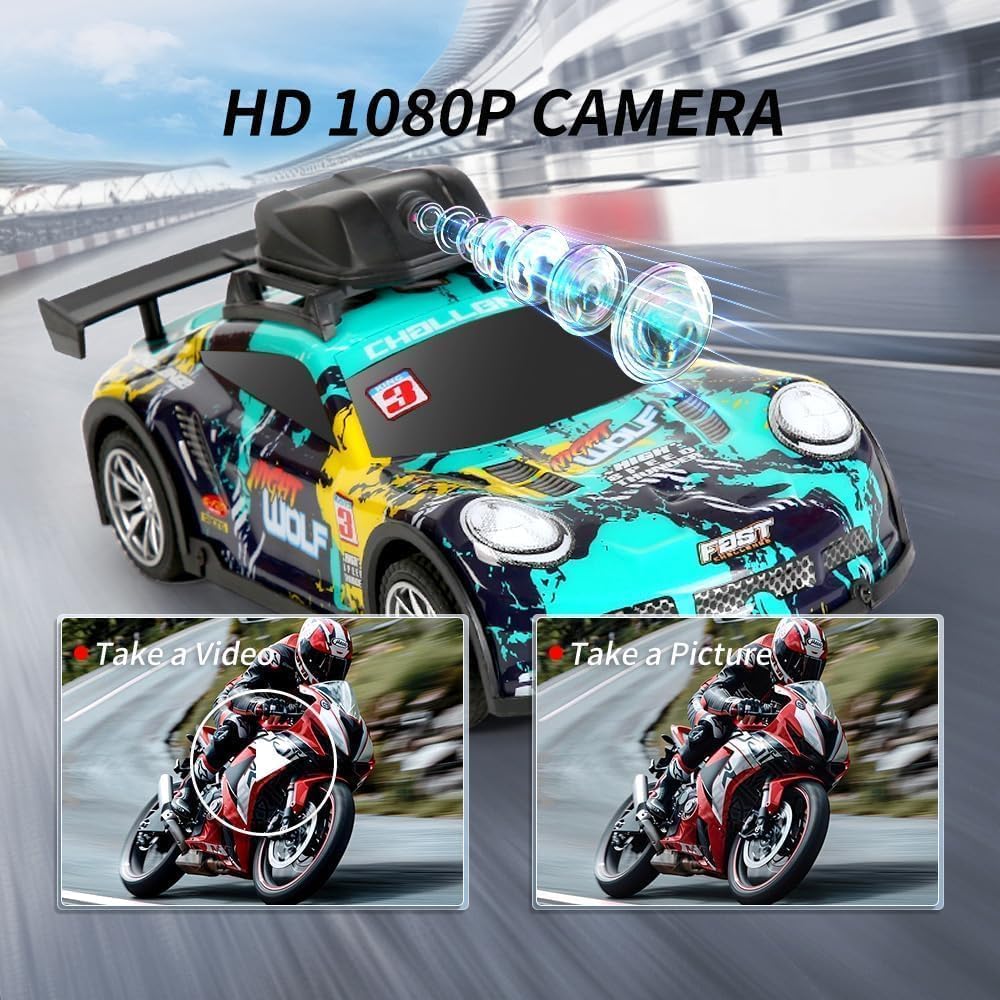
Image: Close-up of the RC car's HD camera, illustrating its capability to capture high-definition photos and videos during operation.
4. Driving on Various Terrains
The B-Qtech RC car is designed with advanced anti-skid tires and shock absorbers for versatile performance.
- Superfícies adequades: The car can be driven on various surfaces including grassland, highway, stone roads, and dirt roads.
- Creuament d'obstacles: Its powerful motor and robust design allow it to easily cross small obstacles.
- Eviteu condicions extremes: Do not operate in deep water, thick mud, or extremely rough terrain that could damage the vehicle.

Image: The RC car depicted on various terrains, including grassland, a paved highway, a stone road, and a dirt road, highlighting its adaptability to different environments.
Manteniment
Proper maintenance will extend the lifespan of your RC car.
- Neteja: After each use, gently wipe the car with a dry or slightly damp cloth to remove dirt and dust. Do not use harsh chemicals or immerse the car in water.
- Cura de la bateria:
- Always fully charge the battery before storage if not used for a long period.
- No sobrecarregueu ni descarregueu excessivament la bateria.
- Remove batteries from the car and remote control when not in use for extended periods to prevent leakage.
- Guardeu les piles en un lloc fresc i sec.
- Emmagatzematge: Store the RC car and remote control in a cool, dry place away from direct sunlight and extreme temperatures.
- Inspecció: Periodically check for loose screws, damaged parts, or worn tires. Replace any damaged components as necessary.
Resolució de problemes
Si teniu problemes, consulteu la taula següent per veure els problemes i les solucions més habituals.
| Problema | Causa possible | Solució |
|---|---|---|
| El cotxe no respon al comandament a distància. |
|
|
| Camera feed is not showing in app. |
|
|
| Car runs slowly or stops suddenly. |
|
|
| Car drifts or doesn't drive straight. |
|
|
Especificacions
| Característica | Detall |
|---|---|
| Número de model | LH-CO75 |
| Freqüència de control | 2.4 GHz |
| Resolució de la càmera | HD 1080P |
| Mètode de control | 2.4G Radio Control, Mobile App Control |
| Material | Plàstic |
| Dimensions del producte | 26 x 14 x 11 cm |
| Pes del producte | 490 grams |
| Edat recomanada | 6 - 13 anys |
| Piles necessàries | Yes (Car: Lithium-ion, Remote: 2 x AA) |
| Data de primera disponibilitat | 10 de setembre de 2024 |
Garantia i Suport
B-Qtech products are manufactured to high quality standards. For any product-related inquiries, technical support, or warranty claims, please contact the seller or manufacturer directly through the platform where the product was purchased. Please retain your proof of purchase for warranty purposes.
For customer service, please refer to the contact information provided by your retailer or visit the official B-Qtech weblloc (si està disponible).