
1. Introducció
The Radtel RT16 FRS Two Way Radio is designed for reliable, license-free communication across 16 channels. Featuring a durable build, USB-C charging, and VOX functionality, it is suitable for various environments from outdoor activities to commercial settings.
Contingut del paquet
Your Radtel RT16 package includes:
- 2x Radtel RT16 Two Way Radios
- 2x Rechargeable Lithium-Ion Batteries (2000mAh)
- 2x clips de cinturó
- 2x USB-C Charger Cables
- 2x Auriculars
- 1 x manual d'usuari
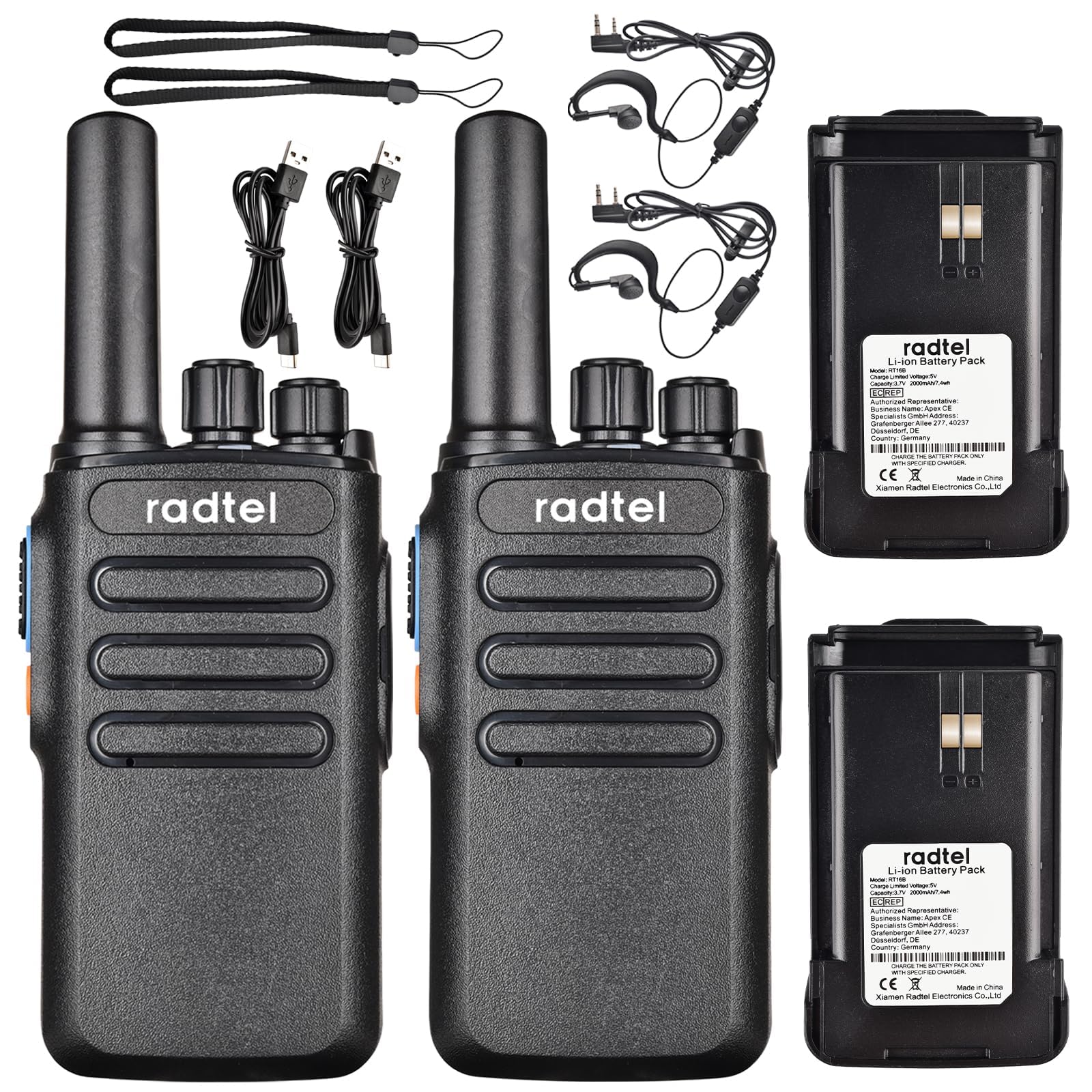
Image 1.1: Radtel RT16 Two Way Radios and included accessories.
2. Configuració
2.1 Instal·lació de la bateria
- Assegureu-vos que la ràdio estigui apagada.
- Localitzeu el compartiment de la bateria a la part posterior de la ràdio.
- Feu lliscar la bateria al compartiment fins que encaixi fermament al seu lloc.

Image 2.1: Battery compartment and belt clip attachment.
2.2 Fixació del clip de cinturó
- Alineeu el clip del cinturó amb les ranures designades a la part posterior de la ràdio.
- Push the clip firmly until it locks into position.
2.3 Càrrega de la bateria
The RT16 radios feature convenient USB-C charging. Use the provided USB-C cable to charge the radio. The charging port is located at the bottom of the radio.
- Connect the USB-C cable to the charging port on the radio.
- Connect the other end of the cable to a compatible USB power source (e.g., phone charger, power bank, car adapter).
- The indicator light on the radio will show charging status (refer to the LED indicator section for details).

Image 2.2: USB-C charging options for the RT16.
3. Instruccions de funcionament
3.1 Engegada/Apagada i control de volum
To power on the radio, rotate the top-left knob clockwise until you hear a click and a voice prompt indicating the current channel. Continue rotating to adjust the volume. To power off, rotate the knob counter-clockwise until it clicks off.
3.2 Selecció de canals
The RT16 has 16 available channels. To select a channel, rotate the top-right knob. The radio will announce the selected channel number.

Imatge 3.1: Part superior view of the RT16 showing power/volume and channel knobs.
3.3 Botó de prémer per parlar (PTT).
To transmit your voice, press and hold the large button on the side of the radio. Release the button to listen.
3.4 Connexió d'auriculars
The radio supports a 2-pin K-connector headset for hands-free operation. Open the rubber cover on the side of the radio and plug in the headset connectors.

Image 3.2: Headset connection port on the RT16.
3.5 Voice Operated Exchange (VOX) Function
The VOX function allows for hands-free transmission without pressing the PTT button. The radio will automatically transmit when it detects your voice. This feature requires software activation for first use and offers 9 adjustable levels.

Image 3.3: Illustration of VOX function for hands-free use.
Activating VOX Mode
To activate VOX mode, hold down the small side button while powering on the radio. Continue holding until you hear a beep indicating activation.
Video 3.1: Demonstrates how to activate the voice control (VOX) mode on the Radtel RT16 radio.
Deactivating VOX Mode
To deactivate VOX mode, hold down the small side button while powering on the radio. Continue holding until you hear two beeps, confirming deactivation.
Video 3.2: Demonstrates how to deactivate the voice control (VOX) mode on the Radtel RT16 radio.
3.6 Language Switch Operation
The radio supports both Chinese and English voice prompts. To switch the language, turn the channel knob to channel 16. Then, power off the radio. While powering on, hold down the small side button until you hear a beep. This will switch the language mode.
Video 3.3: Instructions for switching between Chinese and English voice prompts on the Radtel RT16 radio.
4. Manteniment
- Mantingueu la ràdio neta netejant-la amb un drap suauamp tela. Eviteu utilitzar productes químics o dissolvents aggressivs.
- Do not immerse the radio in water as it is not water resistant.
- Guardeu la ràdio en un lloc fresc i sec quan no la feu servir.
- Ensure the USB-C port cover is securely closed to prevent dust and moisture ingress.
5. Solució De Problemes
| Problema | Causa possible | Solució |
|---|---|---|
| Sense poder | Bateria baixa o no instal·lada correctament. | Carregueu la bateria o torneu-la a instal·lar de manera segura. |
| No es pot comunicar amb altres ràdios | Les ràdios estan en canals diferents o fora de l'abast. | Ensure both radios are on the same channel. Move closer to the other radio. Check for obstructions. |
| Mala qualitat d'àudio | Weak signal, interference, or low volume. | Adjust volume. Move to an area with fewer obstructions. Change channel if interference is present. |
| VOX no funciona | VOX not activated or sensitivity too low. | Activate VOX mode (see Section 3.5). Adjust VOX sensitivity level via programming software. |
6. Especificacions
| Característica | Detall |
|---|---|
| Marca | Radtel |
| Número de model | RT16 |
| Nombre de canals | 16 |
| Interval de freqüència | 462/467 MHz (FRS Band) |
| Interval de conversa màxim | Up to 5 Kilometers (open outdoor areas) |
| Potència de sortida | 2W |
| Tipus de bateria | Ió de liti (2000 mAh) |
| Carregant | USB-C |
| Característiques especials | Long Range, Type-C rechargeable battery, VOX Function, Channel Scan |
| Nivell de resistència a l'aigua | No resistent a l'aigua |
| Dimensions del producte | 1.37 "P x 2.16" W x 5.9" H |
| Pes de l'article | 0.39 lliures |
| Dispositius compatibles | Other FRS two-way radios, Standard earpieces |
7. Garantia
The Radtel RT16 FRS Two Way Radio comes with a 1-Year Warranty from the manufacturer, Xiamen Radtel Electronics Co.,Ltd.
8. Suport
For further assistance or to explore other Radtel products, please visit the official Radtel Store: