
Introducció
The CHUWI Hipen H7 Stylus Pen is an active stylus designed for precise input on compatible devices. Featuring 4096 levels of pressure sensitivity and MPP 2.0 protocol support, it offers a natural writing and drawing experience. This manual provides instructions for setup, operation, maintenance, and troubleshooting to ensure optimal performance of your Hipen H7.
Contingut del paquet
Si us plau, comproveu el paquet per veure si hi ha els elements següents:
- CHUWI Hipen H7 Stylus Pen
- AAAA Battery (pre-installed or separate)
- Replacement Pen Tip (if included)
Configuració
1. Instal·lació de la bateria
The Hipen H7 is powered by an AAAA battery. If the battery is not pre-installed, follow these steps:
- Gireu suaument la tapa superior del llapis òptic en sentit antihorari per obrir el compartiment de la bateria.
- Insert one AAAA battery with the positive (+) end facing towards the pen tip.
- Twist the top cap clockwise to securely close the battery compartment.
 This image illustrates the components of the Hipen H7, including the AAAA battery location.
2. Compatibilitat del dispositiu
The Hipen H7 stylus supports the MPP (Microsoft Pen Protocol) protocol. It is compatible with:
- CHUWI Hi10 Max
- CHUWI FreeBook
- Other devices that support the MPP protocol.
Models not supported: Hipad Xpro, Hipad 11, Minibook X, Hi10 XPro.
 This image demonstrates the stylus's compatibility with Microsoft Surface PC series and other MPP-enabled devices.
3. Maridatge
The Hipen H7 stylus does not require Bluetooth pairing. It works with Windows Ink and is ready to use once the battery is installed and the device supports MPP.
Instruccions de funcionament
1. Ús bàsic
Simply touch the pen tip to the screen of your compatible device to begin writing, drawing, or navigating. The stylus offers 4096 levels of pressure sensitivity for varied line thickness and shading.
 This image illustrates the Hipen H7 in use for various creative and productivity tasks on different devices.
2. Botons laterals
The Hipen H7 features two side buttons:
- Botó del botó dret: Press and hold this button while touching the screen to activate the right-click function, similar to a mouse.
- Eraser Button: Press and hold this button while touching the screen to activate the eraser function. Note: The eraser function is only available for Intel devices.
This diagram highlights the physical features of the Hipen H7, including the side buttons.
3. Rebuig del palmell
The stylus supports palm rejection, allowing you to rest your hand naturally on the screen while writing or drawing without interfering with the stylus input.
4. Funció de repòs automàtica
To conserve battery life, the Hipen H7 will automatically enter a sleep state after 60 seconds of inactivity. It will reactivate automatically when you touch the tip to the screen again.
 This image visually represents the automatic sleep function, which helps extend battery life.
Manteniment
1. Neteja
Wipe the stylus body with a soft, dry cloth. Do not use harsh chemicals or abrasive materials, as they may damage the finish or internal components.
2. Substitució de la punta del bolígraf
If the pen tip becomes worn or damaged, it can be replaced. Gently pull out the old tip and insert a new one firmly until it clicks into place. (Replacement tips may be sold separately or included in the package).
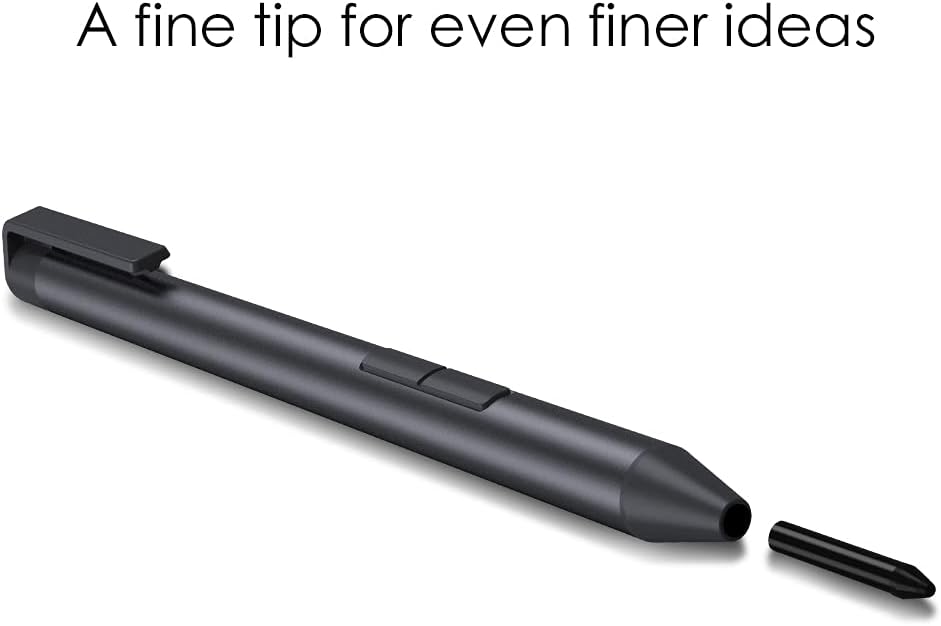 This image demonstrates the replaceable fine tip of the Hipen H7 stylus.
3. Substitució de la bateria
When the stylus performance degrades or it stops responding, replace the AAAA battery following the instructions in the "Battery Installation" section.
Resolució de problemes
- El llapis òptic no respon:
- Assegureu-vos que la pila AAAA estigui instal·lada correctament i que tingui prou càrrega. Substituïu la pila si cal.
- Verify that your device supports the MPP protocol.
- Reinicieu el vostre dispositiu.
- Inaccurate input or jitter:
- Ensure the pen tip is clean and not damaged. Replace if necessary.
- Check for any magnetic interference near your device.
- Ensure your device's screen is clean.
- Side buttons not working:
- Confirm that the eraser function is only supported on Intel devices.
- Ensure the stylus is properly connected (no pairing needed, but ensure battery is good).
Especificacions
| Característica | Detall |
|---|---|
| Model | CHUWI H7 Stylus Pen (Hipen H7) |
| Sensibilitat a la pressió | 4096 nivells |
| Protocol | MPP 2.0 |
| Pen Tip Size | 1.0mm (fine tip) |
| Tipus de bateria | AAAA Battery |
| Durada de la bateria | Up to 180 days (approximate, based on usage) |
| Repòs automàtic | Després de 60 segons d’inactivitat |
| Dimensions | Length: 144mm, Diameter: 9.5mm |
| Pes | 16g (stylus only) / 45g (with battery) |
| Material | Plàstic |
| Dispositius compatibles | CHUWI Hi10 Max, FreeBook, and other MPP-enabled devices |
 Aquesta imatge ofereix una visió més detalladaview of the stylus's key features and specifications.
Garantia i Suport
Informació de la garantia
CHUWI products typically come with a limited warranty. Please refer to the warranty card included with your purchase or visit the official CHUWI weblloc web per obtenir informació detallada sobre els termes i condicions de garantia específics de la vostra regió.
Atenció al client
For technical assistance, troubleshooting, or further inquiries, please contact CHUWI customer support through their official weblloc web o la informació de contacte que es proporciona a l'embalatge del producte.