
1. Introducció
This manual provides essential information for the installation, operation, and maintenance of your ANTEC GSK750 ATX3.1 80PLUS GOLD Power Supply Unit (PSU). Please read this manual thoroughly before installing and using the product to ensure proper function and safety. The ANTEC GSK750 is a high-efficiency, durable power supply designed for modern PC systems.
2. Característiques
- 80PLUS GOLD certification for high efficiency.
- Full modular design for improved cable management.
- Compact design with a depth of 140 mm.
- Active PFC and universal AC input support.
3. Configuració i instal·lació
3.1. Contingut del paquet
Verifiqueu que tots els components siguin presents al paquet:
- ANTEC GSK750 ATX3.1 80PLUS GOLD PSU
- Conjunt de cables modular
- Cable d'alimentació de CA
- Cargols de muntatge
- Manual d'usuari (aquest document)
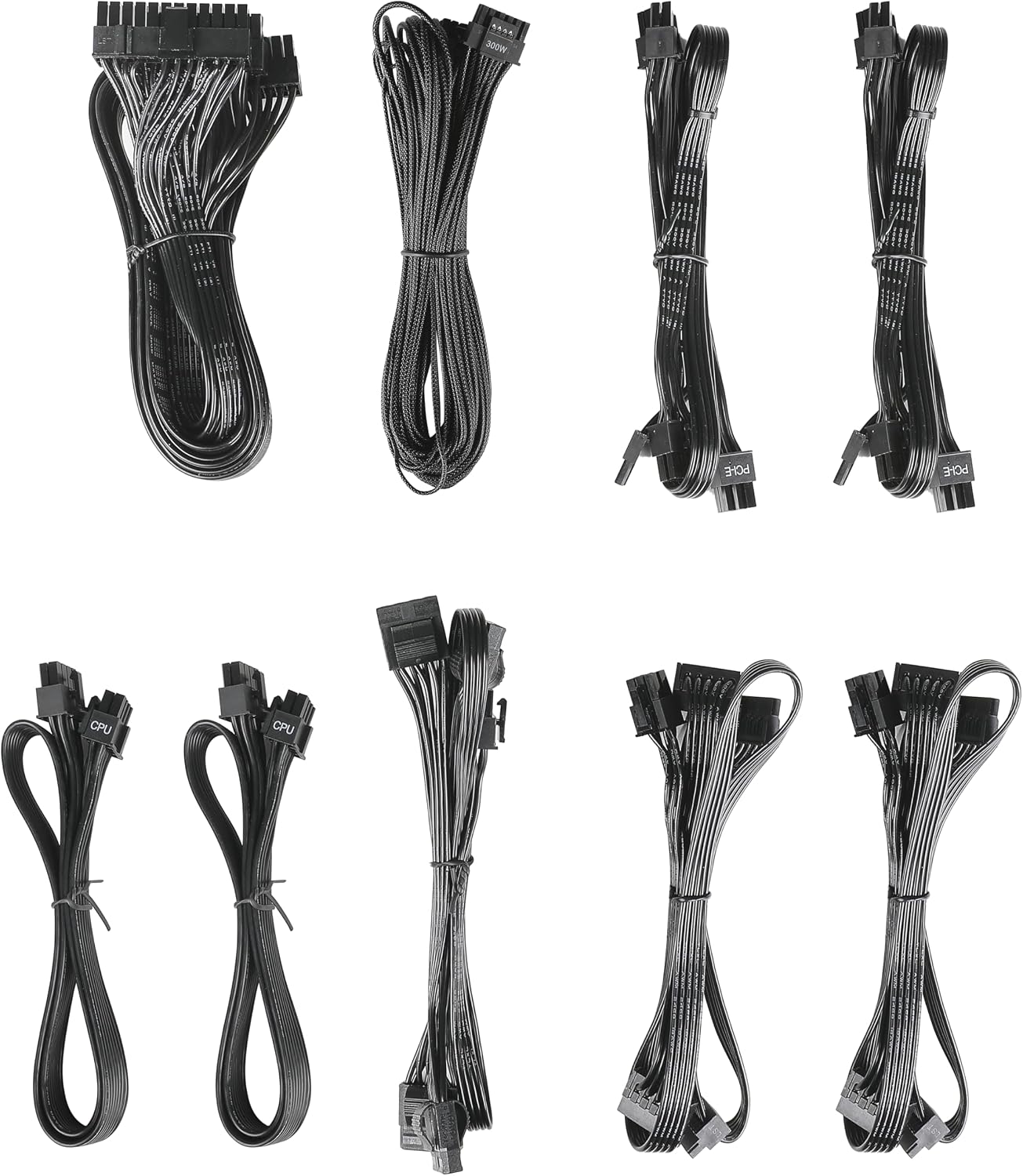
Image: The modular cable set included with the ANTEC GSK750 power supply unit. This includes various cables for motherboard, CPU, PCIe, SATA, and Molex connections.
3.2. Instal·lació física
- Assegureu-vos que l'ordinador estigui apagat i desendollat de la presa de corrent.
- Mount the PSU into the designated PSU bay in your computer case using the provided screws. Ensure the fan is oriented correctly for optimal airflow (typically facing downwards if there's a bottom vent, or upwards if not).

Imatge: Vista de dalt a baix view of the ANTEC GSK750 power supply unit, showing the fan grille and overall compact form factor.
3.3. Connexions de cable
Connect the necessary modular cables to the PSU and your system components. The full modular design allows you to connect only the cables you need, reducing clutter.
- 24-Pin Main Power: Connect to your motherboard.
- 8-Pin (4+4) CPU Power: Connect to your motherboard's CPU power connector.
- PCI-E (6+2 Pin): Connecta't a la teva targeta o targetes gràfiques.
- Alimentació SATA: Connect to SSDs, HDDs, and optical drives.
- Potència Molex: Connecteu-lo a perifèrics o ventiladors de caixa més antics.

Image: The modular connector panel on the side of the ANTEC GSK750 power supply, clearly labeled for PCI-E, CPU, SATA/Molex, and M/B (motherboard) connections.
3.4. Engegada inicial
After all connections are secure, plug the AC power cord into the PSU and then into a wall outlet. Flip the main power switch on the back of the PSU to the 'ON' position. You can then power on your computer.
4. Instruccions de funcionament
4.1. Hybrid Mode
The ANTEC GSK750 features a Hybrid Mode switch located on the rear of the unit. When Hybrid Mode is enabled, the PSU fan will remain off under low load conditions, providing silent operation. The fan will automatically activate when the load increases to maintain optimal temperatures. When Hybrid Mode is disabled, the fan will operate continuously.

Image: The rear panel of the ANTEC GSK750 power supply, featuring the main power switch, AC input, and the 'Hybrid Mode' toggle switch.
5. Manteniment
Per garantir la longevitat i el rendiment òptim de la vostra font d'alimentació, seguiu aquestes pautes de manteniment:
- Neteja: Periodically clean the exterior of the PSU and the fan grille to prevent dust buildup. Use compressed air to gently clear dust from the fan and internal components. Ensure the PSU is unplugged before cleaning.
- Flux d'aire: Ensure that the PSU has adequate airflow within your computer case. Avoid blocking the intake or exhaust vents.
6. Solució De Problemes
If you encounter issues with your ANTEC GSK750 PSU, consider the following:
- Sense energia: Check all cable connections, especially the 24-pin motherboard connector and the CPU power connector. Ensure the AC power cord is securely plugged into both the PSU and the wall outlet. Verify the main power switch on the PSU is in the 'ON' position.
- Inestabilitat/Avaries del sistema: Assegureu-vos que la vostra font d'alimentació estigui calentatage is sufficient for all your components. Overloading the PSU can lead to instability. Check for loose connections.
- Soroll del ventilador: If the fan is excessively noisy and Hybrid Mode is off, ensure there is no obstruction. If Hybrid Mode is on, the fan will spin up under load, which is normal.
If problems persist, consult the ANTEC support weblloc o contacteu amb el servei d'atenció al client.
7. Especificacions
Detailed specifications for the ANTEC GSK750 ATX3.1 80PLUS GOLD PSU:

Image: The specification label of the ANTEC GSK750 power supply, detailing output voltages, currents, and total wattage.
| Especificació | Valor |
|---|---|
| Marca | ANTEC |
| Número de model | GSK750 ATX3.1 |
| Potència de sortidatage | 750 W |
| Factor de forma | ATX |
| Certificació d'eficiència | OR 80 PLUS |
| Dimensions del producte (LxWxH) | 14 x 15 x 8.6 cm |
| Pes del producte | 2.5 kg |
| Vol. d'entrada mínimatage | 100 volts (CA) |
| System Bus Connector Type | 24 Pin |
| Nombre de fans | 2 |
| UPC | 761345200547 |
| País d'origen | Xina |
8. Garantia i Suport
8.1. Informació de la garantia
The ANTEC GSK750 ATX3.1 80PLUS GOLD Power Supply Unit comes with a 7 any de garantia des de la data de compra. Aquesta garantia cobreix els defectes de materials i de fabricació en condicions d'ús normal. Conserveu el comprovant de compra per a reclamacions de garantia.
8.2. Atenció al client
For technical assistance, troubleshooting, or warranty inquiries, please visit the official ANTEC website or contact their customer support department. Contact information can typically be found on the ANTEC weblloc o embalatge del producte.