
1. Introducció
This manual provides detailed instructions for the installation, operation, and maintenance of your Hikity Android 15 Car Stereo. Please read this manual thoroughly before installation and use to ensure proper function and to maximize your experience with the device. This unit is specifically designed for Hyundai Santa Fe IX45 models from 2013 to 2017 and supports original ampaixecadors.
2. Producte acabatview
Característiques clau
- Sistema operatiu Android 15
- 9-inch HD Touchscreen Display (1280*720P)
- 4 GB de RAM + 64 GB de ROM per a un rendiment suau i ampl'emmagatzematge
- Wireless Apple Carplay and Android Auto support
- Built-in GPS Navigation with offline map support (Herewego)
- WiFi and Bluetooth 5.0 connectivity
- Digital Sound Processor (DSP) with 32 EQ adjustments
- FM RDS Radio
- Supports AHD Backup Camera input
- Compatibilitat amb el control del volant (SWC)
- Mirror Link functionality
Contingut del paquet
Verifiqueu que tots els elements siguin presents al paquet:
- 1 x Android Car Stereo Unit
- 1 x cable d'alimentació
- 1 x càmera de seguretat
- 2 x USB Adapters
- 1 antena de ràdio
- 1 x Antena GPS
- 1 x CAM-VIN Cable
- 1 x Manual d'usuari (aquest document)
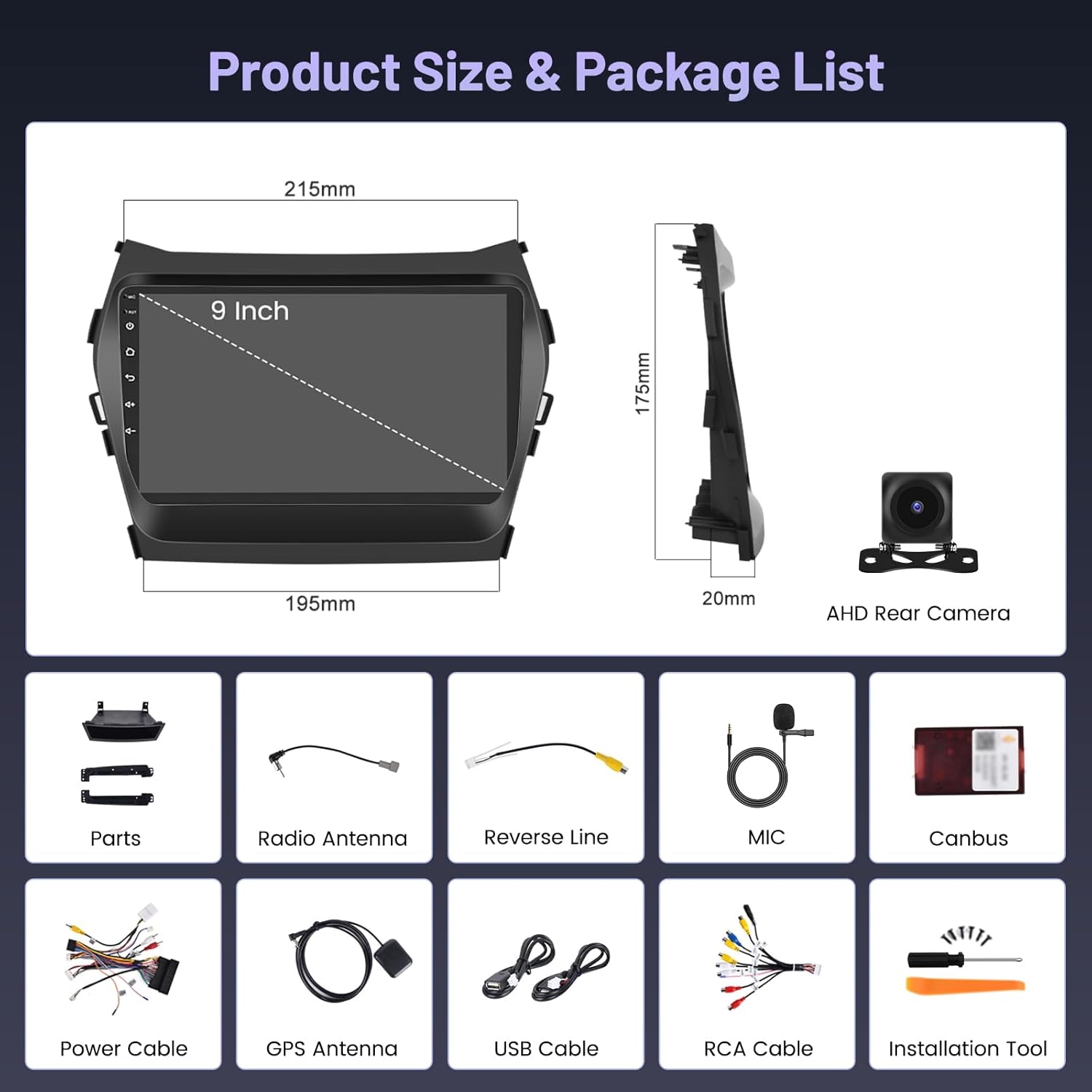
Image: Diagram showing the dimensions of the 9-inch car stereo unit and a visual list of all included accessories: Canbus, Power Cable, Reverse Line, GPS Antenna, USB Cable, Radio Antenna, RCA Cable, Parts, MIC, AHD Rear Camera, and Installation Tool.
3. Configuració i instal·lació
Es recomana la instal·lació per part d'un professional. Assegureu-vos que el vehicle estigui desconnectat abans de començar la instal·lació.
3.1 Comprovació prèvia a la instal·lació
- Verify vehicle compatibility: Hyundai Santa Fe IX45 (2013-2017).
- Confirmeu que hi hagi tot el contingut del paquet.
- Ensure you have the necessary tools for car stereo removal and installation.
3.2 Finalització de la instal·lacióview
The car stereo is designed to integrate seamlessly into your Hyundai Santa Fe IX45 dashboard. The image below illustrates the visual transformation from the original factory radio to the new Hikity Android 15 Car Stereo for both low and high configuration vehicles.

Image: A comparison showing the car dashboard before and after installing the Hikity Android 15 Car Stereo in both low and high configuration Hyundai Santa Fe IX45 models (2013-2017).
3.3 Connexions de cablejat
Carefully connect all cables as per the wiring diagram. Incorrect wiring can damage the unit or vehicle electronics.
- Cable de corrent: Connect to the vehicle's power harness. Ensure correct positive, negative, and ACC connections.
- Antena de ràdio: Connect the included radio antenna for FM/AM reception.
- Antena GPS: Munteu l'antena GPS en un lloc amb llum clara view del cel per a una recepció òptima del senyal.
- USB Adapters: Connect the USB adapters for external storage or wired Carplay/Android Auto.
- CAM-VIN: Connect this cable for the backup camera input.
- Cables RCA: Use for external amplifiers, subwoofers, or auxiliary video/audio input/output.
3.4 Instal·lació de la càmera de marxa enrere
The included AHD backup camera provides clear rear visibility. Follow the wiring diagram for proper connection.

Image: A detailed wiring diagram for the AHD backup camera, showing connections to the car stereo (Reverse Input Cable), camera power (Rod wire to Power, Black to GND), and the camera itself.
Passos de cablejat:
- Connect the camera's power cable to the vehicle's reversing lamp (red wire to positive, black wire to ground).
- Connect the video signal cable from the camera to the CAM-VIN input on the car stereo.
- Ensure the 'Reverse' trigger wire from the car stereo's power harness is connected to the vehicle's reverse light signal.

Image: Illustrates the AHD backup camera with features like HD image quality, waterproof design, distance guidelines, and a wide-angle lens for ultra-clear vision effects.
4. Instruccions de funcionament
4.1 Initial Power-On and Interface
After installation, turn on your vehicle's ignition. The stereo will boot up, displaying the Android home screen. Navigate the interface using the 9-inch touchscreen.
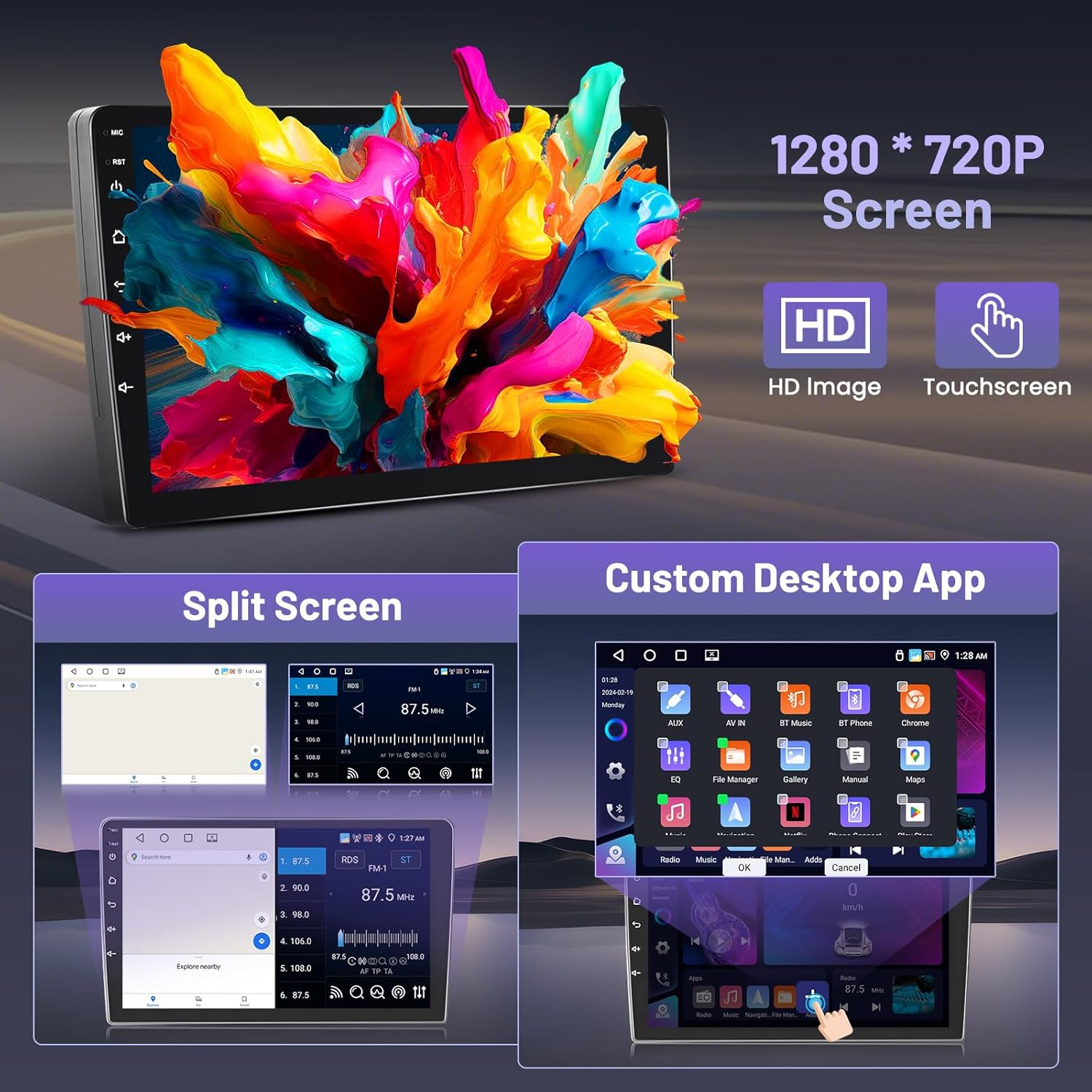
Image: Shows the 9-inch 1280*720P HD touchscreen with examples of split-screen functionality and a customizable desktop app layout.
Carplay sense fil 4.2 i Android Auto
Connect your smartphone wirelessly for seamless integration of navigation, music, calls, and more.

Image: Depicts a smartphone connected wirelessly to the car stereo, showcasing Carplay, Android Auto, and Mirror Link interfaces.
Connection Steps (refer to video for visual guide):
- Open the 'ApplePlay' (for Carplay) or 'Android Auto' app on the car stereo.
- Ensure Bluetooth is enabled on the car stereo.
- On your smartphone, turn on Bluetooth and search for the car stereo's Bluetooth device name (e.g., RK3326S99).
- Pair your phone with the car stereo via Bluetooth and complete any authorization prompts on both devices.
- Once connected, Carplay or Android Auto will launch automatically.
Video: Demonstrates the step-by-step process of connecting a smartphone to the Hikity Android Car Stereo for Wireless Carplay and Wireless Android Auto functionality, including Bluetooth pairing and interface navigation.
4.3 Funcionalitat Bluetooth
Beyond Carplay/Android Auto, Bluetooth allows for hands-free calling and audio streaming.
- Trucades mans lliures: Access your phone's contacts, make calls, and answer incoming calls directly from the stereo screen.
- Transmissió d'àudio: Play music from your smartphone through the car's speakers.
4.4 Navegació GPS
The unit comes with built-in GPS and supports both online and offline navigation.
- Mapes fora de línia: The pre-installed "Herewego" app allows you to download map data for offline use.
- Navegació en línia: Connect to WiFi or a mobile hotspot to use online navigation apps like Google Maps.
4.5 Connectivitat Wi-Fi
Connect the car stereo to a WiFi network or your phone's hotspot to access online features, download apps, and browse the internet.
Ràdio RDS 4.6 FM
Tune into your favorite radio stations with clear sound and quality. The RDS (Radio Data System) feature displays station information where available.
4.7 DSP and EQ Settings
Customize your audio experience with the Digital Sound Processor (DSP) and 32-band Equalizer (EQ).
- Access various sound effects like 3D optimized, 5.1 Panorama, and HiFi scene.
- Adjust individual frequency bands to match your audio preferences.

Imatge: Una mostra de collageasing the Bluetooth interface for calls and music, the Equalizer (EQ) settings, 5G WiFi connectivity, GPS navigation map, and FM RDS radio interface.
4.8 Control del volant (SWC)
After installation, configure the steering wheel controls to operate the car stereo without additional accessories.
Passos de configuració:
- Vés a Configuració > Factory Set Up.
- Introduïu la contrasenya: 8888.
- Navega a Party Control learning or Aprenentatge al volant.
- Segueix les instruccions que apareixen a la pantalla per assignar funcions als botons del volant.

Image: Shows the car stereo's interface for learning steering wheel controls, with options to select, press, start, reset, and save button assignments for various functions like volume, track, and mode.
5. Manteniment
- Neteja: Feu servir un drap suau i sec per netejar la pantalla i la unitat. Eviteu productes de neteja o dissolvents abrasius.
- Actualitzacions de programari: Comproveu periòdicament si hi ha actualitzacions de programari a través de la configuració del sistema per garantir un rendiment òptim i l'accés a les noves funcions.
- Temperatura: Eviteu exposar la unitat a temperatures extremes.
6. Solució De Problemes
Si teniu problemes, consulteu els següents problemes i solucions habituals:
| Problema | Causa possible | Solució |
|---|---|---|
| Sense poder | Cablejat incorrecte, fusible fundit, problema d'alimentació del vehicle. | Check power cable connections, inspect vehicle fuses, ensure vehicle ignition is on. |
| Sense so | Problema de cablejat de l'altaveu, volum massa baix, configuració de sortida d'àudio incorrecta. | Verify speaker connections, increase volume, check audio settings (e.g., balance/fader). |
| El GPS no funciona | GPS antenna not connected or poorly positioned, no map data. | Assegureu-vos que l'antena GPS estigui connectada correctament i que tingui una visió clara view of the sky. Download offline map data or connect to WiFi for online maps. |
| Problemes de connexió Bluetooth | Bluetooth off on phone/stereo, pairing error. | Ensure Bluetooth is enabled on both devices. Delete previous pairings and re-pair. Restart both devices if necessary. |
| La càmera de marxa enrere no es mostra | Incorrect camera wiring, CAM-VIN not connected, reverse trigger not active. | Check camera power and video signal connections. Verify the reverse trigger wire is correctly connected to the vehicle's reverse light. |
Si els problemes persisteixen, poseu-vos en contacte amb l'atenció al client.
7. Especificacions
| Característica | Especificació |
|---|---|
| Marca | Hikity |
| Nom del model | GPS Car Stereo |
| Número de model | A7796A3662H1MI2US26-C536 |
| Sistema operatiu | Android 15 |
| RAM | 4 GB |
| ROM | 64 GB |
| Mida de la pantalla | 9 polzades |
| Tipus de visualització | LCD, Capacitive Touchscreen |
| Resolució de pantalla | 1280*720P |
| Connectivitat | Bluetooth 5.0, USB, FM, AUX, WiFi |
| GPS | Supported Satellite Navigation System (Worldwide Map Type) |
| Mode de sortida d'àudio | estèreo |
| Característiques especials | Carplay, Android Auto, DSP, EQ, Customize Homepage App |
| Dimensions de l'article (L x A x A) | 10.14" x 7.02" x 2.34" |
| Pes de l'article | 1.58 quilos |
8. Garantia i Suport
Informació de la garantia
Hikity offers the following warranty and support for this product:
- Garantia de devolució de 15 dies: For returns within 15 days of purchase.
- 12-month Replacement: For product defects within 12 months of purchase.
- Suport tècnic de tota la vida: Ongoing assistance for any technical issues.
Atenció al client
For technical assistance, warranty claims, or any other inquiries, please contact Hikity customer service:
- Correu electrònic: hikitysales@163.com

Image: Details how to contact Hikity customer service, including an email address for support inquiries.