Manual d'instruccions
Remote Control Compatible for Teac RC-1303 AG-D500 7.1-Channel AV Digital Home Theater Receiver
Model: RC-1303 AG-D500 | Brand: Generic
Introducció
This document serves as an instruction manual for the Generic replacement remote control designed for use with Teac RC-1303 and AG-D500 7.1-Channel AV Digital Home Theater Receivers. This remote is an infrared (IR) replacement unit. Please ensure your original remote control matches the appearance of this replacement unit for compatibility.
Nota important: This remote control is a replacement unit and may not offer all functions identical to your original remote. It is recommended to consult your receiver's original manual for specific functions and programming if needed. If your receiver model is not explicitly listed in the product title, please contact customer support for compatibility verification before use.
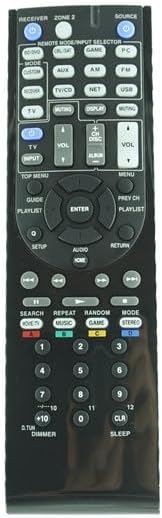
Figura 1: Frontal view of the replacement remote control, showing various function buttons for receiver control.
Configuració
Instal·lació de la bateria
The remote control requires two (2) AAA batteries for operation. Follow these steps to install the batteries:
- Localitzeu el compartiment de la bateria a la part posterior del comandament a distància.
- Premeu el pestell i feu lliscar la tapa de la bateria cap avall per obrir-la.
- Introduïu dues piles AAA, assegurant-vos que els terminals positiu (+) i negatiu (-) s'alineïn correctament amb les marques de l'interior del compartiment.
- Feu lliscar la coberta de la bateria al seu lloc fins que faci un clic de manera segura.

Figura 2: Esquena view of the remote control with the battery cover removed, illustrating the correct orientation for inserting two AAA batteries.
Nota: Substitueix sempre les dues piles alhora. No barregis piles velles i noves, ni piles de diferents tipus.
Instruccions de funcionament
This replacement remote control is designed to function as an infrared (IR) remote for compatible Teac AV receivers. Point the remote directly at your receiver's IR sensor when operating.
Funcions bàsiques
- Botó d'encesa: Located at the top left, typically labeled "RECEIVER" or with a power symbol. Press to turn the receiver on or off.
- Source/Input Selector Buttons: Buttons like "CD," "DVD," "AUX," "AM," "FM," "PC," "USB," "TV/CD," "NET," "GAME" allow you to select the desired audio/video input source on your receiver.
- Control de volum: "VOL +" and "VOL -" buttons adjust the master volume level of your receiver.
- Botó de silenci: Typically located near volume controls, mutes or unmutes the audio output.
- Botons de navegació: A central directional pad (up, down, left, right) with an "ENTER" button is used for navigating menus and confirming selections on your receiver's display.
- Menu/Setup Buttons: Buttons like "SETUP," "MENU," "TOP MENU," "RETURN," "DISPLAY" are used to access and navigate the receiver's on-screen display (OSD) or internal settings.
- Controls de reproducció: Buttons such as "PLAY," "PAUSE," "STOP," "SKIP," "SEARCH," "REPEAT," "RANDOM" are for controlling media playback from connected devices.
- Teclat numèric: Number buttons (0-9, +10) are used for direct input, such as selecting radio presets or track numbers.
For detailed functionality of each button, refer to your Teac receiver's original instruction manual, as this replacement remote is designed to mimic the original's IR signals.
Manteniment
Per garantir la longevitat i el bon funcionament del comandament a distància, seguiu aquestes pautes de manteniment:
- Neteja: Wipe the remote control regularly with a soft, dry cloth. For stubborn dirt, slightly dampNetegeu el drap amb aigua o un netejador suau i no abrasiu. No utilitzeu productes químics agressius ni materials abrasius.
- Cura de la bateria: Remove batteries if the remote control will not be used for an extended period (e.g., one month or more) to prevent battery leakage, which can damage the remote.
- Emmagatzematge: Store the remote control in a cool, dry place, away from direct sunlight, extreme temperatures, and high humidity.
- Eviteu les gotes: Protect the remote from physical impact. Dropping it can damage internal components or the casing.
Resolució de problemes
Si teniu problemes amb el comandament a distància, proveu els passos següents per resoldre problemes:
- El comandament a distància no respon:
- Comproveu si les piles estan inserides correctament amb la polaritat correcta (+/-).
- Replace the batteries with new ones. Weak or dead batteries are a common cause of remote control malfunction.
- Ensure there are no obstructions between the remote control and the receiver's IR sensor.
- Confirm you are pointing the remote directly at the receiver.
- Alguns botons no funcionen:
- This replacement remote may not support all functions of your original remote. Refer to your receiver's manual to confirm if the function is supported by the original remote.
- Netegeu el comandament a distància, especialment al voltant dels botons que no responen, per eliminar la brutícia o les restes que puguin impedir un contacte correcte.
- Remote Control Range is Limited:
- Substituïu les piles.
- Ensure there is no strong light source (like direct sunlight or bright fluorescent lights) interfering with the IR signal.
If the issue persists after trying these steps, please contact customer support for further assistance.
Especificacions
| Model: | RC-1303 AG-D500 (Compatible) |
| Marca: | Genèric |
| Tipus: | IR Replacement Remote Control |
| Font d'alimentació: | 2 piles AAA (no incloses) |
| Color: | Negre |
| Dispositius compatibles: | Teac RC-1303, Teac AG-D500 7.1-Channel AV Digital Home Theater Receivers |
| Nombre màxim de dispositius admesos: | 1 |
Garantia i Suport
As a generic replacement product, specific warranty details may vary. Please refer to the seller's return policy and warranty information provided at the time of purchase. For any questions, troubleshooting assistance, or compatibility concerns, please contact the seller directly through the platform where the product was purchased.
Fabricant: Easytry
Data de primera disponibilitat: 13 de setembre de 2024